
euc2k.py
EUC2K means EasyEDA User Contributed To KiCad.
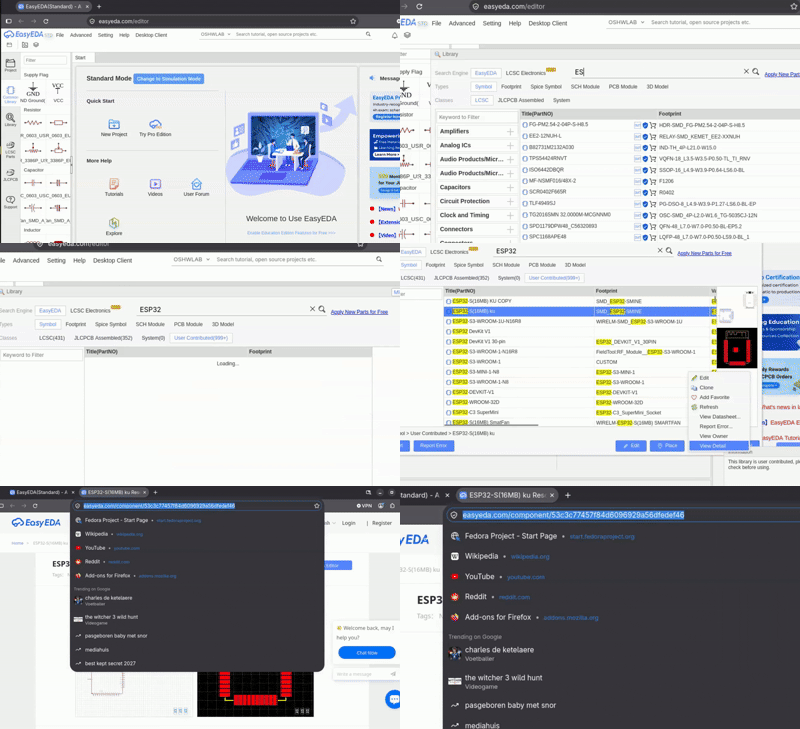
Paste a public EasyEDA Standard component link and get a KiCad 8/9/10 symbol and footprint. Exports are 2D only. No account or search is needed; multiple links are processed sequentially.
Unofficial tool, not affiliated with or endorsed by EasyEDA, JLC or LCSC; contributed components keep their authors’ rights.
Inspired by easyeda2kicad.py. Independent implementation, no code copied.
Current release: v1.4.2 · PyPI · Release notes
Quick start with pip 📦
You need Python 3.11 or newer. Install from PyPI, then paste a component link. No Git or repository download is needed.
Create a virtual environment so the app stays separate from your other Python packages.
Windows CMD:
py -3 -m venv .venv
.venv\Scripts\activate
python -m pip install euc2k
euc2k https://easyeda.com/component/7db93ef938c54a728e02f6579db05977
Linux or macOS:
python3 -m venv .venv
source .venv/bin/activate
python -m pip install euc2k
euc2k https://easyeda.com/component/7db93ef938c54a728e02f6579db05977
Replace the example link with yours. euc2k --version shows the installed version; euc2k --help lists the options. python -m euc2k provides the same CLI. In a new terminal, activate the same environment before using euc2k again.
Your KiCad files appear in output/ in the folder where you run the command. The terminal prints their full paths and a short summary when it finishes.
Run from a checkout
Prefer to clone the repository? Install Git and Python 3.11+, then use the launcher for your system. On Windows, enable Add Python to PATH during Python installation.
Windows CMD:
git clone https://github.com/wysemon/euc2k.py.git
cd euc2k.py
run https://easyeda.com/component/7db93ef938c54a728e02f6579db05977
Linux or macOS:
git clone https://github.com/wysemon/euc2k.py.git
cd euc2k.py
./run.sh https://easyeda.com/component/7db93ef938c54a728e02f6579db05977
The first run creates a local .venv and installs the app. Later runs reuse it. Dependencies refresh automatically when pyproject.toml changes.
Paste links interactively
Run euc2k without arguments. Paste one link at each prompt, then press Enter on an empty line to finish. From a checkout, run on Windows or ./run.sh on Linux/macOS works the same way.
If you already have a links.txt file, the app asks whether to use it. Press Enter for yes. The file accepts one link or UUID per line, with blank lines and # comments allowed. Invalid entries are reported individually, with line numbers for files; valid entries still run in order, with duplicate UUIDs processed once. Any invalid entry makes the command exit with code 1.
Import into KiCad 🔌
Use the full paths printed at the end of the run:
- Open Preferences > Manage Symbol Libraries and add the
.kicad_symfile. - Open Preferences > Manage Footprint Libraries and add the
.prettyfolder. - Give both libraries the generated name, such as
MAX98357A_NO_HOLES_7db93ef9. - In the Schematic Editor, press A, find the symbol, and place it.
The symbol already points to the matching footprint. Library names include the first eight characters of the component UUID to distinguish matching titles. If two full UUIDs still produce the same output name, the app stops that item and keeps the existing folder. Choose a different --output folder for the other component.
Only Reference and Value are shown as properties. Source information, authors and other metadata remain stored but hidden. Symbol drawing text is capped at 75 mil (1.905 mm); smaller text stays smaller. Footprint drawing text keeps the source sizes. Pin labels and Reference/Value use 1.27 mm.
What a run produces
For this link:
https://easyeda.com/component/7db93ef938c54a728e02f6579db05977
The output folder looks like this:
output/
├── fetch_log.tsv
└── MAX98357A_NO_HOLES_7db93ef9/
    ├── raw.json
    ├── CREDITS.txt
    ├── MAX98357A_NO_HOLES_7db93ef9.kicad_sym
    └── MAX98357A_NO_HOLES_7db93ef9.pretty/
        └── MAX98357A_NO_HOLES_7db93ef9.kicad_mod
The summary below uses an example Linux checkout location. Your printed paths will match your own folder.
Summary: 1 succeeded, 0 failed, 0 skipped.
Output: /home/me/euc2k.py/output
add /home/me/euc2k.py/output/MAX98357A_NO_HOLES_7db93ef9/MAX98357A_NO_HOLES_7db93ef9.kicad_sym in Symbol Libraries
add /home/me/euc2k.py/output/MAX98357A_NO_HOLES_7db93ef9/MAX98357A_NO_HOLES_7db93ef9.pretty in Footprint Libraries
Components with no footprint geometry or footprint UUID export a symbol only. The app
prints a warning, leaves the Footprint field empty, and creates no .pretty folder.
raw.json preserves the original API response. CREDITS.txt keeps the authors, source link, full description and any source license. A separate footprint lookup adds package_raw.json. fetch_log.tsv records each item's time and status.
The MAX98357A example warns about duplicate pin numbers 1 and 2. These are in the source: speaker pins +/-- share numbers with header pins. All nine symbol pins and seven footprint pads are kept.
Useful commands
These commands work on Windows, Linux and macOS after pip installation. From a checkout, replace euc2k with run on Windows or ./run.sh on Linux/macOS.
| Task | Command |
|---|---|
| Read a list of links | euc2k --file links.txt |
| Choose an output folder | euc2k <link> --output "my libraries" |
| Rebuild a cached component offline | euc2k convert <uuid> |
| Check a cached conversion with KiCad | euc2k convert <uuid> --validate |
| Try a conversion without saving output | euc2k <link> --dry-run |
| Show detailed errors | euc2k <link> --verbose |
| Print the app version | euc2k --version |
You can use bare 32-hex UUIDs or component URLs from easyeda.com and www.easyeda.com. Trailing slashes, query strings and fragments are accepted. Several links or UUIDs may be passed on the same command line.
Quote links containing &, and quote paths containing spaces. For example:
euc2k "https://easyeda.com/component/7db93ef938c54a728e02f6579db05977?a=1&b=2"
Caching and validation
Complete 2D libraries with a recognized .euc2k-complete.json record are skipped. Missing or unrecognized completion metadata causes rebuilding from cached source, with pin and pad counts checked. Completion also requires matching full UUIDs in the cache, completion record and symbol, with matching symbol/footprint names. Identity conflicts fail without replacing existing files, even with --force. If only raw data is cached, or output is incomplete, the app reports re-converting from cache and rebuilds without downloading again. Missing cached footprint data produces an offline error; it never triggers a hidden download.
Use convert after updating the app to rebuild existing output offline. For older output, add the newly generated UUID-suffixed libraries in KiCad. --force downloads fresh component data and overwrites generated output.
--validate runs KiCad's upgrade commands on temporary copies and reports PASS/FAIL. It leaves your originals untouched. Explicit --validate fails if kicad-cli is missing from PATH. Install KiCad 8/9/10 and add its command-line tools to PATH, then try again. This checks that KiCad can read the libraries; it does not check the design's electrical or manufacturing rules.
--dry-run uses a temporary directory and does not save output or change the log. Cached dry runs make no requests, even with --force. An uncached dry run may fetch component data.
Safe updates and older output
New libraries are built in a temporary folder and checked before they replace anything. With --validate, KiCad must accept them too. A hidden completion record tracks the generated files. If writing or validation fails, the previous libraries stay available. After an interrupted publish, the next normal run restores the previous files. Use convert to rebuild again if those previous files are already complete. Dry runs leave your output untouched. Run only one converter process per output folder.
Unrecognized marker files are left untouched. Matching cached source and symbol UUIDs are required to replace libraries without recognized ownership. Changed libraries are preserved in .previous-<hash> files before replacement; changed attribution is kept in CREDITS.previous-<hash>.txt. Files without ownership evidence are refused. Source model metadata in raw JSON is retained, but models are never downloaded or attached.
Rebuild explicitly with euc2k convert <uuid>. Keep a copy of hand-edited libraries.
Files are relative to where you run the command
The launchers install from the checkout, but --file, --output, default output/, and interactive links.txt use the directory you started in. Calling the launcher by its full path from another folder works too.
The launchers pass this location through EUC2K_CWD. Installed console commands use the current directory unless that variable is set. Windows CMD restores its original console code page on exit.
Troubleshooting
| Problem | What to try |
|---|---|
| Python is missing | Install Python 3.11+ and enable PATH on Windows. On Debian/Ubuntu, you may also need python3-venv. |
| HTTP 403 or 429 | Stop and wait. Check that the component is public. Do not retry rapidly or bypass access restrictions. |
| No internet | Check the connection and proxy settings. Cached convert still works offline. |
Private component or success:false |
Use a public EasyEDA Standard component link. The app does not log in or bypass permissions. |
| Symbol looks tiny or far from the origin | Update the app, run euc2k convert <uuid>, then reload the library in KiCad. Older output may have used zero for a missing EasyEDA origin. |
| Text or pins look wrong | Update the app and re-convert the cache. Check the source and warnings before using the result. Include the raw record when reporting a bug. |
| Duplicate pin warning | All pins are kept. Check the source and connectivity in KiCad; the duplicate may be intentional. |
| Dependencies need refreshing | Changes to pyproject.toml trigger this automatically. Delete .venv/.euc2k-ready to force a refresh. |
| Windows path is too long | Keep the checkout and output paths short. Sanitized titles use at most 60 ASCII characters, followed by _uuid8. |
Be a polite client 🤝
The app deliberately pauses between requests. The default is 4 seconds plus 0–2 seconds of random jitter, including retries and footprint lookups. Requests use one client and run sequentially. Caching avoids repeat downloads.
--delay changes the base cooldown, with a minimum of 1 second. Keep the default unless you have a reason to change it.
403/429/5xx responses honor Retry-After, capped at 300 seconds with a warning. Otherwise, retries wait 30 then 60 seconds, with at most three attempts. Two consecutive 403/429 responses stop the whole run, including during retries. Other item failures are logged and processing continues; any failure gives a nonzero exit status.
TLS verification stays enabled. Redirects, logins, captchas and paywalls are not bypassed. The app contacts only easyeda.com.
Limits and source rights
- Some record types and rotation conventions remain unverified. See API notes. Unsupported decorative records warn and are skipped. Malformed pins, pads, holes, vias or supported copper records fail the component so electrical geometry cannot silently disappear. Unknown electrical types warn and become unspecified. Multi-unit symbols use the verified
result.subpartslayout. Incomplete or unsupported unit layouts fail instead of exporting only part of a component. - Circular SVG arcs become KiCad arcs. Elliptical arcs use sampled polylines. Pads support round, rectangular, oval and custom polygons, with through-hole or SMD layers.
- Filled SVG regions support one straight-edged contour. Compound fills, self-intersecting or touching copper contours, and custom pads whose anchor would add copper are rejected. Copper polygons are limited to 1,000 vertices to bound intersection checks. Separate stroked contours remain supported. Invalid copper widths, empty copper geometry and malformed or unsupported copper text fail the component before publication. Unknown through-hole plating flags warn and default to plated.
- Real asymmetric pads and an oval USB-C slot now have source-to-native-KiCad checks. Some custom shapes, rear-side conventions and text placement still need real component comparisons.
- Courtyards cover pads, holes and non-text body outlines, with 0.25 mm clearance. They are a starting point, not a clearance certification.
- Review geometry, drills, pin mapping and clearances before fabrication. There is no manufacturability guarantee.
- Public component data may have third-party restrictions. Attribution does not grant redistribution rights. Review the source and each generated
CREDITS.txt.
Updates and other installation options
To update a pip installation, activate its virtual environment and run:
python -m pip install --upgrade euc2k
euc2k --version
To install this specific release, use python -m pip install "euc2k==1.4.2".
For an isolated global command, use pipx install euc2k or uv tool install euc2k. These require pipx or uv and their tool directory on PATH. Contributors can still install from a checkout with pip install -e ..
Development checks
On Linux/macOS, after setup:
.venv/bin/python -m pip install -e '.[test]'
.venv/bin/python -m pytest
.venv/bin/python -m ruff check .
.venv/bin/python -m ruff format --check .
On Windows, use .venv\Scripts\python instead of .venv/bin/python, and use double quotes around ".[test]".
The normal suite is offline. KiCad integration checks skip when its CLI is unavailable. euc2k --version prints the installed version.
Files use one shared KiCad 8 format, verified with KiCad 8.0.9, 9.0.9 and 10.0.7 in isolated Ubuntu 24.04 environments. Each passes 37 native checks covering imports, upgrades, rendering, essential properties, pad placement, drills and layers. CI keeps the Python 3.11/3.12 Windows/Linux matrix and tests all three KiCad majors from the KiCad team’s maintained stable PPAs. Each job verifies both CLI and Python binding versions before testing. Native KiCad on Windows/macOS and manual GUI inspection are not covered; see API notes for remaining geometry limits.
To run just the native checks after installing KiCad:
.venv/bin/python -m pytest -m "kicad and not live"
Strict --validate checks file import, not ERC, DRC or fabrication suitability.
Optional live smoke test
pytest -m live opts into fetching exactly one public component through the normal paced client, including its retry/stop rules. It makes no search or footprint fallback requests and writes no output files.
The normal suite deselects it. CI never runs it; CI or EUC2K_DISABLE_LIVE also forces a skip even with -m live. Other tests continue to block HTTP requests.
Project documentation
- Contributing: setup, code map, formatting and test commands.
- API and format notes: verified conventions and remaining limits.
- Report a problem: include the component link, command and relevant warning.
Credits and license
Independent implementation from the supplied API/format description and real fixtures, released under the repository's MIT license. No upstream code copied. Component authors retain their rights; see each generated CREDITS.txt.
The geometry test data has a separate CC-BY-NC-SA 3.0 license and source attribution. The converter code stays MIT.
1 maintainer

Metadata
1 maintainer
Release files for euc2k 1.4.2
For a detailed explanation of source distributions (sdists) and built distributions (wheels), please see the package formats documentation.
Source distribution (sdist)
| File | Size | Uploaded | Provenance | Actions |
|---|---|---|---|---|
| euc2k-1.4.2.tar.gz | 2.4 MB | With provenance | Details for euc2k-1.4.2.tar.gz |
Built distribution (wheel)
| File | Interpreter | ABI | Platform | Actions Reset |
|---|---|---|---|---|
| euc2k-1.4.2-py3-none-any.whl | Python 3 | none | any | Details for euc2k-1.4.2-py3-none-any.whl |
Total release size: 2.5 MB
Release files / euc2k-1.4.2.tar.gz
| Download URL | euc2k-1.4.2.tar.gz |
|---|---|
| Size | 2.4 MB |
| Tags | Source |
|
SHA-256 checksum How to use checksums |
dca5c5c106ec59ec55ce9639bb448c952fbd35cceb9c2cac4f447a594d783520
|
|
BLAKE2b-256 checksum How to use checksums |
c399bdacc97b60e349381c6b3b9a51f237dc543d5fe556e6a6fd6832626da1bd
|
| Upload date | |
|
Uploaded using Trusted Publishing? What is trusted publishing? |
Yes |
| Uploaded via |
twine/7.0.0 CPython/3.13.16
|
Provenance
Provenance describes where a file came from. On PyPI, provenance is shared via attestations, which provide a verifiable record of the build or publishing details. View details, limitations and caveats.


PyPI Publish Attestation
PyPI verified that this artifact, at this checksum, originated from the publisher listed below.
Signed by GitHub Actions, verified by PyPI on Oct 30, 2026.
Transparency logRelease files / euc2k-1.4.2-py3-none-any.whl
| Download URL | euc2k-1.4.2-py3-none-any.whl |
|---|---|
| Size | 47.9 kB |
| Tags | Python 3 |
|
SHA-256 checksum How to use checksums |
88e208b47d1730b8d862c24838b3f8ba54d85a75ec3addf133d7aa937189a8a6
|
|
BLAKE2b-256 checksum How to use checksums |
17ac4b6328bba44b8635dbfa7ab7a534ea4ccb59e23eb6b7426eb15657d659ee
|
| Upload date | |
|
Uploaded using Trusted Publishing? What is trusted publishing? |
Yes |
| Uploaded via |
twine/7.0.0 CPython/3.13.16
|
Provenance
Provenance describes where a file came from. On PyPI, provenance is shared via attestations, which provide a verifiable record of the build or publishing details. View details, limitations and caveats.
PyPI Publish Attestation
PyPI verified that this artifact, at this checksum, originated from the publisher listed below.
Signed by GitHub Actions, verified by PyPI on Oct 30, 2026.
Transparency logSecurity for euc2k 1.4.2
Provenance
Provenance describes where a file came from. On PyPI, provenance is shared via attestations, which provide a verifiable record of the build or publishing details. View details, limitations and caveats.
Full provenance
Both files in this release have been uploaded with provenance metadata.
Attestation for euc2k-1.4.2.tar.gz
PyPI Publish Attestation
PyPI verified that this artifact, at this checksum, originated from the publisher listed below.
Signed by GitHub Actions, verified by PyPI on Oct 30, 2026.
Transparency logA note on package security
PyPI is a repository for distributing packages, not a service for auditing them. While third-party security researchers and our staff do their best to detect and remove malicious packages, PyPI cannot guarantee the quality, security or suitability of any given package.
To learn more about protecting yourself from malicious actors, visit our package security documentation.














