
euc2mqtt


A tool for publishing status data from a local Eaton UPS Companion service to Homeassistant.
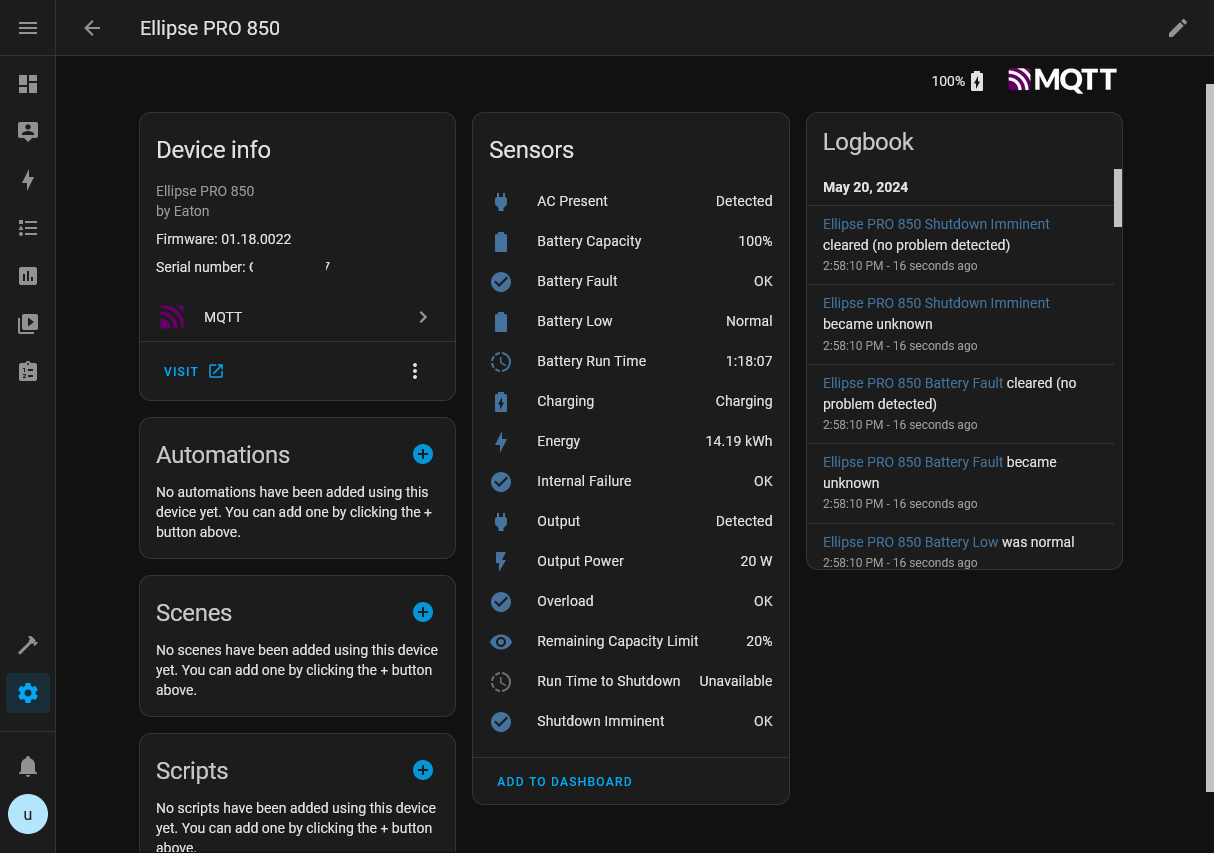
Quick Start
The following quick start guide should get you up and running from a blank Homeassistant installation. Feel free to skip a step if your system is already configured.
Install mosquitto
- In Homeassistant, navigate to Settings, Add-ons
- Click the Add-on store button
- Search for Mosquitto broker and select the result
- Click on Install
[!NOTE] When using the Mosquitto broker Add-on, your MQTT broker hostname will be the same as your Homeassistant's, e.g. "
homeassistant.local".
Create a new Homeassistant user for data ingest
As mosquitto requires authentication, I heavily suggest creating a new user for data ingest.
- In Homeassistant, navigate to Settings, People
- Click on Add person, input a user name
- Check Allow person to log in
- Enter all required fields
- Check Can only log in from local network
Get the application
Windows binaries are provided on the GitHub Releases page.
If you prefer to use your own Python insallation, a pre-built package is hosted on PyPI and can be installed and updated using the pip utility:
pip install -U euc2mqtt
Run it!
[!NOTE] This tool needs to run on the same host as Eaton UPS Companion, as EUC in its default configuration only accepts connections on
localhost:4679.
Open a terminal and run the tool, providing the broker hostname (your Homeassistant hostname), username and the password!
Option 1: Standalone application
.\euc2mqtt --mqtt <broker hostname> --username <user> --password <password>
Option 2: Run as Python module
python -m euc2mqtt --mqtt <broker hostname> --username <user> --password <password>
More info
A more in-depth description of available command line parameters can be viewed by appending -h at the end of your input. For example:
> .\euc2mqtt -h

usage: euc2mqtt [-h] [--name NAME] [--mqtt MQTT] [--euc EUC] [--username USERNAME] [--password PASSWORD] [--interval INTERVAL] [--full-update FULL_UPDATE] [--logfile LOGFILE] [--verbose]

MQTT Publisher for Eaton UPS Companion status messages to Home Assistant. See https://github.com/islandcontroller/euc2mqtt for more info!

options:
  -h, --help            show this help message and exit
  --name NAME           Device name
  --mqtt MQTT           MQTT broker hostname and port (hostname[:port])
  --euc EUC             Eaton UPS Companion hostname and port (hostname[:port])
  --username USERNAME   Username for MQTT broker authentication
  --password PASSWORD   Password for MQTT broker authentication
  --interval INTERVAL   Update interval in seconds
  --full-update FULL_UPDATE
                        Number of incremental dataset fetches between full updates
  --logfile LOGFILE     Output log messages to a file
  --verbose             Enable verbose logging
Running as a Windows Task
- Open Task Scheduler and select Create New Task...
- Select the following options on the General tab:
- Check Run whether user is logged in or not
- Uncheck Do not store password
- On the Triggers tab, create a "At startup" trigger
- On the Actions tab, add the standalone application as a program to run:
- Action: Start a program
- Program/Script: (Navigate to your
euc2mqtt.exehere) - Add arguments:
--mqtt <broker hostname> --username <user> --password <password>
- On the Settings tab, select the following options:
- Check Allow task to be run on demand
- Select If task fails, restart every: 1 minute
- Uncheck Stop the task if it runs longer than: ...
- Select If the task is already running: Do not start a new instance
- Click OK. You will be prompted for a username and password to run the task as.
Configuring bind address for Eaton UPS Companion
[!WARNING] Exposing the EUC service may pose a security risk.
[!NOTE] When euc2mqtt is run on the same host as EUC, it is not required to expose the EUC service.
-
Start a
notepadinstance with Admin privileges -
Open
C:\Program Files (x86)\Eaton\UPSCompanion\configs\config.js -
Edit the "
httpServers" line to listen on all interfaces:"httpServers": {"http": {"port": 4679, "hostname": "0.0.0.0"}},
Legal Information
The contents of this repository are licensed under the MIT License. The full license text is provided in the LICENSE file.
SPDX-License-Identifier: MIT
"Eaton" is a trademark of Eaton Corporation. "Windows" is a trademark of Microsoft Corporation. All trademarks are property of their respective owners.
1 maintainer

Metadata
1 maintainer
Release files for euc2mqtt 1.0.0
For a detailed explanation of source distributions (sdists) and built distributions (wheels), please see the package formats documentation.
Source distribution (sdist)
| File | Size | Uploaded | |
|---|---|---|---|
| euc2mqtt-1.0.0.tar.gz | 92.5 kB | Details |
Built distribution (wheel)
| File | Interpreter | ABI | Platform | Reset |
|---|---|---|---|---|
| euc2mqtt-1.0.0-py3-none-any.whl | Python 3 | none | any | Details |
Total release size: 104.8 kB
Release files / euc2mqtt-1.0.0.tar.gz
| Download URL | euc2mqtt-1.0.0.tar.gz |
|---|---|
| Size | 92.5 kB |
| Tags | Source |
|
SHA-256 checksum How to use checksums |
e4300da9a2499b362ae7f75eb8922dcf044e0d37817610f2bd1aea9c0ed53e01
|
|
BLAKE2b-256 checksum How to use checksums |
3388d10b1e2e2f4d56de248adacd4fa40716953d848bcac8abc8b90c62724612
|
| Upload date | |
|
Uploaded using Trusted Publishing? What is trusted publishing? |
Yes |
| Uploaded via |
twine/5.0.0 CPython/3.12.3
|
Release files / euc2mqtt-1.0.0-py3-none-any.whl
| Download URL | euc2mqtt-1.0.0-py3-none-any.whl |
|---|---|
| Size | 12.2 kB |
| Tags | Python 3 |
|
SHA-256 checksum How to use checksums |
80c8c4e755f429112dfc669c6d1871775e396f80ca5f685b321c5f942a006a0e
|
|
BLAKE2b-256 checksum How to use checksums |
b33970e1e8fbe23c3abf88ca7ef71dd7f77eb515f11700471a9d6dc22a8447db
|
| Upload date | |
|
Uploaded using Trusted Publishing? What is trusted publishing? |
Yes |
| Uploaded via |
twine/5.0.0 CPython/3.12.3
|














