
eulumdat-luminance



Luminance table generation from EULUMDAT (.ldt) photometric files — extension to eulumdat-py.
Features
- Luminance table (cd/m²) computed from intensity distribution and luminous area geometry
- UGR grid (C: 0°–345° in 15° steps, γ: 65°–85° in 5° steps) with automatic bilinear interpolation when the native LDT resolution does not match
- Full native grid mode for detailed photometric analysis
result.at(c_deg, g_deg)— bilinear interpolation at arbitrary (C, γ) anglesresult.projected_area(c_deg, g_deg)— projected luminous area (m²) at arbitrary angles, required byeulumdat-ugrfor solid-angle computation- Polar luminance diagram (SVG + PNG/JPG): all 24 C-planes visible simultaneously, one curve per γ angle, blue gradient palette, optional threshold circle
- Print-ready output by default (
PolarStyle.for_print(width_cm=10, dpi=150, font_scale=2.11)— 10 cm at 150 dpi, Arial 9pt equivalent); customisable viaPolarStyle.for_print(width_cm, dpi) - CSV and JSON export
Installation
pip install eulumdat-luminance
Dependencies
- eulumdat-py — EULUMDAT parser
- numpy, scipy
- vl-convert-python — SVG rasterisation
- Pillow — JPG conversion
Quick start
from pyldt import LdtReader
from eulumdat_luminance import LuminanceCalculator, LuminancePlot, PolarStyle

ldt    = LdtReader.read("luminaire.ldt")
result = LuminanceCalculator.compute(ldt)

print(f"{result.luminaire_name} — {result.maximum:.0f} cd/m²")

# Interpolate luminance at arbitrary (C, γ)
lum  = result.at(c_deg=12.0, g_deg=67.0)           # float, cd/m²

# Projected luminous area at arbitrary (C, γ) — used by eulumdat-ugr
area = result.projected_area(c_deg=0.0, g_deg=65.0) # float, m²

plot = LuminancePlot(result)
plot.polar("polar.svg")   # default: 10 cm at 150 dpi, Arial 9pt equivalent
plot.polar("polar.png")

# Custom size: 8 cm at 300 dpi
plot.polar("polar_report.png", style=PolarStyle.for_print(width_cm=8, dpi=300))

# Get SVG as a string for inline HTML embedding (no file written)
svg_str = plot.polar_svg()
Example output
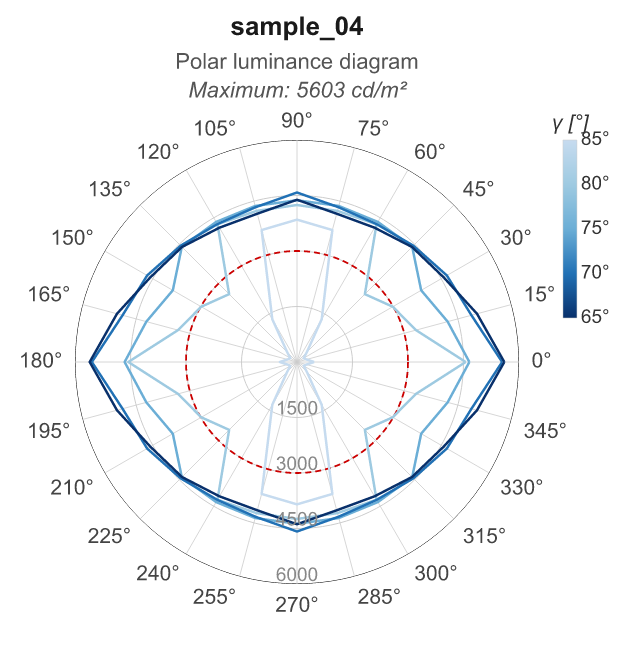
Sample 04 — linear luminaire 1480 × 63 mm, 12 334 lm — default style (PolarStyle.for_print(width_cm=10, dpi=150, font_scale=2.11))
Running the tests
# All tests (numerical validation + diagram generation)
pytest

# Numerical tests only (fast)
pytest tests/test_calculator.py

# Diagram generation only
pytest tests/test_polar_diagram.py

# Verbose with print output
pytest -v -s

# Filter by sample
pytest -k sample_04

# Filter by test type
pytest -k "svg"                  # SVG generation only
pytest -k "png"                  # PNG generation only
pytest -k "for_print"            # print sizing test (8 cm / 300 dpi)
pytest -k "word"                 # Word/PDF report test (10 cm / 150 dpi)
pytest -k "Relux"                # Relux numerical validation (30 tests)
pytest -k "not Smoke"            # exclude smoke tests

# Coverage
pytest --cov=eulumdat_luminance tests/test_calculator.py
License
MIT
1 maintainer

Metadata
1 maintainer
Release files for eulumdat-luminance 1.3.1
For a detailed explanation of source distributions (sdists) and built distributions (wheels), please see the package formats documentation.
Source distribution (sdist)
| File | Size | Uploaded | |
|---|---|---|---|
| eulumdat_luminance-1.3.1.tar.gz | 27.8 kB | Details |
Built distribution (wheel)
| File | Interpreter | ABI | Platform | Reset |
|---|---|---|---|---|
| eulumdat_luminance-1.3.1-py3-none-any.whl | Python 3 | none | any | Details |
Total release size: 47.6 kB
Release files / eulumdat_luminance-1.3.1.tar.gz
| Download URL | eulumdat_luminance-1.3.1.tar.gz |
|---|---|
| Size | 27.8 kB |
| Tags | Source |
|
SHA-256 checksum How to use checksums |
69c9076ede6ff461ba046025478210c2be915c3352c7fa690f5614e3c23d8e24
|
|
BLAKE2b-256 checksum How to use checksums |
9f441ccb33623a43c8a20bfe3ac17fc251363d29c572c7829d36a0076168fdce
|
| Upload date | |
|
Uploaded using Trusted Publishing? What is trusted publishing? |
No |
| Uploaded via |
twine/6.2.0 CPython/3.10.11
|
Release files / eulumdat_luminance-1.3.1-py3-none-any.whl
| Download URL | eulumdat_luminance-1.3.1-py3-none-any.whl |
|---|---|
| Size | 19.8 kB |
| Tags | Python 3 |
|
SHA-256 checksum How to use checksums |
c8d00695781e86a256cf062e3726d103bc4c89cda01b86ebb8087e529a899688
|
|
BLAKE2b-256 checksum How to use checksums |
9834b54697fe1c66c703484529d0a2e0d32f608aa7af44f22db2bd135cdcd646
|
| Upload date | |
|
Uploaded using Trusted Publishing? What is trusted publishing? |
No |
| Uploaded via |
twine/6.2.0 CPython/3.10.11
|














