
eulumdat-report



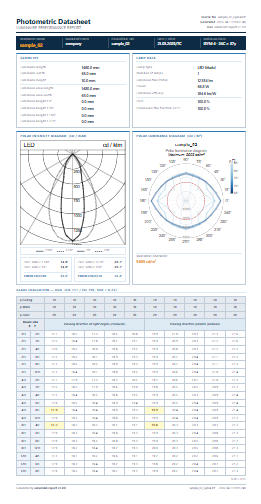
Photometric datasheet generator (HTML + PDF) from EULUMDAT .ldt files — orchestrates the full eulumdat-* ecosystem.
Features
- Single-page A4 datasheet from any EULUMDAT
.ldtfile - Polar intensity diagram (cd/klm) —
eulumdat-plot - Polar luminance diagram (cd/m²) + maximum luminance —
eulumdat-luminance - UGR catalogue table (CIE 117 / CIE 190, 19 rooms × 5 reflectances × 2 directions) —
eulumdat-ugr - Numerical luminance table (cd/m²) — optional section in full report (
--lum-table) - Half-angles and FWHM per C-plane —
eulumdat-analysis - HTML output (self-contained, browser-ready A4 preview)
- PDF output via Playwright / Chromium (cross-platform — see installation notes)
- PNG export of UGR and luminance tables for Word / docxtpl integration
- Custom Jinja2 template support
- CLI and Python API
Sample output
Installation
pip install eulumdat-report
PDF output
PDF rendering uses Playwright (Chromium headless). After installing the package, download the Chromium browser once:
playwright install chromium
This step is required on all platforms (Windows, Linux, macOS). HTML output works without it.
Quick start
CLI
# HTML + PDF
eulumdat-report luminaire.ldt

# HTML only, custom output directory
eulumdat-report luminaire.ldt --no-pdf --output-dir reports/

# Include numerical luminance table
eulumdat-report luminaire.ldt --lum-table

# All options
eulumdat-report --help
Python API
from eulumdat_report.collector import ReportCollector
from eulumdat_report.renderer import ReportRenderer
from pathlib import Path

data = ReportCollector.collect("luminaire.ldt")
html = ReportRenderer.render_html(data)
Path("luminaire.html").write_text(html, encoding="utf-8")

# PDF (requires: playwright install chromium)
ReportRenderer.render_pdf(data, Path("luminaire.pdf"))
PNG export for Word / docxtpl
The UGR table and luminance table can be exported as PNG images (17 cm wide, 150 dpi by default) for embedding in Word documents via docxtpl.
import io
from docxtpl import DocxTemplate, InlineImage
from docx.shared import Mm
from eulumdat_report import render_ugr_image, render_luminance_image

# Render from .ldt path (or pass an already-collected ReportData)
ugr_png = render_ugr_image("luminaire.ldt")
lum_png = render_luminance_image("luminaire.ldt")

doc = DocxTemplate("template.docx")
context = {
    "ugr_table": InlineImage(doc, io.BytesIO(ugr_png), width=Mm(170)),
    "lum_table": InlineImage(doc, io.BytesIO(lum_png), width=Mm(170)),
}
doc.render(context)
doc.save("rapport.docx")
Both functions accept width_cm (default 17.0) and dpi (default 150) parameters.
CLI reference
Usage: eulumdat-report [OPTIONS] LDT_FILE

  Generate a photometric datasheet (HTML/PDF) from an EULUMDAT .ldt file.

Options:
  -o, --output-dir DIRECTORY      Output directory  [default: same as LDT_FILE]
  --template FILE                 Custom Jinja2 HTML template
  --html / --no-html              Generate HTML output  [default: html]
  --pdf  / --no-pdf               Generate PDF output   [default: pdf]
  --lum-table / --no-lum-table    Include numerical luminance table  [default: no-lum-table]
  -v, --verbose                   Enable debug logging
  --help                          Show this message and exit
Output filenames are derived from the input basename: luminaire.ldt → luminaire.html / luminaire.pdf.
Template customisation
The default template is src/eulumdat_report/templates/default.html with companion default.css.
To customise, copy both files to a local directory and pass --template to the CLI:
eulumdat-report luminaire.ldt --template my_templates/custom.html
The template receives a single data object (ReportData dataclass). The following
Jinja2 filters are available:
| Filter | Description | Example |
|---|---|---|
thousands |
Space-separated thousands (int) | 12334 → 12 334 |
fmt1 |
1 decimal place | 184.6 |
ugr_fmt |
1 decimal or — if None |
18.0 / — |
lum_fmt |
Compact luminance: integer ≤ 99 999, scientific above | 123456 → 1.23e5 |
svg_responsive |
Makes SVG responsive (adds viewBox, sets width=100%) |
SVG fields are embedded inline: {{ data.svg_intensity \| svg_responsive \| safe }}.
Key data fields
data.luminaire_name      # str
data.company             # str
data.luminaire_number    # str
data.isym                # int  (0–4)
data.mc, data.ng         # int  (C-planes, gamma angles)
data.lamp_flux           # float (lm)
data.lamp_watt           # float (W)
data.lorl                # float (%)
data.lum_max             # float | None (cd/m²)
data.svg_intensity       # str | None
data.svg_luminance       # str | None
data.ugr                 # UgrTableData | None
data.lum_table           # LuminanceTableData | None
Dependencies
| Package | Role |
|---|---|
eulumdat-py |
EULUMDAT parser |
eulumdat-plot |
Polar intensity diagram (SVG) |
eulumdat-luminance |
Polar luminance diagram (SVG) + maximum |
eulumdat-ugr |
UGR catalogue table |
eulumdat-analysis |
Half-angles, FWHM |
jinja2 |
HTML templating |
playwright |
PDF rendering (Chromium headless) |
click |
CLI |
Running the tests
pip install -e ".[dev]"
pytest
License
MIT
1 maintainer

Release files for eulumdat-report 1.1.0
For a detailed explanation of source distributions (sdists) and built distributions (wheels), please see the package formats documentation.
Source distribution (sdist)
| File | Size | Uploaded | |
|---|---|---|---|
| eulumdat_report-1.1.0.tar.gz | 23.8 kB | Details |
Built distribution (wheel)
| File | Interpreter | ABI | Platform | Reset |
|---|---|---|---|---|
| eulumdat_report-1.1.0-py3-none-any.whl | Python 3 | none | any | Details |
Total release size: 44.8 kB
Release files / eulumdat_report-1.1.0.tar.gz
| Download URL | eulumdat_report-1.1.0.tar.gz |
|---|---|
| Size | 23.8 kB |
| Tags | Source |
|
SHA-256 checksum How to use checksums |
51b2b93a6f3858467d7368886508c91258a8ca774a5e2dba5fedf878e55d2a35
|
|
BLAKE2b-256 checksum How to use checksums |
5174c0b0a55602e1b78dc1b3a35f706a6e903842f39e27f2b820747ef933b915
|
| Upload date | |
|
Uploaded using Trusted Publishing? What is trusted publishing? |
No |
| Uploaded via |
twine/6.2.0 CPython/3.10.11
|
Release files / eulumdat_report-1.1.0-py3-none-any.whl
| Download URL | eulumdat_report-1.1.0-py3-none-any.whl |
|---|---|
| Size | 21.0 kB |
| Tags | Python 3 |
|
SHA-256 checksum How to use checksums |
08b4f460065b418c61cc1ca722bebbeb7532b8b65cea779d124c63b47e4413b5
|
|
BLAKE2b-256 checksum How to use checksums |
bc3732c4cca4a0627ad12f2826f21a0ec9e27e969b76789369a4597ff91e891c
|
| Upload date | |
|
Uploaded using Trusted Publishing? What is trusted publishing? |
No |
| Uploaded via |
twine/6.2.0 CPython/3.10.11
|














