
ENISA EUVD data fetcher and formatter

Project description
EUVD Mapper v1.5 - ! The pip repository will be updated on June 29, 2025.



⚙️ ENISA EUVD Data Retriever and Formatter
Fetch, filter, and format data from ENISA’s Exploited Vulnerabilities Database (EUVD) with ease.
✨ Features
🔄 New Lookup Flags
--last Show the latest 8 EUVD entries
--critical Show the latest 8 critical vulnerabilities
--enisa-id Lookup by ENISA internal ID (EUVD-YYYY-XXXX)
--advisory-id Lookup full advisory details by its slug
🚫 No-Banner Mode
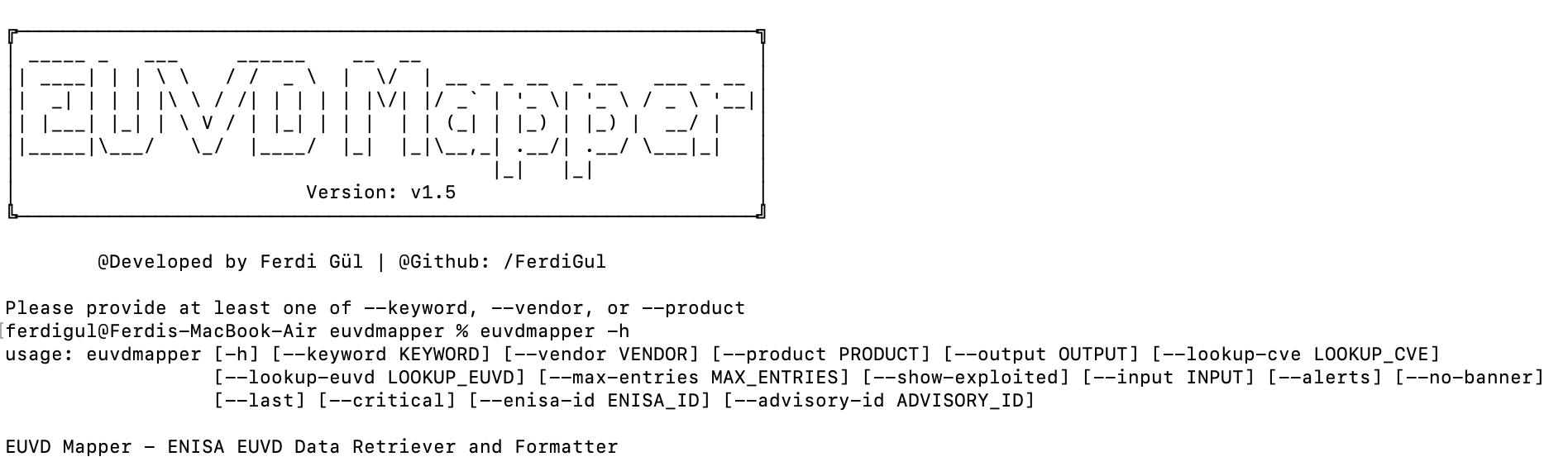
--no-bannerSuppress the ASCII art on terminals (works with-htoo!)
🔍 Flexible Search
Query vulnerabilities by keyword, vendor, product, or any combination.
📤 Multiple Export Formats
Output results as .json, .csv, or interactive .html reports.
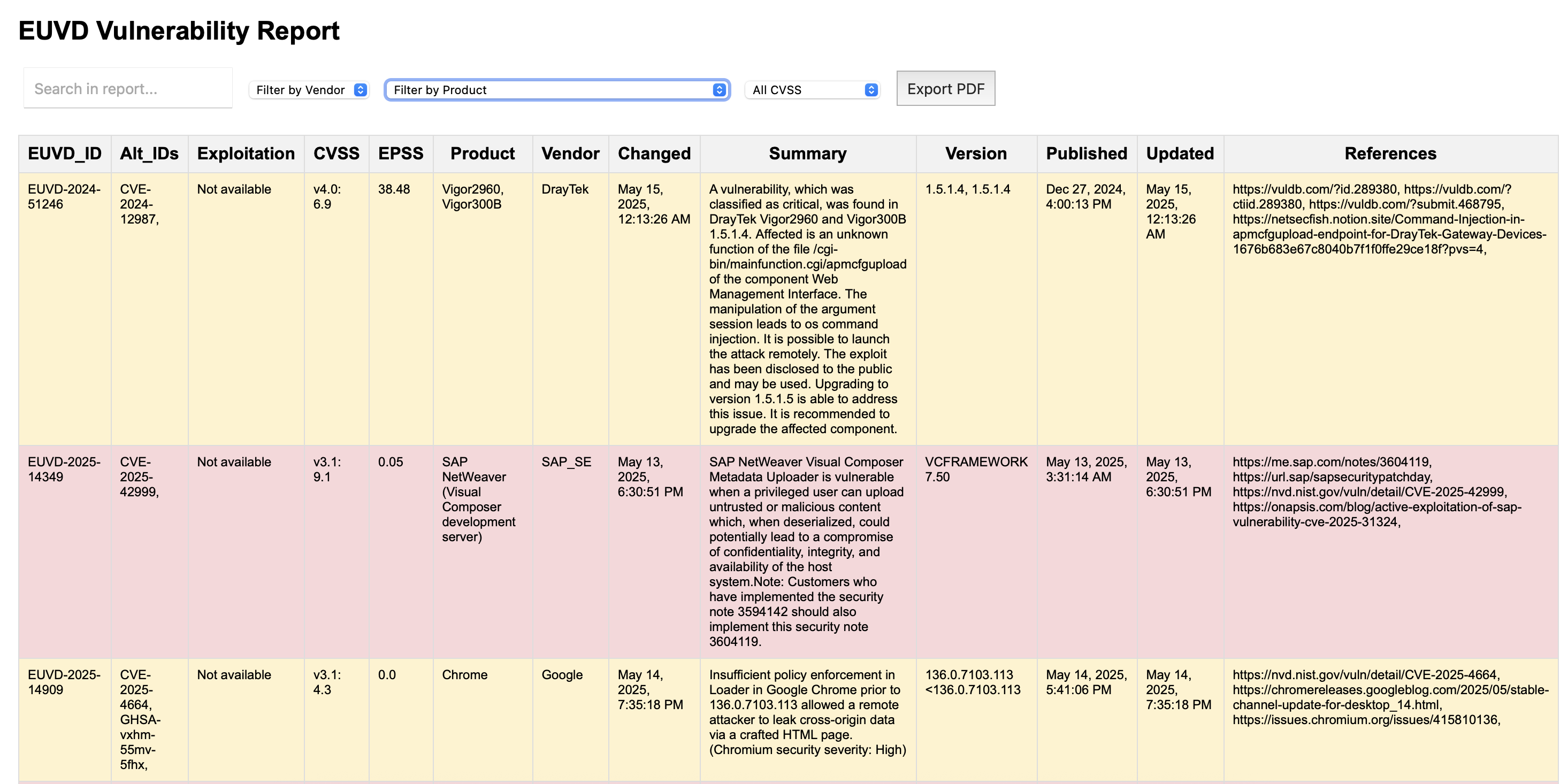
🧠 Smart HTML Reporting
- CVSS-based risk coloring (Low / Medium / High / Critical)
- Filter by vendor, product, or CVSS score
- In-browser search and the ability to export reports in PDF format.
🔎 Lookup Utilities
- Search by CVE ID or EUVD ID
- Get alias mappings and extended metadata
⚠️ Live Threat Feed
Fetch latest exploited vulnerabilities using ENISA’s public API.
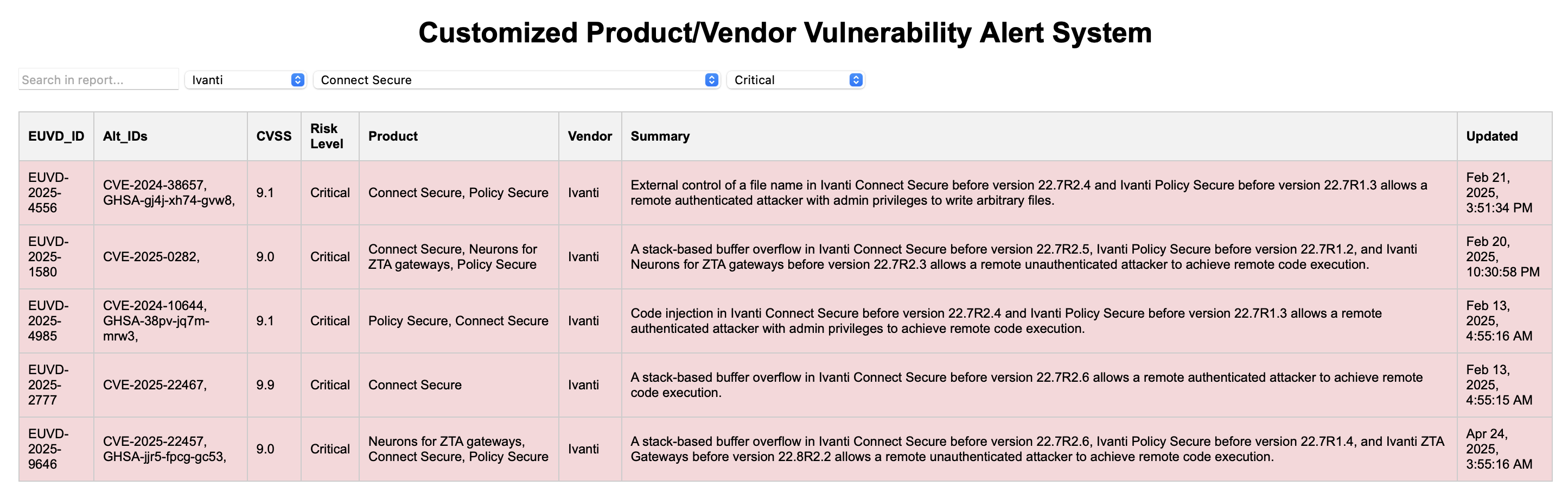
📌 Customized Watchlist Alerts
- YAML-powered alerting system based on specific vendor/product pairs
- Generates filtered
.csvand.htmlreports - Automatically highlights high/critical vulnerabilities for watched assets
🖥️ Responsive Terminal Experience
- ASCII art banner shown conditionally based on terminal width
- Clean fallback mode for small terminal displays
📋 YAML Watchlist Format (for Alert Mode)
To use the --input <file>.yaml --alerts feature, your YAML file must define both vendor and product fields for each entry.
Example watchlist.yaml:
watchlist:
  - vendor: Microsoft
    product: Windows 10
  - vendor: Fortinet
    product: FortiOS
  - vendor: Cisco
    product: IOS
📦 Installation
** PYPI You can install euvdmapper directly from PyPI:
pip install euvdmapper


** Install from source:

```bash
git clone https://github.com/FerdiGul/euvdmapper.git
cd euvdmapper
pip install .

---

## 🚀 Usage

You can run the CLI tool via terminal:

```bash
euvdmapper -h
🔍 Examples
euvdmapper --keyword fortinet
    Searches for vulnerabilities by keyword and prints the results.

euvdmapper --keyword fortinet --output fortinet.csv
    Searches and exports results to CSV.

euvdmapper --keyword fortinet --output fortinet.html
    Generates an interactive HTML report.

euvdmapper --keyword google --output google.json
    Exports data in JSON format.

euvdmapper --lookup-cve CVE-2024-1234
    Looks up by CVE ID and prints to terminal.

euvdmapper --lookup-euvd EUVD-2024-5678
    Looks up by EUVD ID and prints to terminal.

euvdmapper --show-exploited --output exploited.html
    Displays the latest exploited vulnerabilities and generates an HTML report.

euvdmapper --show-exploited --output exploited.json
    Displays the latest exploited vulnerabilities and exports to JSON.

euvdmapper --vendor Fortinet --output fortinet.html
    Filters vulnerabilities by vendor and generates an HTML report.

euvdmapper --product FortiOS --output fortios.csv
    Filters vulnerabilities by product and exports to CSV.

euvdmapper --keyword firewall --vendor Fortinet
    Searches by keyword and filters by vendor.

euvdmapper --keyword firewall --vendor Fortinet --product FortiGate --output combo.json
    Full filter: keyword + vendor + product with export.

euvdmapper --input watchlist.yaml --alerts
    Loads a YAML-based custom vendor/product watchlist and generates interactive HTML + CSV
    reports with CVSS-based risk levels, alt IDs, and filterable UI.

euvdmapper --keyword fortinet --no-banner | jq .
    # raw JSON output (no banner)

euvdmapper --last --output last.json
    # fetches last 8 entries (API cap: max 8)

euvdmapper --critical --output critical.csv
    # fetches last 8 critical entries (API cap: max 8)

euvdmapper --enisa-id EUVD-2025-1234
    # lookup by ENISA internal ID

euvdmapper --advisory-id cisco-sa-20210315-abcd
    # fetch full advisory metadata
📂 Output Formats
| Format | Description |
|---|---|
.json |
Machine-readable structured output |
.csv |
Spreadsheet-friendly tabular data |
.html |
Interactive report with filterable UI |
🔔 HTML reports support browser search, color-coding by CVSS, and filter dropdowns.
📸 Preview
https://github.com/user-attachments/assets/5a2b1196-dfaa-49f9-9b52-8bede5bc5804
🙋♂️ Author
Developed by: Ferdi Gül
📧 Email: 0xfrd1gul@gmail.com
🔗 LinkedIn: linkedin.com/in/ferdigul
💻 GitHub: github.com/FerdiGul
📝 License
This project is licensed under the MIT License.


Download files
Download the file for your platform. If you're not sure which to choose, learn more about installing packages.
Source Distribution
Built Distribution
Filter files by name, interpreter, ABI, and platform.
If you're not sure about the file name format, learn more about wheel file names.
Copy a direct link to the current filters
File details
Details for the file euvdmapper-1.5.tar.gz.
File metadata
- Download URL: euvdmapper-1.5.tar.gz
- Upload date:
- Size: 13.1 kB
- Tags: Source
- Uploaded using Trusted Publishing? No
- Uploaded via: twine/6.1.0 CPython/3.10.10
File hashes
| Algorithm | Hash digest | |
|---|---|---|
| SHA256 |
c2cbd07ab3a0412289fbe7c1bbddc1de4d87be51b08dcb1610ca159818971c2d
|
|
| MD5 |
210500725d33a3b11f30e458f4113cd8
|
|
| BLAKE2b-256 |
0d7ce07eb6b831f97a2b10220a2db04b83707a60aab27aa97f63b538b5e667d0
|
File details
Details for the file euvdmapper-1.5-py3-none-any.whl.
File metadata
- Download URL: euvdmapper-1.5-py3-none-any.whl
- Upload date:
- Size: 13.0 kB
- Tags: Python 3
- Uploaded using Trusted Publishing? No
- Uploaded via: twine/6.1.0 CPython/3.10.10
File hashes
| Algorithm | Hash digest | |
|---|---|---|
| SHA256 |
3027810997b9fd7836d0797d95c6a4ff5f14197ff05e82b9ae1c511d2aa9a6e2
|
|
| MD5 |
8d54d1e6e7ae18f58c69b2ec30b0ee8f
|
|
| BLAKE2b-256 |
2fa1d6ff8271bb8929668d08472456e3592d3ff577997e95eddd1640ef375fc0
|






