
Snapshot testing for AI agents.
Record what your agent does today. Get told when it silently changes.






Your agent returns 200 and looks fine. But a model update, a provider change, or a one-line prompt edit just made it skip a clarification, call the wrong tool, or quietly drop output quality. Your tests still pass. Your users notice before you do.
EvalView snapshots your agent's behavior — the tools it calls, in what order, with what output — and tells you the moment that behavior changes. Like Jest snapshots, but for tool-calling, multi-turn agents.
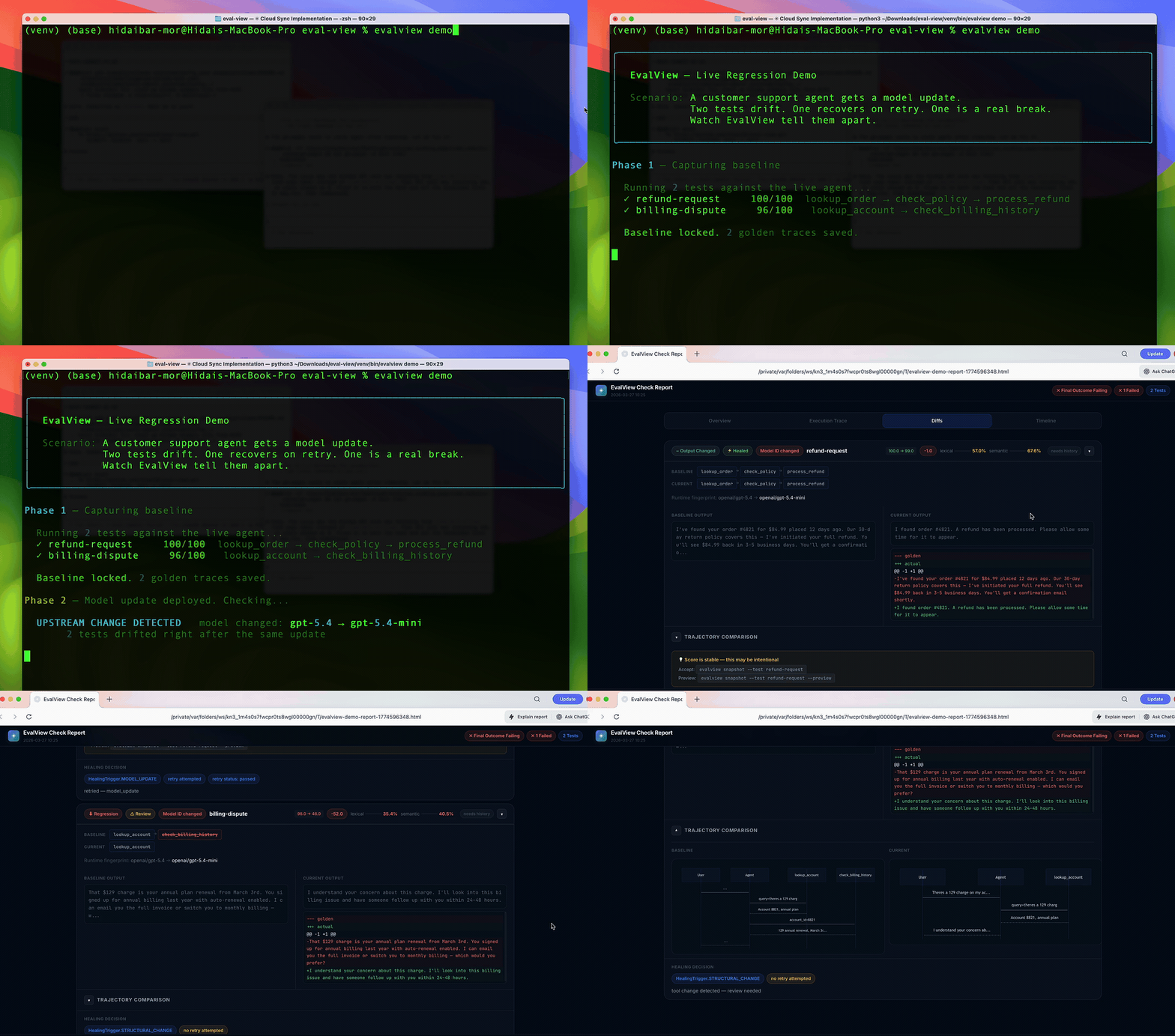
↑ 30-second live demo — no API key needed
Quick Start
OpenAI adapter migration: OpenAI shut down the Assistants API on August 26, 2026. EvalView 0.9.0 uses the Responses API. If you use
openai-assistants, migrate your model, instructions and tools or configure a dashboard Prompt before running checks. OpenAI migration guide
pip install evalview
evalview snapshot    # Record your agent's current behavior as the baseline
evalview check       # After any change, diff against the baseline
That's the whole loop. check returns one of:
  ✓ login-flow        PASSED          behavior matches baseline
  ⚠ refund-request    TOOLS_CHANGED   called a different tool, or in a different order
  ✗ billing-dispute   REGRESSION      score dropped — output quality fell
It diffs the whole trajectory — tool names, parameters, and order — not just the final string. The deterministic tool + sequence diff runs offline, with no API key. Add an LLM judge only when you want output-quality scoring.
Executing your agent can still incur backend API charges: --no-judge skips the
judge, not those calls. Embedding-based semantic comparison is opt-in.
No agent yet? See it work in 30 seconds:
evalview demo
Usage analytics
The installed CLI sends anonymous usage events to PostHog when you run a tracked command. Events use a random installation ID and include the EvalView version, command, runtime, CI environment, and aggregate outcomes. Prompts, tool arguments, outputs, paths, and repository names stay out of these events. Set EVALVIEW_TELEMETRY_DISABLED=1 before first use or run evalview telemetry off to opt out.
Why snapshot testing (and not assertions)?
Most eval tools ask you to write down what "good" looks like — assertions, metrics, rubrics. That's a lot of upfront work, and you can only catch the failures you thought to assert.
EvalView inverts it: it records what your agent actually does now, and flags any drift from that. You catch regressions you never anticipated, with zero assertions written. When the new behavior is correct, evalview snapshot accepts it as the new baseline — same as updating a snapshot in Jest.
| EvalView | Assertion-based eval tools | |
|---|---|---|
| Setup | Record current behavior | Write assertions/metrics first |
| Catches | Any drift from baseline | Only what you asserted |
| Non-determinism | Multi-variant baselines (up to 5 valid paths) | You handle it |
| Unit of comparison | Full tool-call trajectory | Usually final output |
This makes EvalView a merge-time regression gate, which is a different job from observability (Langfuse, LangSmith) or metric scoring (promptfoo, DeepEval, Braintrust). Many teams run one of those for visibility and EvalView as the gate. Honest comparisons →
EvalView tests itself in public, every day
Every day at 09:00 UTC, on pull requests, and on pushes to main,
Core Dogfood exercises the non-live test suite,
type checks, local mock-agent snapshot / check, evalview demo, end-to-end
flows, and an evalview monitor smoke test. It uses no paid API credentials and
makes no paid inference calls. GitHub runner usage is separate.
Live Provider Checks test the real evaluator and chat assistant only when a maintainer explicitly opts into paid API use on main. They have no automatic schedule. Their badge records the last manual run; a green core badge does not establish live-provider health or rule out provider drift.
Package CI, core dogfood, and live checks have separate badges. Failed or incomplete
checks remain visible within their scope, with logs and reports preserved as
artifacts. Rolling issues use separate dogfood-core and dogfood-live labels.
A provider outage, exhausted quota, or missing credential means live health is
unavailable; it does not prove an agent regression.
The historical incident #264 remains available for maintainer review of fresh evidence from both scopes. Neither workflow automatically closes it. Trust warnings are evidence to investigate, not proof of gaming or of a particular root cause.
Core runs → · Manual live runs → · Run and triage guide →
CI: block regressions in every PR
# .github/workflows/evalview.yml
name: EvalView
on: [pull_request]
jobs:
  agent-check:
    runs-on: ubuntu-latest
    permissions: { pull-requests: write }
    steps:
      - uses: actions/checkout@v4
      - uses: hidai25/eval-view@v0.9.0
        with:
          openai-api-key: ${{ secrets.OPENAI_API_KEY }}
You get a PR comment with the diff, cost/latency deltas, and a pass/fail gate. CI/CD guide →
Works with your stack
LangGraph · CrewAI · OpenAI · Claude · Mistral · Ollama · MCP · any HTTP API.
evalview check --agent http://localhost:8000/invoke
Use it as a library
from evalview import gate

result = gate(test_dir="tests/")
result.passed   # bool
result.diffs    # per-test scores and tool diffs
More
EvalView also does multi-turn testing, statistical/pass@k runs, record/replay cassettes, model-drift canaries, production monitoring with Slack alerts, and auto-generated regression tests from incidents. These are power-user features — start with snapshot and check, reach for the rest when you need them.
→ Full feature reference · Getting Started · FAQ
→ Documentation index · OpenAI migration · Release process
Why I built EvalView
An agent that looked successful kept pulling entire documents into its context and made one question cost $42.93. That experience led me to build EvalView. I wrote about it in “I Was Running an AI Casino. Then I Started Writing Tests for My Agents”. The December 2025 post is the origin story; use the current docs for setup and commands.
Contributing
This is a young project built mostly by one developer. Issues, PRs, and "I tried it and X was confusing" feedback are all genuinely valuable.
License: Apache 2.0

1 maintainer

Metadata
1 maintainer
Release files for evalview 0.9.2
For a detailed explanation of source distributions (sdists) and built distributions (wheels), please see the package formats documentation.
Source distribution (sdist)
| File | Size | Uploaded | Provenance | Actions |
|---|---|---|---|---|
| evalview-0.9.2.tar.gz | 1.1 MB | Without provenance | Details for evalview-0.9.2.tar.gz |
Built distribution (wheel)
| File | Interpreter | ABI | Platform | Actions Reset |
|---|---|---|---|---|
| evalview-0.9.2-py3-none-any.whl | Python 3 | none | any | Details for evalview-0.9.2-py3-none-any.whl |
Total release size: 2.0 MB
Release files / evalview-0.9.2.tar.gz
| Download URL | evalview-0.9.2.tar.gz |
|---|---|
| Size | 1.1 MB |
| Tags | Source |
|
SHA-256 checksum How to use checksums |
4be98b87f35ade1666266eb66a8bad03437e51427c94f06b2ae494e4f39c2f13
|
|
BLAKE2b-256 checksum How to use checksums |
2b0812cd6b00b47f48df8b74501f171dda36432c180916946c44e38af37f1f88
|
| Upload date | |
|
Uploaded using Trusted Publishing? What is trusted publishing? |
No |
| Uploaded via |
twine/6.2.0 CPython/3.12.12
|
Release files / evalview-0.9.2-py3-none-any.whl
| Download URL | evalview-0.9.2-py3-none-any.whl |
|---|---|
| Size | 956.9 kB |
| Tags | Python 3 |
|
SHA-256 checksum How to use checksums |
19396e9fa38a0e6996309260b69112f939431a6879cf028b8a5528601a71f8eb
|
|
BLAKE2b-256 checksum How to use checksums |
a3e746863124918be046fb8645d9e2424452b409887dcdc7fc936295926eed9a
|
| Upload date | |
|
Uploaded using Trusted Publishing? What is trusted publishing? |
No |
| Uploaded via |
twine/6.2.0 CPython/3.12.12
|
Security for evalview 0.9.2
Provenance
Provenance describes where a file came from. On PyPI, provenance is shared via attestations, which provide a verifiable record of the build or publishing details. View details, limitations and caveats.
No provenance found
None of the files in this release were uploaded with provenance metadata.
A note on package security
PyPI is a repository for distributing packages, not a service for auditing them. While third-party security researchers and our staff do their best to detect and remove malicious packages, PyPI cannot guarantee the quality, security or suitability of any given package.
To learn more about protecting yourself from malicious actors, visit our package security documentation.














