
Python interface to make requests from EVDS API Server. Fast, efficient and user friendly solution. Caches results to avoid redundant requests. Creates excel files reading configuration text file that can be easily created from the menu or console. Provides visual menu to the user. It is extendable and importable for user's own python projects.

Project description




evdspy
Updated on this version
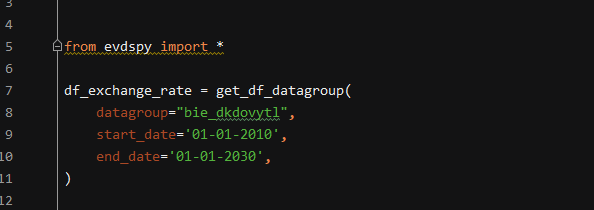
* get_df_datagroup function was added
Updated on 1.1.6
* Fixed type error on json result.
* Some more type hints and refactoring.
Updated on 1.1.1
* The categories menu now goes only one step back as it should instead of returning.
* Fixed some verbose debug results.
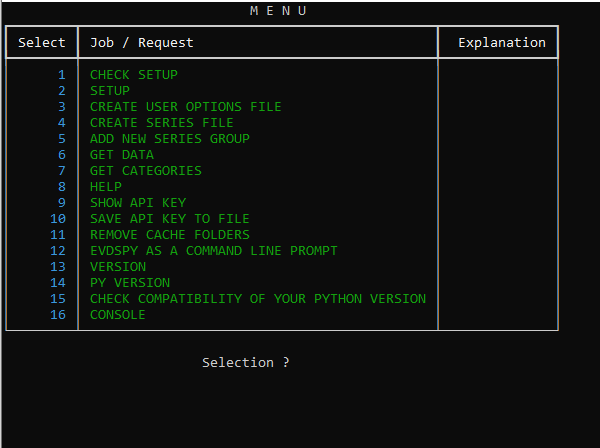
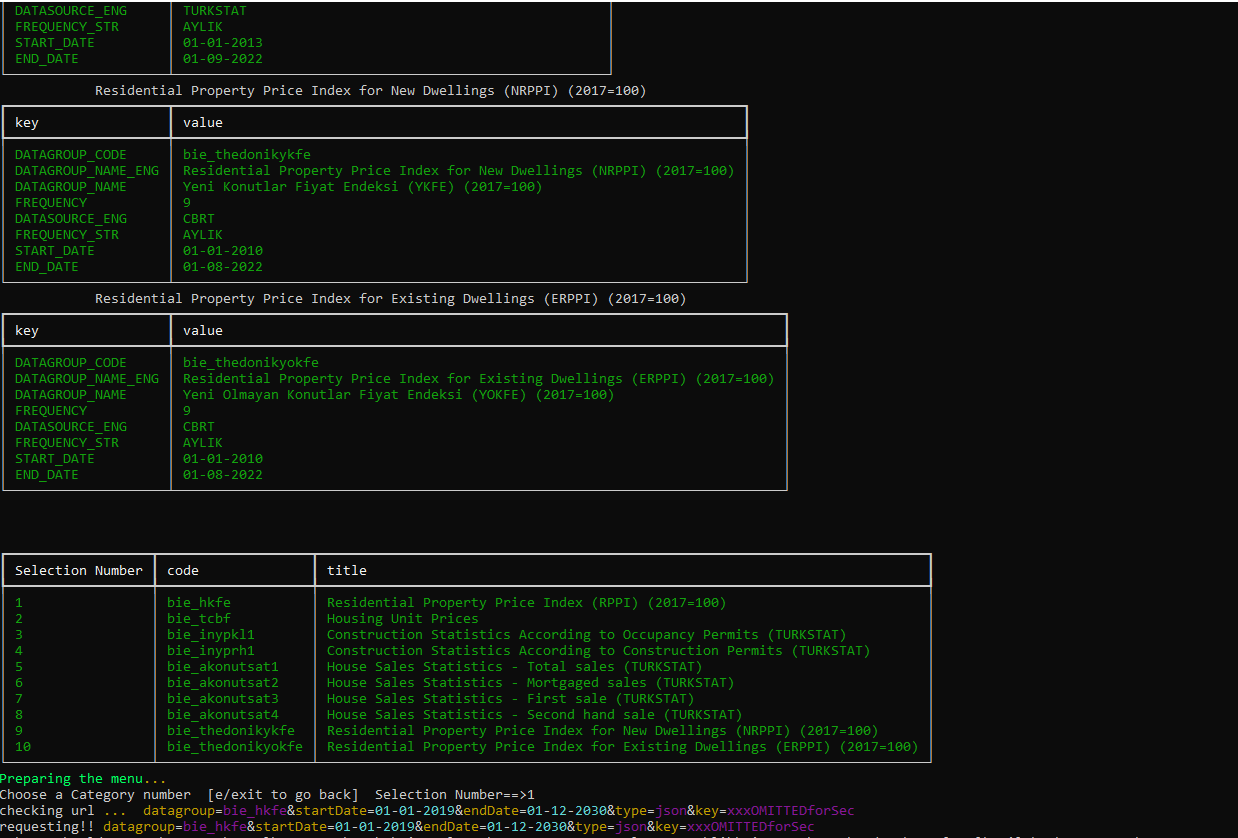
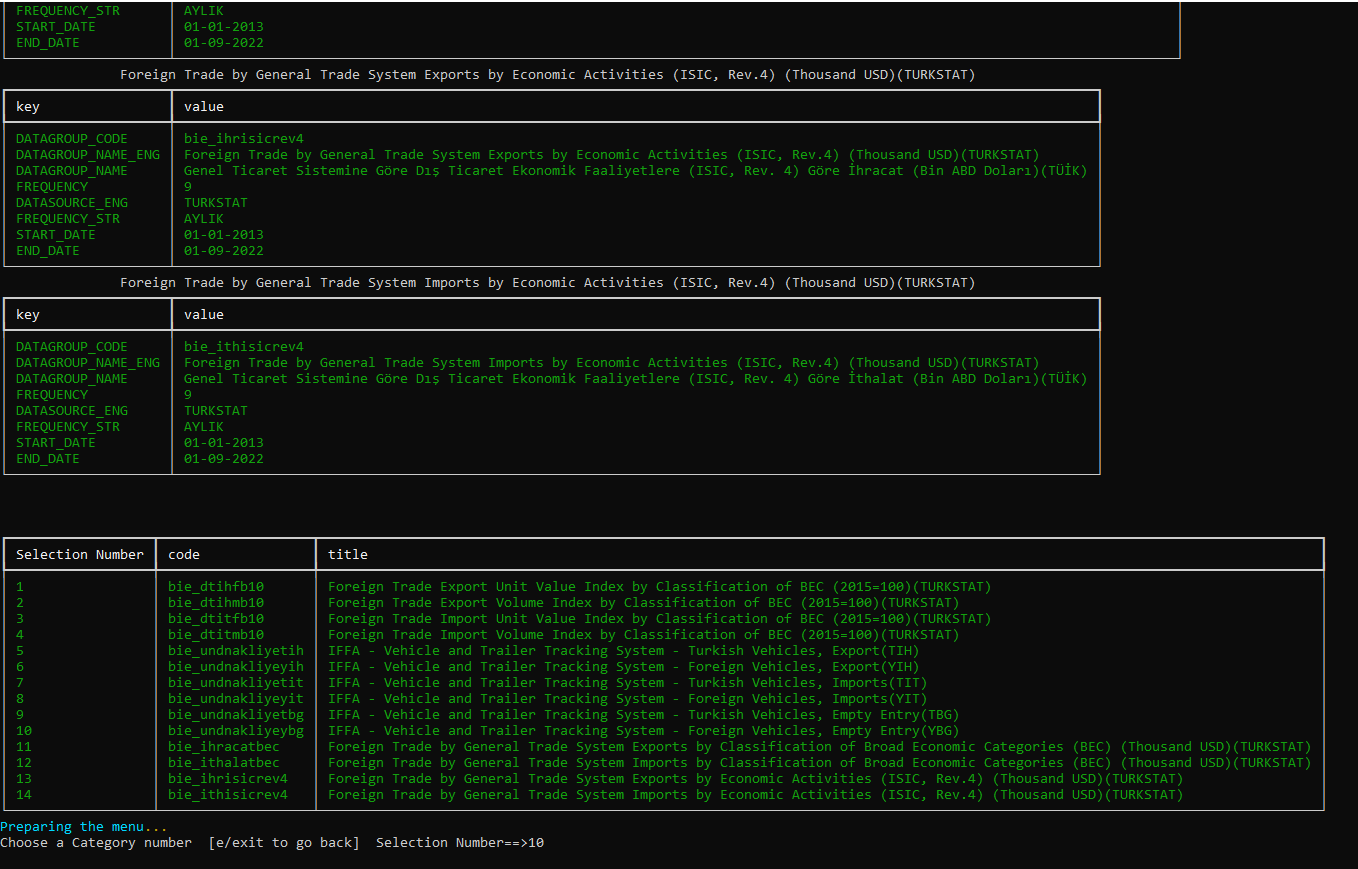
Visual Menu to request data
About
evdspy is an open source python interface which helps you make efficient requests by caching results (storing a dict using hashable parameters in order to avoid redundant requests), it provides a user friendly menu to ask data from the institution's API service.
It is a Python interface to make requests from (CBRT) EVDS API Server. Fast, efficient and user friendly solution. Caches results to avoid redundant requests. Creates excel files reading configuration text file that can be easily created from the menu or console. Provides visual menu to the user. It is extendable and importable for user's own python projects.
Please see the disclaimer below
installation
pip install evdspy
importing
from evdspy import *
check()
get()
help_evds()
or
import evdspy as ev
ev.check()
ev.get()
ev.help_evds()
menu
from evdspy import *
menu()
or
import evdspy as ev
ev.menu()

Menu function will display a friendly menu to setup project, creating output folders and some setup files to
create some set of series to make a request and download from EVDS server save your api key to get data from EVDS.
Than it will convert this data to a pandas dataframe and create some folders on your local area.
menu()
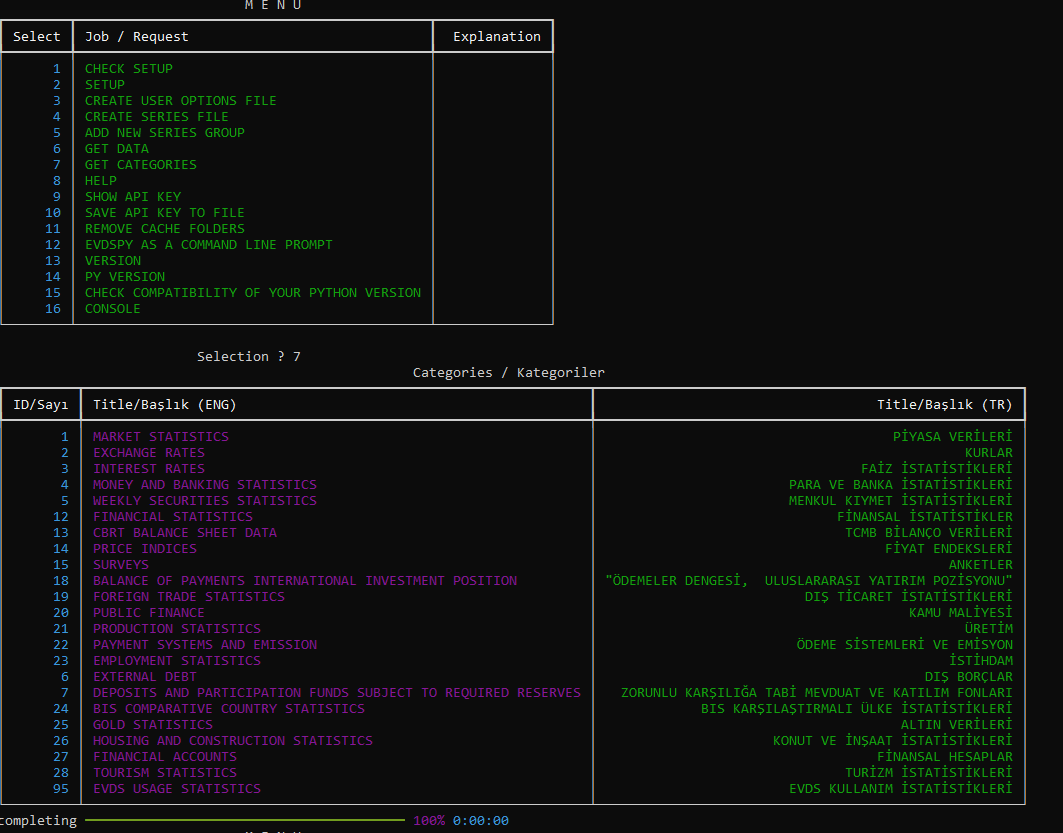
OPTION 1
FROM THE CONSOLE
create_series_file()
or
csf()
or from selection menu choose create series file (config_series.cfg) option.
With this command program will create file similar to below. You may later add new series info or modify this file or delete and create a new on from menu or console using commands summarized in this file.
config_series.cfg content example
#Series_config_file
E V D S P Y  _  C O N F I G  _  F I L E  ---------------------------------------------
#
# This file will be used by evdspy package (python) in order to help updating
# your series.
# Script will be adding this file when you setup a new project.
# Deleting or modifying its content may require to setup configuration from the beginning
# ----------------------------------------------------------------------------------------
#
#About alternative params
# ----------------------------------------------------------------------------------------


          Frequencies
          -----------------

          Daily: 1
          Business: 2
          Weekly(Friday): 3
          Twicemonthly: 4
          Monthly: 5
          Quarterly: 6
          Semiannual: 7
          Annual: 8


          `Formulas`s
          -----------------

          Level: 0
          Percentage change: 1
          Difference: 2
          Year-to-year Percent Change: 3
          Year-to-year Differences: 4
          Percentage Change Compared to End-of-Previous Year: 5
          Difference Compared to End-of-Previous Year : 6
          Moving Average: 7
          Moving Sum: 8

          Aggregate types
          -----------------

          Average: avg,
          Minimum: min,
          Maximum: max
          Beginning: first,
          End: last,
          Cumulative: sum


#Begin_series

---Series---------------------------------
foldername : visitors\annual
abs_path : visitors\annual
subject  : visitors
prefix   : EVPY_
frequency : 8 # annually
formulas : 0 # Level
aggregateType : avg
------------SERIES CODES------------------
TP.ODEMGZS.BDTTOPLAM
TP.ODEMGZS.ABD
TP.ODEMGZS.ARJANTIN
TP.ODEMGZS.BREZILYA
TP.ODEMGZS.KANADA
TP.ODEMGZS.KOLOMBIYA
TP.ODEMGZS.MEKSIKA
TP.ODEMGZS.SILI
------------/SERIES CODES------------------
---/Series---------------------------------
--++--

---Series---------------------------------
foldername : visitors\monthly
abs_path : C:\Users\User\SeriesData\visitors\monthly
subject  : visitors
prefix   : EVPY_
frequency : 5 # Monthly
formulas : 0 # Level
aggregateType : avg
------------SERIES CODES------------------
TP.ODEMGZS.BDTTOPLAM
TP.ODEMGZS.ABD
TP.ODEMGZS.ARJANTIN
TP.ODEMGZS.BREZILYA
TP.ODEMGZS.KANADA
TP.ODEMGZS.KOLOMBIYA
TP.ODEMGZS.MEKSIKA
TP.ODEMGZS.SILI
------------/SERIES CODES------------------
---/Series---------------------------------
--++--
initial commands
from evdspy import *
help_evds():
see a list of popular commands of this package to create setup folder and files, and request data.
    'easy_setup',
'setup',
'setup_series',
"setup_series_steps",
'help_evds',
'check',
'get',
help
'h',
'help_evdspy',
'help_',
series file
'create_series_file',
'csf',
options file
'create_options_file',
'cof'
menu , console
'console',
'menu',
version
'version',
api key
'save_apikey',
'save',
cache
'remove_cache',
check():
check setup and create required folders and see current installation status.
setup() :
creates folders and files
____Folders_______________
        `pickles`
            will be used to store some request results to ovoid redundant requests from the EVDS api

        `SeriesData`
            to save results of requests or caches to an excel file using information on user option files
____Files_______________
        `options.cfg`
            a text file consisting global user options such as start date, end date and caching period.


        `config_series.cfg`
            this file consists information regarding individual sets of series. From the menu user can add
        new series that will be requesting from the server. Program will produce on for example and this file
        can be modified and new sets of series can be added following the example format.

from evdspy.main import *
setup_now()
get():
# this will check for your current series.txt file
# if proper data series codes are given it will either download them
# or use the latest cache from your local environment
# to provide other cache options such as nocache / daily / hourly you may change your
# defaults or give arguments such as

    get()
save("MyApiKey"):
Program will store your api key in your environment in a safe folder
called APIKEY_FOLDER
and only use it when you run a new request which was not requested
recently depending on your cache preference.
.
save("MyApiKey")
save()
    When you call it without any argument, program will ask for your key and do the same
above
create_series_file() or csf() :
# creates example `config_series.cfg` file on your work environment. evdspy input file (EIF) formatted
# you may modify it according to your preferences.
create_series_file()
# or
csf()
Options File
      #Global Options File (options.cfg)
      # G L O B A L   O P T I O N S   F I L E   -------------------------------------------------------
      cache_freq : daily
      gl_date_start : 01-01-2010
      gl_date_end : 01-12-2030
create_options
create_options()
THESE functions will return a Pandas Dataframe
get_df_datagroup
params
    returns all series as df to extend
    params:
    -----------------------
    datagroup : str
        e.g. `bie_dkdovytl`
    start_date : str
        e.g. `31-01-2010`
    end_date : str
        e.g. `31-01-2030`
example usage :
df_exchange_rate = get_df_datagroup(
    datagroup="bie_dkdovytl",
    start_date = '01-01-2010',
    end_date: str ='01-01-2030',
)
OPTION 2
FROM THE MENU
menu()
checking....
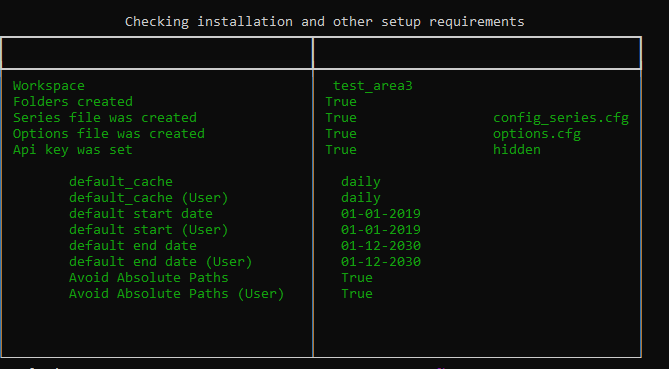
OPTION 3
FROM THE OS COMMAND LINE
(Windows Command line / Linux Terminal / Mac Terminal) ( > , $ , $ as $ )
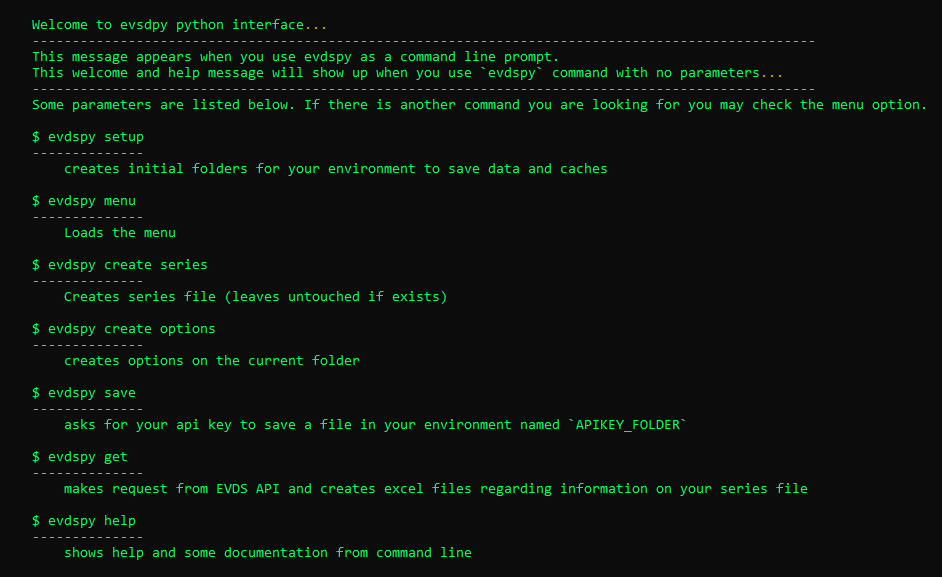
$ evdspy setup
--------------
    creates initial folders for your environment to save data and caches

$ evdspy menu
--------------
    Launces evdspy and loads the menu

$ evdspy create series
--------------
    Creates series file (leaves untouched if exists)

$ evdspy help
--------------
    shows help and some documentation from command line

$ evdspy create options
--------------
    creates options on the current folder

$ evdspy get
--------------
    makes request from EVDS API and creates excel files regarding information on your series file

$ evdspy save
--------------
    asks for your api key to save a file in your environment named `APIKEY_FOLDER`
How to get an API key?
Get a CBRT EVDS API key https://evds2.tcmb.gov.tr/index.php?/evds/login
Main page of CBRT EVDS API
CBRT EVDS API Docs
https://evds2.tcmb.gov.tr/index.php?/evds/userDocs
About
evdspy is an open source python interface which helps you make efficient requests by caching results (storing a dict using hashable parameters in order to avoid redundant requests), it provides a user friendly menu to ask data from the institution's API service.
Disclaimer
We would like inform you that evdspy is not an official package affiliated or endorsed by the CBRT institution.
It is an open source project with MIT LICENSE therefore following the rules of its
general MIT LICENSE you may use this interface without creator's permission, extend it or write your own modules
by importing evdspy's modules, classes or functions to request data from the mentioned API Service following the
institution's rules and parameters.
Release history Release notifications | RSS feed


Download files
Download the file for your platform. If you're not sure which to choose, learn more about installing packages.
Source Distributions
Built Distribution
Filter files by name, interpreter, ABI, and platform.
If you're not sure about the file name format, learn more about wheel file names.
Copy a direct link to the current filters
File details
Details for the file evdspy-1.1.11-py2.py3-none-any.whl.
File metadata
- Download URL: evdspy-1.1.11-py2.py3-none-any.whl
- Upload date:
- Size: 109.3 kB
- Tags: Python 2, Python 3
- Uploaded using Trusted Publishing? No
- Uploaded via: twine/4.0.1 CPython/3.9.7
File hashes
| Algorithm | Hash digest | |
|---|---|---|
| SHA256 |
10fefe2c816cbdbc045a1c19dc331a05621a1c2048864f6c7e8e02e093ef0b10
|
|
| MD5 |
3e3520fe385d7e5692026555e818cbff
|
|
| BLAKE2b-256 |
0da40ff77120f0097d475cb676dc1cd951e5537f6961b6bc17272ee85a837c22
|






