
Event Count Logger
Python library (and a daemon program) allowing to count the number of various events per time interval(s) in a distributed system using shared counters in Redis.
Simple example:
ecl = EventCountLogger(cfg_groups)
event_logger = ecl.get_group('event_group_1')
...
event_logger.log('event1')  # increment shared counter of 'event1' by 1
# Read counts in the last 5-min interval
$ ecl_reader ecl_config.yml -g event_group_1 -i 5m
event1:10
event2:2
Main features
- Count any 'events' across multiple processes or machines
- Multiple counters, grouped into event groups
- Pre-defined or dynamic list of event IDs in each group
- Multiple time intervals (count number of events in 5 minute and 1 hour intervals at the same time, for example)
- Local cache for high-rate events, synchronized with the shared counters at a lower rate
Installation
pip install event_count_logger
Python >=3.6 is required.
Architecture
   System
 components                      Redis                    ecl_reader
+-----------+                +------------+           +---------------+
|   log()   | -------------> |   shared   | --------> |  get_counts() |
+-----------+      +-------> |  counters  |           +---------------+
                   |         +------------+
+-----------+      |               ^               ecl_master
|   log()   | -----+               |           +----------------+
+-----------+                      +---------> |  periodically  |
                                               | reset counters |
                                               +----------------+
Shared counters are stored in Redis (in-memory key-value store).
They can be safely incremented by calls to EventGroup.log(event_id) from multiple processes.
A single instance of ecl_master script must be continuously running - it resets the counters in defined time intervals (and makes values of the last complete interval available for reading).
Counters can be read by ecl_reader script, or by using EventCountLogger.get_*() methods from any other program.
How it works
Multiple types of event (identified by any string, event ID) can be logged. They are split into groups, each group is configured and handled separately.
For each group, a list of event ID is defined in a configuration file (or they can be defined dynamically, see later), as well as the list of time intervals, in which the counters should be 'rotated'.
In Redis, there are two keys with integer value for each event ID and interval length - one with the number of
logged events in the current (incomplete) interval, one with the final value of the last finished interval.
The keys are named as <group>:<interval>:<cur_or_last>:<event_id>, e.g. requests:5m:cur:req1.
Logging an event means to increment the cur counters with given <group> and <event_id> and all <intervals>.
At the end of an interval, the ecl_master script renames all cur keys (with matching <interval>) to corresponding last ones and resets the cur ones to zero.
The expected usage is that ecl_reader is called periodically to fetch values of the last counters and
passes them to some monitoring system (e.g. Munin) or shows them in real-time in some GUI, for example.
There is also a <group>:<interval>:cur:@ts key for each group and interval containing the start time of the current interval (as UNIX timestamp).
Local counters
Normally, when an event is logged, the counter in Redis in incremented immediately.
While Redis is quite fast, it is still a network communication which may be a problem with too frequent events.
So, there is a possibility cache counts locally in a specific group.
In such case, only a local counter (i.e. a normal Python variable) is incremented when event is logged.
These local counters are synchronized with Redis only after some time elapses (sync_interval config param)
or when one of the counters in the group counter reaches a defined value (sync_limit).
Usage example
Log event in a program:
from event_count_logger import EventCountLogger
cfg_groups = {
  'requests': {
    'events': ['req1', 'req2', 'req3', 'error'],
    'intervals': ['5s', '5m'],
  }
}
ecl = EventCountLogger(cfg_groups)
req_logger = ecl.get_group('requests')

...

def handle_request(..., req_type, ...):
  try:
    if req_type == 'req1':
      req_logger.log('req1') # increment counter of 'req1' event by 1
      process_req1()
    ...
  except Exception as e:
    req_logger.log('error') # increment 'error' counter by 1
    handle_error(e)
Read the number of events in the last finished 5-minute interval:
$ ecl_reader ecl_config.yml -g requests -i 5m
req1:54
req2:11
req3:42
error:3
Configuration
A YAML file is used to define event groups and specify Redis connection parameters.
See example_config.yml for an example with comments.
Event group specification keys:
events(mandatory) - List of predefined event IDs (strings). Only those events can be logged in the group, unlessauto_declare_events=true.intervals(mandatory) - List of interval lengths in which to 'rotate' the counters. Each interval length is a string in format<number><s/m/h>(seconds, minutes, hours), e.g.5mor1h.auto_declare_events- Enable automatic declaration of events not listed inevents, i.e. a new counter is automatically created when a new event ID is logged. Such events are ephemeral, the counters are removed at the end of each interval. (true/false, default:false)sync_interval- Synchronize local counters with Redis after this number of seconds (int or float).sync_limit- Synchronize local counters with Redis when a counter reach this number (int).
If none of sync_interval and sync_limit is specified, local counters are not used (i.e. shared counters in Redis are manipulated directly).
Munin
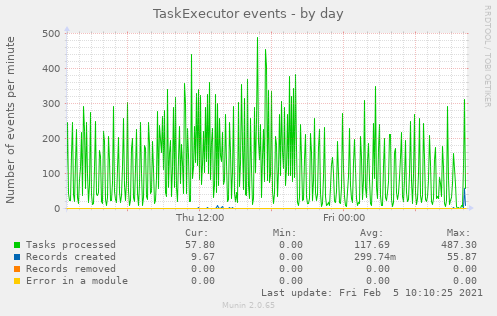
Example Munin plugins are included for easy logging and visualization (they must be modified for a specific case, a separate plugin should be used for each event group).
Example output:
Notes
Written mainly for NERD (and another internal project), but can be used in any Python system distributed to multiple processes.
If you want to use it and need more info, drop me a message (bartos <at> cesnet.cz).
If there are more users, I'll write a more complete documentation.
1 maintainer

Metadata
1 maintainer
Release files for event-count-logger 1.1.3
For a detailed explanation of source distributions (sdists) and built distributions (wheels), please see the package formats documentation.
Source distribution (sdist)
| File | Size | Uploaded | |
|---|---|---|---|
| event_count_logger-1.1.3.tar.gz | 13.6 kB | Details |
Built distribution (wheel)
| File | Interpreter | ABI | Platform | Reset |
|---|---|---|---|---|
| event_count_logger-1.1.3-py3-none-any.whl | Python 3 | none | any | Details |
Total release size: 28.9 kB
Release files / event_count_logger-1.1.3.tar.gz
| Download URL | event_count_logger-1.1.3.tar.gz |
|---|---|
| Size | 13.6 kB |
| Tags | Source |
|
SHA-256 checksum How to use checksums |
11c910ec56fbb3a4da3315e104efca752624de08091af3934bba20958d639683
|
|
BLAKE2b-256 checksum How to use checksums |
831d458b1d4e7087ab859effc5a70abba12be2c87d629c3ce1e2eb2c187e454e
|
| Upload date | |
|
Uploaded using Trusted Publishing? What is trusted publishing? |
No |
| Uploaded via |
twine/6.2.0 CPython/3.9.25
|
Release files / event_count_logger-1.1.3-py3-none-any.whl
| Download URL | event_count_logger-1.1.3-py3-none-any.whl |
|---|---|
| Size | 15.3 kB |
| Tags | Python 3 |
|
SHA-256 checksum How to use checksums |
777de5df7a4fb006ff102d642b2d6f69994bf589f8d0172745f63742c4a7c2a4
|
|
BLAKE2b-256 checksum How to use checksums |
9e343e703430f5470cd7dcef7231ac719efa41536b1b7ca752c9cc58b7f76222
|
| Upload date | |
|
Uploaded using Trusted Publishing? What is trusted publishing? |
No |
| Uploaded via |
twine/6.2.0 CPython/3.9.25
|














