
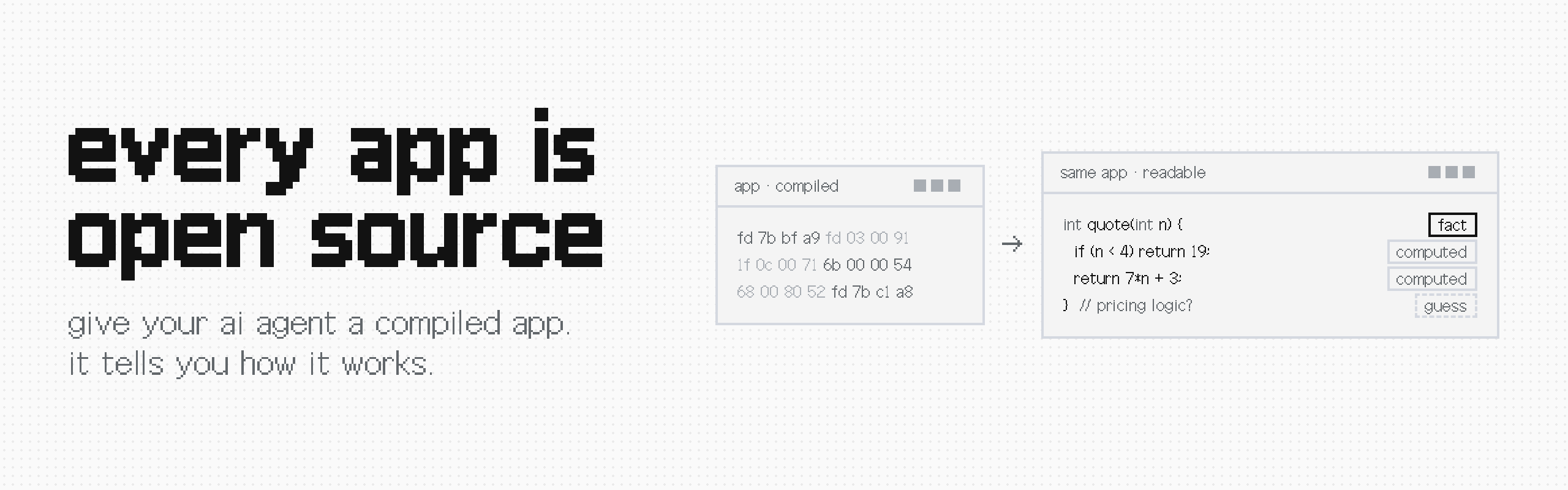




Every App Is Open Source
Give your AI agent a compiled program, and it works out how it's built. Ghidra does the decompiling. This is the agent's side of it: a small set of MCP tools, short answers by default, and evidence you can trace back to the binary.
Benchmarked against REA and GhidraMCP on real programs: same answers, for less cost and less time. Every run, number and limitation is in BENCHMARKS.md.
The name is a provocation, not a license. Seeing how an app works doesn't give you the right to copy it. Read the disclaimer.
Install
You need an Apple Silicon Mac, uv and Apple's Command Line Tools (xcode-select --install).
uvx --python 3.13 --from every-app-is-open-source eaos setup
That downloads checksum-pinned Java and Ghidra and builds Ghidra's Apple Silicon decompiler, which the official download doesn't include. Everything goes into ~/Library/Application Support/Every App Is Open Source/. It doesn't touch your shell profile, your system Java or your agent's settings. The exact versions, download sizes, troubleshooting and uninstall steps are in SETUP.md.
Windows, Linux and Intel Macs aren't supported yet.
Connect your agent
Point it at one program:
uvx --python 3.13 --from every-app-is-open-source eaos mcp /absolute/path/to/program
Setup for Claude Code, Codex and any other MCP client is in CLIENTS.md. You can also call a single tool from the terminal:
uvx --python 3.13 --from every-app-is-open-source eaos call /absolute/path/to/program open_program
To analyze a Mac app, copy its executable out of the app bundle first. For big programs, let the first analysis finish in the terminal before you connect your agent.
Try it on something small
The repo includes a tiny C program with a function called quote. Compile it, connect your agent, and ask:
What does quote(6) return? Explain both branches and show the function address and evidence.
The answer is 45: below 4 it returns 19, otherwise 7*n + 3. The step-by-step version walks you through it, and there's a full transcript of a real agent session if you want to see every tool call first.
The tools
I counted every tool call agents made across 24 earlier test runs and built only what they actually used.
| Tool | What it does |
|---|---|
open_program |
What the program is: architecture, memory layout, analysis status |
search |
Find text inside the program and where it's used, or find functions |
inspect |
Decompiled code, raw instructions, callers and callees |
read_memory |
Read the actual bytes at an address |
calculate |
Safe arithmetic and byte decoding, so the agent doesn't do math in its head |
decode_swift_string |
Recover text hidden inside Swift code on Apple platforms |
read_evidence |
Pull up the full saved evidence behind any reply, hash-checked |
The exact inputs, outputs and limits of each one are in the tool contract.
Never "exact" for a guess
Every answer says what it is:
- fact: read straight from the binary
- computed: worked out from it, like decompiled code or a decoded string
- guess: an interpretation with nothing solid behind it
Decompiled code is computed, not the original source. When a tool fails, it says so.
I care about this because of what I found in REA: a Map lookup labelled as a network endpoint and a local class labelled as SQLite storage, both marked "observed, exact". Both are fixed in REA now.
Analyze once, reuse it
Ghidra's analysis is slow, so each program gets its own eaos-analysis/<sha256>/ folder right next to it, with the analyzed project and every piece of evidence. Opening the same program again reuses all of it.
Each session works on a read-only copy of the exact bytes it hashed, so changing the original file doesn't affect a session that's already open. If a cached project doesn't match the program's hash, it stops instead of guessing, and it never deletes old evidence.
One Ghidra quirk: it won't create projects inside a folder whose name starts with a dot, like .cache. Keep the program you're analyzing out of those.
Benchmarks
I test it against REA and GhidraMCP whenever I point it at something new. The results live in BENCHMARKS.md, one row per target, each linked to every run and answer.
The rules stay the same every time:
- Same model, fresh sessions, three runs per tool.
- Questions and answer key frozen before the first run. Where a model might know the answers by heart, I secretly change them and rebuild the program first.
- Same head start. Every tool begins with the program already analyzed, outside the timer.
- REA runs the way people actually install it, with its bundled skill and its full tool catalog.
- Everything is kept, including rounds I lost.
Want to check my work? Run your own.
What's next
Right now it handles compiled programs. Next up are JavaScript and Electron apps, then Android, .NET, and watching apps while they run. Each one gets its own benchmark before I claim anything.
Security
The tools only expose the program you selected and its evidence. There's no general file-reading or shell tool. The Python and Java processes aren't sandboxed by the OS, though: they run with your user's permissions, and text recovered from a binary is untrusted. Read the security model before you analyze anything you don't trust.
Found a vulnerability? Report it privately, not in a public issue.
Development
uv build
PYTHONPATH=src uv run --no-project --python 3.13 python -m unittest discover -s tests -v
python3 scripts/check_distribution.py dist
To work from a checkout instead of PyPI, ./install.sh sets up everything locally, then ./eaos mcp /absolute/path/to/program starts the server.
Contributing
This is my project, and I build it myself. Bug reports and ideas are very welcome through issues. I don't accept outside code. If you want to take it somewhere else, fork it; that's what the license is for. More in CONTRIBUTING.md.
License and credits
Apache-2.0. If you build on it, keep the NOTICE file. What's changed in each release is in the changelog.
Ghidra and PyGhidra do the heavy lifting; they're the work of their own contributors. The comparison baseline is LaurieWired's GhidraMCP. The programs I benchmark on, and their licenses, are credited in BENCHMARKS.md.
Made by thomasisalwayslate. I make apps, games and small tools, usually something I want to use myself. More on my site, including the write-ups behind the benchmarks.
If this saved you some digging, a ⭐ helps other people find it.
1 maintainer

Metadata
1 maintainer
Release files for every-app-is-open-source 0.1.3
For a detailed explanation of source distributions (sdists) and built distributions (wheels), please see the package formats documentation.
Source distribution (sdist)
| File | Size | Uploaded | Provenance | |
|---|---|---|---|---|
| every_app_is_open_source-0.1.3.tar.gz | 48.1 kB | Without provenance | Details |
Built distribution (wheel)
| File | Interpreter | ABI | Platform | Reset |
|---|---|---|---|---|
| every_app_is_open_source-0.1.3-py3-none-any.whl | Python 3 | none | any | Details |
Total release size: 78.1 kB
Release files / every_app_is_open_source-0.1.3.tar.gz
| Download URL | every_app_is_open_source-0.1.3.tar.gz |
|---|---|
| Size | 48.1 kB |
| Tags | Source |
|
SHA-256 checksum How to use checksums |
680f9e022d43e47ddbba30615fca1643456dc5b8a28112fbe74080dd9cdae7c7
|
|
BLAKE2b-256 checksum How to use checksums |
eb94c9b5c39ebfce8e18fa7c44830c99c4d46eca9629853a46c08ab40e79e84c
|
| Upload date | |
|
Uploaded using Trusted Publishing? What is trusted publishing? |
Yes |
| Uploaded via |
uv/0.11.8 {"installer":{"name":"uv","version":"0.11.8","subcommand":["publish"]},"python":null,"implementation":{"name":null,"version":null},"distro":{"name":"Ubuntu","version":"24.04","id":"noble","libc":null},"system":{"name":null,"release":null},"cpu":null,"openssl_version":null,"setuptools_version":null,"rustc_version":null,"ci":true}
|
Release files / every_app_is_open_source-0.1.3-py3-none-any.whl
| Download URL | every_app_is_open_source-0.1.3-py3-none-any.whl |
|---|---|
| Size | 29.9 kB |
| Tags | Python 3 |
|
SHA-256 checksum How to use checksums |
8e8c34ccaf1f08be14c5b5924cfaa2f45b757d75de36cec192022139e0ca45fa
|
|
BLAKE2b-256 checksum How to use checksums |
5344d315602fb960a93f7046c9993c848078c652d50e8eb6f04f5a6f3d972ecf
|
| Upload date | |
|
Uploaded using Trusted Publishing? What is trusted publishing? |
Yes |
| Uploaded via |
uv/0.11.8 {"installer":{"name":"uv","version":"0.11.8","subcommand":["publish"]},"python":null,"implementation":{"name":null,"version":null},"distro":{"name":"Ubuntu","version":"24.04","id":"noble","libc":null},"system":{"name":null,"release":null},"cpu":null,"openssl_version":null,"setuptools_version":null,"rustc_version":null,"ci":true}
|
Security for every-app-is-open-source 0.1.3
Provenance
Provenance describes where a file came from. On PyPI, provenance is shared via attestations, which provide a verifiable record of the build or publishing details. View details, limitations and caveats.
No provenance found
None of the files in this release were uploaded with provenance metadata.
A note on package security
PyPI is a repository for distributing packages, not a service for auditing them. While third-party security researchers and our staff do their best to detect and remove malicious packages, PyPI cannot guarantee the quality, security or suitability of any given package.














