
Python package to handle EWC resources.

Project description

ewccli
European Weather Cloud Command Line Interface
View Usage Demo
·
Report Bugs
·
Request Features
·
Get Support
Table of Contents
- Introduction
- Prerequisites
- Installing
- Getting started
- Login to prepare the environment
- List Items in the catalog
- Deploy Items from the catalog
- Test Items unreleased or from private sources
- Deploy a custom Item
- SW Bill of Materials
- Changelog
- Contributing
- Development
- Code Styling
- Code Unittesting
- Coverage Reporting
- Documenting
- Copyright and License
- Authors
Introduction
The ewccli is the European Weather Cloud (EWC) Command Line Interface (CLI). This tool is developed to support EWC users on the use of the EWC services.
Prerequisites
- You will need a python environment to run the library implementation of this code. Python version 3.11 or higher.
- git installed on your operating system. (usually is available to most OS nowadays)
Openstack inputs
You can use the following link to obtain:
- Applications Credentials (ID and secret)
Installing
We recommend installing ewccli inside a virtual environment to avoid dependency conflicts with system packages.
Installing with PIP from PyPI
The EWC CLI Python package is available through PyPI:
pip install ewccli
Installing from source
- Clone this repository and move into it
git clone THIS_REPO && cd ewccli
- Create virtualenv with minimum python version > 3.10
python3 -m venv ewcclienv
- Activate the virtual environment
source ./ewcclienv/bin/activate
- Upgrade pip
pip install --upgrade pip
- Install the package
pip install -e .
Installing in a container
If Docker is your preferred containerization tool, you can replace
podmanwithdockerin the commands below.
You may also run in an completely isolated environment using containerization. After cloning the repository and cd into it.
- Clone this repository and move into it
git clone THIS_REPO && cd ewccli
- Create a wheel package (
./dist/ewccli-<version>-py3-none-any.whl)
pip install -q build
python3 -m build
- Build an image including the package previously created
podman build --no-cache -t ewccli -f ./Containerfile .
- Start a container with an interactive shell
podman run -it --rm --workdir /home/ewccli --entrypoint /bin/bash ewccli
Getting started
Then run ewc to verify everything works:

If you get a WARNING like WARNING: The script ewc is installed in '~/.local/bin' which is not on PATH. Add the following to your profile configuration file:
echo 'export PATH="$HOME/.local/bin:$PATH"' >> ~/.profile
Login to prepare the environment
ewc login
IMPORTANT:
- EWC CLI uses the following order of importance:
- env variables
- cli config
- any other config (e.g. Openstack cloud.yaml or Kubernetes
kubeconfigfile)
All your profiles are saved under ~/.ewccli/profiles
You can manually add profiles in the same file and the ewccli can use them already.
Info required for a profile:
[my-profile]
federee = EUMETSAT or ECMWF
tenant_name = eumetsat-ewc-communityhub
application_credential_id =
application_credential_secret =
ssh_public_key_path =
ssh_private_key_path =
List Items in the catalog
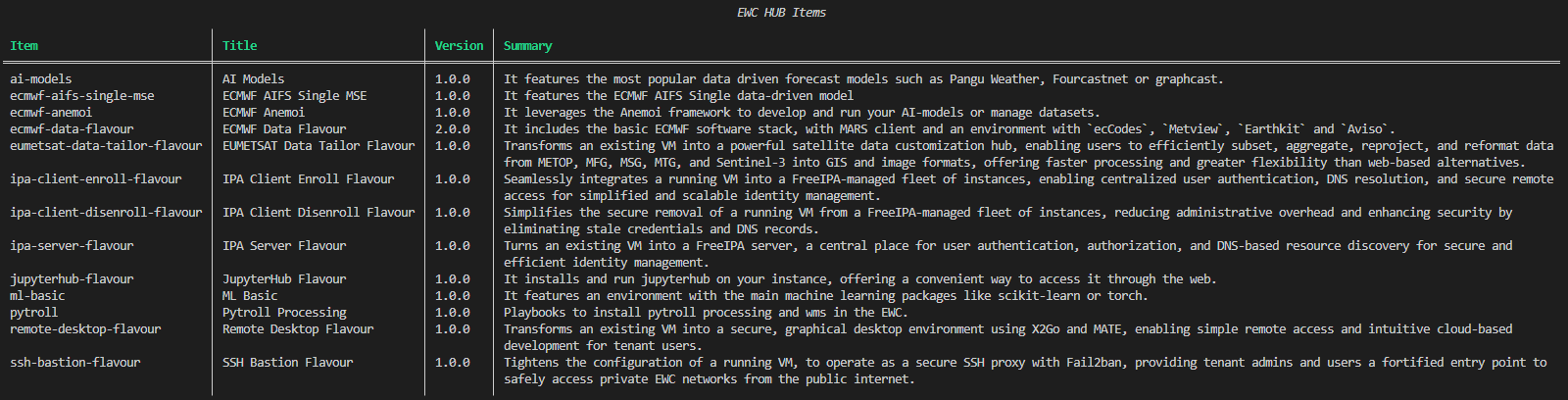
The following command shows the current available Items. Official Items are listed here.
ewc hub list
Deploy Items from the catalog
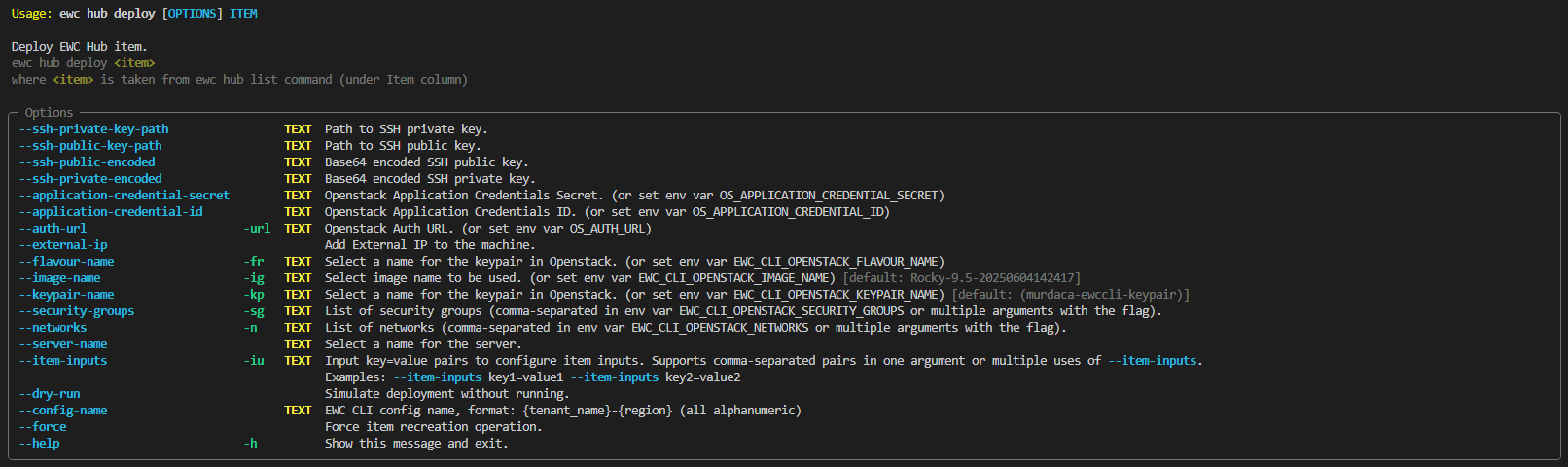
ewc hub deploy ITEM
where ITEM is taken from ewc hub list command under Item column.
Test Items unreleased or from private sources
If you would like to test the deployment of:
-
an Item with private source code (local or remote)
OR
-
a new Item, not yet published in the EWC Community Hub
OR
-
a new version of an Item, not yet updated in the EWC Community Hub
you can take advantage of the --path-to-catalog to point the EWCCLI to the correct source location, and deploy the Item to your target tenant of choice.
Preparing a test
Create a local catalogue file, named ./custom_catalog.yaml, with the complete metadata for your Item:
⚠️ Always verify the latest Items metadata schema directly from the EWC Hub Catalogue documentation.
apiVersion: communityhub.europeanweather.cloud/v1alpha1
kind: CommunityHubCatalog
spec:
  items:
    my-test-item:
      name: "my-test-item"
      version: "0.0.1"
      description: |
        My first Item in EWC Community Hub

      ewccli:
        pathToRequirementsFile: path_to_your_requirements_file
        pathToMainFile: path_to_your_main_ansible_playbook_file
        publicIP: true
        inputs:
          - name: myoptionalinput
            description: "myoptionalinput"
            type: str
            default: Add default key if you want this input to be optional. If this key is not set, the ewccli will expect this value to be provided by the user (mandatory input)
          - name: mymandatoryinput
            description: "mymandatoryinput: cli will complain if this is not provided as --item-inputs"
            type: str
      home: https://github.com/your-repo
      sources:
        - https://github.com/your-repo.git OR /home/murdaca/custom-items/new-item
      maintainers:
        - name: your name or your org
          email: youremail
          url: https://github.com/your-repo/issues
      icon: https://raw.githubusercontent.com/ewcloud/ewc-community-hub/refs/heads/main/logos/EWCLogo.png
      annotations:
        technology: "Ansible Playbook"
        category: "Test Item"
        supportLevel: "Community"
        licenseType: "Apache License 2.0"
        others: "Deployable,EWCCLI-compatible"
      displayName: My First EWC Community hub Item
      summary: My test Item
      license: https://github.com/your-repo/blob/main/LICENSE
      published: true
where
sourcescan be (only the first element in the list is considered):- Public repo URL (e.g. https://github.com/your-repo.git) if your repository is public already
- Absolute path to a directory with the Item (e.g.
/home/murdaca/custom-items/new-item). The path needs to point to a directory that needs to exists an not be empty. (WARNING: No local path are accepted!)
pathToMainFileis the relattive path to your directory or repositorypathToRequirementsFileis the relattive path to your directory or repositorypublicIPis a flag used to enable deployment ofewccli.inputsis the list of inputs you want the user to be able to provide, they can be mandatory or optional, respecively with default key not set or set.
Running a test
Once metadata is correct and complete, execute list, show or deploy commands as needed:
ewc hub --path-to-catalog ./custom_catalog.yaml list|show|deploy
ewc hub --path-to-catalog ./custom_catalog.yaml show
ewc hub --path-to-catalog ./custom_catalog.yaml deploy
Backends
This section described the backends used and which commands are backed by those backends.
Openstack
Used by infra and hub subcommands.
Ansible
Used by hub subcommand.
Terraform
Used by hub subcommand. (COMING SOON)
Kubernetes
Used by dns, s3, k8s subcommmands. (COMING SOON)
SW Bill of Materials (SBoM)
Dependencies
The following dependencies are not included in the package but they are required and will be downloaded at build or compilation time:
| Dependency | Version | License | Home URL |
|---|---|---|---|
| requests | 2.32.5 | Apache Software License (Apache-2.0) | https://requests.readthedocs.io/en/latest |
| click | 8.1.8 | BSD-3-Clause | https://github.com/pallets/click |
| rich | 14.1.0 | MIT License | https://github.com/Textualize/rich |
| rich-click | 1.8.9 | MIT License | https://pypi.org/project/rich-click |
| prompt_toolkit | 3.0.51 | BSD-3-Clause License | https://python-prompt-toolkit.readthedocs.io/en/stable |
| pyyaml | 6.0.2 | MIT License | https://pyyaml.org |
| cryptography | 45.0.6 | Apache-2.0 OR BSD-3-Clause | https://github.com/pyca/cryptography |
| python-openstackclient | 8.2.0 | Apache Software License (Apache-2.0) | https://docs.openstack.org/python-openstackclient/latest |
| ansible | 11.10.0 | GNU General Public License v3 or later (GPLv3+) (GPL-3.0-or-later) | https://www.redhat.com/en/ansible-collaborative |
| ansible-runner | 2.4.1 | Apache Software License (Apache Software License, Version 2.0) | https://ansible.readthedocs.io/projects/runner/en/latest |
| kubernetes | 33.1.0 | Apache Software License (Apache License Version 2.0) | https://github.com/kubernetes-client/python |
| pydantic | 2.12.5 | MIT License | https://github.com/pydantic/pydantic |
Build/Edit/Test Dependencies
The following dependencies are only required for building/editing/testing the software:
| Dependency | Version | License | Home URL |
|---|---|---|---|
| pytest | 8.4.1 | MIT License (MIT) | https://docs.pytest.org/en/latest |
| pytest-html | 4.1.1 | MIT License (MIT) | https://github.com/pytest-dev/pytest-html |
| pytest-mock | 3.14.1 | MIT License (MIT) | https://github.com/pytest-dev/pytest-mock |
| coverage | 7.10.5 | Apache Software License (Apache License Version 2.0) | https://github.com/nedbat/coveragepy |
| pre-commit | 4.3.0 | MIT License (MIT) | https://github.com/pre-commit/pre-commit |
| sphinx | 8.1.3 | BSD-2-Clause License | https://www.sphinx-doc.org/en/master |
| sphinx-click | 6.0.0 | MIT License (MIT) | https://github.com/click-contrib/sphinx-click |
| sphinx-rtd-theme | 3.0.2 | MIT License (MIT) | https://sphinx-rtd-theme.readthedocs.io/en/stable |
| pydeps | 3.0.1 | BSD-2-Clause License | https://github.com/thebjorn/pydeps |
Changelog
All notable changes (i.e. fixes, features and breaking changes) are documented in the CHANGELOG.md.
Contributing
Thanks for taking the time to join our community and start contributing!
Please make sure to:
-
Familiarize yourself with our Code of Conduct before contributing.
-
See CONTRIBUTING.md for instructions on how to request or submit changes.
Development
- Fork this repository and move into it
git clone https://github.com/ewcloud/ewccli.git && cd ewccli
- Install the package for testing
pip install --user -e .[test]
-
Modify the local code and test changes.
-
Push code to your fork and open a pull request.
Code Styling
Execute all linting tests by running:
pre-commit run --all-files
This will provide you with hints about:
- Basic format of the files (i.e. spacing, line breaking, etc.) using
black - PEP standars infringement flagged by
flake8 - Static typing and type hinting recommendations given by
mypy
Resolving Style Issues
To enforce basic formating issues , run:
black ./
Currently, there is no automated way of addressing errors raised by flake8 and mypy.
To resolve those, check the logs from the pre-commit execution, understand the type of error and adjust the code accordingly.
Code Unittesting
Execute all tests by running:
pytest
Coverage Reporting
Generate unittest coverage reports in standard formats by executing:
coverage run --module pytest --no-header --verbose -ra --junitxml=coverage.xml --html=coverage.html
Documenting
Generate documentation from source code docstrings:
sphinx-build -b html docs/source/ Documentation/
Copyright and License
Copyright © EUMETSAT, ECMWF 2026
The provided code and instructions are licensed under GPLv3+. They are intended to automate the setup of an environment that includes third-party software components. The usage and distribution terms of the resulting environment are subject to the individual licenses of those third-party libraries.
Users are responsible for reviewing and complying with the licenses of all third-party components included in the environment.
Contact EUMETSAT for details on the usage and distribution terms.
Authors
- Francesco Murdaca - Initial work and maintainer - EUMETSAT


Download files
Download the file for your platform. If you're not sure which to choose, learn more about installing packages.
Source Distribution
Built Distribution
Filter files by name, interpreter, ABI, and platform.
If you're not sure about the file name format, learn more about wheel file names.
Copy a direct link to the current filters
File details
Details for the file ewccli-0.3.2.tar.gz.
File metadata
- Download URL: ewccli-0.3.2.tar.gz
- Upload date:
- Size: 2.4 MB
- Tags: Source
- Uploaded using Trusted Publishing? No
- Uploaded via: twine/6.2.0 CPython/3.12.11
File hashes
| Algorithm | Hash digest | |
|---|---|---|
| SHA256 |
94e53c1af6a66340cc1bd99231c2d259bf93d7fbf552cda88e200db9e7c1b548
|
|
| MD5 |
3044d355e79cefe702e8e10db0864f6b
|
|
| BLAKE2b-256 |
96c9eca4c0abf700310ca6e46b33973fbfcda91e340cd1209f8c876c3297dba3
|
File details
Details for the file ewccli-0.3.2-py3-none-any.whl.
File metadata
- Download URL: ewccli-0.3.2-py3-none-any.whl
- Upload date:
- Size: 125.8 kB
- Tags: Python 3
- Uploaded using Trusted Publishing? No
- Uploaded via: twine/6.2.0 CPython/3.12.11
File hashes
| Algorithm | Hash digest | |
|---|---|---|
| SHA256 |
d5d02141dedfb9b06c3eea50ae9479fd0433d36357bbbfa1cb1bbc4444be14b4
|
|
| MD5 |
f5efeb93e23c1f15db7b51404e8d15ba
|
|
| BLAKE2b-256 |
f5086692c1f69cc8def1e11c4f2ca5b751984723f43b92615379359fbb749b43
|






