
Python package to handle EWC resources.

Project description
ewccli
ewccli is the European Weather Cloud (EWC) Command Line Interface (CLI). This tool is developed to support EWC users on the use of the EWC services.
For more info about this SW, you may contact the European Weather Cloud <support@europeanweather.cloud>.
Copyright and License
Copyright © EUMETSAT, ECMWF 2025.
The provided code and instructions are licensed under GPLv3+. They are intended to automate the setup of an environment that includes third-party software components. The usage and distribution terms of the resulting environment are subject to the individual licenses of those third-party libraries.
Users are responsible for reviewing and complying with the licenses of all third-party components included in the environment.
Contact EUMETSAT for details on the usage and distribution terms.
Authors
- Francesco Murdaca - Initial work - EUMETSAT
Prerequisites
- You will need a python environment to run the library implementation of this code. Python version 3.11 or higher.
- git installed on your operating system. (usually is available to most OS nowadays)
Openstack inputs
You can use the following link to obtain:
- Applications Credentials (ID and secret)
Installing
We recommend installing ewccli inside a virtual environment to avoid dependency conflicts with system packages.
Installing with PIP from PyPI
The EWC CLI Python package is available through PyPI:
pip install ewccli
Installing from source
- Fork this repository and move into it
git clone THIS_REPO && cd ewccli
- Create virtualenv with minimum python version > 3.10
python3 -m venv ewcclienv
- Activate the virtual environment
source ./ewcclienv/bin/activate
- Upgrade pip
pip install --upgrade pip
- Install the package
pip install -e .
Getting started
Then run ewc to verify everything works:

If you get a WARNING like WARNING: The script ewc is installed in '~/.local/bin' which is not on PATH. Add the following to your profile configuration file:
echo 'export PATH="$HOME/.local/bin:$PATH"' >> ~/.profile
Login to prepare the environment
ewc login
IMPORTANT:
- EWC CLI uses the following order of importance:
- env variables
- cli config
- any other config (e.g. Openstack cloud.yaml or Kubernetes
kubeconfigfile)
List items
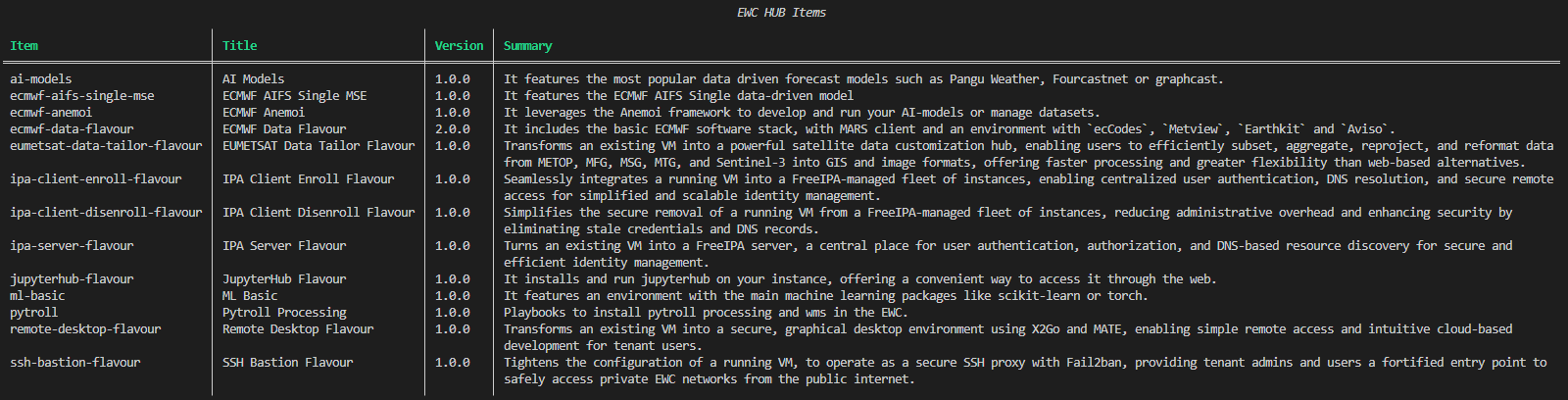
The following command shows the current available items. Official items are listed here.
ewc hub list
Deploy an item
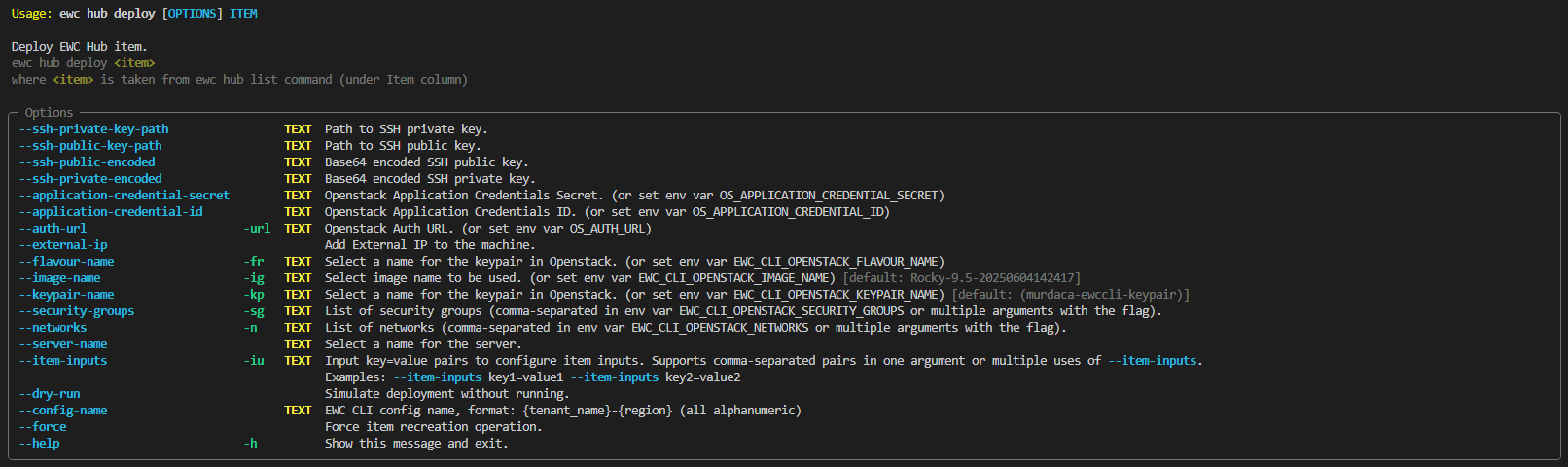
ewc hub deploy ITEM
where ITEM is taken from ewc hub list command under Item column.
Backends
This section described the backends used and which commands are backed by those backends.
Openstack
Used by infra and hub subcommands.
Ansible
Used by hub subcommand.
Terraform
Used by hub subcommand. (COMING SOON)
Kubernetes
Used by dns, s3, k8s subcommmands. (COMING SOON)
SW Bill of Materials (SBoM)
Dependencies
The following dependencies are not included in the package but they are required and will be downloaded at build or compilation time:
| Dependency | Version | License | Home URL |
|---|---|---|---|
| requests | 2.32.5 | Apache Software License (Apache-2.0) | https://requests.readthedocs.io/en/latest |
| click | 8.1.8 | BSD-3-Clause | https://github.com/pallets/click |
| rich | 14.1.0 | MIT License (MIT) | https://github.com/Textualize/rich |
| rich-click | 1.8.9 | MIT License (MIT License) | https://pypi.org/project/rich-click |
| prompt_toolkit | 3.0.51 | BSD-3-Clause License | https://python-prompt-toolkit.readthedocs.io/en/stable |
| pyyaml | 6.0.2 | MIT License (MIT) | https://pyyaml.org |
| cryptography | 45.0.6 | Apache-2.0 OR BSD-3-Clause | https://github.com/pyca/cryptography |
| python-openstackclient | 8.2.0 | Apache Software License (Apache-2.0) | https://docs.openstack.org/python-openstackclient/latest |
| ansible | 11.10.0 | GNU General Public License v3 or later (GPLv3+) (GPL-3.0-or-later) | https://www.redhat.com/en/ansible-collaborative |
| ansible-runner | 2.4.1 | Apache Software License (Apache Software License, Version 2.0) | https://ansible.readthedocs.io/projects/runner/en/latest |
| kubernetes | 33.1.0 | Apache Software License (Apache License Version 2.0) | https://github.com/kubernetes-client/python |
Build/Edit/Test Dependencies
The following dependencies are only required for building/editing/testing the software:
| Dependency | Version | License | Home URL |
|---|---|---|---|
| pytest | 8.4.1 | MIT License (MIT) | https://docs.pytest.org/en/latest |
| pytest-html | 4.1.1 | MIT License (MIT) | https://github.com/pytest-dev/pytest-html |
| pytest-mock | 3.14.1 | MIT License (MIT) | https://github.com/pytest-dev/pytest-mock |
| coverage | 7.10.5 | Apache Software License (Apache License Version 2.0) | https://github.com/nedbat/coveragepy |
| pre-commit | 4.3.0 | MIT License (MIT) | https://github.com/pre-commit/pre-commit |
| sphinx | 8.1.3 | BSD-2-Clause License | https://www.sphinx-doc.org/en/master |
| sphinx-click | 6.0.0 | MIT License (MIT) | https://github.com/click-contrib/sphinx-click |
| sphinx-rtd-theme | 3.0.2 | MIT License (MIT) | https://sphinx-rtd-theme.readthedocs.io/en/stable |
| pydeps | 3.0.1 | BSD-2-Clause License | https://github.com/thebjorn/pydeps |
| pydantic | 2.11.7 | MIT License (MIT) | https://github.com/pydantic/pydantic |
Changelog
All notable changes (i.e. fixes, features and breaking changes) are documented in the CHANGELOG.md.
Contributing
Thanks for taking the time to join our community and start contributing!
Please make sure to:
-
Familiarize yourself with our Code of Conduct before contributing.
-
See CONTRIBUTING.md for instructions on how to request or submit changes.
Development
- Fork this repository and move into it
git clone https://repository.europeanweather.cloud/ewc-automation/ewccli.git && cd ewccli
- Install the package for testing
pip install --user -e .[test]
-
Modify the local code and test changes.
-
When you are happy, push code to your fork and open a MR (Gitlab) or PR (Github)
Generate docs
sphinx-build -b html docs/source/ Documentation/
Check coverage
coverage run -m pytest
Run tests
pytest
Test in a container
After cloning the repository and cd into it.
- Create the .dist/ repo
pip install -q build
python3 -m build
- Create a container if you need to test anything before.
podman build -t test-ewccli -f ./Containerfile .
or same command with docker if you use it.


Download files
Download the file for your platform. If you're not sure which to choose, learn more about installing packages.
Source Distribution
Built Distribution
Filter files by name, interpreter, ABI, and platform.
If you're not sure about the file name format, learn more about wheel file names.
Copy a direct link to the current filters
File details
Details for the file ewccli-0.2.0.tar.gz.
File metadata
- Download URL: ewccli-0.2.0.tar.gz
- Upload date:
- Size: 1.2 MB
- Tags: Source
- Uploaded using Trusted Publishing? No
- Uploaded via: twine/6.2.0 CPython/3.12.11
File hashes
| Algorithm | Hash digest | |
|---|---|---|
| SHA256 |
4c6ead708232123c8840f06a00852cf180ac35273ba3399ce4e38abf5e8da11d
|
|
| MD5 |
1c07073dd4f3bccda8fca269673cdc1c
|
|
| BLAKE2b-256 |
cad7e065469cb1f783e620d3f4efdf7a3499368b2580c698e9eb235bc8f84e77
|
File details
Details for the file ewccli-0.2.0-py3-none-any.whl.
File metadata
- Download URL: ewccli-0.2.0-py3-none-any.whl
- Upload date:
- Size: 106.2 kB
- Tags: Python 3
- Uploaded using Trusted Publishing? No
- Uploaded via: twine/6.2.0 CPython/3.12.11
File hashes
| Algorithm | Hash digest | |
|---|---|---|
| SHA256 |
e22aabb3bffcc961a1edf97014644d0a178bdd6ccf5ec9ea5d56be0459478191
|
|
| MD5 |
be161ddb9d02efc9cf27c070f4f2e33b
|
|
| BLAKE2b-256 |
c95bd0694f48d54f9f70c52216b903570854a38cef05d1068f15159241218c12
|






