
dokr - Make your docker and ecs tasks easy
A Helper pip package for docker and ECS tasks. This pip package helps you automate your CI/CD pipeline. If your using docker and Amazon ECS for deployments, this tool can be really helpful. This package uses aws cli and ecs cli. Mak
Assumptions:
- Assuming python is installed on your system.
- Docker is installed on your system
- aws-cli is installed and credentials are configured on your system.
- ecs-cli is installed on system [For Log Command only]
Install dokr on your system using :
pip install dokr
ECS Options
- login into ecs directly (Assuming awscli is installed and configured)
dokr ecs login

- Deploy an image on a cluster
dokr ecs deploy --cluster cluster_name --service service_name --tag image_version

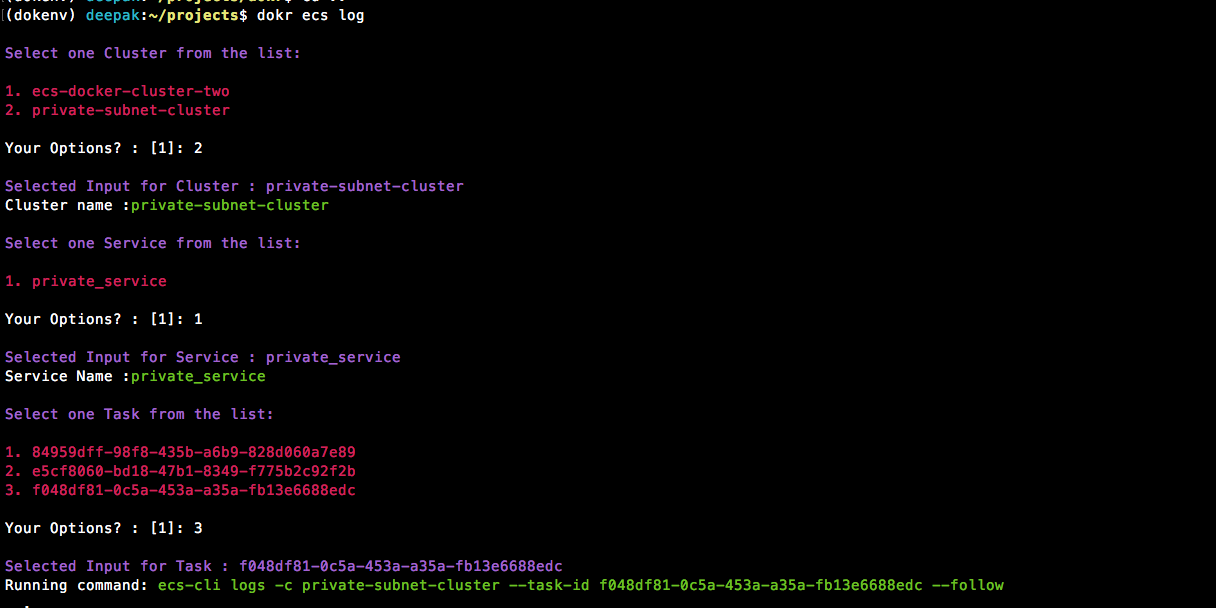
- Check ecs running logs of a Task - this command will ask for cluster/service and task defination.
Note: Install ecs-cli before running this command from here: https://docs.aws.amazon.com/AmazonECS/latest/developerguide/ECS_CLI_installation.html
dokr ecs log
Docker Helper Commands
- Prune whole system - Cleans unused images, containers and volumes.
dokr dock --clean-all

- Delete all the images matching the pattern
dokr dock --clean pattern_xxx

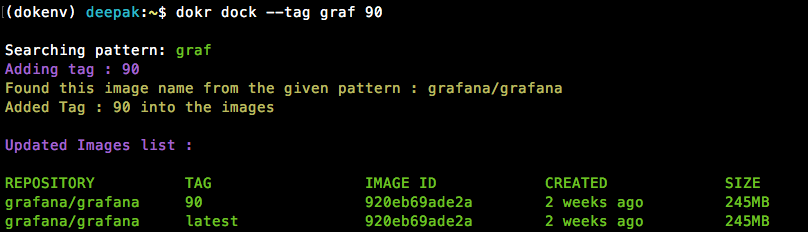
- Add a tag to the existing image matching the provided pattern (for latest tag only)
dokr dock --tag pattern_xxx tag_name
- Push all images on a system matching a pattern
This will push all images matching pattern 'pat'
dokr dock --push pat

AWS Commands
- Check current public ip of a machine on AWS
dokr aws --ip jenkins

Run Apps (subsitute to docker run command and DockerCompose)
- Configure your default values(like docker registry, port mapping, volume mapping etc. that will be same for all apps):

- Add an new app for deployment:

- Run all configured apps:

- Run a particular app from ECR tags:

- Run a particular app by providing a tag:

Development:
- Clean ununsed:
rm -rf build/ dist/ *egg* **.pyc __pycache__ - Build package:
python setup.py bdist_wheel - deploy package:
python -m twine upload dist/*
follow this link for more details https://dzone.com/articles/executable-package-pip-install
1 maintainer

Metadata
1 maintainer
Release files for example1111111-pkg-bravo1996 0.0.1
For a detailed explanation of source distributions (sdists) and built distributions (wheels), please see the package formats documentation.
Source distribution (sdist)
| File | Size | Uploaded | Provenance | Actions |
|---|---|---|---|---|
| example1111111-pkg-bravo1996-0.0.1.tar.gz | 2.6 kB | Without provenance | Details for example1111111-pkg-bravo1996-0.0.1.tar.gz |
Built distribution (wheel)
| File | Interpreter | ABI | Platform | Actions Reset |
|---|---|---|---|---|
| example1111111_pkg_bravo1996-0.0.1-py3-none-any.whl | Python 3 | none | any | Details for example1111111_pkg_bravo1996-0.0.1-py3-none-any.whl |
Total release size: 5.1 kB
Release files / example1111111-pkg-bravo1996-0.0.1.tar.gz
| Download URL | example1111111-pkg-bravo1996-0.0.1.tar.gz |
|---|---|
| Size | 2.6 kB |
| Tags | Source |
|
SHA-256 checksum How to use checksums |
2e057c3f96fbd893bd5d5b15d3a9f3051f811499f36b86db4216e442642ec2d4
|
|
BLAKE2b-256 checksum How to use checksums |
3ad35e6714025e8d0f70223ad413d5f12c4a6ecb7711e076dc9e181e3bed2448
|
| Upload date | |
|
Uploaded using Trusted Publishing? What is trusted publishing? |
No |
| Uploaded via |
twine/3.4.1 importlib_metadata/4.5.0 pkginfo/1.7.0 requests/2.25.1 requests-toolbelt/0.9.1 tqdm/4.46.0 CPython/3.7.7
|
Release files / example1111111_pkg_bravo1996-0.0.1-py3-none-any.whl
| Download URL | example1111111_pkg_bravo1996-0.0.1-py3-none-any.whl |
|---|---|
| Size | 2.5 kB |
| Tags | Python 3 |
|
SHA-256 checksum How to use checksums |
dfdfc4634276c1e7f30d301d0d59daf1215ce9de36de0a74f371c0cbd9b4b349
|
|
BLAKE2b-256 checksum How to use checksums |
4ee8d71d4e1af6d874196eb106e53767ffee6dcf2ddfc2792e9c23df3e8aaac6
|
| Upload date | |
|
Uploaded using Trusted Publishing? What is trusted publishing? |
No |
| Uploaded via |
twine/3.4.1 importlib_metadata/4.5.0 pkginfo/1.7.0 requests/2.25.1 requests-toolbelt/0.9.1 tqdm/4.46.0 CPython/3.7.7
|
Security for example1111111-pkg-bravo1996 0.0.1
Provenance
Provenance describes where a file came from. On PyPI, provenance is shared via attestations, which provide a verifiable record of the build or publishing details. View details, limitations and caveats.
No provenance found
None of the files in this release were uploaded with provenance metadata.
A note on package security
PyPI is a repository for distributing packages, not a service for auditing them. While third-party security researchers and our staff do their best to detect and remove malicious packages, PyPI cannot guarantee the quality, security or suitability of any given package.
To learn more about protecting yourself from malicious actors, visit our package security documentation.













