
Unofficial MCP server for Excalidraw diagram management with canvas sync

Project description
Excalidraw MCP Server: AI-Powered Live Visual Diagramming



🙏 Acknowledgments This project is based on and extends the excellent work from yctimlin/mcp_excalidraw. Special thanks to the original contributors for creating the foundation that made this enhanced version possible.
A dual-language MCP (Model Context Protocol) server that combines Excalidraw's powerful drawing capabilities with AI integration, enabling AI agents like Claude to create and manipulate diagrams in real-time on a live canvas.
Features Python FastMCP server with TypeScript canvas server for optimal performance and maintainability.
🚀 What This System Does
- 🎨 Live Canvas: Real-time Excalidraw canvas accessible via web browser
- 🤖 AI Integration: MCP server allows AI agents (like Claude) to create visual diagrams
- ⚡ Real-time Sync: Elements created via MCP API appear instantly on the canvas
- 🔄 WebSocket Updates: Live synchronization across multiple connected clients
- 🏗️ Production Ready: Clean, minimal UI suitable for end users
🎥 Demo Video
See MCP Excalidraw in Action!
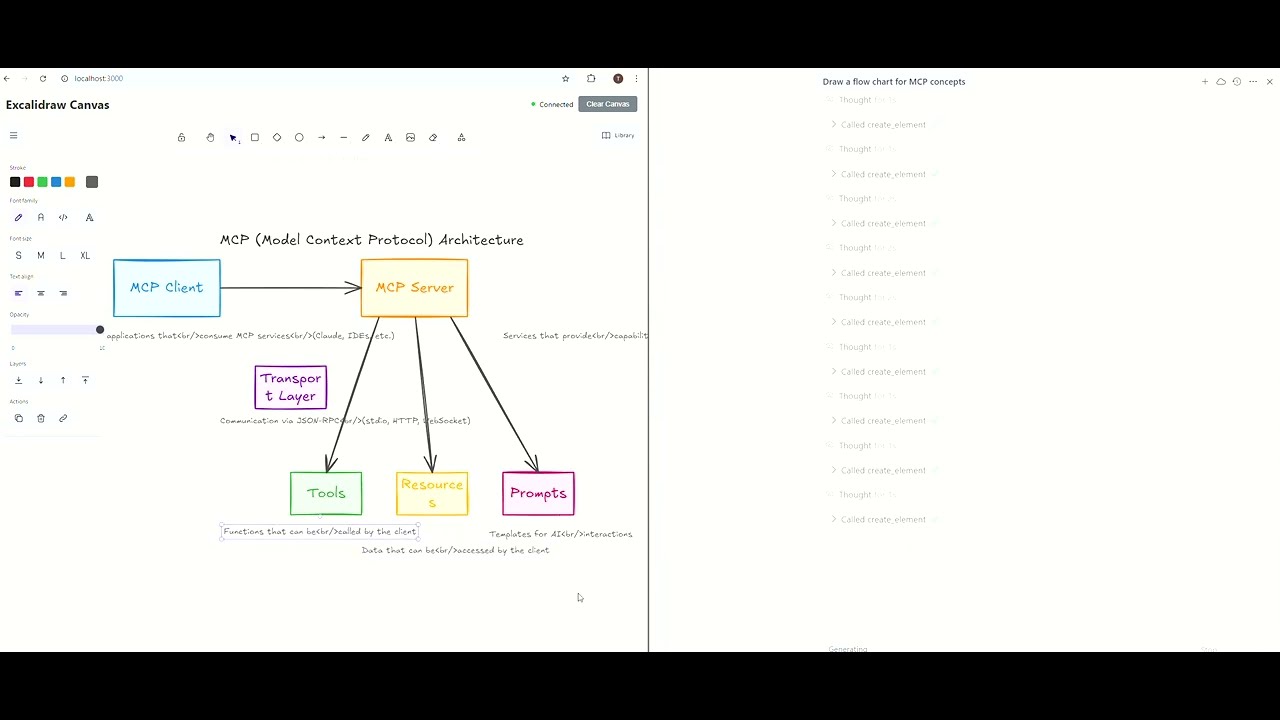
Watch how AI agents create and manipulate diagrams in real-time on the live canvas
🏛️ Architecture Overview
sequenceDiagram
    participant AI as AI Agent<br/>(Claude)
    participant MCP as MCP Server<br/>(Python FastMCP)
    participant Canvas as Canvas Server<br/>(Express.js)
    participant WS as WebSocket Server
    participant UI as React Frontend<br/>(Excalidraw)

    AI->>MCP: MCP Tool Call<br/>(create_element)
    activate MCP
    MCP->>MCP: Validate Request<br/>(Pydantic)
    MCP->>Canvas: HTTP POST<br/>/api/elements
    activate Canvas
    Canvas->>Canvas: Store Element<br/>(in-memory Map)
    Canvas->>WS: Broadcast Update
    WS->>UI: WebSocket Message<br/>(element_created)
    deactivate Canvas
    UI->>UI: Render in Excalidraw
    MCP-->>AI: Tool Response
    deactivate MCP

    Note over MCP,Canvas: Auto-management: Python server<br/>monitors and restarts canvas server
    Note over WS,UI: Real-time: All connected clients<br/>receive updates simultaneously
Hybrid Architecture Benefits:
- Python FastMCP: Handles MCP protocol, tool registration, and auto-manages canvas server
- TypeScript Canvas: Express.js API + WebSocket for real-time canvas synchronization
- Auto-Management: Python server monitors and restarts canvas server as needed
- Type Safety: Comprehensive TypeScript definitions ensure consistency across the stack
🌟 Key Features
Modern TypeScript Architecture
- Full TypeScript Migration: Complete type safety for backend and frontend
- Comprehensive Type Definitions: Excalidraw elements, API responses, WebSocket messages
- Strict Type Checking: Enhanced development experience and compile-time error detection
- Type-Safe React Components: TSX components with proper props typing
Real-time Canvas Integration
- Elements created via MCP appear instantly on the live canvas
- WebSocket-based real-time synchronization
- Multi-client support with live updates
Production-Ready Interface
- Clean, minimal UI with connection status
- Simple "Clear Canvas" functionality
- No development clutter or debug information
Comprehensive MCP API
- Element Creation: rectangles, ellipses, diamonds, arrows, text, lines
- Element Management: update, delete, query with filters
- Batch Operations: create multiple elements in one call
- Advanced Features: grouping, alignment, distribution, locking
Robust Architecture
- TypeScript-based Express.js backend with REST API + WebSocket
- React frontend with official Excalidraw package and TypeScript
- Dual-path element loading for reliability
- Auto-reconnection and error handling
📦 Installation & Setup
✅ Quick Start (Recommended)
1. Clone and Setup
git clone https://github.com/lesleslie/excalidraw-mcp.git
cd excalidraw-mcp

# Install Python dependencies
uv sync

# Install Node.js dependencies and build
npm install
npm run build
2. Start the System
# The Python MCP server auto-starts the canvas server
uv run python excalidraw_mcp/server.py

# Or manually start canvas server (optional)
npm run canvas
3. Access the Canvas
Open your browser and navigate to:
http://localhost:3031
📋 Development Setup
# Development mode (TypeScript watch + Vite dev server)
npm run dev

# Or production mode
npm run production
Development Workflow:
- Setup →
uv sync && npm install && npm run build - Development →
npm run dev(TypeScript watch + Vite dev server) - Testing →
pytest(Python) +npm test(TypeScript) - Quality Checks →
uv run ruff check+npm run type-check - Iterate → Make changes, tests auto-reload
- Commit → All quality checks pass
Development Modes:
| Mode | Command | Use Case |
|---|---|---|
| Dev | npm run dev |
Active development with hot-reload |
| Build | npm run build |
Compile TypeScript + React |
| Canvas | npm run canvas |
Start canvas server only |
| Production | npm run production |
Full build + start |
🔧 Available Scripts
| Script | Description |
|---|---|
npm start |
Build and start MCP server (dist/index.js) |
npm run canvas |
Build and start canvas server (dist/server.js) |
npm run canvas-bg |
Build and start canvas server in background |
npm run start-canvas |
Build and start canvas server |
npm run canvas-for-npx |
Special script for npx usage |
npm run start-all |
Start both servers together |
npm run build |
Build both frontend and TypeScript backend |
npm run build:frontend |
Build React frontend only |
npm run build:server |
Compile TypeScript backend to JavaScript |
npm run build:types |
Generate TypeScript declaration files only |
npm run dev |
Start TypeScript watch mode + Vite dev server |
npm run dev:server |
Start TypeScript in watch mode only |
npm run type-check |
Run TypeScript type checking without compilation |
npm run production |
Build + start in production mode |
npm test |
Run all tests |
npm run test:watch |
Run tests in watch mode |
npm run test:coverage |
Run tests with coverage report |
npm run test:unit |
Run unit tests only |
npm run test:integration |
Run integration tests only |
🎯 Usage Guide
For End Users
- Open the canvas at
http://localhost:3031 - Check connection status (should show "Connected")
- AI agents can now create diagrams that appear in real-time
- Use "Clear Canvas" to remove all elements
For AI Agents (via MCP)
The MCP server provides these tools for creating visual diagrams:
Basic Element Creation
// Create a rectangle
{
  "type": "rectangle",
  "x": 100,
  "y": 100,
  "width": 200,
  "height": 100,
  "backgroundColor": "#e3f2fd",
  "strokeColor": "#1976d2",
  "strokeWidth": 2
}
Create Text Elements
{
  "type": "text",
  "x": 150,
  "y": 125,
  "text": "Process Step",
  "fontSize": 16,
  "strokeColor": "#333333"
}
Create Arrows & Lines
{
  "type": "arrow",
  "x": 300,
  "y": 130,
  "width": 100,
  "height": 0,
  "strokeColor": "#666666",
  "strokeWidth": 2
}
Batch Creation for Complex Diagrams
{
  "elements": [
    {
      "type": "rectangle",
      "x": 100,
      "y": 100,
      "width": 120,
      "height": 60,
      "backgroundColor": "#fff3e0",
      "strokeColor": "#ff9800"
    },
    {
      "type": "text",
      "x": 130,
      "y": 125,
      "text": "Start",
      "fontSize": 16
    }
  ]
}
🔌 Integration with Claude Code
✅ Recommended: uvx Configuration
Add this configuration to your Claude Code .mcp.json:
{
  "mcpServers": {
    "excalidraw": {
      "command": "uvx",
      "args": ["excalidraw-mcp"],
      "env": {
        "EXPRESS_SERVER_URL": "http://localhost:3031",
        "ENABLE_CANVAS_SYNC": "true"
      }
    }
  }
}
Alternative: Local Development Configuration
For local development, use:
{
  "mcpServers": {
    "excalidraw": {
      "command": "uv",
      "args": ["run", "python", "excalidraw_mcp/server.py"],
      "cwd": "/absolute/path/to/excalidraw-mcp"
    }
  }
}
Important: Replace /absolute/path/to/excalidraw-mcp with the actual absolute path to your cloned repository.
🔧 Integration with Other Tools
Cursor IDE
Add to your .cursor/mcp.json:
{
  "mcpServers": {
    "excalidraw": {
      "command": "uvx",
      "args": ["excalidraw-mcp"],
      "env": {
        "EXPRESS_SERVER_URL": "http://localhost:3031"
      }
    }
  }
}
VS Code MCP Extension
For VS Code MCP extension, add to your settings:
{
  "mcp": {
    "servers": {
      "excalidraw": {
        "command": "uvx",
        "args": ["excalidraw-mcp"],
        "env": {
          "EXPRESS_SERVER_URL": "http://localhost:3031"
        }
      }
    }
  }
}
🛠️ Environment Variables
| Variable | Default | Description |
|---|---|---|
EXPRESS_SERVER_URL |
http://localhost:3031 |
Canvas server URL for MCP sync |
ENABLE_CANVAS_SYNC |
true |
Enable/disable canvas synchronization |
CANVAS_AUTO_START |
true |
Auto-start canvas server with MCP server |
SYNC_RETRY_ATTEMPTS |
3 |
Number of retry attempts for failed operations |
SYNC_RETRY_DELAY_SECONDS |
1.0 |
Base delay between retry attempts (seconds) |
SYNC_RETRY_MAX_DELAY_SECONDS |
30.0 |
Maximum delay between retry attempts (seconds) |
SYNC_RETRY_EXPONENTIAL_BASE |
2.0 |
Exponential base for backoff calculation |
SYNC_RETRY_JITTER |
true |
Enable/disable jitter for retry delays |
PORT |
3031 |
Canvas server port |
HOST |
localhost |
Canvas server host |
DEBUG |
false |
Enable debug logging |
📊 API Endpoints
The canvas server provides these REST endpoints:
| Method | Endpoint | Description |
|---|---|---|
GET |
/api/elements |
Get all elements |
POST |
/api/elements |
Create new element |
PUT |
/api/elements/:id |
Update element |
DELETE |
/api/elements/:id |
Delete element |
POST |
/api/elements/batch |
Create multiple elements |
GET |
/health |
Server health check |
🎨 MCP Tools Available
Element Management
create_element- Create any type of Excalidraw elementupdate_element- Modify existing elementsdelete_element- Remove elementsquery_elements- Search elements with filters
Batch Operations
batch_create_elements- Create complex diagrams in one call
Element Organization
group_elements- Group multiple elementsungroup_elements- Ungroup element groupsalign_elements- Align elements (left, center, right, top, middle, bottom)distribute_elements- Distribute elements evenlylock_elements/unlock_elements- Lock/unlock elements
Resource Access
get_resource- Access scene, library, theme, or elements data
🏗️ Development Architecture
Frontend (frontend/src/)
- React + TypeScript: Modern TSX components with full type safety
- Vite Build System: Fast development and optimized production builds
- Official Excalidraw:
@excalidraw/excalidrawpackage with TypeScript types - WebSocket Client: Type-safe real-time element synchronization
- Clean UI: Production-ready interface with proper TypeScript typing
Canvas Server (src/server.ts → dist/server.js)
- TypeScript + Express.js: Fully typed REST API + static file serving
- WebSocket: Type-safe real-time client communication
- Element Storage: In-memory with comprehensive type definitions
- CORS: Cross-origin support with proper typing
- Middleware: Custom Express middleware components
- Storage: Element storage implementations
- WebSocket: Dedicated WebSocket server components
- Utils: Utility functions for various operations
MCP Server (excalidraw_mcp/server.py)
- Python FastMCP: Python-based Model Context Protocol implementation
- Canvas Sync: HTTP requests to canvas server for element synchronization
- Element Management: Full CRUD operations for Excalidraw elements
- Batch Support: Complex diagram creation through batch operations
- Process Management: Canvas server lifecycle management
- HTTP Client: Async HTTP client with retry mechanisms
- Configuration: Centralized configuration management
Type System (src/types.ts)
- Excalidraw Element Types: Complete type definitions for all element types
- API Response Types: Strongly typed REST API interfaces
- WebSocket Message Types: Type-safe real-time communication
- Server Element Types: Enhanced element types with metadata
🐛 Troubleshooting
flowchart TD
    Start[Issue Detected] --> IssueType{What's the problem?}

    IssueType -->|Canvas Not Loading| CanvasCheck{Build succeeded?}
    IssueType -->|Elements Not Syncing| SyncCheck{Canvas server<br/>running?}
    IssueType -->|WebSocket Issues| WSVerify{Check console<br/>for errors}
    IssueType -->|Build Errors| BuildClean{Node version<br/>OK?}
    IssueType -->|Python Errors| DepCheck{uv sync<br/>succeeded?}

    CanvasCheck -->|No| A1[Run npm run build]
    CanvasCheck -->|Yes| A2{Server running?}

    A2 -->|No| A3[Check port 3031<br/>lsof -i :3031]
    A2 -->|Yes| A4{Health check OK?}

    A4 -->|No| A5[Review console logs]
    A4 -->|Yes| A6[Check firewall]

    SyncCheck -->|No| B1[Python auto-starts<br/>canvas server]
    SyncCheck -->|Yes| B2{ENABLE_CANVAS_SYNC<br/>= true?}

    B2 -->|No| B3[Set env variable]
    B2 -->|Yes| B4{/health OK?}

    B4 -->|No| B5[Check canvas<br/>server logs]
    B4 -->|Yes| B6[Verify WebSocket<br/>connection]

    WSVerify -->|Errors found| C1[Check firewall<br/>settings]
    WSVerify -->|No errors| C2[Refresh browser<br/>page]

    BuildClean -->|No| D1[Delete node_modules<br/>npm install]
    BuildClean -->|Yes| D2[Run type-check<br/>npm run type-check]

    DepCheck -->|No| E1[Run uv sync]
    DepCheck -->|Yes| E2{Python 3.13+?}

    E2 -->|No| E3[Install Python 3.13]
    E2 -->|Yes| E4[Check uv<br/>installation]

    style Start fill:#e3f2fd
    style A1 fill:#c8e6c9
    style A6 fill:#ffcdd2
    style B1 fill:#c8e6c9
    style E4 fill:#fff9c4
Canvas Not Loading
- Ensure
npm run buildcompleted successfully - Verify canvas server is running on port 3031
- Python MCP server auto-starts canvas server - check console for errors
Elements Not Syncing
- Python server automatically manages canvas server
- Check
ENABLE_CANVAS_SYNC=truein environment - Verify canvas server health at
http://localhost:3031/health
WebSocket Connection Issues
- Check browser console for WebSocket errors
- Ensure no firewall blocking WebSocket connections
- Try refreshing the browser page
Build Errors
- Delete
node_modulesand runnpm install - Check Node.js version (requires 16+)
- Run
npm run type-checkto identify TypeScript issues - Run
uv syncto update Python dependencies
Python Dependencies
- Use
uv syncto install/update Python dependencies - Ensure Python 3.13+ is installed
- Check
uv --versionto verify uv installation
📋 Project Structure
excalidraw-mcp/
├── examples/                 # Usage examples
├── excalidraw_mcp/           # Python FastMCP server
│   ├── monitoring/           # Monitoring and health check utilities
│   ├── server.py             # Main MCP server (Python)
│   ├── config.py             # Configuration management
│   ├── element_factory.py    # Element creation utilities
│   ├── http_client.py        # HTTP client for canvas server
│   ├── process_manager.py    # Canvas server lifecycle management
│   ├── retry_utils.py        # Retry mechanisms for failed operations
│   ├── cli.py                # Command-line interface
│   ├── mcp_tools.py          # MCP tool implementations
│   ├── __init__.py           # Package initialization
│   └── __main__.py           # Main entry point
├── frontend/                 # React frontend
│   ├── src/
│   │   ├── App.tsx           # Main React component (TypeScript)
│   │   └── main.tsx          # React entry point (TypeScript)
│   └── index.html            # HTML template
├── src/                      # TypeScript canvas server
│   ├── middleware/           # Express middleware components
│   ├── storage/              # Element storage implementations
│   ├── utils/                # Utility functions
│   ├── websocket/            # WebSocket server components
│   ├── config.ts             # Server configuration
│   ├── server.ts             # Express server + WebSocket (TypeScript)
│   └── types.ts              # Type definitions
├── dist/                     # Compiled TypeScript output
│   ├── server.js             # Compiled canvas server
│   ├── server.d.ts           # Server type definitions
│   ├── server.js.map         # Server source maps
│   ├── types.js              # Compiled type definitions
│   ├── types.d.ts            # Type definition files
│   ├── types.js.map          # Type definition source maps
│   ├── utils/                # Compiled utilities
│   ├── assets/               # Frontend assets
│   └── frontend/             # Built React frontend
├── tests/                    # Python test suite
│   ├── unit/                 # Unit tests
│   ├── integration/         # Integration tests
│   ├── security/             # Security tests
│   ├── performance/         # Performance tests
│   └── e2e/                  # End-to-end tests
├── .github/                  # GitHub configurations
├── pyproject.toml            # Python project configuration
├── package.json             # Node.js dependencies and scripts
├── tsconfig.json             # TypeScript configuration
└── README.md                 # This file
📦 Package Naming
This project uses consistent naming across different contexts:
- Python Package:
excalidraw_mcp(underscore) - used in imports and Python module references - PyPI Distribution:
excalidraw-mcp(hyphen) - used foruvx excalidraw-mcpand pip installation - npm Package:
excalidraw-mcp(hyphen) - used for Node.js dependencies - MCP Server Name:
excalidraw- used in .mcp.json configuration
Example Usage:
# Python imports (underscore)
from excalidraw_mcp.server import main

# Shell commands (hyphen)
uvx excalidraw-mcp
pip install excalidraw-mcp
🧪 Testing & Quality Assurance
Coverage Requirements
- Python: 85% minimum test coverage (enforced by pytest)
- TypeScript: 70% minimum test coverage (enforced by Jest)
Running Tests
# Python tests with coverage
pytest --cov=excalidraw_mcp --cov-report=html
pytest --cov=excalidraw_mcp --cov-report=term-missing

# TypeScript tests with coverage
npm run test:coverage

# Run all tests
pytest && npm test

# Specific test categories
pytest tests/unit/                  # Python unit tests
pytest tests/integration/           # Python integration tests
pytest -m security                 # Security tests
pytest -m performance              # Performance benchmarks

npm run test:unit                   # TypeScript unit tests
npm run test:integration            # TypeScript integration tests
Quality Standards
This project enforces strict quality standards:
- All code must pass type checking (Pyright for Python, TSC for TypeScript)
- Security scanning with Bandit for Python
- Linting and formatting with Ruff (Python) and built-in TypeScript rules
- Comprehensive test coverage as specified above
📦 Publishing & Distribution
PyPI Distribution
The Python package is published to PyPI as excalidraw-mcp:
# Install from PyPI
pip install excalidraw-mcp

# Use with uvx (recommended)
uvx excalidraw-mcp
Local Development
For local development and testing:
# Install in editable mode
pip install -e .

# Or use UV for development
uv sync
uv run python excalidraw_mcp/server.py
Version Management
- Semantic versioning (SemVer) is used
- Version is managed in both
pyproject.tomlandpackage.json - Releases are tagged in git with version numbers
🔮 Development Roadmap
- ✅ Python FastMCP Architecture: Modern hybrid implementation with auto-management
- ✅ TypeScript Canvas Server: Complete type safety for enhanced development experience
- ✅ Comprehensive Testing: Security, performance, and integration test suites
- 🔧 Enhanced Features: Additional MCP tools and canvas capabilities
- 🔧 Performance Optimization: Real-time sync improvements
- 🔧 Docker Deployment: Containerized deployment options
🤝 Contributing
We welcome contributions! Please:
- Fork the repository
- Create a feature branch (
git checkout -b feature/amazing-feature) - Commit your changes (
git commit -m 'Add amazing feature') - Push to the branch (
git push origin feature/amazing-feature) - Open a Pull Request
📝 License
This project is licensed under the MIT License - see the LICENSE file for details.
🙏 Acknowledgments
- Excalidraw Team - For the amazing drawing library
- MCP Community - For the Model Context Protocol specification
Release history Release notifications | RSS feed


Download files
Download the file for your platform. If you're not sure which to choose, learn more about installing packages.
Source Distribution
Built Distribution
Filter files by name, interpreter, ABI, and platform.
If you're not sure about the file name format, learn more about wheel file names.
Copy a direct link to the current filters
File details
Details for the file excalidraw_mcp-0.35.2.tar.gz.
File metadata
- Download URL: excalidraw_mcp-0.35.2.tar.gz
- Upload date:
- Size: 668.8 kB
- Tags: Source
- Uploaded using Trusted Publishing? No
- Uploaded via: uv/0.9.26 {"installer":{"name":"uv","version":"0.9.26","subcommand":["publish"]},"python":null,"implementation":{"name":null,"version":null},"distro":{"name":"macOS","version":null,"id":null,"libc":null},"system":{"name":null,"release":null},"cpu":null,"openssl_version":null,"setuptools_version":null,"rustc_version":null,"ci":null}
File hashes
| Algorithm | Hash digest | |
|---|---|---|
| SHA256 |
6c74121026adb96d1337a1907450417bb592e6b9a4180c7991e06ba8860a57ff
|
|
| MD5 |
92365f4a872bc14bead1941f197984cc
|
|
| BLAKE2b-256 |
19047735ab478b930fd10894dab033250ffe2a63a52377a14850f2d82ffbd128
|
File details
Details for the file excalidraw_mcp-0.35.2-py3-none-any.whl.
File metadata
- Download URL: excalidraw_mcp-0.35.2-py3-none-any.whl
- Upload date:
- Size: 299.9 kB
- Tags: Python 3
- Uploaded using Trusted Publishing? No
- Uploaded via: uv/0.9.26 {"installer":{"name":"uv","version":"0.9.26","subcommand":["publish"]},"python":null,"implementation":{"name":null,"version":null},"distro":{"name":"macOS","version":null,"id":null,"libc":null},"system":{"name":null,"release":null},"cpu":null,"openssl_version":null,"setuptools_version":null,"rustc_version":null,"ci":null}
File hashes
| Algorithm | Hash digest | |
|---|---|---|
| SHA256 |
6be8c12005a7619e459c4e8a5da5f51289450cbae057cc2565131505a7fc5c37
|
|
| MD5 |
880222118b1665a8c9f7f2fd429fb4f8
|
|
| BLAKE2b-256 |
188938d486fc80b1e538b7b7ecd7437de7565adbbe2987d71c3241aae6694af4
|






