
excel2md




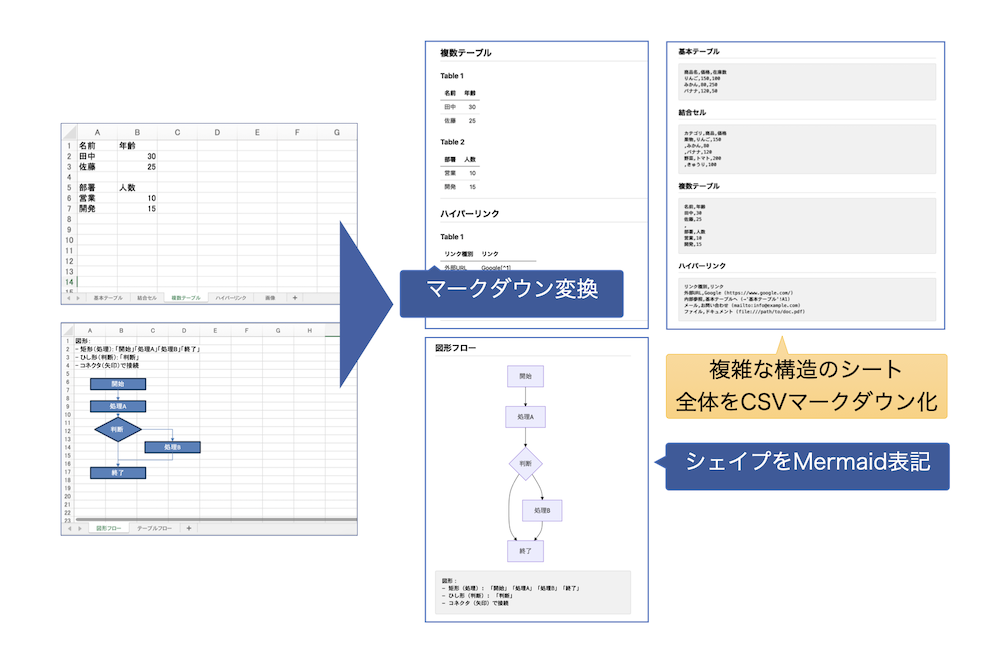
Excel to Markdown converter. Reads Excel workbooks (.xlsx/.xlsm) and automatically generates Markdown format output.
Features
- Smart Table Detection: Automatically detects Excel print areas and converts them to Markdown tables
- CSV Markdown Output: Exports entire sheets in CSV format with validation metadata
- Image Extraction: Extracts images from Excel files and outputs them as Markdown image links
- Mermaid Flowcharts: Generates Mermaid diagrams from Excel shapes and tables
- Hyperlink Support: Multiple output modes (inline, footnote, plain text)
- Split by Sheet: Generate individual files per sheet
- Customizable: Detailed settings for formatting, alignment, and data processing
Use Cases
- Document Generation: Convert Excel specifications to Markdown
- AI/LLM Processing: CSV markdown format optimized for token efficiency
- Flowchart Extraction: Extract diagrams from Excel shapes
- Data Migration: Export Excel data to portable Markdown format
- Version Control: Track Excel changes in text-based format
Documentation
- CHANGELOG.md - Version history
- CONTRIBUTING.md - Contribution guidelines
- SECURITY.md - Security policy and best practices
- Technical specifications are kept at the repository root as
spec.mdandspec_appendix.md
Installation
Requires Python 3.10 or higher.
pip install excel2md
# or with uv
uv add excel2md
After installation, the excel2md command is available on your PATH.
Usage
excel2md input.xlsx
This generates:
input_csv.md: CSV markdown format (default)input_images/: Image directory (if images exist)
Note
- Output filenames and directories are based on input filename (e.g.,
input.xlsx→input_csv.md,input_images/) - Output is saved in the same directory as input file (use
--csv-output-dirto change)
Common Examples
Convert with Mermaid flowchart support:
excel2md input.xlsx --mermaid-enabled
Generate individual files per sheet:
excel2md input.xlsx --split-by-sheet
Specify CSV markdown output directory:
excel2md input.xlsx --csv-output-dir ./output
# CSV markdown: ./output/input_csv.md
# Images: ./output/input_images/
Output standard Markdown only (no CSV output):
excel2md input.xlsx -o output.md --no-csv-markdown-enabled
Plain text hyperlinks (no Markdown syntax):
excel2md input.xlsx --hyperlink-mode inline_plain
Reduce token count (exclude CSV summary section):
excel2md input.xlsx --no-csv-include-description
Use as a Library
excel2md is also usable as a Python library.
from excel2md import convert_to_markdown

# Pass a path, or raw xlsx bytes (handy for Pyodide / web uploads)
result = convert_to_markdown("input.xlsx", csv_markdown_enabled=False)

print(result["markdown"])      # Generated Markdown string
print(result["output_path"])   # Where the .md file was written
CLI options map 1:1 to keyword arguments (e.g. mermaid_enabled=True, split_by_sheet=True). For multiple conversions sharing the same configuration, use ConversionConfig + ExcelConverter directly.
From source
git clone https://github.com/elvezjp/excel2md.git
cd excel2md
uv sync
See CONTRIBUTING.md for the full developer setup.
Key Options
Output Control
| Option | Default | Description |
|---|---|---|
--split-by-sheet |
false | Generate individual files per sheet |
--csv-markdown-enabled |
true | Enable CSV markdown output |
--csv-output-dir |
Same as input | Output directory for CSV markdown and images |
--csv-include-description |
true | Include summary section in CSV output |
--csv-include-metadata |
true | Include validation metadata in CSV output |
--image-extraction |
true | Enable image extraction |
-o, --output |
- | Output file path for standard Markdown |
Hyperlink Formats
| Mode | Description | Output Example |
|---|---|---|
inline |
Markdown format | [text](URL) |
inline_plain |
Plain text format | text (URL) |
footnote |
Footnote format | [text][^1] + [^1]: URL |
text_only |
Display text only | text |
both |
Inline + footnote | Both formats |
Mermaid Flowcharts
| Option | Default | Description |
|---|---|---|
--mermaid-enabled |
false | Enable Mermaid conversion |
--mermaid-detect-mode |
shapes | Detection mode: shapes, column_headers, heuristic |
--mermaid-direction |
TD | Flowchart direction: TD, LR, BT, RL |
--mermaid-keep-source-table |
true | Output original table along with Mermaid |
Table Processing
| Option | Default | Description |
|---|---|---|
--header-detection |
first_row | Treat first row as header |
--align-detection |
numbers_right | Right-align numeric columns |
--max-cells-per-table |
200000 | Maximum cells per table |
--no-print-area-mode |
used_range | Behavior when print area not set |
Advanced Options
List all options:
excel2md --help
Key advanced options:
- Cell merge policy
- Date/number format control
- Whitespace handling
- Markdown escape level
- Hidden row/column policy
- Locale-specific formatting
Output Examples
Real input / output samples (including images) live under docs/examples/. It contains:
- Input
.xlsxfiles output-default/— default mode (CSV markdown + image extraction)output-markdown/— standard Markdown mode (--no-csv-markdown-enabled)output-mermaid/— Mermaid flowchart enabled (--mermaid-enabled)
The regeneration commands for each pattern are documented in docs/examples/README.md.
Directory Structure
excel2md/
├── excel_to_md.py          # Entry point
├── excel2md/               # Main package
├── tests/                  # Test suite
├── spec.md                 # Specification
├── spec_appendix.md        # Specification appendix
├── scripts/                # Development scripts (benchmarks, etc.)
├── docs/                   # Documentation
├── pyproject.toml          # Project metadata
├── LICENSE                 # MIT License
├── README.md / _ja.md     # README (English / Japanese)
├── CONTRIBUTING.md / _ja.md # Contribution guide (English / Japanese)
├── SECURITY.md / _ja.md   # Security policy (English / Japanese)
└── CHANGELOG.md / _ja.md  # Version history (English / Japanese)
Past release source trees are no longer kept as directories. See CHANGELOG.md for the version history, or the git commit history if you need the actual source of an older release.
Security
For security concerns, please see SECURITY.md.
Key security notes:
- Only process Excel files from trusted sources
- excel2md does not save changes to input workbooks; use
--read-onlywhen you prefer openpyxl read-only loading - Excel macros are not executed
- Sanitize Markdown output to prevent injection
Contributing
Contributions are welcome! See CONTRIBUTING.md for details.
- Report bugs via GitHub Issues
- Submit pull requests for improvements
- Follow existing code style
- Add tests for new features
Changelog
See CHANGELOG.md for details.
Background
This tool was created during the development of IXV, an AI development ecosystem designed for Japanese engineering teams.
IXV delivers a methodology and OSS that put AI to practical use in real development workflows. This repository publishes a portion of that work.
License
MIT License - See LICENSE for details.
Contact
- Email: info@elvez.co.jp
- Company: Elvez, Inc.
3 maintainers


Metadata
3 maintainers
Release files for excel2md 2.3.0
For a detailed explanation of source distributions (sdists) and built distributions (wheels), please see the package formats documentation.
Source distribution (sdist)
| File | Size | Uploaded | |
|---|---|---|---|
| excel2md-2.3.0.tar.gz | 69.6 kB | Details |
Built distribution (wheel)
| File | Interpreter | ABI | Platform | Reset |
|---|---|---|---|---|
| excel2md-2.3.0-py3-none-any.whl | Python 3 | none | any | Details |
Total release size: 129.9 kB
Release files / excel2md-2.3.0.tar.gz
| Download URL | excel2md-2.3.0.tar.gz |
|---|---|
| Size | 69.6 kB |
| Tags | Source |
|
SHA-256 checksum How to use checksums |
12156d0d37006ae2f3dabcbaea9524a35fb774f8c7eb9c54c86b2faa56fbce66
|
|
BLAKE2b-256 checksum How to use checksums |
104b3127d00f84f9fe7e3cddb88e7c999d82bc0c18acc5ad191b616eef6a5fd6
|
| Upload date | |
|
Uploaded using Trusted Publishing? What is trusted publishing? |
Yes |
| Uploaded via |
twine/6.1.0 CPython/3.13.12
|
Provenance
Provenance describes where a file came from. On PyPI, provenance is shared via attestations, which provide a verifiable record of the build or publishing details. View details, limitations and caveats.


PyPI Publish Attestation
PyPI verified that this artifact, at this checksum, originated from the publisher listed below.
Signed by GitHub Actions, verified by PyPI on Jul 3, 2026.
Transparency logRelease files / excel2md-2.3.0-py3-none-any.whl
| Download URL | excel2md-2.3.0-py3-none-any.whl |
|---|---|
| Size | 60.3 kB |
| Tags | Python 3 |
|
SHA-256 checksum How to use checksums |
1379d30330441eaa2330f44761fffd7997da15d4a37cad5d0266ff2c566fe74e
|
|
BLAKE2b-256 checksum How to use checksums |
84d9d9ec4af7c21a4a04ae8277300feb0cd3138c75dbf9603fe387dd8d4187c2
|
| Upload date | |
|
Uploaded using Trusted Publishing? What is trusted publishing? |
Yes |
| Uploaded via |
twine/6.1.0 CPython/3.13.12
|
Provenance
Provenance describes where a file came from. On PyPI, provenance is shared via attestations, which provide a verifiable record of the build or publishing details. View details, limitations and caveats.
PyPI Publish Attestation
PyPI verified that this artifact, at this checksum, originated from the publisher listed below.
Signed by GitHub Actions, verified by PyPI on Jul 3, 2026.
Transparency log













