




PyXIRR
Rust-powered collection of financial functions.
PyXIRR stands for "Python XIRR" (for historical reasons), but contains many other financial functions such as IRR, FV, NPV, etc.
Features:
- correct
- supports different day count conventions (e.g. ACT/360, 30E/360, etc.)
- works with different input data types (iterators, numpy arrays, pandas DataFrames)
- no external dependencies
- type annotations
- blazingly fast
Installation
pip install pyxirr
WASM wheels for pyodide are also available, but unfortunately are not supported by PyPI. You can find them on the GitHub Releases page.
Benchmarks
Rust implementation has been tested against existing xirr package (uses scipy.optimize under the hood) and the implementation from the Stack Overflow (pure python).
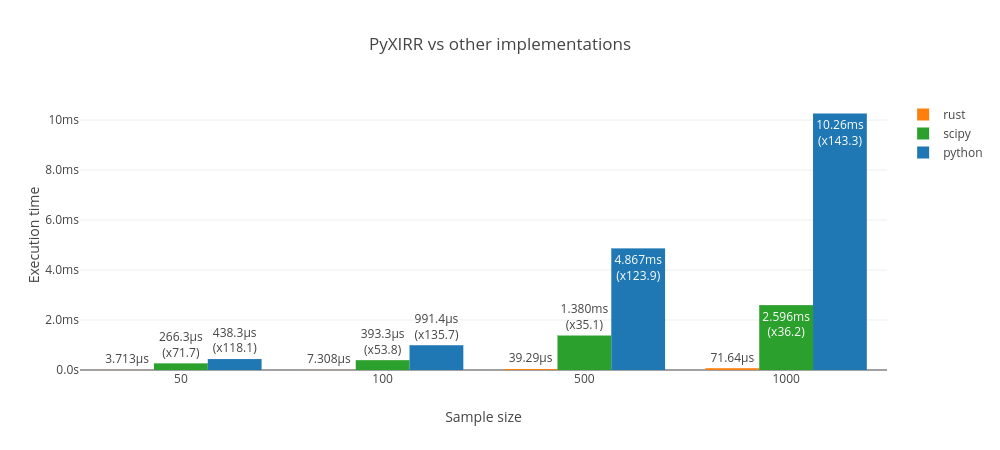
PyXIRR is much faster than the other implementations.
Powered by github-action-benchmark and plotly.js.
Live benchmarks are hosted on Github Pages.
Example
from datetime import date
from pyxirr import xirr

dates = [date(2020, 1, 1), date(2021, 1, 1), date(2022, 1, 1)]
amounts = [-1000, 750, 500]

# feed columnar data
xirr(dates, amounts)
# feed iterators
xirr(iter(dates), (x / 2 for x in amounts))
# feed an iterable of tuples
xirr(zip(dates, amounts))
# feed a dictionary
xirr(dict(zip(dates, amounts)))
# dates as strings
xirr(['2020-01-01', '2021-01-01'], [-1000, 1200])
Multiple IRR problem
The Multiple IRR problem occurs when the signs of cash flows change more than once. In this case, we say that the project has non-conventional cash flows. This leads to situation, where it can have more the one IRR or have no IRR at all.
PyXIRR addresses the Multiple IRR problem as follows:
- It looks for positive result around 0.1 (the same as Excel with the default guess=0.1).
- If it can't find a result, it uses several other attempts and selects the lowest IRR to be conservative.
Here is an example illustrating how to identify multiple IRRs:
import numpy as np
import pyxirr

# load cash flow:
cf = pd.read_csv("tests/samples/30-22.csv", names=["date", "amount"])
# check whether the cash flow is conventional:
print(pyxirr.is_conventional_cash_flow(cf["amount"]))  # false

# build NPV profile:
# calculate 50 NPV values for different rates
rates = np.linspace(-0.5, 0.5, 50)
# any iterable, any rates, e.g.
# rates = [-0.5, -0.3, -0.1, 0.1, -0.6]
values = pyxirr.xnpv(rates, cf)

# print NPV profile:
# NPV changes sign two times:
#   1) between -0.316 and -0.295
#   2) between -0.03 and -0.01
print("NPV profile:")
for rate, value in zip(rates, values):
    print(rate, value)

# plot NPV profile
import pandas as pd
series = pd.Series(values, index=rates)
pd.DataFrame(series[series > -1e6]).assign(zero=0).plot()

# find points where NPV function crosses zero
indexes = pyxirr.zero_crossing_points(values)

print("Zero crossing points:")
for idx in indexes:
    print("between", rates[idx], "and", rates[idx+1])

# XIRR has two results:
#   -0.31540826742734207
#   -0.028668460065441048
for i, idx in enumerate(indexes, start=1):
    rate = pyxirr.xirr(cf, guess=rates[idx])
    npv = pyxirr.xnpv(rate, cf)
    print(f"{i}) {rate}; XNPV = {npv}")
More Examples
Numpy and Pandas
import numpy as np
import pandas as pd

# feed numpy array
xirr(np.array([dates, amounts]))
xirr(np.array(dates), np.array(amounts))

# feed DataFrame (columns names doesn't matter; ordering matters)
xirr(pd.DataFrame({"a": dates, "b": amounts}))

# feed Series with DatetimeIndex
xirr(pd.Series(amounts, index=pd.to_datetime(dates)))

# bonus: apply xirr to a DataFrame with DatetimeIndex:
df = pd.DataFrame(
    index=pd.date_range("2021", "2022", freq="MS", inclusive="left"),
    data={
        "one": [-100] + [20] * 11,
        "two": [-80] + [19] * 11,
    },
)
df.apply(xirr)  # Series(index=["one", "two"], data=[5.09623547168478, 8.780801977141174])
Day count conventions
Check out the available options on the docs/day-count-conventions.
from pyxirr import DayCount

xirr(dates, amounts, day_count=DayCount.ACT_360)

# parse day count from string
xirr(dates, amounts, day_count="30E/360")
Private equity performance metrics
from pyxirr import pe

pe.pme_plus([-20, 15, 0], index=[100, 115, 130], nav=20)

pe.direct_alpha([-20, 15, 0], index=[100, 115, 130], nav=20)
Other financial functions
import pyxirr

# Future Value
pyxirr.fv(0.05/12, 10*12, -100, -100)

# Net Present Value
pyxirr.npv(0, [-40_000, 5_000, 8_000, 12_000, 30_000])

# IRR
pyxirr.irr([-100, 39, 59, 55, 20])

# ... and more! Check out the docs.
Vectorization
PyXIRR supports numpy-like vectorization.
If all input is scalar, returns a scalar float. If any input is array_like, returns values for each input element. If multiple inputs are array_like, performs broadcasting and returns values for each element.
import pyxirr

# feed list
pyxirr.fv([0.05/12, 0.06/12], 10*12, -100, -100)
pyxirr.fv([0.05/12, 0.06/12], [10*12, 9*12], [-100, -200], -100)

# feed numpy array
import numpy as np
rates = np.array([0.05, 0.06, 0.07])/12
pyxirr.fv(rates, 10*12, -100, -100)

# feed any iterable!
pyxirr.fv(
    np.linspace(0.01, 0.2, 10),
    (x + 1 for x in range(10)),
    range(-100, -1100, -100),
    tuple(range(-100, -200, -10))
)

# 2d, 3d, 4d, and more!
rates = [[[[[[0.01], [0.02]]]]]]
pyxirr.fv(rates, 10*12, -100, -100)
API reference
See the docs
Roadmap
- Implement all functions from numpy-financial
- Improve docs, add more tests
- Type hints
- Vectorized versions of numpy-financial functions.
- Compile library for rust/javascript/python
Development
Running tests with pyo3 is a bit tricky. In short, you need to compile your tests without extension-module feature to avoid linking errors.
See the following issues for the details: #341, #771.
If you are using pyenv, make sure you have the shared library installed (check for ${PYENV_ROOT}/versions/<version>/lib/libpython3.so file).
$ PYTHON_CONFIGURE_OPTS="--enable-shared" pyenv install <version>
Install dev-requirements
$ pip install -r dev-requirements.txt
Building
$ maturin develop
Testing
$ LD_LIBRARY_PATH=${PYENV_ROOT}/versions/3.10.8/lib cargo test
Benchmarks
$ pip install -r bench-requirements.txt
$ LD_LIBRARY_PATH=${PYENV_ROOT}/versions/3.10.8/lib cargo +nightly bench
Building and distribution
This library uses maturin to build and distribute python wheels.
$ docker run --rm -v $(pwd):/io ghcr.io/pyo3/maturin build --release --manylinux 2010 --strip
$ maturin upload target/wheels/pyxirr-${version}*
1 maintainer

Metadata
1 maintainer
Release files for excele-xirr 0.10.6
For a detailed explanation of source distributions (sdists) and built distributions (wheels), please see the package formats documentation.
Source distribution (sdist)
| File | Size | Uploaded | |
|---|---|---|---|
| excele_xirr-0.10.6.tar.gz | 40.4 kB | Details |
Built distributions (wheels)
| File | Interpreter | ABI | Platform | Reset |
|---|---|---|---|---|
| excele_xirr-0.10.6-cp313-cp313-macosx_11_0_arm64.whl | CPython 3.13 | CPython 3.13 | macOS 11.0+ ARM64 | Details |
| excele_xirr-0.10.6-cp39-cp39-manylinux_2_17_aarch64.manylinux2014_aarch64.whl | CPython 3.9 | CPython 3.9 | Linux glibc 2.17+ ARM64 | Details |
Total release size: 937.9 kB
Release files / excele_xirr-0.10.6.tar.gz
| Download URL | excele_xirr-0.10.6.tar.gz |
|---|---|
| Size | 40.4 kB |
| Tags | Source |
|
SHA-256 checksum How to use checksums |
2b4b388ea644ff959e31db78603e6834d18254180f29e48811a582dadea5c42d
|
|
BLAKE2b-256 checksum How to use checksums |
bca65952a72c858432da5dbfbaf36dc147ee8820c031b5cb98d85ecbcf625a9e
|
| Upload date | |
|
Uploaded using Trusted Publishing? What is trusted publishing? |
No |
| Uploaded via |
twine/6.1.0 CPython/3.12.3
|
Release files / excele_xirr-0.10.6-cp313-cp313-macosx_11_0_arm64.whl
| Download URL | excele_xirr-0.10.6-cp313-cp313-macosx_11_0_arm64.whl |
|---|---|
| Size | 441.1 kB |
| Tags | CPython 3.13 macOS 11.0+ ARM64 |
|
SHA-256 checksum How to use checksums |
b1b832d062186ecb5cf6df8581e9664b5575813160dc84fe2d6fb15b9509fe0a
|
|
BLAKE2b-256 checksum How to use checksums |
2b18adc236bc58cd5758e9f625cda2279d1a8e55cd37485f06c3df2025ef2160
|
| Upload date | |
|
Uploaded using Trusted Publishing? What is trusted publishing? |
No |
| Uploaded via |
twine/6.1.0 CPython/3.12.3
|
Release files / excele_xirr-0.10.6-cp39-cp39-manylinux_2_17_aarch64.manylinux2014_aarch64.whl
| Download URL | excele_xirr-0.10.6-cp39-cp39-manylinux_2_17_aarch64.manylinux2014_aarch64.whl |
|---|---|
| Size | 456.5 kB |
| Tags | CPython 3.9 Linux glibc 2.17+ ARM64 |
|
SHA-256 checksum How to use checksums |
643b3237fab1f497dc1abe7661e064cf3b87b89a6dcd9454ade29551d2453138
|
|
BLAKE2b-256 checksum How to use checksums |
a958b09da8f791f9acfb5eaf12a32d835a12c37ead5d479bd4955f27434dd305
|
| Upload date | |
|
Uploaded using Trusted Publishing? What is trusted publishing? |
No |
| Uploaded via |
maturin/1.8.3
|













