
ExceptBot: Django Exception Logger with AI Suggestions for Fixing
Imagine: An exception is thrown on your site and it is critical.
You need a solution fast.
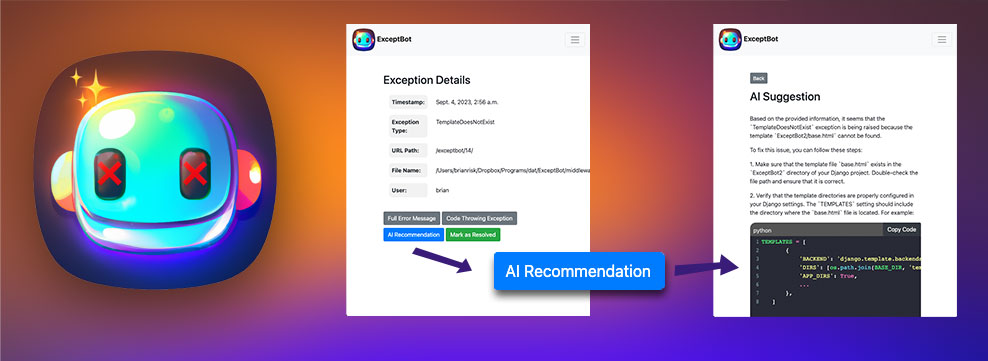
ExceptBot is a Django middleware application that captures and logs exceptions that occur within your Django project. Site admins can quickly view exceptions, the code where the problem originated, and with a button-click feed all that info to ChatGPT to get a possible solution.
Features
- Automatically logs exceptions, including:
- The Python Code and line where the exception occurred
- The full stack trace
- URL path, Exception type, timestamp, user (if authenticated)
- Gets AI Suggestions
- Sends all relevant info to ChatGPT API:
- Stack trace
- Source code producing the exception
- line causing the exception
- Sends all relevant info to ChatGPT API:
- Superuser-restricted views to:
- View a list of unresolved exceptions
- Mark exceptions as resolved
- View detailed information for each exception
- Tracks which superuser resolved an exception and when
Installation
- Install the ExceptBot library
pip3 install exceptbot
- Add 'ExceptBot' to INSTALLED_APPS in your project's
settings.py:
INSTALLED_APPS = [
    # ...
    'exceptbot',
    # ...
]
- Include the middleware in the MIDDLEWARE list in your
settings.py:
MIDDLEWARE = [
    # ...
    'exceptbot.middleware.ExceptBotMiddleware',
    # ...
]
- Include the ExceptBot URLs in your project's
urls.py:
from django.urls import path, include

urlpatterns = [
  # ...
  path('exceptbot/', include('exceptbot.urls')),
  # ...
]
Run migrations to create the necessary database tables and set up static files
$ python3 manage.py makemigrations exceptbot
$ python3 manage.py migrate exceptbot
$ python3 manage.py collectstatic --no-input
Usage
Once integrated into your Django project:
- setup the Chat GPT connection (When you have an account, your API key is here)
- Any exception that occurs will be automatically logged by the middleware.
- Superusers can navigate to
/exceptbot/to view a list of unresolved exceptions. - Click on an exception to view its detailed information.
- Superusers can mark exceptions as resolved, which will also record who resolved it and when.
1 maintainer

Metadata
1 maintainer
Release files for exceptbot 1.0.11
For a detailed explanation of source distributions (sdists) and built distributions (wheels), please see the package formats documentation.
Source distribution (sdist)
| File | Size | Uploaded | |
|---|---|---|---|
| exceptbot-1.0.11.tar.gz | 283.3 kB | Details |
Built distribution (wheel)
| File | Interpreter | ABI | Platform | Reset |
|---|---|---|---|---|
| exceptbot-1.0.11-py3-none-any.whl | Python 3 | none | any | Details |
Total release size: 569.5 kB
Release files / exceptbot-1.0.11.tar.gz
| Download URL | exceptbot-1.0.11.tar.gz |
|---|---|
| Size | 283.3 kB |
| Tags | Source |
|
SHA-256 checksum How to use checksums |
173a98884a7f0387336a14b50e581acc4ecbc2d7269b3cfb7c810f8b90274512
|
|
BLAKE2b-256 checksum How to use checksums |
c669e9714b67ee94a46fc44fca5791c488dfb964faee50f3349ce458a567d11a
|
| Upload date | |
|
Uploaded using Trusted Publishing? What is trusted publishing? |
No |
| Uploaded via |
twine/4.0.2 CPython/3.9.18
|
Release files / exceptbot-1.0.11-py3-none-any.whl
| Download URL | exceptbot-1.0.11-py3-none-any.whl |
|---|---|
| Size | 286.2 kB |
| Tags | Python 3 |
|
SHA-256 checksum How to use checksums |
bc703458d9dbb267e56441bff8162ad0c8d823644c910ca46f4a04a4b5fd0bf1
|
|
BLAKE2b-256 checksum How to use checksums |
231bf93d3a0324afd857450e44e1f40564d1bf29a930837d11b5743345fa8b9f
|
| Upload date | |
|
Uploaded using Trusted Publishing? What is trusted publishing? |
No |
| Uploaded via |
twine/4.0.2 CPython/3.9.18
|














