
A small library for getting information on cash exchange rates of PrivatBank and the NBU on the selected date

Project description

Official Repo: https://gtlb.jetsoftpro.com/mariana.drozd/exchange_rates_mariana_drozd
It uses the following libraries:
- Requests for requests to exchange rates
- Pandas for working with tables
- Matplotlib for plots
Quick Install / Usage
pip install exchange_rates_mariana_drozd
from datetime import datetime

from exchange_rates_mariana_drozd import get_exchange_rates_from_date_to_date


def main():
    exchange_rates_from_date_to_date = get_exchange_rates_from_date_to_date(
        datetime(day=15, month=4, year=2019),
        datetime(day=20, month=4, year=2019),
        currency="USD",
        save_to_csv_file=False,
        save_to_json_file=False,
        show_plot=False
    )

    print(exchange_rates_from_date_to_date)

 # Output:
 #    {
 # "15.04.2019": {
 #  "date": "15.04.2019",
 #  "bank": "PB",
 #  "baseCurrency": 980,
 #  "baseCurrencyLit": "UAH",
 #  "exchangeRate": [
 #   {
 #    "baseCurrency": "UAH",
 #    "currency": "UZS",
 #    "saleRateNB": 0.003243,
 #    "purchaseRateNB": 0.003243
 #   },
 #   {
 #    "baseCurrency": "UAH",
 #    "currency": "BYN",
 #    "saleRateNB": 12.64203,
 #    "purchaseRateNB": 12.64203
 #   },
 #   {
 #    "baseCurrency": "UAH",
 #    "currency": "TMT",
 #    "saleRateNB": 7.774029,
 #    "purchaseRateNB": 7.774029
 #   },
 #    ...
Note:
If you need to save data in CSV or/and JSON file, set needed parameter (save_to_csv_file and/or save_to_json_file) to "True".
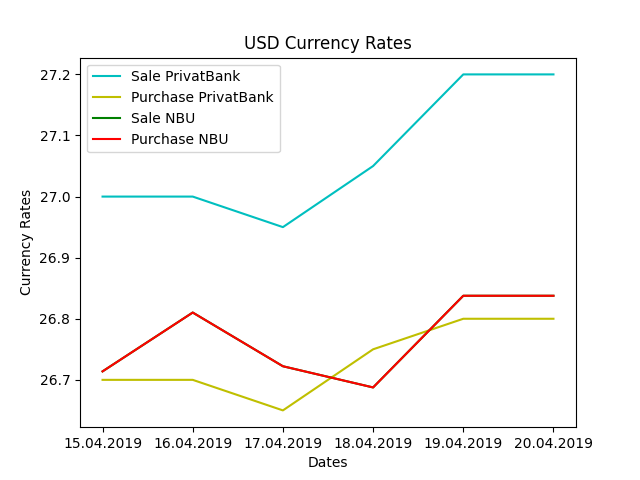
Also, if you want to see plot of selected currency, set show_plot to "True"
Example of USD currency plot:
Release history Release notifications | RSS feed


Download files
Download the file for your platform. If you're not sure which to choose, learn more about installing packages.
Source Distribution
File details
Details for the file exchange-rates_mariana_drozd-0.0.4.tar.gz.
File metadata
- Download URL: exchange-rates_mariana_drozd-0.0.4.tar.gz
- Upload date:
- Size: 4.0 kB
- Tags: Source
- Uploaded using Trusted Publishing? No
- Uploaded via: twine/4.0.0 CPython/3.8.10
File hashes
| Algorithm | Hash digest | |
|---|---|---|
| SHA256 |
a34526ddf51578a794c926c7711e66db6f455d732716c9ad76497c8c2307fbf2
|
|
| MD5 |
4646b6ae6493c8e21872c51fed4f2dc7
|
|
| BLAKE2b-256 |
6e8e4e70d52ac5005f2c17a6e34fa529a6bc88f195712261f48f9f44637fc96b
|






