
exe-dev-atlas
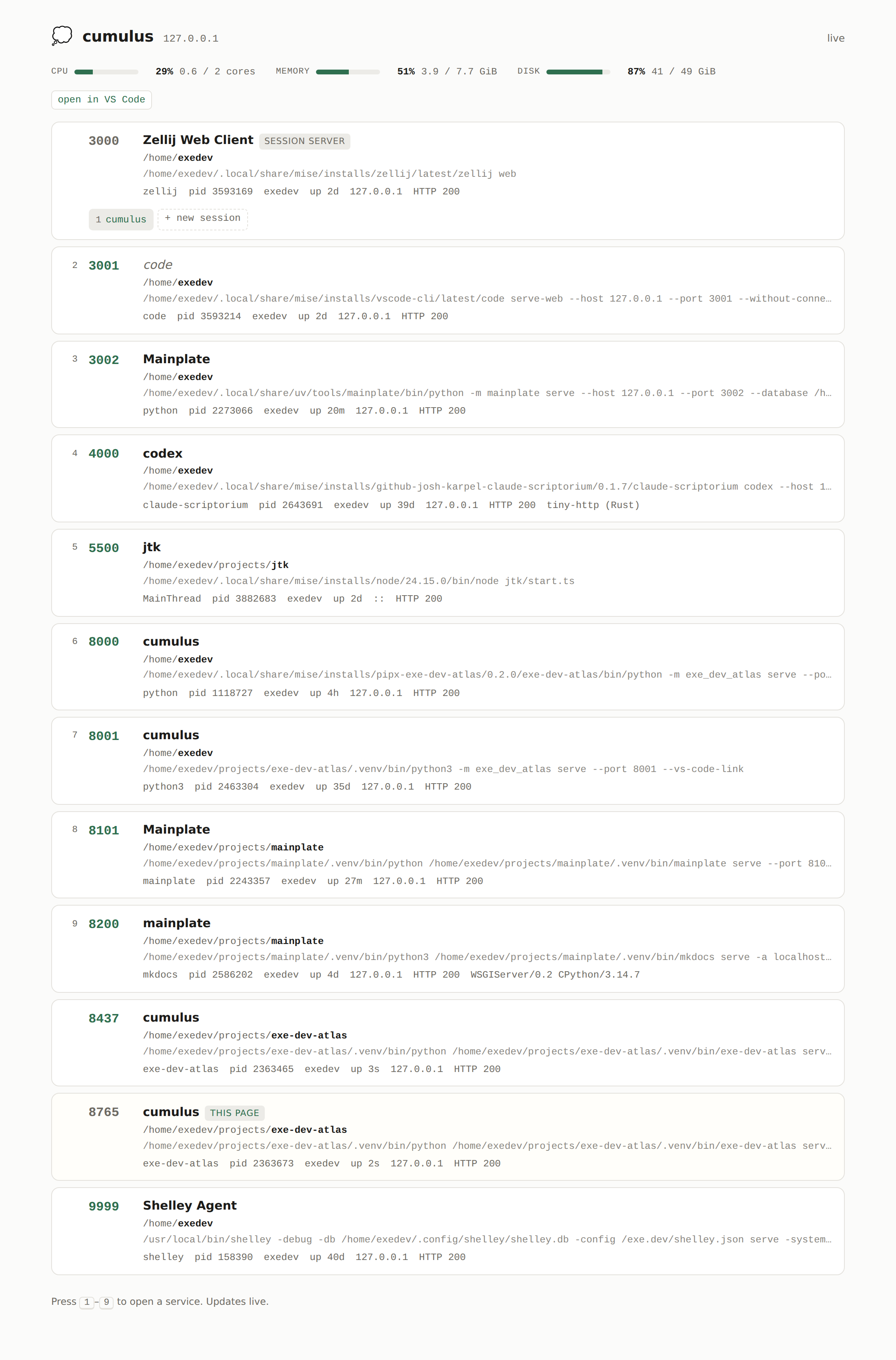
A front door for an exe.dev VM: what is listening, what it is, and what to open.
exe.dev forwards ports 3000-9999 to https://<vm>.exe.xyz:<port>/ with no configuration, so
a dev server started on one already has a URL. What it has no way to tell you is which ports
are live and what is on them. The atlas serves that list on the port the bare hostname points
at, so https://<vm>.exe.xyz/ becomes a launcher for everything else on the box, alongside
the zellij sessions that have no port of their own.
Install
$ uv tool install exe-dev-atlas
$ exe-dev-atlas install
exeuntu, the default exe.dev image, ships with uv, so there is nothing to install before that first line.
install writes a user systemd unit and starts it. serve runs the same server in the
foreground. Both take --port (default 8000, also read from EXE_DEV_ATLAS_PORT).
Run this only on a VM you would hand somebody a shell on
Every row carries a process's full command line, its working directory, its user, and its
pid, and that is the public half of what this serves. Command lines routinely carry
secrets: a --backend-store-uri postgresql://user:hunter2@db/app, an --api-key, a token
in an argument. /proc/<pid>/cmdline is world-readable, so the listing covers other users'
processes on the box too, whatever this daemon can and cannot read of them.
So this page is only as private as the VM it runs on, and exe.dev's sharing controls are the only thing between it and a reader:
- Never make a VM running the atlas public.
share set-public <vm>drops the login requirement on the proxied port, and an unauthenticated caller sends nox-exedev-emailheader, so anybody who finds the hostname gets the page. - Read a Web share as a share of every command line on the box.
share add <vm> <email>grants access to the VM's HTTPS proxy, and this page is on it. Withholding the zellij session names and the VS Code link from a non-owner is one degree less detail on the same page, not confidentiality. - The port itself is defended by nothing. The header the owner check reads is added by exe.dev's proxy. A caller that reaches the port without making that hop, an SSH tunnel or another user on the box, sends whatever address it likes and is served the owner's view.
share show <vm> says who has access today.
What it shows
One row per listening process in the proxied port range, pushed over SSE and updated within a second of anything changing. One port carries two rows where two processes hold it between them, one on loopback and one on a LAN address, since they are two services:
- The port, linked, unless it is this page's own or it did not answer HTTP.
- Whatever the port called itself: the
<title>of the page it served, falling back to the process name. - The process behind it, its working directory, its owner, and how long it has been up.
1-9open the first nine links from the keyboard.
Listeners are found by polling, because the kernel offers no alternative: netlink's
inet_diag answers a query rather than announcing a new socket, and /proc/net/tcp cannot be
watched. A scan costs a few milliseconds, so it runs once a second and pushes only when the
result differs from the last one.
Links are built from the browser's own location rather than from the VM name, so they stay correct whether the page was reached through the exe.dev proxy or an SSH tunnel to the same port.
What only the owner sees
The atlas is reachable by anyone the VM is shared with, so two things are withheld from everyone but the address the VM is owned by, as exe.dev's proxy reports it. This is a smaller distinction than it sounds, and the section above says what it does not cover:
- zellij session names, which are often a project or a client name.
- the VS Code Remote-SSH link, which only works for someone with SSH access anyway.
Ownership is decided once at startup from exe.dev's reflection integration, and the comparison fails closed: a reflection lookup that did not answer and an unauthenticated caller both produce an empty address, and an empty address matches nobody. A box whose lookup failed therefore serves the public view to everyone until it is restarted.
A zellij web server is the one port not linked directly. Arriving there without a session named in the path does not land on a picker, it creates a new session, so a link to its root would litter the box with an empty session per visit. Its existing sessions are listed individually instead, which is both the useful destination and the harmless one.
The systemd unit
install names the interpreter that ran it. exe-dev-atlas install is invoked by the
installed CLI, so sys.executable is already an absolute path to an interpreter holding this
package and its dependencies, and nothing has to be looked up on PATH or derived from a
login shell:
ExecStart=/home/you/.local/share/uv/tools/exe-dev-atlas/bin/python -m exe_dev_atlas serve --port 8000
This tool does not fetch, build, or manage a Python environment. Whoever installed the package
chose the version; install only points systemd at it. To upgrade, upgrade the package and
run install again: an upgrade in place renders an identical unit, so the restart is what
puts the new code in front of anything, and it happens whether the unit changed or not.
The unit carries only a standard system PATH, and nothing is looked up on it. The zellij
binary a session lookup runs is read from the serving process itself, so it is the exact
binary that is serving rather than whatever a lookup would find.
WantedBy=default.target starts the unit when the user manager starts, which without
loginctl enable-linger <user> is at first login rather than at boot. install checks this
and says so if it is off, because the failure is otherwise invisible: the unit is enabled, the
file is correct, and nothing is running.
Requirements
Linux and Python 3.14. Every listener fact comes from /proc, read through
psutil, so this is not portable off Linux, and the proxy's
port range, its authentication header, and the reflection integration are all assumed to be
exe.dev's.
Development
$ just setup
$ just test
just --list shows the rest. Built on without: without-http
serves, without-web routes, without-html renders the shell, without-async supervises the
scan task, and without-asgi both frames the event stream and serves the stylesheet and
script out of an inventory walked once at startup.
1 maintainer

Metadata
1 maintainer
Release files for exe-dev-atlas 0.1.0
For a detailed explanation of source distributions (sdists) and built distributions (wheels), please see the package formats documentation.
Source distribution (sdist)
| File | Size | Uploaded | |
|---|---|---|---|
| exe_dev_atlas-0.1.0.tar.gz | 33.7 kB | Details |
Built distribution (wheel)
| File | Interpreter | ABI | Platform | Reset |
|---|---|---|---|---|
| exe_dev_atlas-0.1.0-py3-none-any.whl | Python 3 | none | any | Details |
Total release size: 72.4 kB
Release files / exe_dev_atlas-0.1.0.tar.gz
| Download URL | exe_dev_atlas-0.1.0.tar.gz |
|---|---|
| Size | 33.7 kB |
| Tags | Source |
|
SHA-256 checksum How to use checksums |
a5552d4c254d3f70b199938bcd6b24f4bfda4ec18f7cfb2466a80ed120432982
|
|
BLAKE2b-256 checksum How to use checksums |
a1ddec49c09a29a8168044ef2f9f971c239fdf950ce71d9a017c2aac9d6d5f3c
|
| Upload date | |
|
Uploaded using Trusted Publishing? What is trusted publishing? |
Yes |
| Uploaded via |
uv/0.12.6 {"installer":{"name":"uv","version":"0.12.6","subcommand":["publish"]},"python":null,"implementation":{"name":null,"version":null},"distro":{"name":"Ubuntu","version":"24.04","id":"noble","libc":null},"system":{"name":null,"release":null},"cpu":null,"openssl_version":null,"setuptools_version":null,"rustc_version":null,"ci":true}
|
Release files / exe_dev_atlas-0.1.0-py3-none-any.whl
| Download URL | exe_dev_atlas-0.1.0-py3-none-any.whl |
|---|---|
| Size | 38.7 kB |
| Tags | Python 3 |
|
SHA-256 checksum How to use checksums |
0158cdbb67c0252b38c6759f642ccf825a33f0cccc16ccdbe05b2d8a75aca04b
|
|
BLAKE2b-256 checksum How to use checksums |
10b75ac6979aaf4600347e2431f8ecb13ade19be99dcb259f676fb2477445ce8
|
| Upload date | |
|
Uploaded using Trusted Publishing? What is trusted publishing? |
Yes |
| Uploaded via |
uv/0.12.6 {"installer":{"name":"uv","version":"0.12.6","subcommand":["publish"]},"python":null,"implementation":{"name":null,"version":null},"distro":{"name":"Ubuntu","version":"24.04","id":"noble","libc":null},"system":{"name":null,"release":null},"cpu":null,"openssl_version":null,"setuptools_version":null,"rustc_version":null,"ci":true}
|














