

Multi-DBMS SQL script processor.







Overview
execsql is a toolchain for SQL scripts: write them with editor support, format them consistently, lint them without a database, and run them against nine DBMSs.
Scripts are ordinary SQL plus metacommands embedded in comments (-- !x!), which add importing and exporting data, copying between databases, conditional execution, looping, substitution variables, and interactive prompts. Because the metacommands live in comments, the scripts stay valid SQL and other tools (psql, sqlcmd, your editor) ignore them.
| Command | What it does | Needs a database? |
|---|---|---|
execsql format |
Normalize keywords, indentation, and SQL layout | No |
execsql lint |
Static analysis: structure, unknown metacommands, variables, targets | No |
execsql run |
Run the script against PostgreSQL, MySQL, SQLite, DuckDB, … | Yes |
execsql config |
Show every config option, its value, and the file that set it | No |
execsql list |
Metacommands, encodings, plugins, or the keyword vocabulary | No |
execsql init |
Set up a project: config file, a script with a header, pre-commit hooks | No |
| VS Code extension | Syntax highlighting for metacommands and variables | No |
format and lint take files or directories.
Quick start: no database required
format and lint work on a bare .sql file, with no server and no config. Try them first:
uv tool install "execsql2[formatter]"     # or: pipx install "execsql2[formatter]"

execsql format --check scripts/   # is it formatted?
execsql format -i scripts/        # format it
execsql lint scripts/             # find problems before they cost you a run
lint reports unmatched blocks, misspelled or malformed metacommands and conditions, undefined and unused substitution variables, unreachable branches, and INCLUDE/SCRIPT targets that do not exist: the failures that otherwise surface halfway through a run against a live database:
$ execsql lint load_data.sql
load_data.sql
  1  warning  V002  variable !!site_cd!! is never used
  2  warning  I001  INCLUDE file does not exist: common/setup.sql
  3  warning  V001  undefined variable !!site_code!!

Found 3 issues in 1 file: 3 warnings (1 file checked)
V002 and V001 together point at a typo: site_cd is defined and site_code is used. Every issue has a rule code for --select and --ignore; --output-format concise prints one path:line line per issue and json feeds CI tools. The lint rules page explains each one.
execsql format also runs as a pre-commit hook, so formatting is enforced without anyone remembering to run it.
Example
Lines prefixed with -- !x! are metacommands; identifiers wrapped in !! are substitution variables:
-- ==== Configuration ====
-- Put the (date-tagged) logfile name in the 'inputfile' substitution variable.
-- !x! SUB inputfile logs/errors_!!$date_tag!!
-- Ensure that the export directory will be created if necessary.
-- !x! CONFIG MAKE_EXPORT_DIRS Yes

-- ==== Display Fatal Errors ====
-- !x! IF(file_exists(!!inputfile!!))
    -- Import the data to a staging table.
    -- !x! IMPORT TO REPLACEMENT staging.errorlog FROM !!inputfile!!
    -- Create a view to display only fatal errors.
    create temporary view fatals as
        select user, run_time, process
        from   staging.errorlog
        where  severity = 'FATAL';
    -- !x! IF(HASROWS(fatals))
        -- Export the fatal errors to a dated report.
        -- !x! EXPORT fatals TO reports/error_report_!!$date_tag!! AS CSV
        -- Also display it to the user in a GUI.
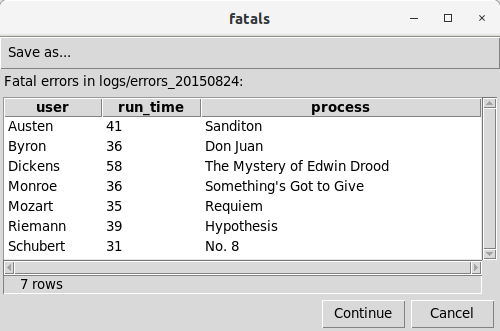
        -- !x! PROMPT MESSAGE "Fatal errors in !!inputfile!!:" DISPLAY fatals
    -- !x! ELSE
        -- !x! WRITE "There are no fatal errors."
    -- !x! ENDIF
-- !x! ELSE
    -- !x! WRITE "There is no error log."
-- !x! ENDIF
drop table if exists staging.errorlog cascade;
The PROMPT metacommand produces a GUI display of the data:
Installation
uv tool install execsql2                  # core: SQLite works with no extras
uv tool install "execsql2[postgres]"      # with a driver: postgres, mysql, mssql, duckdb, firebird, oracle, odbc
uv tool install "execsql2[all]"           # everything: all drivers plus all feature extras
pipx install takes the same arguments. Quote the name when it has extras
(zsh reports no matches found otherwise). To call execsql from Python code,
add it to that project instead: uv add "execsql2[postgres]" or
pip install "execsql2[postgres]" in its virtual environment.
Feature extras cover spreadsheet and Parquet/Feather formats, keyring authentication, PostgreSQL upsert, and more. See the installation guide for the full list.
Usage
execsql run    [OPTIONS] SQL_SCRIPT [SERVER DATABASE | DATABASE_FILE]
execsql format [--check | -i] [--indent N] FILE_OR_DIR...
execsql lint   [OPTIONS] FILE_OR_DIR...
execsql config [SQL_SCRIPT] [--init] [--config FILE]
execsql list   metacommands|encodings|plugins|keywords
execsql init   [DIR] [--script NAME] [--no-script] [--no-config] [--no-pre-commit]
Examples:
execsql run -tp script.sql myserver mydb        # PostgreSQL
execsql run -tm script.sql myserver mydb        # MySQL / MariaDB
execsql run -ts script.sql myserver mydb        # SQL Server
execsql run -tl script.sql mydb.sqlite          # SQLite
execsql run -tk script.sql mydb.duckdb          # DuckDB
execsql run -to script.sql myserver myservice   # Oracle
execsql run script.sql                          # read connection from config file
Supported Databases
| Flag | Database | Support |
|---|---|---|
p |
PostgreSQL | Supported: verified against a live server in CI |
m |
MySQL / MariaDB | Supported: verified against a live server in CI |
s |
MS SQL Server | Supported: verified against a live server in CI |
l |
SQLite | Supported: verified against real files in CI |
k |
DuckDB | Supported: verified against real files in CI |
a |
MS Access | Best effort: not verified in CI |
f |
Firebird | Best effort: not verified in CI |
o |
Oracle | Best effort: not verified in CI |
d |
ODBC DSN | Best effort: not verified in CI |
Supported adapters run against a live server or a real database file on
every CI run; a regression blocks the release and bugs get fixed. Best
effort adapters are carried forward from the upstream monolith and are not
exercised anywhere in CI. The code is there and may work, but nothing proves
it still does. Issues and pull requests are welcome for them; no guarantee is
made. Opening a best-effort connection prints one informational line, which
support_tier_notice=No in the [interface] section of execsql.conf
silences.
Common options
| Flag | Description |
|---|---|
-t {p,m,s,l,k,a,f,o,d} |
Database type |
-u USER |
Database username |
-p PORT |
Server port |
--dsn URL |
Connection string (e.g. postgresql://user:pass@host/db) |
-n |
Create a new SQLite or PostgreSQL database if it does not exist |
-c SCRIPT |
Execute inline SQL or metacommand string |
-a VALUE |
Set substitution variable $ARG_x |
--var NAME=VALUE |
Set the substitution variable !!NAME!! |
-v {0,1,2,3} |
GUI level (0=none, 1=password/PAUSE, 2=+HALT and DB selection, 3=console) |
--config FILE |
Load an explicit config file |
--dry-run |
Parse the script and report commands without executing |
--manifest FILE |
Write a JSON record of the run: files read and written, statements, errors |
--debug |
Start in step-through debug mode (REPL pauses before each stmt) |
--no-system-cmd / --no-rm-file / --no-serve |
Disable the SYSTEM_CMD / RM_FILE / SERVE metacommands |
See the full options reference or run execsql run --help for the complete list, execsql run --ping to test a connection, execsql config to see which config files set what, and execsql list metacommands for all metacommands.
Features
Data movement
- Import data from CSV, TSV, JSON, Excel, OpenDocument, Feather, or Parquet files into a database table.
- Export query results in 20+ formats including CSV, TSV, JSON, YAML, XML, HTML, Markdown, LaTeX, XLSX, OpenDocument, Feather, Parquet, HDF5, DuckDB, SQLite, plain text, and Jinja2 templates.
- Copy data between databases, including across different DBMS types.
Script logic
- Conditionally execute SQL and metacommands using
IF/ELSE/ENDIFbased on data values, DBMS type, or user input. - Loop over blocks of SQL and metacommands using
LOOP/ENDLOOP; include or chain scripts withINCLUDEandSCRIPT. - Use substitution variables (
SUB,$ARG_x, built-in variables like$date_tag) to parameterize scripts. - Validate data with
ASSERT: halt the script with a clear error message if a condition is false (ideal for CI pipelines).
Interaction & observability
- Display query results in a GUI dialog; optionally prompt the user to select a row, enter a value, or submit a form.
- Write status messages or tabular output to the console or a file during execution.
- Automatically log each run, recording databases used, scripts executed, and user responses.
Extensibility
- Extend with custom metacommands, exporters, and importers via the plugin system.
Library API
execsql can be used as a Python library for programmatic script execution:
from execsql import run

# Execute a script file
result = run(script="pipeline.sql", dsn="postgresql://user:pass@host/db")

# Execute inline SQL
result = run(
    sql="CREATE TABLE t (id INT);\nINSERT INTO t VALUES (1);",
    dsn="sqlite:///my.db",
    new_db=True,
)

# With substitution variables: each key becomes a $ variable,
# so the script refers to these as !!$SCHEMA!! and !!$DATE!!
result = run(
    script="etl.sql",
    dsn="sqlite:///data.db",
    variables={"SCHEMA": "public", "DATE": "2026-01-01"},
)

# Check results
print(result.success)       # True
print(result.commands_run)  # 2
print(result.elapsed)       # 0.003 (seconds)
print(result.variables)     # {"schema": "public", ...} (names lower-cased, no $)
Error handling:
result = run(sql="SELECT * FROM nonexistent;", dsn="sqlite:///:memory:")
if not result.success:
    for err in result.errors:
        print(f"{err.source}:{err.line}: {err.message}")

# Or raise on failure
result.raise_on_error()  # raises ExecSqlError
Use a pre-existing database connection instead of a DSN. This is useful for reusing one connection across multiple run() calls, or when connection parameters come from your application's configuration rather than a URL:
from execsql import run
from execsql.db.factory import db_Postgres, db_SQLite

# PostgreSQL connection object (psycopg3 under the hood)
conn = db_Postgres(
    "db.example.com",              # server
    "warehouse",                   # database
    user="etl",
    port=5432,                     # optional, default 5432
    password="s3cret",             # omit to use keyring / interactive prompt
)

# Reuse the same connection across multiple calls
staged = run(script="stage.sql", connection=conn)
loaded = run(
    script="load.sql",
    connection=conn,
    variables={"RUN_DATE": "2026-07-03"},
)

# run() does NOT close the connection; you manage its lifecycle
conn.close()

# SQLite works the same way
conn = db_SQLite("my.db", new_db=True)
result = run(sql="SELECT 1;", connection=conn)
conn.close()
Factory functions exist for every supported backend (db_Postgres, db_MySQL, db_SQLite, db_DuckDB, db_SqlServer, db_Oracle, db_Firebird, db_Access, db_Dsn). See execsql.db.factory.
Each call to run() uses an isolated RuntimeContext, so multiple calls do not share state.
Formatting Scripts
The execsql format command normalizes execsql script files: it uppercases metacommand keywords, corrects block indentation, and optionally reformats SQL via sqlglot. The metacommand / indent / keyword reformatting is built into execsql2; SQL reformatting requires the [formatter] extra (or pass --no-sql to skip it):
# Install with the SQL-reformatting extra
uv tool install "execsql2[formatter]"

# Format files in place
execsql format --in-place scripts/

# Check formatting without writing (useful in CI)
execsql format --check scripts/

# Run the formatter without sqlglot: keyword/indent normalization only
execsql format --no-sql --in-place scripts/
execsql format and execsql lint are also available as pre-commit hooks. The format hook id is unchanged, so existing configs keep working:
repos:
  - repo: https://github.com/geocoug/execsql
    rev: v2.25.1
    hooks:
      - id: execsql-format
      - id: execsql-lint
The format hook rewrites *.sql files in place by default; the lint hook fails the commit when a script has a lint error. See the formatter documentation for --check, --indent, and other options.
VS Code Syntax Highlighting
A VS Code extension for execsql syntax highlighting is included in extras/vscode-execsql. It injects a TextMate grammar into .sql files, adding highlighting for -- !x! metacommand markers, keywords (control flow, block, action, directive), variable substitutions (!!var!!, !{var}!), built-in functions, export formats, and config options, all layered on top of standard SQL highlighting.
To install, symlink the extension folder into your VS Code extensions directory:
ln -s /path/to/execsql/extras/vscode-execsql ~/.vscode/extensions/execsql-syntax
See the extension README for Windows instructions, color customization, and troubleshooting.
Templates
The templates/ directory in this repository includes ready-to-use execsql scripts:
- Upsert scripts (
pg_upsert.sql,md_upsert.sql,ss_upsert.sql): Perform merge/upsert operations on multiple tables simultaneously, respecting foreign key order, for PostgreSQL, MySQL/MariaDB, and SQL Server. - Comparison scripts (
pg_compare.sql,md_compare.sql,ss_compare.sql): Compare staging and base tables across multiple dimensions. - Glossary scripts (
pg_glossary.sql,md_glossary.sql,ss_glossary.sql): Produce a glossary of column names and definitions to accompany a database export. script_template.sql: A framework for new scripts with sections for configuration, logging, and error reporting.execsql.conf: An annotated configuration file covering all available settings.
Documentation
Full documentation, including a complete metacommand reference and 30+ examples, is at execsql2.readthedocs.io.
Copyright and License
Copyright (c) 2007-2025 R.Dreas Nielsen
Copyright (c) 2026-present Caleb Grant
This program is free software: you can redistribute it and/or modify it under the terms of the GNU General Public License as published by the Free Software Foundation, either version 3 of the License, or (at your option) any later version. This program is distributed in the hope that it will be useful, but WITHOUT ANY WARRANTY; without even the implied warranty of MERCHANTABILITY or FITNESS FOR A PARTICULAR PURPOSE. See the GNU General Public License for more details.
1 maintainer

Metadata
1 maintainer
Release files for execsql2 2.25.1
For a detailed explanation of source distributions (sdists) and built distributions (wheels), please see the package formats documentation.
Source distribution (sdist)
| File | Size | Uploaded | |
|---|---|---|---|
| execsql2-2.25.1.tar.gz | 2.5 MB | Details |
Built distribution (wheel)
| File | Interpreter | ABI | Platform | Reset |
|---|---|---|---|---|
| execsql2-2.25.1-py3-none-any.whl | Python 3 | none | any | Details |
Total release size: 3.0 MB
Release files / execsql2-2.25.1.tar.gz
| Download URL | execsql2-2.25.1.tar.gz |
|---|---|
| Size | 2.5 MB |
| Tags | Source |
|
SHA-256 checksum How to use checksums |
6e0e787cb9a66d9e436ccfc8b4f419c848e8798e3ed3e6b106345305291d6a61
|
|
BLAKE2b-256 checksum How to use checksums |
1e63267b05dafb1b92e84c116ec13e4d668c4a7734ac03687419002dfebefa27
|
| Upload date | |
|
Uploaded using Trusted Publishing? What is trusted publishing? |
Yes |
| Uploaded via |
twine/7.0.0 CPython/3.13.14
|
Provenance
Provenance describes where a file came from. On PyPI, provenance is shared via attestations, which provide a verifiable record of the build or publishing details. View details, limitations and caveats.


PyPI Publish Attestation
PyPI verified that this artifact, at this checksum, originated from the publisher listed below.
Signed by GitHub Actions, verified by PyPI on Oct 9, 2026.
Transparency logRelease files / execsql2-2.25.1-py3-none-any.whl
| Download URL | execsql2-2.25.1-py3-none-any.whl |
|---|---|
| Size | 534.8 kB |
| Tags | Python 3 |
|
SHA-256 checksum How to use checksums |
86e2327857622e257d269e9e99a03cd9d656d871ecf561ea37cbc742e01df833
|
|
BLAKE2b-256 checksum How to use checksums |
d2ae7e5cf60bdcf4f53ff3659f884f0d30cd228193531954515c9eb96874e149
|
| Upload date | |
|
Uploaded using Trusted Publishing? What is trusted publishing? |
Yes |
| Uploaded via |
twine/7.0.0 CPython/3.13.14
|
Provenance
Provenance describes where a file came from. On PyPI, provenance is shared via attestations, which provide a verifiable record of the build or publishing details. View details, limitations and caveats.
PyPI Publish Attestation
PyPI verified that this artifact, at this checksum, originated from the publisher listed below.
Signed by GitHub Actions, verified by PyPI on Oct 9, 2026.
Transparency log













