
execubot-py

Package providing the Execubot project Python code (https://execubot.fr).
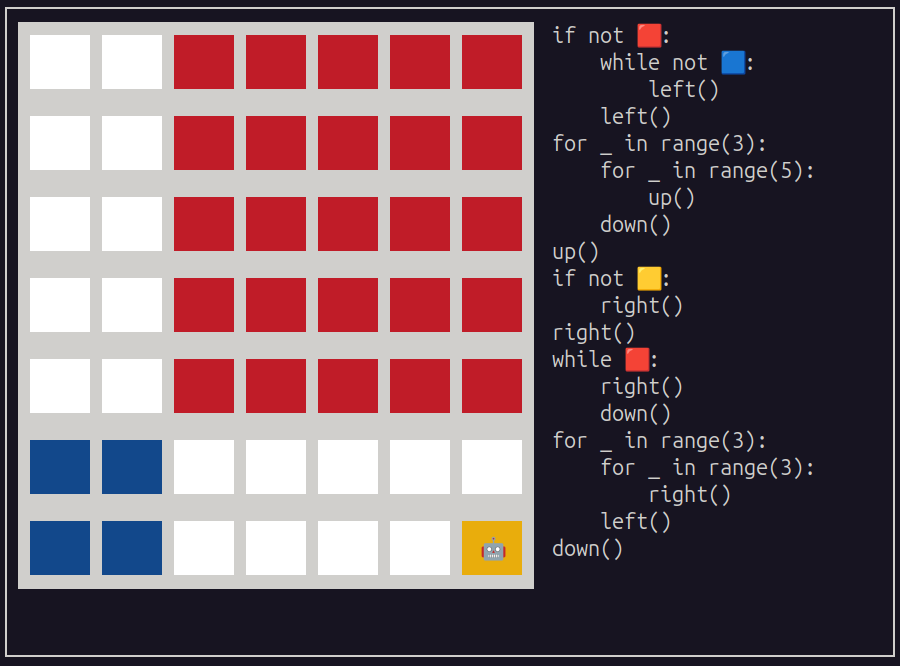
Yes, you can even play Execubot in your terminal! 🤖
CLI
execubot-cli play       <FILE>...   # play level in terminal (curses)
execubot-cli print      <FILE>...   # print level source with syntax highlighting
execubot-cli extractor  <FILE>...   # parse level file and show metadata
execubot-cli solver     <FILE>...   # solve level and show solution
execubot-cli generator  <FILE>...   # generate JSON metadata for web frontend
execubot-cli grid       <FILE>...   # show standardized grid
execubot-cli lang       <FILE>...   # show language dict
execubot-cli tags       <FILE>...   # show tags
execubot-cli difficulty <FILE>...   # show difficulty score
<FILE> accepts file paths or bare level numbers (e.g. 1 → level1.pye).
The standalone script scripts/execubot-cli (PEP 723) is provided and can be run directly without installing the package:
scripts/execubot-cli play 106
Level file format (.pye)
grid = [['purple', 'green']]   # header: Python assignments (grid is mandatory; row=0, col=0, lang='en', message, author are optional)
                               # mandatory blank line
right()                        # body: level code executed by the solver
Python API
from execubot_py import solve, extractor, stdgrid, dictlang, generate, tags, difficulty

solve("path/to/level.pye")                        # → [('Right', 0), ('Down', 2), ...]
extractor("path/to/level.pye")                    # → {'grid': ..., 'code': ..., 'row': 0, ...}
stdgrid(["w o", "y w"])                           # → [['white', 'orange'], ['yellow', 'white']]
dictlang("fr")                                    # → {'purple': 'violet', 'right': 'droite', ...}
generate("path/to/level.pye")                     # → '{"id": 1, "answer": [...], "grid": [...], ...}'
tags("if orange():\n    right()")                 # → ['if']
difficulty("while orange():\n    right()")        # → 10

# solve, extractor and generate also accept raw file content instead of a path
content = "grid = [['white', 'orange']]\n\nright()"
solve(content)                                    # → [('Right', 0)]
Architecture
The package is split into two layers:
solver.py — core engine
Execubotclass: takes(code, grid, row, col, lang)and runs the player's Python code viaexec()in a restricted namespace (only color-test functions and direction functions are exposed).extractor(): parses a.pyelevel file, splitting it at the first blank line — the header (above) isexec'd to extractgrid,row,col,lang, etc.; the body (below) becomescode.- Translations live in
Execubot.translations(a class-level dict built fromtranslation.py, or fromjson/solver.jsonunder Brython). Color/direction functions are injected under their translated names at solve time. Supported languages: 🇬🇧en, 🇫🇷fr, 🇪🇸es, 🇮🇹it, 🇳🇱nl, 🇻🇳vi.
generator.py — level metadata
Level(Execubot): extends the solver to produce JSON output (generator()) consumed by the web frontend. Computesdifficulty(keyword-weighted score) andtagsfrom the level's code.
Tests compare CLI/function output against golden files in tests/out/*.out. When adding or modifying a level, regenerate the fixtures with scripts/updater_tests.sh.
Brython variant: src/execubot_py/solver/solver.py is compiled to solver.brython.js for the browser frontend — not shipped in the package but available via CDN at https://www.jsdelivr.com/package/gh/fgallaire/execubot.
Credits
Copyright (C) 2025-2026, Florent Gallaire <fgallaire@gmail.com> & Célia Piquet <cepiquet@proton.me>.
Licensed under the GNU GPLv3 or later.
1 maintainer

Metadata
1 maintainer
Release files for execubot-py 2.5
For a detailed explanation of source distributions (sdists) and built distributions (wheels), please see the package formats documentation.
Source distribution (sdist)
| File | Size | Uploaded | Provenance | |
|---|---|---|---|---|
| execubot_py-2.5.tar.gz | 44.5 kB | Without provenance | Details |
Built distribution (wheel)
| File | Interpreter | ABI | Platform | Reset |
|---|---|---|---|---|
| execubot_py-2.5-py3-none-any.whl | Python 3 | none | any | Details |
Total release size: 98.6 kB
Release files / execubot_py-2.5.tar.gz
| Download URL | execubot_py-2.5.tar.gz |
|---|---|
| Size | 44.5 kB |
| Tags | Source |
|
SHA-256 checksum How to use checksums |
8736ea356f00c9e9ef57fd21c8fe0af158d3f93e3b7b52af4c5536fbc05b49a0
|
|
BLAKE2b-256 checksum How to use checksums |
691963e83d472194d5bda952d46562f4f158dee48c10ebd605e99ddf67fb54fb
|
| Upload date | |
|
Uploaded using Trusted Publishing? What is trusted publishing? |
No |
| Uploaded via |
uv/0.10.6 {"installer":{"name":"uv","version":"0.10.6","subcommand":["publish"]},"python":null,"implementation":{"name":null,"version":null},"distro":{"name":"Ubuntu","version":"24.04","id":"noble","libc":null},"system":{"name":null,"release":null},"cpu":null,"openssl_version":null,"setuptools_version":null,"rustc_version":null,"ci":null}
|
Release files / execubot_py-2.5-py3-none-any.whl
| Download URL | execubot_py-2.5-py3-none-any.whl |
|---|---|
| Size | 54.1 kB |
| Tags | Python 3 |
|
SHA-256 checksum How to use checksums |
cb573c899b5165e398708099db5d0d464f30d54b0a1de565edb5e02b83499b1e
|
|
BLAKE2b-256 checksum How to use checksums |
dedbd2308e5814f0e26040c0a49b77a161dbca1f03dd9f64140237eac6f78ae8
|
| Upload date | |
|
Uploaded using Trusted Publishing? What is trusted publishing? |
No |
| Uploaded via |
uv/0.10.6 {"installer":{"name":"uv","version":"0.10.6","subcommand":["publish"]},"python":null,"implementation":{"name":null,"version":null},"distro":{"name":"Ubuntu","version":"24.04","id":"noble","libc":null},"system":{"name":null,"release":null},"cpu":null,"openssl_version":null,"setuptools_version":null,"rustc_version":null,"ci":null}
|
Security for execubot-py 2.5
Provenance
Provenance describes where a file came from. On PyPI, provenance is shared via attestations, which provide a verifiable record of the build or publishing details. View details, limitations and caveats.
No provenance found
None of the files in this release were uploaded with provenance metadata.
A note on package security
PyPI is a repository for distributing packages, not a service for auditing them. While third-party security researchers and our staff do their best to detect and remove malicious packages, PyPI cannot guarantee the quality, security or suitability of any given package.
To learn more about protecting yourself from malicious actors, visit our package security documentation.














