
A little tool to show a simple window with a map based on exif gps location.

Project description
ExifMapOverlay 
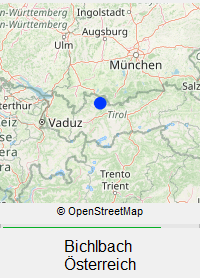
The purpose of this tool is to show a simple small map overlay when viewing photos. Intended as a nice gimmick when reviewing vacation photos. If a jpeg contains GeoLocation Data, fetch a map and place name from OpenStreetMap and display a small window always on top for a few seconds, then autoclose the map again.
I use IrfanView as image viewer, but I felt it misses this feature (in stock IrfanView, you need to press I🡒E🡒O (Info🡒Exif🡒OpenStreetMap) to view a map in the browser), with this utility, you can just assign it as external editor in IrfanView and then press ⇧ Shift + 1 to open the map.
Here is what the overlay looks like:
Installation
Dependencies for this project are Pillow, request and OSMPythonTools. The latter has quite a few dependencies itself.
To install, you need python version 3. Simplest way is then to use pip with
pip install exifMapOverlay
Compiling to executable
You may want to package this into its own "standalone" executable. In that case,
I recommend to first create a new virtual python environment and then use PyInstaller
with the --onedir argument.
The most straightforward way to get an executable is to create a new folder,
open up a terminal inside that folder (under Windows use Powershell) and paste the following lines
python -m venv emoInstallEnv
./emoInstallEnv/Scripts/activate
pip install exifMapOverlay[installer]
python -m PyInstaller ./emoInstallEnv/Lib/site-packages/exifMapOverlay/__main__.py -n exifMapOverlay --onedir --hide-console hide-early --icon ./emoInstallEnv/Lib/site-packages/exifMapOverlay/resources/logo_emo.ico --distpath ./dist --exclude-module numpy
cp ./emoInstallEnv/Lib/site-packages/exifMapOverlay/resources/ ./dist/exifMapOverlay/_internal/exifMapOverlay/resources -r
rm exifMapOverlay.spec
rm -r ./build
rm -r ./emoInstallEnv
This should leave you with the folder structure
.
└── dist
    └── exifMapOverlay
        ├── exifMapOverlay.exe
        └── _internal
that contains the packaged program. If you want to move the program, just move the whole
folder exifMapOverlay, i.e. the folder _internal must be kept next to the executable.
Once you have this executable, you can use it on another cmoputer with teh same operating
system even if python is not installed, since the needed python libraries are kept in the
_internal folder.
In my expecrience, the folder _internal should end up taking about 50MB of disk space
(which I know is a lot for a simple tool like this.) Due to the many dependencies of
OSMPythonTools, there will be quite a few files in this folder that are not actually
needed, but I can't say which exactly. The exclusion of numpy is highly recommended
though, since on some distribtions, this may ship with MKL and be >500MB then.
Usage
Call exifMapOverlay with the path to a jpeg file as single argument. If you have installed it as a python module, use
python -m exifMapOverlay somePhoto.jpg
If you have packaged it with PyInstaller, use
exifMapOverlay.exe somePhoto.jpg
General usage
The map window can be dragged around with the mouse. The current position will be saved for the next program start. You may want to set the Nominatim place names to a fixed language, to do so, edit the settings file. See Settings on how to find it.
Usage with IrfanView
If you are using IrfanView (such as myself), you can simply set up exifMapOerlay as an external editor,
which will allow you to bring up the overlay from IrfanView by pressing e.g. ⇧ Shift + 1.
To do so navigate to Options🡒Properties🡒Miscellaneous and add the path to exifMapOverlay.exe
(e.g. C:\Users\sayofan\portableApps\exifMapOverlay\exifMapOverlay.exe) as one of the external editors.
There is no need to add any arguments, as IrfanView will automatically pass the current file name as first argument.
Settings
There are a few simple settings like position of the window which are kept in a .json file.
The file is stored under {system temp folder}/ExifMapOverlay/emo_settings.json and will be created upon the
first execution of exifMapOerlay with default parameters.
For windows, the path might be e.g. C:\Users\sayofan\AppData\Local\Temp\ExifMapOverlay\emo_settings.json
The contents of the settings file are
{
    "window_pos_x": 200,
    "window_pos_y": 100,
    "nominatim_language": null,  // null for native names; otherwise a http Accept-Language header (e.g. "de-DE")
    "tile_server_url_template": "https://tile.osm.org/{z}/{x}/{y}.png",  // # OSM tile server. For a list, see https://wiki.openstreetmap.org/wiki/Raster_tile_providers
    "tile_size_px": 256,  // the side length of the tiles. must be matched to the server. usually 256 or 512.
    "map_zoom_level": 6,  // tile zoom level, see https://wiki.openstreetmap.org/wiki/Zoom_levels
    "map_pixel_size_x": 200,
    "map_pixel_size_y": 200,
    "place_text_font_size": 12,
    "approx_display_time_ms": 6000
}
To set e.g. english names, you can edit the fourth line of this file to
"nominatim_language": "en",
Remarks
This project uses OSMPythonTools to access Nominatim and a slightly modified Static Map (modified for caching) to access map tiles from OpenStreetMap. Downloaded data is cached as required by OSM when using their APIs. I do not set an expiration date for the cache, it is simply stored in the system's tempfolder.
Please respect the usage policies of any tile server you use.
Release history Release notifications | RSS feed


Download files
Download the file for your platform. If you're not sure which to choose, learn more about installing packages.
Source Distribution
Built Distribution
Filter files by name, interpreter, ABI, and platform.
If you're not sure about the file name format, learn more about wheel file names.
Copy a direct link to the current filters
File details
Details for the file exifmapoverlay-1.0.1.tar.gz.
File metadata
- Download URL: exifmapoverlay-1.0.1.tar.gz
- Upload date:
- Size: 120.4 kB
- Tags: Source
- Uploaded using Trusted Publishing? No
- Uploaded via: twine/6.2.0 CPython/3.12.2
File hashes
| Algorithm | Hash digest | |
|---|---|---|
| SHA256 |
e435c824c39ba296b1ee04a27a85a127c439b5c718a37b82c08eddcb868677f3
|
|
| MD5 |
c0046bc5d8d68fcf76c42d9de0268b3d
|
|
| BLAKE2b-256 |
375b7b8f02b0a2c5add128fd3c729525a947a7de73fa93f434478af5f697a60b
|
File details
Details for the file exifmapoverlay-1.0.1-py3-none-any.whl.
File metadata
- Download URL: exifmapoverlay-1.0.1-py3-none-any.whl
- Upload date:
- Size: 24.3 kB
- Tags: Python 3
- Uploaded using Trusted Publishing? No
- Uploaded via: twine/6.2.0 CPython/3.12.2
File hashes
| Algorithm | Hash digest | |
|---|---|---|
| SHA256 |
6764eb1df71c5b21d73db4290ebb2ee7498eb8bf626c3db11d484317ecab90ac
|
|
| MD5 |
ca06ed33d425d6487d09a8067264a618
|
|
| BLAKE2b-256 |
d79f26d3e0fe48a03b49904ebe0d5f130f8b26ba6b566bdeb4dc02f324ece790
|






