
Production-quality Whole Exome Sequencing analysis pipeline

Project description

ExomeFlow: A Production-Quality Python WES Analysis Toolkit

| Testing |  |
| Package |   |
| Meta |    |
What is it?
ExomeFlow is a Python package that provides a complete, automated Whole Exome Sequencing (WES) analysis workflow from raw FASTQ files to functionally annotated variants in a single reproducible CLI command.
It aims to be the standard high-level pipeline for WES analysis in Python, combining GATK best-practice variant calling, hard filtering, and ANNOVAR annotation into one modular, maintainable package. It handles cohort-level processing (multiple samples), checkpointing for resumable runs, structured logging, and parallel execution out of the box.
Table of Contents
- What is it?
- Main Features
- Pipeline Workflow
- Benchmarks
- Where to get it
- System Requirements
- Python Dependencies
- Quick Start
- Commands
- Reference Files
- Input Convention
- Output Files
- Getting Help
- License
- Citation
Main Features
Here are the things ExomeFlow does well:
- One-command setup —
exomeflow setupinstalls all system tools, downloads hg38 reference files (~13 GB) and ANNOVAR databases (~100 GB) automatically - Automatic sample detection — scans an input directory and detects all paired-end samples from FASTQ filenames; no manifest file required
- Complete GATK best-practice workflow — fastp QC → BWA MEM alignment → coordinate sorting → duplicate marking → BQSR → HaplotypeCaller → hard filtering → ANNOVAR annotation
- Cohort processing — processes any number of samples sequentially or in parallel
with
--max-workers - Checkpointing and resume — every completed step is recorded; an interrupted run resumes exactly where it left off without repeating work
- Automatic requirements check — verifies all system tools and Python packages before the pipeline starts, reporting every missing dependency at once
- Structured logging — per-sample log files plus a pipeline-wide log with INFO / WARNING / ERROR / SUCCESS levels
- GATK hard filters — applies GATK best-practice SNP and INDEL hard-filter thresholds and extracts PASS-only variants automatically
- ANNOVAR functional annotation — annotates variants against 8 databases: refGene, ClinVar, gnomAD, dbNSFP, COSMIC, ExAC, avSNP150, and dbscSNV
- Modular architecture — each pipeline step is an independent Python module; easy to extend or modify individual steps without touching the rest
- PyPI installable —
pip install exomeflow; no Docker or Nextflow required
Pipeline Workflow
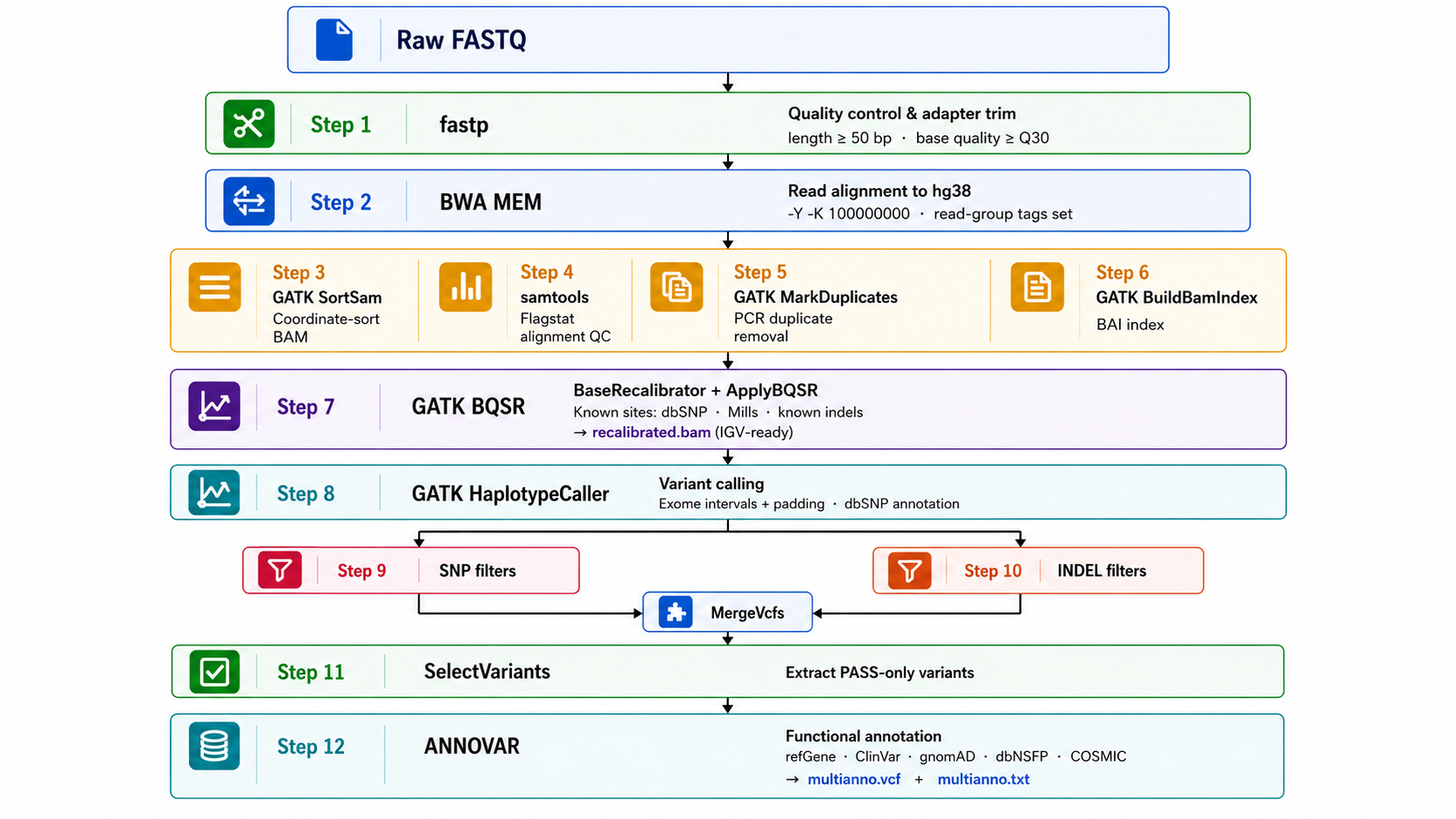
Text version
Raw FASTQ
    │
    ▼
┌─────────────────────────────────────────────────────────┐
│  Step 1   fastp         Quality control & adapter trim   │
│           length ≥ 50 bp · base quality ≥ Q30            │
└──────────────────────────┬──────────────────────────────┘
                           │
                           ▼
┌─────────────────────────────────────────────────────────┐
│  Step 2   BWA MEM        Read alignment to hg38          │
│           -Y -K 100000000 · read-group tags set          │
└──────────────────────────┬──────────────────────────────┘
                           │
                           ▼
┌─────────────────────────────────────────────────────────┐
│  Step 3   GATK SortSam   Coordinate-sort BAM             │
│  Step 4   samtools       Flagstat alignment QC           │
│  Step 5   GATK MarkDuplicates   PCR duplicate removal    │
│  Step 6   GATK BuildBamIndex    BAI index                │
└──────────────────────────┬──────────────────────────────┘
                           │
                           ▼
┌─────────────────────────────────────────────────────────┐
│  Step 7   GATK BQSR      BaseRecalibrator + ApplyBQSR    │
│           Known sites: dbSNP · Mills · known indels      │
│           → recalibrated.bam  (IGV-ready)                │
└──────────────────────────┬──────────────────────────────┘
                           │
                           ▼
┌─────────────────────────────────────────────────────────┐
│  Step 8   GATK HaplotypeCaller   Variant calling         │
│           Exome intervals + padding · dbSNP annotation   │
└──────────────────────────┬──────────────────────────────┘
                           │
                    ┌──────┴──────┐
                    ▼             ▼
               SNP filters   INDEL filters
               (Step 9)       (Step 10)
                    └──────┬──────┘
                           │  MergeVcfs
                           ▼
┌─────────────────────────────────────────────────────────┐
│  Step 11  SelectVariants  Extract PASS-only variants     │
└──────────────────────────┬──────────────────────────────┘
                           │
                           ▼
┌─────────────────────────────────────────────────────────┐
│  Step 12  ANNOVAR         Functional annotation          │
│           refGene · ClinVar · gnomAD · dbNSFP · COSMIC   │
│           → multianno.vcf  +  multianno.txt              │
└─────────────────────────────────────────────────────────┘
Benchmarks
Benchmarked on NA12878 (HG001) whole-exome sequencing data (Agilent SureSelect V8 Clinical Exome, hg38). Accuracy evaluated against GIAB NISTv4.2.1 truth set restricted to Agilent V8 capture regions.
Performance
| Metric | Value |
|---|---|
| Total runtime (12 steps) | 218.4 min |
| Slowest step | BQSR (141.3 min) |
| Threads | 24 |
Variant Quality (PASS variants)
| Metric | Value | Expected range |
|---|---|---|
| SNPs called | 38,413 | — |
| INDELs called | 5,971 | — |
| Ts/Tv ratio | 2.58 | 2.0–3.3 ✓ |
| Het/Hom ratio | 3.10 | 1.5–2.5 |
| dbSNP concordance | 44.7% | — |
Accuracy (vs GIAB NISTv4.2.1, PASS-only)
| Variant type | Precision | Recall | F1 score | TP | FP | FN |
|---|---|---|---|---|---|---|
| SNP | 99.41% | 64.67% | 78.36% | 7,787 | 46 | 4,255 |
| INDEL | 89.38% | 66.14% | 76.02% | 623 | 74 | 319 |
Recall reflects PASS-only evaluation (conservative hard filters applied). Running without
--pass-onlyyields higher recall at the cost of precision.
Functional Annotation (NA12878)
| Category | Count |
|---|---|
| Total annotated variants | 44,673 |
| Exonic | 15,466 (34.6%) |
| Nonsynonymous SNV | 6,957 |
| Synonymous SNV | 8,158 |
| Stopgain | 57 |
| Frameshift indel | 224 |
| Splicing | 62 |
| ClinVar pathogenic/likely-pathogenic | 5 |
| Novel (not in dbSNP avSNP150) | 658 |
Where to get it
ExomeFlow is available via three installation methods:
Option 1 — Python Package (recommended)
pip install exomeflow
Option 2 — Docker
# Pull
docker pull itsrobintomar/exomeflow:1.0.7

# Run
docker run --rm -it \
  -v /path/to/fastq:/data/fastq \
  -v /path/to/refs:/refs \
  -v /path/to/vcf:/vcf \
  -v /path/to/annovar:/annovar \
  -v /path/to/results:/data/results \
  itsrobintomar/exomeflow:1.0.7 run \
    --input-dir    /data/fastq \
    --output       /data/results \
    --reference    /refs/Homo_sapiens_assembly38.fasta \
    --dbsnp        /vcf/Homo_sapiens_assembly38.dbsnp138.vcf.gz \
    --mills        /vcf/Mills_and_1000G_gold_standard.indels.hg38.vcf.gz \
    --known-indels /vcf/Homo_sapiens_assembly38.known_indels.vcf.gz \
    --annovar-bin  /annovar \
    --annovar-db   /annovar/humandb \
    --threads      24
| Volume mount | Host path | Container path |
|---|---|---|
| Input FASTQs | /your/fastq/ |
/data/fastq |
| Reference FASTA + BWA index | /your/refs/ |
/refs |
| VCF files (dbSNP, Mills, known indels) | /your/vcf/ |
/vcf |
| ANNOVAR scripts | /your/annovar/ |
/annovar |
| ANNOVAR humandb | /your/annovar/humandb/ |
/annovar/humandb |
| Output | /your/results/ |
/data/results |
Note: ANNOVAR must be mounted — it cannot be bundled due to licensing. Register and download at annovar.openbioinformatics.org
Option 3 — Singularity (HPC clusters)
# Option A — Pull directly from Docker Hub (easiest)
singularity pull exomeflow-1.0.7.sif docker://itsrobintomar/exomeflow:1.0.7

# Option B — Build from definition file (contact author for .def file)
singularity build exomeflow-1.0.7.sif exomeflow.def

# Run
singularity exec \
  --bind /path/to/fastq:/data/fastq \
  --bind /path/to/refs:/refs \
  --bind /path/to/vcf:/vcf \
  --bind /path/to/annovar:/annovar \
  --bind /path/to/results:/data/results \
  exomeflow-1.0.7.sif exomeflow run \
    --input-dir    /data/fastq \
    --output       /data/results \
    --reference    /refs/Homo_sapiens_assembly38.fasta \
    --dbsnp        /vcf/Homo_sapiens_assembly38.dbsnp138.vcf.gz \
    --mills        /vcf/Mills_and_1000G_gold_standard.indels.hg38.vcf.gz \
    --known-indels /vcf/Homo_sapiens_assembly38.known_indels.vcf.gz \
    --annovar-bin  /annovar \
    --annovar-db   /annovar/humandb \
    --threads      24
SLURM job script example
#!/bin/bash
#SBATCH --job-name=exomeflow
#SBATCH --cpus-per-task=24
#SBATCH --mem=90G
#SBATCH --time=24:00:00
#SBATCH --output=exomeflow_%j.log

singularity exec \
  --bind $FASTQ_DIR:/data/fastq \
  --bind $REFS_DIR:/refs \
  --bind $VCF_DIR:/vcf \
  --bind $ANNOVAR_DIR:/annovar \
  --bind $RESULTS_DIR:/data/results \
  exomeflow-1.0.7.sif exomeflow run \
    --input-dir    /data/fastq \
    --output       /data/results \
    --reference    /refs/Homo_sapiens_assembly38.fasta \
    --dbsnp        /vcf/Homo_sapiens_assembly38.dbsnp138.vcf.gz \
    --mills        /vcf/Mills_and_1000G_gold_standard.indels.hg38.vcf.gz \
    --known-indels /vcf/Homo_sapiens_assembly38.known_indels.vcf.gz \
    --annovar-bin  /annovar \
    --annovar-db   /annovar/humandb \
    --threads      $SLURM_CPUS_PER_TASK
System Requirements
ExomeFlow calls the following external tools via the command line.
They must be installed separately and available on your PATH.
| Tool | Minimum Version | Install |
|---|---|---|
| BWA | ≥ 0.7.17 | conda install -c bioconda bwa |
| SAMtools | ≥ 1.13 | conda install -c bioconda samtools |
| GATK | ≥ 4.6.0 | conda install -c bioconda gatk4 |
| fastp | ≥ 0.20.1 | conda install -c bioconda fastp |
| Perl | ≥ 5.26 | conda install perl |
| ANNOVAR | latest | Register + download from website |
Tip: Run
exomeflow setupafter installation to automatically verify tools, download hg38 reference files, and populate ANNOVAR databases in one step.
Python Dependencies
- typer — Builds the CLI interface
- rich — Provides coloured terminal output and structured logging
- pandas — Data handling for variant count summaries
All Python dependencies are installed automatically with pip install exomeflow.
Quick Start
1. Install ExomeFlow
pip install exomeflow
2. Set up all dependencies and reference data
exomeflow setup \
  --refs-dir   /data/references/hg38 \
  --annovar-bin /opt/annovar \
  --annovar-db  /opt/annovar/humandb
This command will:
- Install missing Python packages
- Install system tools via conda (fastp, bwa, samtools, gatk4, perl)
- Download hg38 reference files (~13 GB) using gsutil or wget
- Download ANNOVAR annotation databases (~100 GB)
3. Prepare FASTQ files
fastq/
├── sample1_1.fastq.gz
├── sample1_2.fastq.gz
├── sample2_1.fastq.gz
└── sample2_2.fastq.gz
4. Run the pipeline
exomeflow run \
  --input-dir    fastq/ \
  --output       results/ \
  --reference    /data/references/hg38/hg38.fa \
  --dbsnp        /data/references/hg38/dbsnp.vcf.gz \
  --mills        /data/references/hg38/Mills_and_1000G_gold_standard.indels.hg38.vcf.gz \
  --known-indels /data/references/hg38/Homo_sapiens_assembly38.known_indels.vcf.gz \
  --intervals    refs/Illumina_Exome_TargetedRegions_v1.2.hg38.bed \
  --annovar-bin  /opt/annovar \
  --annovar-db   /opt/annovar/humandb \
  --threads      32 \
  --max-workers  2
Commands
exomeflow setup — Install dependencies and download reference data
exomeflow setup --refs-dir PATH --annovar-bin PATH --annovar-db PATH
| Option | Description |
|---|---|
--refs-dir |
Directory to download hg38 reference files into |
--annovar-bin |
ANNOVAR installation directory (must contain annotate_variation.pl) |
--annovar-db |
ANNOVAR humandb directory for database downloads |
exomeflow run — Execute the WES pipeline
exomeflow run [OPTIONS]
| Option | Default | Description |
|---|---|---|
--input-dir, -i |
required | Directory containing paired FASTQ files |
--output, -o |
results/ |
Root output directory |
--reference, -r |
required | BWA-indexed reference FASTA (hg38.fa) |
--dbsnp |
required | dbSNP VCF (bgzipped + tabix-indexed) |
--mills |
required | Mills and 1000G gold standard indels VCF |
--known-indels |
required | Known indels VCF for BQSR |
--intervals |
(optional) | Exome capture BED file |
--interval-padding |
100 |
Base-pair padding around each target interval |
--annovar-bin |
required | Directory containing table_annovar.pl |
--annovar-db |
required | ANNOVAR humandb directory |
--threads, -t |
24 |
Threads for BWA MEM and GATK HaplotypeCaller |
--fastp-threads |
8 |
Threads for fastp |
--annovar-threads |
24 |
Threads for ANNOVAR |
--max-workers |
1 |
Number of samples to process in parallel |
--java-opts |
-Xmx80g |
JVM options passed via JAVA_OPTS |
Reference Files
| File | Source | Size |
|---|---|---|
hg38.fa + BWA index |
UCSC / GATK resource bundle | ~10 GB |
dbsnp.vcf.gz |
GATK resource bundle | ~10 GB |
Mills_and_1000G_gold_standard.indels.hg38.vcf.gz |
GATK resource bundle | ~200 MB |
Homo_sapiens_assembly38.known_indels.vcf.gz |
GATK resource bundle | ~100 MB |
| Exome capture BED | Your sequencing kit vendor | varies |
| ANNOVAR humandb (8 databases) | ANNOVAR download server | ~100 GB |
exomeflow setup downloads all GATK resource bundle files automatically.
Manual download:
gsutil -m cp -r gs://gcp-public-data--broad-references/hg38/v0/ /data/refs/
Input Convention
ExomeFlow automatically detects samples from paired-end FASTQ filenames. Files must follow the pattern:
<sample_id>_1.fastq.gz   ← Read 1
<sample_id>_2.fastq.gz   ← Read 2
The sample_id can be any string — SRR accession, patient ID, etc.
Output Files
| File | Description |
|---|---|
Mapsam/<sample>_recalibrated.bam |
Analysis-ready BAM — open in IGV |
VCF/<sample>.vcf |
Raw HaplotypeCaller output |
VCF/<sample>_PASS.vcf |
PASS-only hard-filtered variants |
VCF/<sample>.annovar.hg38_multianno.vcf |
Annotated VCF |
VCF/<sample>.annovar.hg38_multianno.txt |
Annotated tab-delimited table |
filtered_fastp/<sample>_fastp.html |
fastp QC report |
Mapsam/<sample>_flagstat.txt |
Alignment statistics |
logs/analysis_<timestamp>.log |
Full pipeline log |
logs/<sample>_<timestamp>.log |
Per-sample log |
Getting Help
For usage questions and bug reports, contact:
Robin Tomar — itsrobintomar@gmail.com AIIMS New Delhi
License
MIT — see pypi.org/project/exomeflow for details.
Citation
If you use ExomeFlow in your research, please cite:
Robin Tomar. ExomeFlow: A Production-Quality Python Package for Automated Whole Exome Sequencing Analysis. AIIMS New Delhi, 2025. https://pypi.org/project/exomeflow/
Built for the bioinformatics community · Robin Tomar, AIIMS New Delhi
Project details


Download files
Download the file for your platform. If you're not sure which to choose, learn more about installing packages.
Source Distribution
Built Distribution
Filter files by name, interpreter, ABI, and platform.
If you're not sure about the file name format, learn more about wheel file names.
Copy a direct link to the current filters
File details
Details for the file exomeflow-1.0.8.tar.gz.
File metadata
- Download URL: exomeflow-1.0.8.tar.gz
- Upload date:
- Size: 38.8 kB
- Tags: Source
- Uploaded using Trusted Publishing? No
- Uploaded via: twine/6.2.0 CPython/3.10.12
File hashes
| Algorithm | Hash digest | |
|---|---|---|
| SHA256 |
6125a90a9fc1b5c9ddf2791b197857ea22a461dd75c263005e50fe68e17f211c
|
|
| MD5 |
7ece5b1df8cb291ccdfdb98a6eaf4675
|
|
| BLAKE2b-256 |
06b4bcfa2faa375ecc6d5bc90160d340528df15270a67692430b417dec299a5a
|
File details
Details for the file exomeflow-1.0.8-py3-none-any.whl.
File metadata
- Download URL: exomeflow-1.0.8-py3-none-any.whl
- Upload date:
- Size: 39.6 kB
- Tags: Python 3
- Uploaded using Trusted Publishing? No
- Uploaded via: twine/6.2.0 CPython/3.10.12
File hashes
| Algorithm | Hash digest | |
|---|---|---|
| SHA256 |
75569797f467cf723340953b10239aabf99d4b3ad2be249de3bf5c2dad665496
|
|
| MD5 |
ffae82a845236ffd78ec31696d11f102
|
|
| BLAKE2b-256 |
3932ea8dba8414a6ba3a84a3d44bbf9396438aa45bd9ff114c0b70d50506f3a5
|






