
export-igorgraph
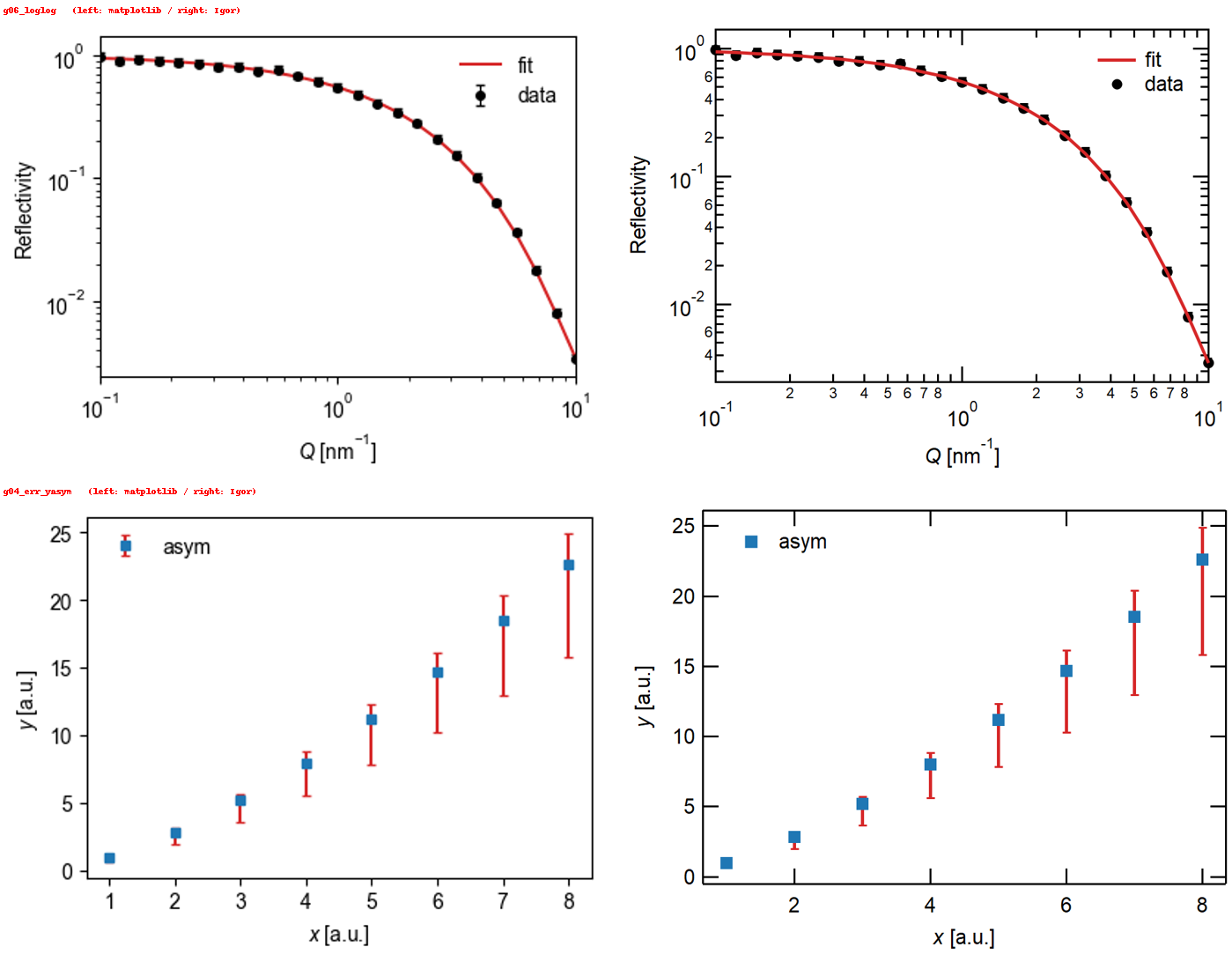
Turn a matplotlib figure into an Igor Pro graph — the same look, editable in Igor.
export_igor(fig, outdir, name) writes one HDF5 file (name.h5) containing the real data and the Igor drawing commands.
In Igor you load it with LoadPythonFigure() — no per-figure procedure files.
Why
Analysis and quick plotting often happen in Python; the publication-quality graph (and the collaborators' habits) live in Igor Pro. Re-drawing by hand loses time and consistency. This tool reproduces what matplotlib shows — data, axes, log scales, markers, dashes, error bars with caps, legends, labels, images, color scales and contours — as a native Igor graph that you can keep editing in Igor.
- Native Igor objects: traces, images,
ColorScale, and real Igor contours (AppendMatrixContour/ModifyContour) built from the original Z matrix. - Looks like the matplotlib figure, not "roughly": sizes, dash patterns, marker outlines, error-bar caps and label positions were measured on Igor and calibrated.
- Nothing is dropped silently: whatever Igor cannot reproduce is reported in
report.warnings. - Safe to open: the Igor loader runs only commands that match a strict allow-list, and rejects the whole file if any command does not.
- No extra Igor XOPs, no Python in Igor (works with Igor 8; Python is only needed to create the
.h5).
First: install the loader in Igor (once)
To load graphs, Igor needs the fixed loader ExportIgorGraphLoader.ipf (in igor/ of this repository; python -m export_igorgraph loader <folder> also writes it).
- Copy
ExportIgorGraphLoader.ipfinto (Windows):Documents\WaveMetrics\Igor Pro 8 User Files\Igor Procedures\- Files there are loaded automatically when Igor starts (this is the way that was tested).
- If you prefer not to auto-load it, put it in
...\Igor Pro 8 User Files\User Procedures\and load it when needed (File > Open File > Procedure…, or#include "ExportIgorGraphLoader"in the procedure window). This route is untested in this project.
- Restart Igor (needed if Igor is already running).
- Check that
LoadPythonFigureappears in the Macros menu. If not, look for compile errors in the procedure window. - To load a figure:
Macros > LoadPythonFigure, or runLoadPythonFigure()on the command line, and pick the.h5.
(LoadPythonFigure is a macro that just calls the function LoadPythonFigure_exec(). To give a path directly, call the function: LoadPythonFigure_exec(h5Path="C:\\folder\\fig1.h5").)
Quick start
pip install git+https://github.com/nlyamada/export-igorgraph # or: pip install . from a clone
import export_igorgraph                                 # import BEFORE contour(): see "Contours"
from export_igorgraph import export_igor
import matplotlib.pyplot as plt

fig, ax = plt.subplots(figsize=(4, 3))
ax.errorbar(q, R, yerr=dR, fmt="o", color="k", ms=4, capsize=2, label="data")
ax.plot(q, R_fit, "-", color="tab:red", lw=1.5, label="fit")
ax.set_xscale("log"); ax.set_yscale("log")
ax.set_xlabel(r"$Q$ [nm$^{-1}$]"); ax.set_ylabel("Reflectivity")
ax.legend(loc="upper right", frameon=False)

report = export_igor(fig, "out", "fig1")                # → out/fig1.h5
print(report.summary())                                 # warnings for anything Igor cannot reproduce
In Igor: LoadPythonFigure() and pick fig1.h5.
Formatting: your own defaults
The main settings are plain style= entries — tick, mirror, standoff, grid, width, height, font, gFont:
export_igor(fig, "out", "fig1", style={"tick": 0, "grid": 1, "width": 300, "height": 200})
Settings you always want can live in a JSON file (export_igorgraph_style.json in the current folder or ~/.export_igorgraph_style.json; see export_igorgraph_style.example.json). Unknown keys warn, invalid values raise an error. All keys: docs/en/usage.md.
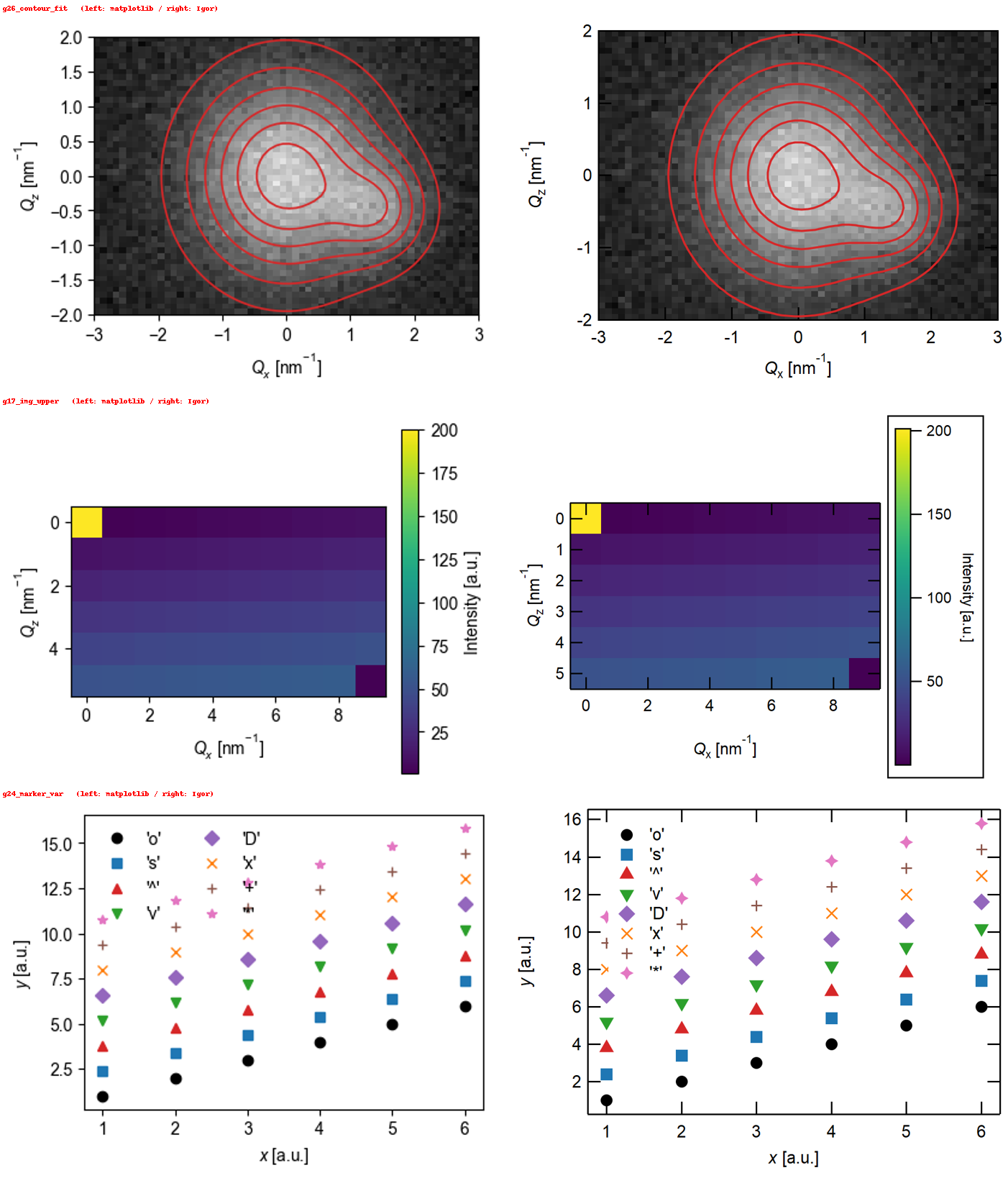
Contours over an image (e.g. a fit over 2-D data)
ax.imshow(data, extent=(x0, x1, y0, y1), origin="lower", cmap="gray", aspect="auto")
ax.contour(X, Y, fit, levels=levels, colors="tab:red", linewidths=1.2)
export_igor(fig, "out", "fig_fit")      # the contour becomes an Igor contour; change levels/colors later with ModifyContour
matplotlib does not keep the Z matrix of a contour set. import export_igorgraph wraps the public Axes.contour/contourf to remember (X, Y, Z) at call time;
if a contour was drawn earlier, pass export_igor(..., contour_data=(X, Y, Z)). Requires matplotlib ≥ 3.8.
How it works
matplotlib Figure ──export_igor()──▶ name.h5 (waves + commands) ──Igor: LoadPythonFigure()──▶ Igor graph
                                       │
                                       └─ the loader checks every command against an allow-list, then runs them
Status
- Verified on Igor Pro 8.04, Windows. Other Igor versions and macOS are untested (reports welcome).
- Python 3.9+; matplotlib 3.6–3.10 pass the test suite (contours need ≥ 3.8).
- What is supported, what is not, and known differences: docs/en/supported.md.
- How everything was verified and calibrated: docs/en/verified.md.
- The default layout is a compact single-column style (8 cm plot width, Arial, inside ticks). Use
use_mpl_size=Trueto take sizes from the matplotlib figure, or override anything viastyle=.
Safety
A .h5 carries commands that Igor executes, so the loader only runs commands that fully match a strict allow-list; if any command is rejected, nothing is loaded.
See docs/en/safety.md for the design and its limits, and SECURITY.md to report a problem.
Use with Claude
plugin/ is a Claude Code plugin (and the same skill can be packaged for Claude.ai): ask Claude to "draw this in Igor" and it writes the matplotlib code, runs export_igor, and — in Claude Code on Windows — can drive Igor to compare the result.
/plugin marketplace add nlyamada/export-igorgraph
/plugin install export-igorgraph@export-igorgraph
Documentation
Usage · Supported features · Safety · Verification · Driving Igor automatically · Developing · 日本語ドキュメント
License
MIT — see LICENSE.
Igor Pro is a product and trademark of WaveMetrics, Inc. This project is independent and not affiliated with or endorsed by WaveMetrics.
1 maintainer

Metadata
1 maintainer
Release files for export-igorgraph 0.1.0
For a detailed explanation of source distributions (sdists) and built distributions (wheels), please see the package formats documentation.
Source distribution (sdist)
| File | Size | Uploaded | |
|---|---|---|---|
| export_igorgraph-0.1.0.tar.gz | 82.1 kB | Details |
Built distribution (wheel)
| File | Interpreter | ABI | Platform | Reset |
|---|---|---|---|---|
| export_igorgraph-0.1.0-py3-none-any.whl | Python 3 | none | any | Details |
Total release size: 138.0 kB
Release files / export_igorgraph-0.1.0.tar.gz
| Download URL | export_igorgraph-0.1.0.tar.gz |
|---|---|
| Size | 82.1 kB |
| Tags | Source |
|
SHA-256 checksum How to use checksums |
97b7f822a3c1fed19f5fe808c5faae722ac80540eca96cb128c11c3ec92cc95a
|
|
BLAKE2b-256 checksum How to use checksums |
2c971052fbf77b93c85438a8eba60b27223c0e1aeb7e016dc800dec04dbfd8c6
|
| Upload date | |
|
Uploaded using Trusted Publishing? What is trusted publishing? |
Yes |
| Uploaded via |
twine/7.0.0 CPython/3.13.14
|
Provenance
Provenance describes where a file came from. On PyPI, provenance is shared via attestations, which provide a verifiable record of the build or publishing details. View details, limitations and caveats.


PyPI Publish Attestation
PyPI verified that this artifact, at this checksum, originated from the publisher listed below.
Signed by GitHub Actions, verified by PyPI on Oct 9, 2026.
Transparency logRelease files / export_igorgraph-0.1.0-py3-none-any.whl
| Download URL | export_igorgraph-0.1.0-py3-none-any.whl |
|---|---|
| Size | 55.8 kB |
| Tags | Python 3 |
|
SHA-256 checksum How to use checksums |
ed3437d32f51ddd4d863ff0ce17150310e04664d2022392382b5048446987931
|
|
BLAKE2b-256 checksum How to use checksums |
9c300711c703259a33f4d2d97ea31b96e70dcd694ef13093a4bdd55669b4c2bb
|
| Upload date | |
|
Uploaded using Trusted Publishing? What is trusted publishing? |
Yes |
| Uploaded via |
twine/7.0.0 CPython/3.13.14
|
Provenance
Provenance describes where a file came from. On PyPI, provenance is shared via attestations, which provide a verifiable record of the build or publishing details. View details, limitations and caveats.
PyPI Publish Attestation
PyPI verified that this artifact, at this checksum, originated from the publisher listed below.
Signed by GitHub Actions, verified by PyPI on Oct 9, 2026.
Transparency log












