
ExposeText
Expose the text in a document for modification.





⚠️ Disclaimer ⚠️: This is a prototype. Do not use for anything critical.
What is ExposeText?
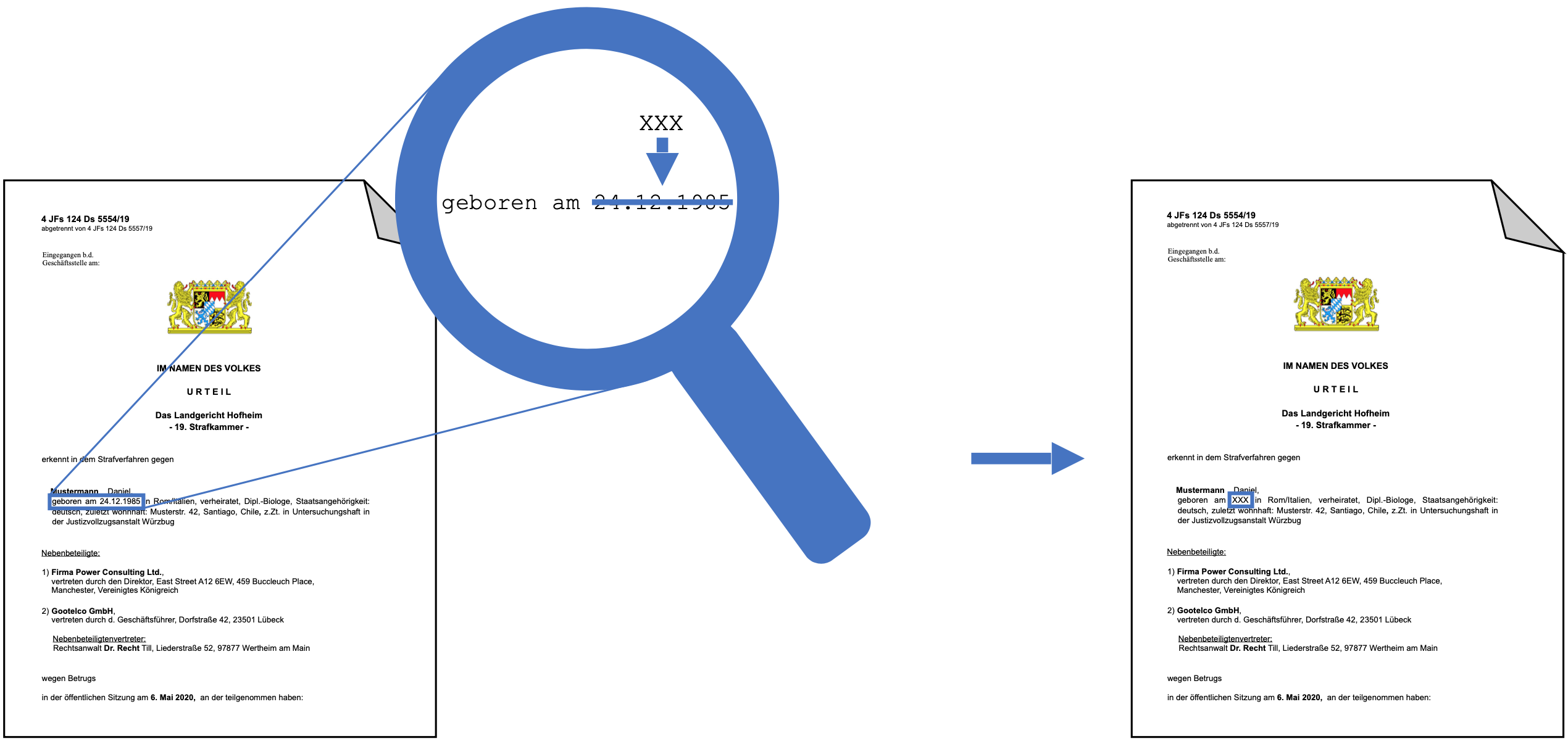
Dealing with document file formats can be quite painful. Oftentimes code must be written that’s specific to one file format. We have written ExposeText with the goal to make modifying documents as simple as changing Python strings. A slice of the original document can be directly assigned a new content by using the character indices of the extracted text, all while keeping the document's original formatting.
We published a blog post about ExposeText on Medium.
Supported Formats
ExposeText has prototypical support for the following file formats:
- .txt
- Per default, the encoding is assumed to be UTF-8.
- You can install chardet (
pip install chardet), to automatically detect the encoding.
- .html
- You can pass either an HTML snippet, an HTML body or a complete HTML document. If you pass a complete HTML document, every text content outside the body is ignored.
- The output file will always be encoded in UTF-8.
- .docx
- Only text within
<w:t>tags (the tags for anything that is text) is exposed. E.g. the mailto link of an e-mail address is not exposed.
- Only text within
- .pdf
- Per default, text in PDFs can only be replaced with characters that occur in the file (fonts are stored economically in PDF files).
- If you install the additional dependencies Poppler (pdftohtml) and wkhtmltopdf, the PDF is rerendered and there is no more restriction on the characters that can be used.
Usage
ExposeText supports files as well as binary data objects. Depending on your use case you can use one of the following interfaces for making modifications.
Installation
expose-text can be installed from PyPi and has to be installed in a virtual environment (venv or conda for instance).
pip install expose-text
Slicing API
The slicing API applies each alteration immediately.
Exposing and modifying text inside a file:
>>> from expose_text import FileWrapper
>>>
>>> wrapper = FileWrapper("myfile.docx")
>>> wrapper.text
'This is the content as string.'

>>> wrapper[12:19] = "new content"
>>> wrapper.text
'This is the new content as string.'

>>> wrapper[33] = "!"  # note that you have to use the updated index here
>>> wrapper.text
'This is the new content as string!'

>>> wrapper.save("newfile.docx")
If you want to work directly with binary data you have to pass the file format:
>>> from expose_text import BinaryWrapper
>>>
>>> wrapper = BinaryWrapper(my_bytes, ".docx")
>>> wrapper.text
'This is the content as string.'

>>> wrapper[12:19] = "new content"
>>> wrapper.text
'This is the new content as string.'

>>> wrapper.bytes  # get the modified file as bytes
b'...'
Functional API
With the functional API, you can queue several alterations based on the initial indices and then apply them together.
>>> wrapper.text
'This is the content as string.'

>>> wrapper.add_alter(12, 19, "new content")
>>> wrapper.add_alter(29, 30, "!")
>>> wrapper.apply_alters()
>>> wrapper.text
'This is the new content as string!'
Development
Install requirements
You can install all (production and development) requirements using:
pip install -r requirements.txt
Install the pre-commit hooks
This repository uses git hooks to validate code quality and formatting.
pre-commit install
git config --bool flake8.strict true  # Makes the commit fail if flake8 reports an error
To run the hooks:
pre-commit run --all-files
Testing
The tests can be executed with:
pytest --doctest-modules --cov-report term --cov=expose_text
Testing in Docker
You can run the test as well in a Docker container:
docker build -t expose-text
docker run expose-text
How to contact us
For usage questions, bugs, or suggestions please file a Github issue. If you would like to contribute or have other questions please email hello@openredact.org.
License
1 maintainer

Metadata
1 maintainer
Release files for expose-text 0.1.6
For a detailed explanation of source distributions (sdists) and built distributions (wheels), please see the package formats documentation.
Source distribution (sdist)
| File | Size | Uploaded | Provenance | |
|---|---|---|---|---|
| expose-text-0.1.6.tar.gz | 25.9 kB | Without provenance | Details |
Built distribution (wheel)
| File | Interpreter | ABI | Platform | Reset |
|---|---|---|---|---|
| expose_text-0.1.6-py3-none-any.whl | Python 3 | none | any | Details |
Total release size: 53.7 kB
Release files / expose-text-0.1.6.tar.gz
| Download URL | expose-text-0.1.6.tar.gz |
|---|---|
| Size | 25.9 kB |
| Tags | Source |
|
SHA-256 checksum How to use checksums |
2b6bc3280dbf0dbe8ac4c4b6f92e2755ab619a84f134a83e30c7d079408725dd
|
|
BLAKE2b-256 checksum How to use checksums |
20c4d726ca1015c7a3a518bf76fc66cf242575279ead4053601006d71e892afe
|
| Upload date | |
|
Uploaded using Trusted Publishing? What is trusted publishing? |
No |
| Uploaded via |
twine/3.2.0 pkginfo/1.5.0.1 requests/2.24.0 setuptools/49.6.0 requests-toolbelt/0.9.1 tqdm/4.48.2 CPython/3.8.5
|
Release files / expose_text-0.1.6-py3-none-any.whl
| Download URL | expose_text-0.1.6-py3-none-any.whl |
|---|---|
| Size | 27.8 kB |
| Tags | Python 3 |
|
SHA-256 checksum How to use checksums |
69732cd755c35d5c95545102c410f54c69fb65b0768a4e9675cd5894112fe3c6
|
|
BLAKE2b-256 checksum How to use checksums |
34788c40685f860ea529331b53490c6dce77de0eef11fa8fd77b40bb8a4cbe4c
|
| Upload date | |
|
Uploaded using Trusted Publishing? What is trusted publishing? |
No |
| Uploaded via |
twine/3.2.0 pkginfo/1.5.0.1 requests/2.24.0 setuptools/49.6.0 requests-toolbelt/0.9.1 tqdm/4.48.2 CPython/3.8.5
|
Security for expose-text 0.1.6
Provenance
Provenance describes where a file came from. On PyPI, provenance is shared via attestations, which provide a verifiable record of the build or publishing details. View details, limitations and caveats.
No provenance found
None of the files in this release were uploaded with provenance metadata.
A note on package security
PyPI is a repository for distributing packages, not a service for auditing them. While third-party security researchers and our staff do their best to detect and remove malicious packages, PyPI cannot guarantee the quality, security or suitability of any given package.
To learn more about protecting yourself from malicious actors, visit our package security documentation.














