


ExPreSS
Exabyte Property Extractor, Sourcer, Serializer (ExPreSS) is a Python package to extract material- and simulation-related properties and serialize them according to the Exabyte Data Convention (EDC) outlined in Exabyte Source of Schemas and Examples (ESSE).
1. Overview
The following Functionality is supported:
- Extract structural information, material properties and from simulation data
- Serialize extracted information according to ESSE data standard
- Support for multiple simulation engines, including:
- VASP
- Quantum ESPRESSO
- JARVIS
- others, to be added
The package is written in a modular way easy to extend for additional applications and properties of interest. Contributions can be in the form of additional functionality and bug/issue reports.
2. Installation
ExPreSS can be installed as a Python package either via PyPi or the repository as below.
2.1. From PyPi
pip install express-py
2.2. From GitHub repository
See "Development" section below.
3. Usage
3.1. Extract Total Energy
The following example demonstrates how to initialize an ExPreSS class instance to extract and serialize total energy produced in a Quantum ESPRESSO calculation. The full path to the calculation directory (work_dir) and the file containing standard output (stdout_file) are required to be passed as arguments to the underlying Espresso parser.
import json
from express import ExPrESS

kwargs = {
    "work_dir": "./tests/fixtures/espresso/test-001",
    "stdout_file": "./tests/fixtures/espresso/test-001/pw-scf.out"

}

handler = ExPrESS("espresso", **kwargs)
data = handler.property("total_energy", **kwargs)
print(json.dumps(data, indent=4))
3.2. Extract Relaxed Structure
In this example the final structure of a VASP calculation is extracted and is serialized to a material. The final structure is extracted from the CONTCAR file located in the calculation directory (work_dir). is_final_structure=True argument should be passed to the Material Property class to let it know to extract final structure.
import json
from express import ExPrESS

kwargs = {
    "work_dir": "./tests/fixtures/vasp/test-001",
    "stdout_file": "./tests/fixtures/vasp/test-001/vasp.out"

}

handler = ExPrESS("vasp", **kwargs)
data = handler.property("material", is_final_structure=True, **kwargs)
print(json.dumps(data, indent=4))
3.3. Extract Structure from input file
One can use StructureParser to extract materials from POSCAR or PW input files. Please note that StructureParser class only works with strings and not files and therefore the input files should be read first and then passed to the parser.
import json
from express import ExPrESS

with open("./tests/fixtures/vasp/test-001/POSCAR") as f:
    poscar = f.read()

kwargs = {
    "structure_string": poscar,
    "structure_format": "poscar"
}

handler = ExPrESS("structure", **kwargs)
data = handler.property("material", **kwargs)
print(json.dumps(data, indent=4))

with open("./tests/fixtures/espresso/test-001/pw-scf.in") as f:
    pwscf_input = f.read()

kwargs = {
    "structure_string": pwscf_input,
    "structure_format": "espresso-in"
}

handler = ExPrESS("structure", **kwargs)
data = handler.property("material", **kwargs)
print(json.dumps(data, indent=4))
4. Development
4.1. Install From GitHub
- Install git-lfs in order to pull the files stored on Git LFS.
- Clone repository:
git clone git@github.com:Exabyte-io/express.git
- Install virtualenv using pip if not already present:
pip install virtualenv
- Create virtual environment and install required packages:
cd express
virtualenv venv
source venv/bin/activate
export GIT_LFS_SKIP_SMUDGE=1
pip install -e PATH_TO_EXPRESS_REPOSITORY
4.2. Tests
There are two types of tests in ExPreSS: unit and integration, implemented in Python Unit Testing Framework.
4.2.1. Unit Tests
Unit tests are used to assert properties are serialized according to EDC. Properties classes are initialized with mocked parser data and then are serialized to assert functionality.
4.2.2. Integration Tests
Parsers functionality is tested through integration tests. The parsers are initialized with the configuration specified in the Tests Manifest and then the functionality is asserted.
4.2.3. Running Tests
Note that the CI tests are run using a github action in
.github, and not using the script below, so there could be discrepancies.
Run the following commands to run the tests ("unit" tests only in this case).
python -m unittest discover --verbose --catch --start-directory tests/unit
5. Architecture
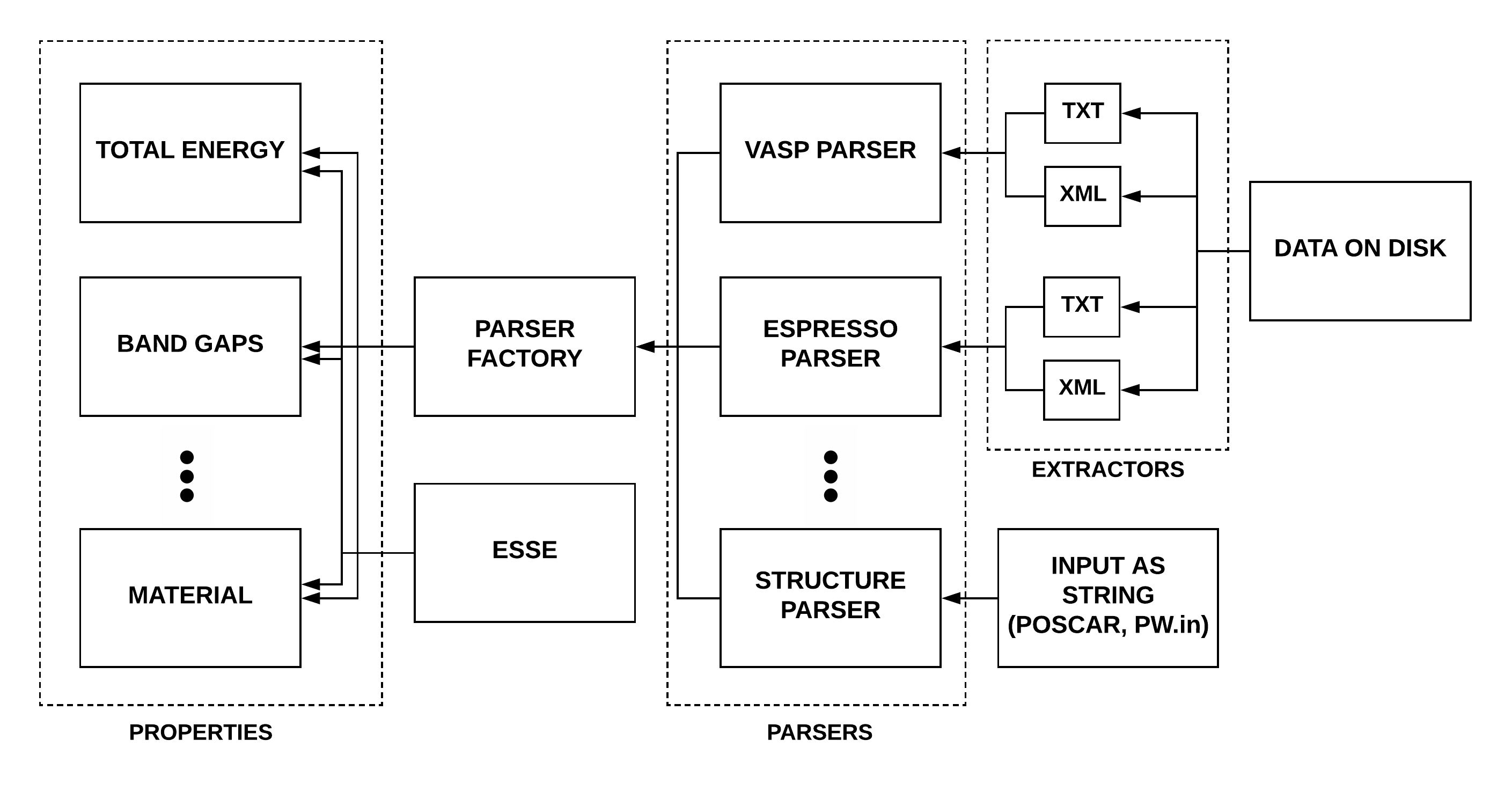
The following diagram presents the package architecture. The package provides an interface to extract properties in EDC format. Inside the interface Property classes are initialized with a Parser (Vasp, Espresso, or Structure) depending on the given parameters through the parser factory. Each Property class implements required calls to Parser functions listed in these Mixins Classes to extract raw data either from the textual files, XML files or input files in string format and implements a serializer to form the final property according to the EDC format.
5.1. Parsers
As explained above, ExPreSS parsers are responsible for extracting raw data from different sources such as data on the disk and provide the raw data to properties classes. In order to make sure all parsers implement the same interfaces and abstract properties classes from the parsers implementations, a set a Mixin Classes are provided which should be mixed with the parsers. The parsers must implement Mixins' abstract methods at the time of inheritance.
5.2. Properties
ExPreSS properties classes are responsible to form the properties based on the raw data provided by the parsers and serialize the property according to EDC. A list of supported properties are available in here.
5.3. Extractors
Extractors are classes that are composed with the parsers to extract raw data from the corresponding sources such as text or XML.
6. Contribution
This repository is an open-source work-in-progress and we welcome contributions. We suggest forking this repository and introducing the adjustments there. The changes in the fork can further be considered for merging into this repository as explained in GitHub Standard Fork and Pull Request Workflow.
7. TODO list
Desirable features for implementation:
- Add support for other properties
- Add support for other types of applications, parsers and extractors
- other (TBA)
Links
1 maintainer

Download files
Download the file for your platform. If you're not sure which to choose, learn more about installing packages.
Source Distribution
Built Distribution
Filter files by name, interpreter, ABI, and platform.
If you're not sure about the file name format, learn more about wheel file names.
Copy a direct link to the current filters
File details
Details for the file express_py-2026.8.7.post0.tar.gz.
File metadata
- Download URL: express_py-2026.8.7.post0.tar.gz
- Upload date:
- Size: 6.1 MB
- Tags: Source
- Uploaded using Trusted Publishing? No
- Uploaded via:
twine/3.7.1 importlib_metadata/9.0.0 pkginfo/1.12.1.2 requests/2.34.2 requests-toolbelt/1.0.0 tqdm/4.70.0 CPython/3.10.13
File hashes
| Algorithm | Hash digest | |
|---|---|---|
| SHA256 |
5865eef6d07e6cdd468e4bacdbd8d1e7cae442cea595fcef212b8b80bb237d9b
|
|
| MD5 |
4af454861feda72143c0ab5cc2a3338d
|
|
| BLAKE2b-256 |
95f05488cebf5b8f98ed03b0ea9d616846fa6d920895a79a97526296a0b80a93
|
File details
Details for the file express_py-2026.8.7.post0-py3-none-any.whl.
File metadata
- Download URL: express_py-2026.8.7.post0-py3-none-any.whl
- Upload date:
- Size: 84.9 kB
- Tags: Python 3
- Uploaded using Trusted Publishing? No
- Uploaded via:
twine/3.7.1 importlib_metadata/9.0.0 pkginfo/1.12.1.2 requests/2.34.2 requests-toolbelt/1.0.0 tqdm/4.70.0 CPython/3.10.13
File hashes
| Algorithm | Hash digest | |
|---|---|---|
| SHA256 |
60362bed3a5d5d4128bf2d461da76e87dfb2b915a76d2dac75aaacaac67b4693
|
|
| MD5 |
958cef39490734aa5920d120c7142ff3
|
|
| BLAKE2b-256 |
c38bd5a86adb49751189060410bb1d0114535ead4011c7055af46cbd65c7cf89
|







