
Lightweight, extractor-agnostic tool to visually inspect PDF text-extraction quality before it silently breaks your RAG or document pipeline.

Project description
extractlint
A lightweight, extractor-agnostic tool for catching bad PDF text extraction before it silently breaks your RAG or document pipeline.
The problem
If you've built anything that pulls text out of PDFs and feeds it to an LLM, you've hit this: the extraction looks like it worked -- no errors, no crash -- but a table got flattened into garbage, or a scanned page came back completely empty, and you don't find out until the model gives a confidently wrong answer three steps downstream. By then you're debugging retrieval quality instead of the actual extraction bug.
Most tools in this space (LlamaParse, Unstructured, Docling, and friends) compete on being a better parser. None of them are a lightweight QA layer that sits on top of whichever parser you already picked and tells you which pages to actually go check. That's what this is.
What it does
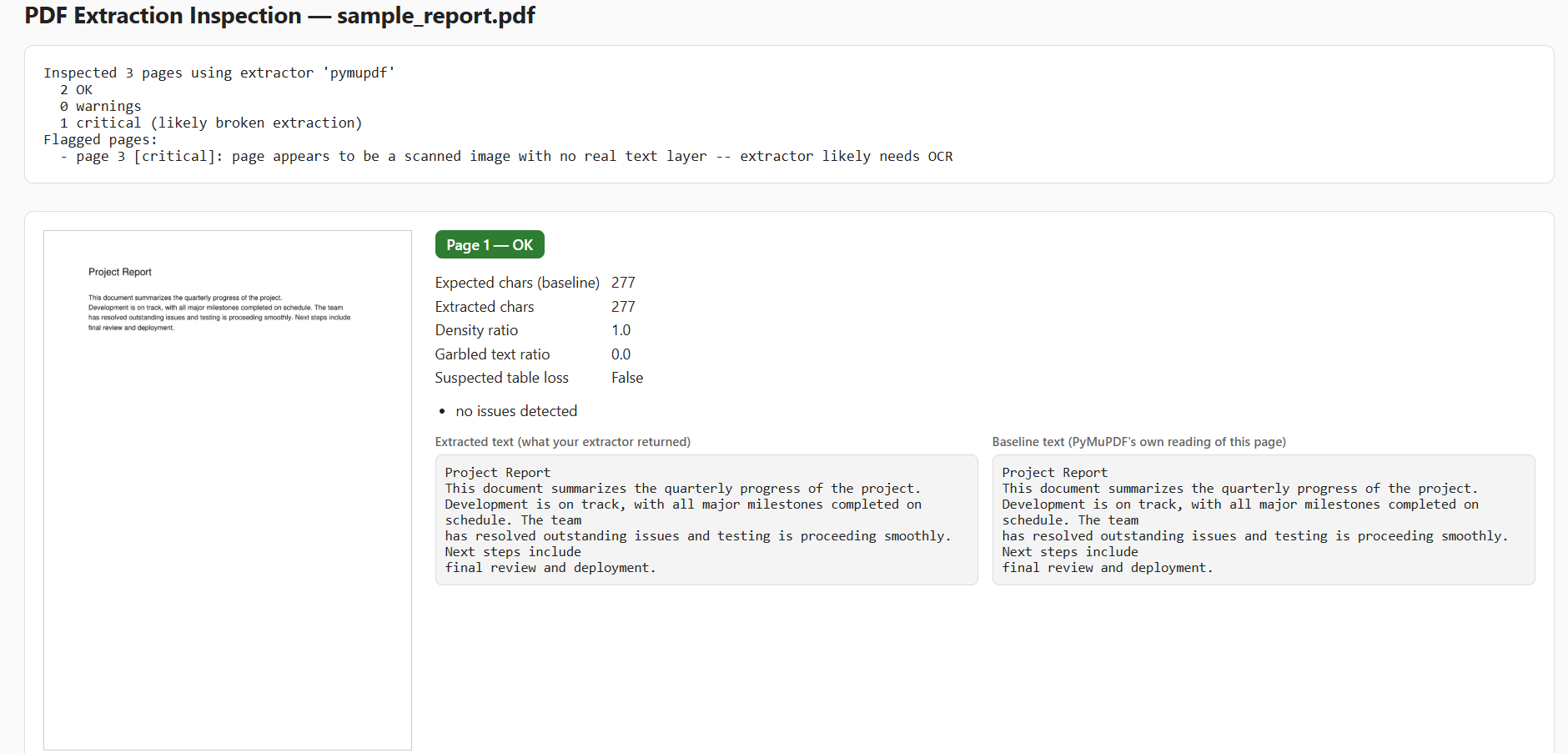
Point it at a PDF and either your own already-extracted text, or a known extractor, and it flags pages where something likely went wrong -- low text density, garbled characters, a table that got dropped, or a scanned page with no real text layer at all -- and renders a side-by-side visual report so you can see the original page next to what came out.
It does not try to be a better extractor, and it does not use a trained model to score pages. The scoring is heuristic (text density vs. a PyMuPDF baseline, garbled-character ratio, image-coverage detection for scanned pages). It's a fast sanity check, not a certified accuracy metric -- treat flagged pages as "go look at this," not as ground truth.
Install
pip install extractlint
# or, for the pdfplumber adapter too:
pip install "extractlint[pdfplumber]"
Quickstart
import extractlint

# Option 1: you already extracted the text yourself
report = extractlint.inspect("report.pdf", extracted=my_extracted_text)

# Option 2: let it run a known extractor for you
report = extractlint.inspect("report.pdf", extractor="pymupdf")

print(report.summary())
report.save("report.html")   # visual side-by-side, opens in any browser
extracted accepts whatever you already have lying around: a single string, a list of per-page strings, or a {page_number: text} dict. No intermediate files required.
Using your own extractor
Built-in adapters: pymupdf, pdfplumber. To use anything else (Unstructured, Docling, LlamaParse, your own pipeline), register it -- no fork required:
from extractlint import register_adapter, ExtractedPage

def my_extractor(pdf_path):
    return [ExtractedPage(page_number=1, text="...", has_tables=False)]

register_adapter("my_extractor", my_extractor)
report = extractlint.inspect("report.pdf", extractor="my_extractor")
What gets flagged
| Signal | What it catches |
|---|---|
| Density ratio | Extracted far less text than the PDF's own text layer suggests it should have |
| Garbled text ratio | High proportion of stray/non-standard characters (mojibake, broken encoding) |
| Suspected table loss | Page visually contains a table, extractor reported none |
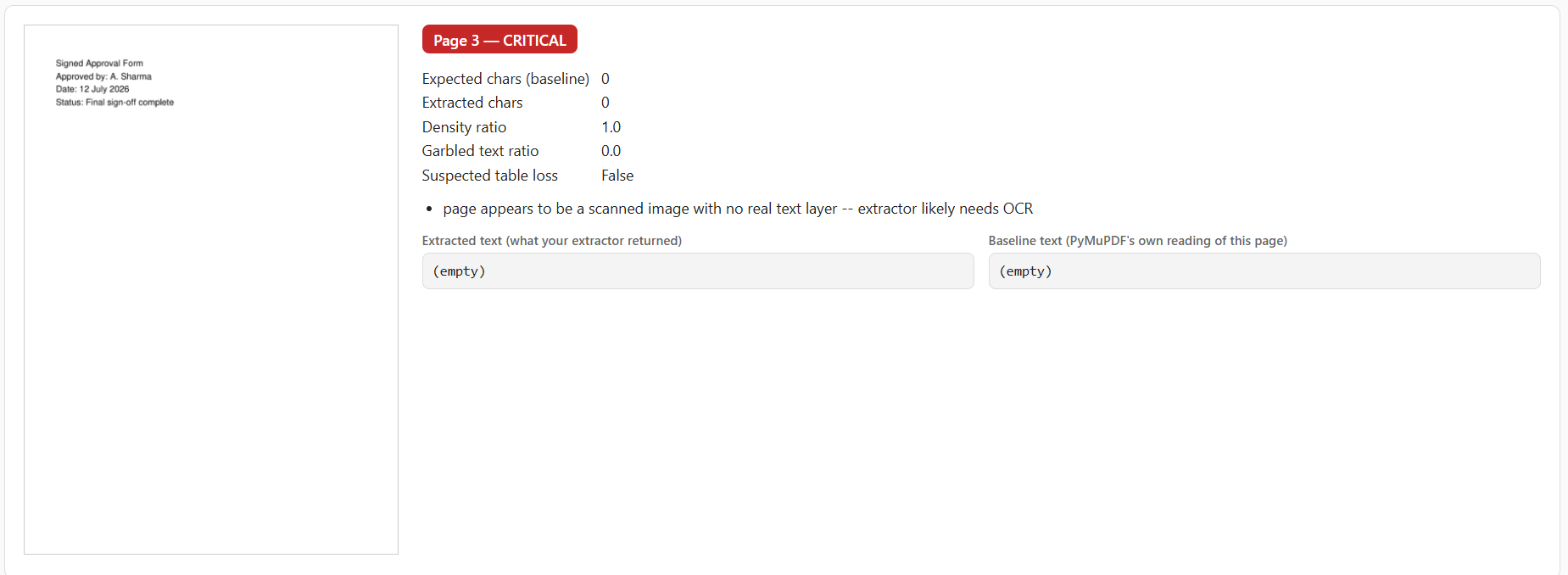
| Suspected scanned page | Page is mostly image with no real text layer -- extractor likely needs OCR |
A flagged page shows the extracted text next to PyMuPDF's own baseline reading, so you can see exactly what went wrong instead of just a score:
Use cases
- RAG pipeline debugging -- catch bad extraction before it corrupts your vector store, instead of debugging retrieval quality after the fact
- Document QA systems -- quickly audit a batch of PDFs before feeding them to an LLM
- Migrating extractors -- compare how well two different extraction libraries handle the same document set
- Pre-flight checks -- run before an automated pipeline to flag documents that need manual review or OCR
API reference
inspect(pdf_path, extracted=None, extractor=None)
| Parameter | Description |
|---|---|
pdf_path |
Path to the PDF file |
extracted |
Text you already extracted -- a string, list of strings, or {page_number: text} dict |
extractor |
Name of a registered adapter to run for you (e.g. "pymupdf", "pdfplumber") |
Exactly one of extracted or extractor must be given. Returns an InspectionReport.
InspectionReport
| Method / property | Description |
|---|---|
.summary() |
Plain-text summary of results |
.flagged_pages |
List of pages with warnings or critical issues |
.save(path) |
Write the visual side-by-side HTML report to disk |
.show() |
Save to a temp file and open it in your browser |
Requirements
- Python 3.9+
- PyMuPDF (installed automatically)
- pdfplumber (optional, only needed for that adapter)
Limitations, honestly
- The "expected text" baseline comes from PyMuPDF's own text layer. If PyMuPDF itself can't see something (e.g. a scanned page), density comparison alone can't catch it -- that's why scanned-page detection is a separate check based on image coverage, not density.
- Heuristic thresholds are tuned for typical documents (reports, forms, structured text), not exotic layouts. Expect to tune
scoring.py's thresholds for your own document types. - This checks extraction coverage and structure, not semantic correctness. A page can score "ok" and still have subtly wrong text if the extractor introduced errors within otherwise-plausible-looking output.
Why this exists
Built after running into exactly this problem in a medical report simplifier that used PyMuPDF + an LLM to turn lab reports into plain language -- trusting the extraction step silently was the riskiest part of that pipeline.
Contributing
Contributions are welcome -- feel free to open an issue or submit a pull request.
License
MIT


Download files
Download the file for your platform. If you're not sure which to choose, learn more about installing packages.
Source Distribution
Built Distribution
Filter files by name, interpreter, ABI, and platform.
If you're not sure about the file name format, learn more about wheel file names.
Copy a direct link to the current filters
File details
Details for the file extractlint-0.1.1.tar.gz.
File metadata
- Download URL: extractlint-0.1.1.tar.gz
- Upload date:
- Size: 13.1 kB
- Tags: Source
- Uploaded using Trusted Publishing? No
- Uploaded via: twine/6.2.0 CPython/3.13.3
File hashes
| Algorithm | Hash digest | |
|---|---|---|
| SHA256 |
613f2d656c57f558b3eb62ee39ee05783b81b4780e9585c6958180dcc13165f8
|
|
| MD5 |
1b28b273897395a3618d84f6e841add2
|
|
| BLAKE2b-256 |
a0e5107b1060fcc319ce2b0c41c437f34e66d147390708b76a9f62013d4fc993
|
File details
Details for the file extractlint-0.1.1-py3-none-any.whl.
File metadata
- Download URL: extractlint-0.1.1-py3-none-any.whl
- Upload date:
- Size: 11.6 kB
- Tags: Python 3
- Uploaded using Trusted Publishing? No
- Uploaded via: twine/6.2.0 CPython/3.13.3
File hashes
| Algorithm | Hash digest | |
|---|---|---|
| SHA256 |
809d9a6c84e0fc4eed3a781feae8a6e52110b75d262121c7f834e13c0ea45189
|
|
| MD5 |
e3d26c52a75c1f6a07b8701844bbc864
|
|
| BLAKE2b-256 |
08bc49f0d8401d00a1c34efb45c5d8d3ba50387da328997bf90f0a49f48dc296
|






