
EyeBrowse — a stealthy, LLM-drivable browser-control engine (CloakBrowser, stealth Chromium), consumed as a library and over MCP.

Project description
👁️ EyeBrowse
A stealthy, LLM-drivable browser engine — one codebase, two faces.
A Python library and an MCP server for driving a real, hard-to-detect browser, so legitimate automation isn't false-flagged or IP-banned by Cloudflare, DataDome, Akamai, or PerimeterX. Built on CloakBrowser — a stealth Chromium (Chrome/146) that's a Playwright drop-in — so EyeBrowse gets the full Chrome DevTools Protocol: trusted cursorless clicks, deep network inspection, MHTML, PDF, and native video.





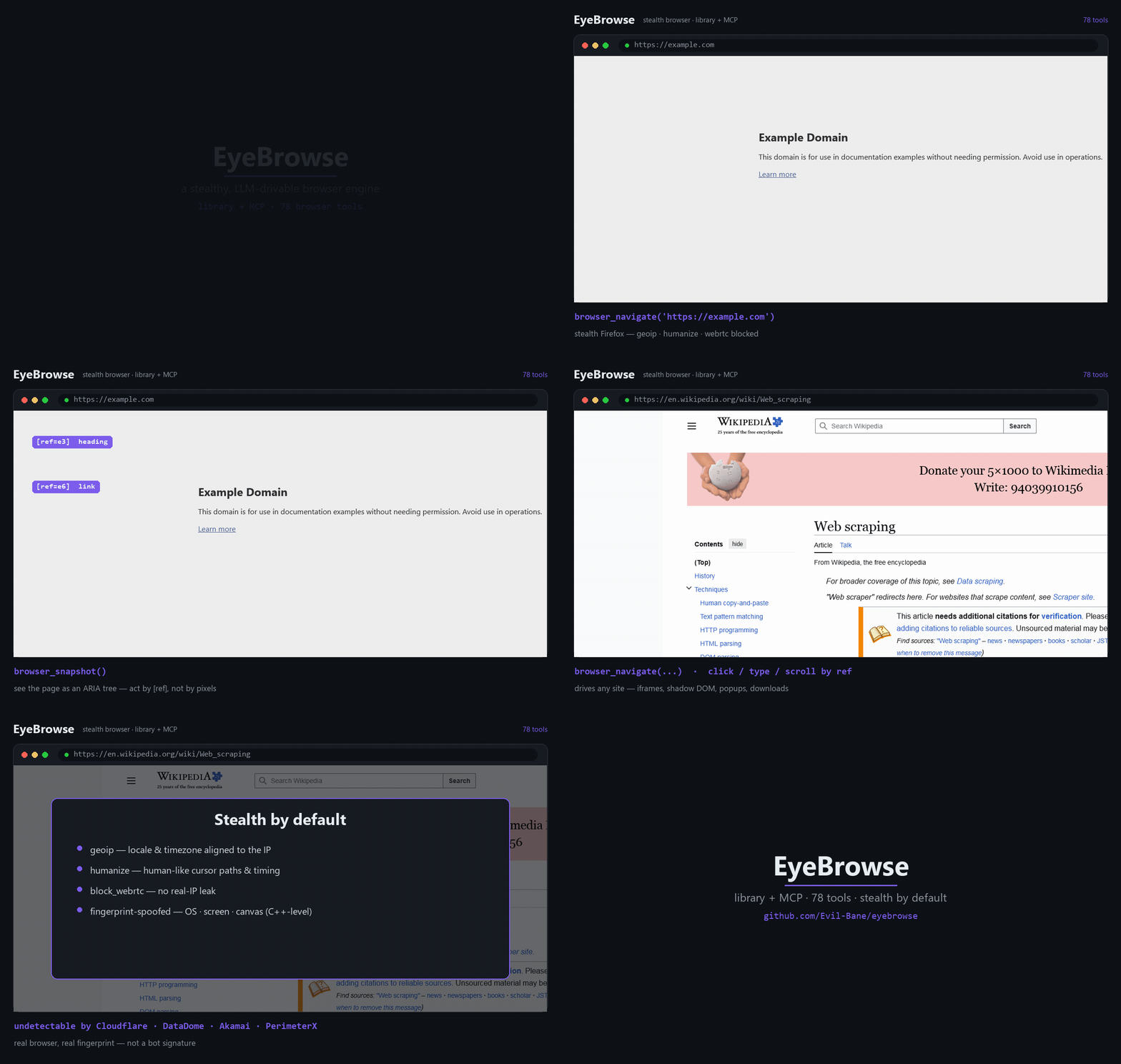
▶ Higher-quality MP4: docs/demo.mp4 — a real EyeBrowse session captured with native video (examples/make_demo.py)
Why EyeBrowse?
- 🥷 Stealth by default — engine-level fingerprint spoofing (
geoip+humanizeon out of the box, novel fingerprint per launch);navigator.webdrivermasked; viewport auto-sized to the spoofed screen. Nopuppeteer-extraband-aids — the anti-detection is compiled into the browser. - 🤖 Built for LLMs — pages are read as an ARIA tree with
[ref=…]handles; the model acts by ref (click/type/hover), not by brittle CSS or raw pixels. Cross-origin iframes, shadow DOM, popups — handled. - ⚡ Chrome DevTools Protocol — trusted, cursorless clicks by node ref (
Input.dispatchMouseEvent), rawNetwork/Performance/Emulationaccess, MHTML snapshots, PDF export, and native video — all reachable as tools. - 🧰 Library and MCP from one codebase — a clean Python API (
EyeBrowse+Session), mirrored 1:1 by a thin MCP server (81browser_*tools) for Claude Code and any MCP client. - 🪟 Never boxed in — the curated high-level API doesn't hide Playwright: reach
session.page/.context/.browserfor anything it doesn't wrap. - 🔋 Batteries included — multi-session, proxy + identity rotation, API-mode captcha solvers, native video, full HAR capture, and clean-markdown extraction.
Scope. EyeBrowse is a low-level browser engine — it holds no workflow logic. Consumers decide what to do; the engine provides what's possible.
Contents
Quickstart · Install · Features · Library · MCP · Proxy & identity · Extraction · Recording · How it works · Caveats · Tools · License
Quickstart
pip install eyebrowse
# The stealth-Chromium binary downloads automatically on first launch — nothing else to run.
import asyncio
from eyebrowse import EyeBrowse

async def main():
    eb = EyeBrowse()                          # stealth defaults: geoip · humanize
    async with eb.session() as s:
        await s.navigate("https://example.com")
        print(await s.snapshot())             # ARIA tree with [ref=...] handles
        await s.click("e6")                   # act on a ref from the snapshot
    await eb.aclose()

asyncio.run(main())
…or wire it into Claude Code (or any MCP client) — see Use over MCP.
Install
From PyPI
pip install eyebrowse                 # or: uv pip install eyebrowse
# CloakBrowser fetches its Chromium binary lazily on first launch — nothing to run.
pip install "eyebrowse[extract]"     # optional: + Crawl4AI markdown extraction (heavier)
From source (development)
git clone https://github.com/Evil-Bane/eyebrowse && cd eyebrowse
uv sync                              # core engine  (add --extra extract for Crawl4AI)
cp .env.example .env                 # only if you use a proxy / captcha keys
Python 3.12 (pinned <3.13). Engine: cloakbrowser>=0.3 (stealth Chromium, Chrome/146), on
playwright 1.60 and mcp 1.27.
Features
| 🥷 Stealth | CloakBrowser's patched-Chromium fingerprint spoofing (novel --fingerprint per launch); geoip + humanize by default; webdriver masked; viewport matched to the spoofed screen. |
| 🤖 LLM interaction | aria_snapshot(mode="ai") → ARIA tree + [ref] handles; click / type / hover / select / drag / file-upload / dialogs / keyboard; coordinate mouse too. |
| ⚡ CDP | trusted cursorless click by ref, raw CDP (Network / Performance / Emulation), MHTML capture, PDF export. |
| 🪟 Frames & DOM | cross-origin iframe routing by ref, shadow-DOM piercing, popup/new-tab switching, evaluate inside any frame. |
| 🗂 Multi-session | independent stealth sessions, each with its own context / identity / proxy. |
| 🌐 Network | inspect requests/responses (incl. XHR/fetch bodies & WebSocket frames), block URLs, mock responses, go offline, full HAR export. |
| 💾 State | cookies, localStorage & sessionStorage (CRUD), storage_state save/reload. |
| 🪪 Identity rotation | fresh fingerprint + isolated profile + paired proxy; pluggable residential ProxyProvider. |
| 🧩 Captcha | pluggable API-mode solvers (CapSolver / 2Captcha / CapMonster / NextCaptcha) + TOTP — no browser extension. |
| 📄 Extraction | Crawl4AI raw: feed → clean, token-efficient markdown (no LLM, no API keys). |
| 🎥 Capture | screenshots, Playwright tracing, and native video (.webm). |
| ✅ Verify & debug | assertions, element highlighting, locator generation, geolocation/header emulation. |
Full per-tool reference: docs/TOOLS.md (81 tools across 18 groups).
Use as a library
import asyncio
from eyebrowse import EyeBrowse

async def main():
    eb = EyeBrowse()                           # stealth defaults
    try:
        async with eb.session() as s:          # a stealth session (auto-closed)
            await s.navigate("https://example.com")
            print(await s.snapshot())          # ARIA tree with [ref=...] handles
            await s.click("e6")                # act on a ref
            await s.type("e8", "hello", submit=True)
            png = await s.screenshot(full_page=True)
            title = await s.page.title()        # full Playwright power when you need it
    finally:
        await eb.aclose()

asyncio.run(main())
Run the included proof: uv run python examples/direct_usage.py.
Use over MCP
EyeBrowse ships an MCP server (eyebrowse-mcp, FastMCP over stdio). Add it to any MCP client.
Claude Code (CLI):
claude mcp add eyebrowse -- eyebrowse-mcp
Any MCP client (JSON config):
{
  "mcpServers": {
    "eyebrowse": {
      "command": "eyebrowse-mcp"
    }
  }
}
Then drive the loop: browser_navigate(url) → read the snapshot → act by ref
(browser_click / browser_type / …). A default session is auto-created, so most tools just
work. Full list: docs/TOOLS.md.
Proxy & identity (optional)
Runs proxyless by default (geoip still aligns locale/timezone to your real IP). Add a proxy
only when you want one:
await eb.new_session(proxy="http://user:pass@residential.example:8080")
await eb.rotate_identity(proxy="socks5://host:1080")   # fresh fingerprint + paired IP
await eb.new_session(no_proxy=True)                     # force proxyless
Set a default once via EYEBROWSE_PROXY_* in .env, eb.set_static_proxy(...), or a custom
ProxyProvider for rotation. Over MCP: browser_new_session(proxy_url=…) /
browser_new_identity(proxy_url=…) / browser_set_proxy(…).
reCAPTCHA v3 / reputation gates are score-based and key off IP + session reputation — a fresh browser on a flagged IP fails regardless of stealth. Pair EyeBrowse with a clean residential proxy.
Extraction
eb.extract() (or browser_extract) hands the rendered HTML to Crawl4AI's raw: feed and
returns clean, pruned markdown — no LLM is called and no LLM keys are ever read; the
consuming agent does any structuring.
md  = await eb.extract()                            # markdown string
res = await eb.extract(output_path="data/page.md")  # → {"path": ..., "chars": ...}
Recording
Native video — Playwright records the whole session to a .webm, written on close. The path
is known up-front; the file finalizes when the session closes:
s = await eb.new_session(record_video=True)
# ... drive the browser ...
print(await s.video_path())          # path is known up-front; file finalizes on close
await eb.close_session(s.id)
Over MCP: browser_new_session(record_video=True) → browser_video_path. Want a GIF for a README?
Convert the .webm with ffmpeg (ffmpeg -i demo.webm demo.gif). The demo at the top was captured
this way — see examples/make_demo.py.
How it works
CONSUMERS                         ENGINE (library: eyebrowse/)
 Claude Code  ──MCP──▶  mcp/  ──▶  EyeBrowse façade (public API)
 your code   ─ import ──────────▶   ├─ BrowserEngine (CloakBrowser / stealth Chromium)
 any MCP client                     ├─ proxy / identity rotation (pluggable)
                                    ├─ captcha solvers (pluggable, API-mode)
                                    └─ Crawl4AI (raw: feed) → clean markdown
The façade (EyeBrowse + Session) is the product; the MCP adapter is a thin 1:1 wrapper over
it. The high-level API is curated and LLM-friendly — not a reimplementation of all of Playwright
— and the raw page / context / browser objects are always one attribute away. The launcher
is the only engine-specific layer; everything else is plain Playwright.
Caveats
Worth knowing:
evaluateruns in the page's main world (page globals reachable). To override a page's widget globals and fire a site callback (e.g. for captcha), EyeBrowse injects a<script>so the code runs in the page world — seecaptcha/inject.py.- HAR export closes the session — Playwright only flushes the HAR buffer when the context
closes. Use the checkpoint pattern:
browser_storage_state→browser_har_export→browser_new_session(storage_state=...). For the initiator-rich Chrome HAR (JS call stacks), reach theNetwork.*domain viabrowser_cdp_send. - Native video is
.webm— convert to GIF/MP4 with ffmpeg if you need another format.
Project layout
eyebrowse/
  api.py            EyeBrowse façade — the single public entry point
  config.py         settings / secrets (pydantic-settings)
  snapshot.py       aria_snapshot(mode="ai") + aria-ref= resolution
  proxy.py          ProxyConfig + pluggable ProxyProvider
  identity.py       Identity + random_identity() (isolated profile dir)
  extract.py        Crawl4AI raw: feed → markdown (lazy, optional dep)
  engine/           engine.py (CloakBrowser launch) + session.py (verbs + registry)
  captcha/          solver ABC + 4 providers + DOM detect/inject
  mcp/              FastMCP server + state + tools/ (18 groups, 81 tools)
examples/direct_usage.py   library proof (no MCP)
examples/make_demo.py      the native-video demo above
docs/TOOLS.md              full tool reference
Build notes, version-pin rationale, and verified engine behavior live in CLAUDE.md.
Use responsibly
EyeBrowse drives a real browser with anti-detection features. Use it only against sites you own or are explicitly authorized to automate, and within their terms and applicable law.
License
MIT © Evil-Bane
Release history Release notifications | RSS feed


Download files
Download the file for your platform. If you're not sure which to choose, learn more about installing packages.
Source Distribution
Built Distribution
Filter files by name, interpreter, ABI, and platform.
If you're not sure about the file name format, learn more about wheel file names.
Copy a direct link to the current filters
File details
Details for the file eyebrowse-0.3.2.tar.gz.
File metadata
- Download URL: eyebrowse-0.3.2.tar.gz
- Upload date:
- Size: 2.7 MB
- Tags: Source
- Uploaded using Trusted Publishing? No
- Uploaded via: uv/0.11.14 {"installer":{"name":"uv","version":"0.11.14","subcommand":["publish"]},"python":null,"implementation":{"name":null,"version":null},"distro":null,"system":{"name":null,"release":null},"cpu":null,"openssl_version":null,"setuptools_version":null,"rustc_version":null,"ci":null}
File hashes
| Algorithm | Hash digest | |
|---|---|---|
| SHA256 |
8ea2540ca1f2bec4810b72601dfbb606a29aa7664b6220854c4f3247ee1ec2c5
|
|
| MD5 |
95cfb1c968c86881aa55148079df1c4e
|
|
| BLAKE2b-256 |
263f6e453a984bce4a289dd860624a138bba4961db14d3a647d316f670d308a3
|
File details
Details for the file eyebrowse-0.3.2-py3-none-any.whl.
File metadata
- Download URL: eyebrowse-0.3.2-py3-none-any.whl
- Upload date:
- Size: 62.7 kB
- Tags: Python 3
- Uploaded using Trusted Publishing? No
- Uploaded via: uv/0.11.14 {"installer":{"name":"uv","version":"0.11.14","subcommand":["publish"]},"python":null,"implementation":{"name":null,"version":null},"distro":null,"system":{"name":null,"release":null},"cpu":null,"openssl_version":null,"setuptools_version":null,"rustc_version":null,"ci":null}
File hashes
| Algorithm | Hash digest | |
|---|---|---|
| SHA256 |
2e587fd8c0f8ba2c7d9384b7a63f93d353caa547ce13a0378715d9c3cb9b4764
|
|
| MD5 |
c0949d4d29c32fef11f31d3f21940d89
|
|
| BLAKE2b-256 |
3d6f218748ea6ca816990b076983aed481131faa24e1adaecc5d1b7907188aa2
|






