
eyelogic-recorder

A lightweight Python client for EyeLogic
eye trackers, built on top of the official EyeLogic SDK. It adds what the SDK does not provide: asynchronous
recording of every gaze sample to plain CSV, timestamped messages (for example
TRIALID 3 or TRIAL_END) in a separate TSV file that shares the clock of the
sample file, typed exceptions, and context-manager cleanup. It works well with
PsychoPy but does not require it. The only Python dependency is NumPy (plus the
Windows-only EyeLogic SDK).
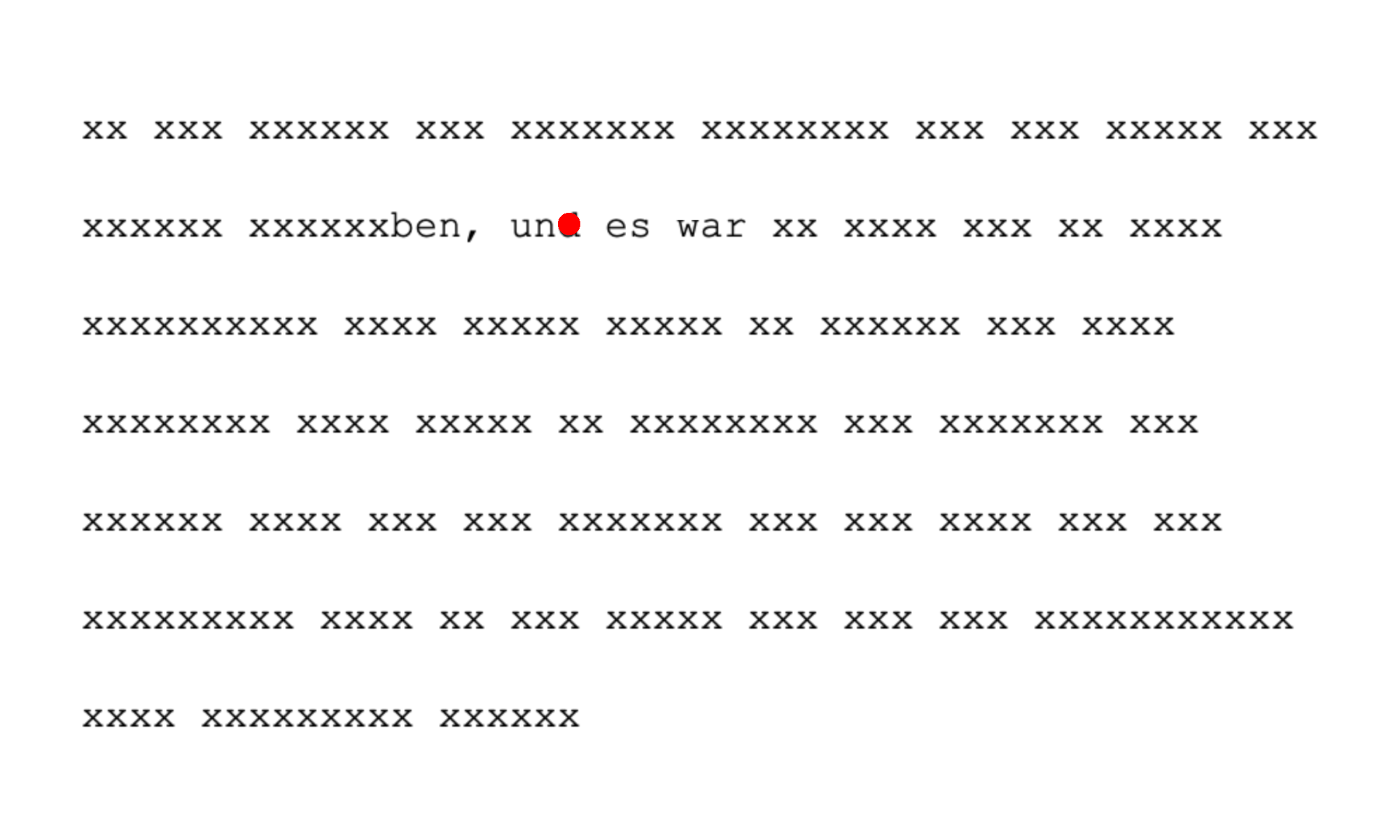
examples/gaze_contingent.py in reading mode: outside seven characters to
either side of the fixated letter (red dot), letters are replaced by x.
Status
First public release (0.2.0). The recording code was reviewed by EyeLogic and tested on their hardware. Feedback and issues welcome.
Installation
pip install eyelogic-recorder
On Windows this also installs the EyeLogic SDK (eyelogic-sdk), pinned to the
version eyelogic-recorder is tested with (1.2.4). The installed EyeLogic server must be at
least as new as the SDK (1.2.4 or later); EyeLogic keeps newer servers
compatible with older SDKs. SDK 1.2.x no longer bundles the MSVC runtime, so
you may need the Microsoft Visual C++ Redistributable.
Reading recorded files (load_samples, load_messages) works on any
platform; recording requires Windows and the SDK.
The development version installs from GitHub:
pip install git+https://github.com/laubrock-lab/eyelogic-recorder.
Quick start
from eyelogic_recorder import EyeLogicClient, EyeLogicError

try:
    with EyeLogicClient("my_experiment", data_folder="data") as et:
        et.connect()
        et.find_tracker()
        et.start_tracking()
        et.calibrate()
        et.validate()
        for trial in trials:
            et.start_recording()
            et.send_message(f"TRIALID {trial.id}")
            ...  # present the stimulus
            et.send_message("TRIAL_END")
            et.stop_recording()
            et.check_health()
except EyeLogicError as err:
    print("Eye tracker problem:", err)
Leaving the with block (or calling close()) stops recording and tracking,
disconnects, and closes the files.
Right after calibrate() the EyeLogic server is briefly busy (a known server
bug, confirmed by EyeLogic), so a validate() started immediately would fail
with ALREADY_BUSY. calibrate() and validate() therefore retry for up to
busy_timeout seconds (default 5); no wait is needed in your own code.
calibrate() also waits up to eye_timeout seconds (default 5) for a detected
eye and raises NoEyeDetectedError if there is none.
A runnable version without PsychoPy is in
examples/minimal.py (python examples/minimal.py --help).
Examples (all accept --help; the PsychoPy ones also --simulate --windowed
to run without a tracker, with the mouse as the eye):
examples/minimal.py: recording without PsychoPy.examples/psychopy_free_viewing.py: free viewing of images.examples/paragraph_reading.py: paragraph reading with a comprehension question; word AOIs derived from TextBox2 glyph vertices and logged as messages; own texts via--textsCSV. The built-in texts are the openings of two Grimm fairy tales (1857 edition, public domain).examples/gaze_contingent.py: gaze marker plus a moving window, for reading (--mode text, ±N characters on the fixated line) or scene viewing (--mode scene, circular window).examples/boundary.py: boundary paradigm for reading, with a fixation check, the changed sentence pre-rendered so the display change is a pure buffer swap, and word AOIs logged as messages (based on an implementation by Philipp Freiherr von Entreß-Fürsteneck).
Running without a tracker
eyelogic_recorder.simulator replaces the EyeLogic SDK with a simulated tracker that
delivers samples at the device frame rate (synthetic fixations, saccades and
blinks, or any position source such as the mouse). It works on any OS:
from eyelogic_recorder import EyeLogicClient, simulator

simulator.install()  # before creating the client
with EyeLogicClient("dry_run") as et:
    ...
The same simulator drives the test suite and benchmarks/synthetic_throughput.py.
Output files
Each client creates two files in data_folder, named
<experiment>_<YYYYmmdd_HHMMSS>.csv and .tsv. Existing files are never
overwritten (a numeric suffix is added if needed).
Samples (.csv)
One row per gaze sample. Invalid samples (eye not tracked) are kept, with NA
in the gaze and eye columns.
| Column | Meaning |
|---|---|
ETTime |
Timestamp from the SDK (timestampMicroSec), microseconds since the epoch on the host clock |
Index |
SDK sample index (gaps mean samples the SDK did not deliver) |
x, y |
Binocular raw point of regard, screen pixels |
x.filtered, y.filtered |
Binocular filtered point of regard, screen pixels |
x.left, y.left |
Left-eye point of regard, screen pixels |
eyePositionLeftX/Y/Z |
Left-eye position in mm, device coordinates |
pr.left |
Left pupil radius in mm |
x.right, y.right |
Right-eye point of regard, screen pixels |
eyePositionRightX/Y/Z |
Right-eye position in mm, device coordinates |
pr.right |
Right pupil radius in mm |
SysTime |
Host time.time() (seconds) when the sample arrived in Python; same clock as the message file |
Use SysTime to align samples with messages. SysTime − ETTime is not a
reliable per-sample latency; for measuring gaze-contingent latency see
benchmarks/gaze_contingent_latency.md.
Validity is per vector (EyeLogic): each eye's point of regard (x.left/y.left,
x.right/y.right), eye position and pupil can be NA independently. The
binocular point of regard (x/y, x.filtered/y.filtered) is valid when at
least one eye's is. Points of regard need a calibration; eye positions and
pupils only need a found eye, so before calibration they are recorded while the
gaze columns are NA.
Messages (.tsv)
Tab-separated with columns SysTime, Type, Text. Type is MSG for your
own messages (send_message), EVENT for device events reported by the SDK,
ERROR for failures (with the reason, e.g. Validation failed: ReturnValidate.ALREADY_BUSY),
WARNING for data-quality problems (e.g. a recording without any detected eye),
and INFO for client status lines (connect, calibration, validation, recording
start/stop). SysTime is on the same clock as the SysTime column of the
sample file, so messages can be aligned with samples.
Reading the data
Python:
import eyelogic_recorder

samples = eyelogic_recorder.load_samples("data/my_experiment_20260101_120000.csv")  # structured array, NA -> NaN
messages = eyelogic_recorder.load_messages("data/my_experiment_20260101_120000.tsv")  # list of Message(sys_time, type, text)
R:
samples  <- read.csv("data/my_experiment_20260101_120000.csv")  # NA is read as missing by default
messages <- read.delim("data/my_experiment_20260101_120000.tsv")
Gaze-contingent use
get_position() returns the latest filtered gaze position (or None if the
last sample was invalid) whenever tracking runs, also between recordings.
get_position(as_array=True) returns a NumPy array; last_sample gives the
full SDK sample (every sample, also when some of its fields are invalid).
Error model
All errors derive from EyeLogicError:
ConnectError,DeviceNotFoundError,StartTrackingError,CalibrationError,ValidationError: raised by the corresponding call.ConnectionClosedError,DeviceDisconnectedError,TrackingStoppedError: the server connection, device, or tracking was lost unexpectedly.WriterError: the background writer thread failed (for example disk full).RecordingOverflowError: samples were dropped because the writer fell behind by more than the buffer pool (samples_dropped).MessageWriteError: a message (e.g. a trial marker) could not be written.NoEyeDetectedError:calibrate()saw no eye withineye_timeoutseconds (participant not in view, or a frame rate the device offers but does not support: according to EyeLogic only the LogicOne supports 250 Hz, but an EyeLogic Lite may still offer it).
A ValidationError is also raised when validation finds no eye at any target.
After each recording, the message file gets the share of samples with a
detected eye; if there were none (or no samples at all), a WARNING line is
written and an EyeLogicWarning is issued.
Failures that occur on SDK or writer threads cannot be raised where they
happen. They are stored and raised by check_health() and by the methods that
call it (connect, start_recording, get_position, ...). Call
check_health() regularly, for example once per trial.
Running tests
pip install -e .[dev]
pytest
The tests use a fake SDK and run on any OS.
Design
Gaze samples are copied by the SDK callback into preallocated NumPy chunks;
full chunks go to a writer thread, so disk I/O never delays the SDK callback
(the EyeLogic server drops samples when the callback is slow). The chunk pool
buffers 40 s at 250 Hz by default; if the disk stalls for longer, samples are
dropped, counted (samples_dropped) and reported by check_health() as
RecordingOverflowError instead of being lost silently. See
docs/recording_pipeline.md for details.
Contributors
- Philipp Freiherr von Entreß-Fürsteneck: the boundary-paradigm example
(
examples/boundary.py), adapted from Philipp's original implementation, and the high-DPI coordinate conversion used in all PsychoPy examples. - Aynur Pelin Çelikkol: the paragraph-reading example
(
examples/paragraph_reading.py), which follows the design of Pelin's reading-comprehension task (trial flow, text display with TextBox2). - Niklas Rosin and Joline Flatau: testing on EyeLogic hardware.
Acknowledgements
We thank Matthias Nieser and Thomas Jablonski of EyeLogic for reviewing the recording code and testing it on EyeLogic hardware. eyelogic-recorder is developed independently and is not an official EyeLogic product.
License
MIT, see LICENSE.
Citation
Please cite the software via its DOI, https://doi.org/10.5281/zenodo.23537087, which resolves to the latest version (each version also has its own DOI on Zenodo). Details are in CITATION.cff.
1 maintainer

Metadata
1 maintainer
Release files for eyelogic-recorder 0.2.0
For a detailed explanation of source distributions (sdists) and built distributions (wheels), please see the package formats documentation.
Source distribution (sdist)
| File | Size | Uploaded | Provenance | |
|---|---|---|---|---|
| eyelogic_recorder-0.2.0.tar.gz | 29.7 kB | Without provenance | Details |
Built distribution (wheel)
| File | Interpreter | ABI | Platform | Reset |
|---|---|---|---|---|
| eyelogic_recorder-0.2.0-py3-none-any.whl | Python 3 | none | any | Details |
Total release size: 52.0 kB
Release files / eyelogic_recorder-0.2.0.tar.gz
| Download URL | eyelogic_recorder-0.2.0.tar.gz |
|---|---|
| Size | 29.7 kB |
| Tags | Source |
|
SHA-256 checksum How to use checksums |
c7d554d174f24165c29b4f5f345d4d3e86193c8580ab49fb586d6dd30c22c329
|
|
BLAKE2b-256 checksum How to use checksums |
264cf31d6ff4f5d0a65d293df528be161ff85d75e426b1a7e184e8b8a349eb7f
|
| Upload date | |
|
Uploaded using Trusted Publishing? What is trusted publishing? |
No |
| Uploaded via |
twine/7.0.0 CPython/3.12.11
|
Release files / eyelogic_recorder-0.2.0-py3-none-any.whl
| Download URL | eyelogic_recorder-0.2.0-py3-none-any.whl |
|---|---|
| Size | 22.3 kB |
| Tags | Python 3 |
|
SHA-256 checksum How to use checksums |
1e57f65cdeeb83e5f7e6b554a82dd5fa1a2652bdac21f66dc9935c0a83292c94
|
|
BLAKE2b-256 checksum How to use checksums |
b241b309122558d12442c25ca5608188e62b731c425eaeec2ec259738f87d837
|
| Upload date | |
|
Uploaded using Trusted Publishing? What is trusted publishing? |
No |
| Uploaded via |
twine/7.0.0 CPython/3.12.11
|
Security for eyelogic-recorder 0.2.0
Provenance
Provenance describes where a file came from. On PyPI, provenance is shared via attestations, which provide a verifiable record of the build or publishing details. View details, limitations and caveats.
No provenance found
None of the files in this release were uploaded with provenance metadata.
A note on package security
PyPI is a repository for distributing packages, not a service for auditing them. While third-party security researchers and our staff do their best to detect and remove malicious packages, PyPI cannot guarantee the quality, security or suitability of any given package.













