
eyepy
A powerful Python package for importing, analyzing, and visualizing retinal imaging data, including OCT and OCT Angiography.
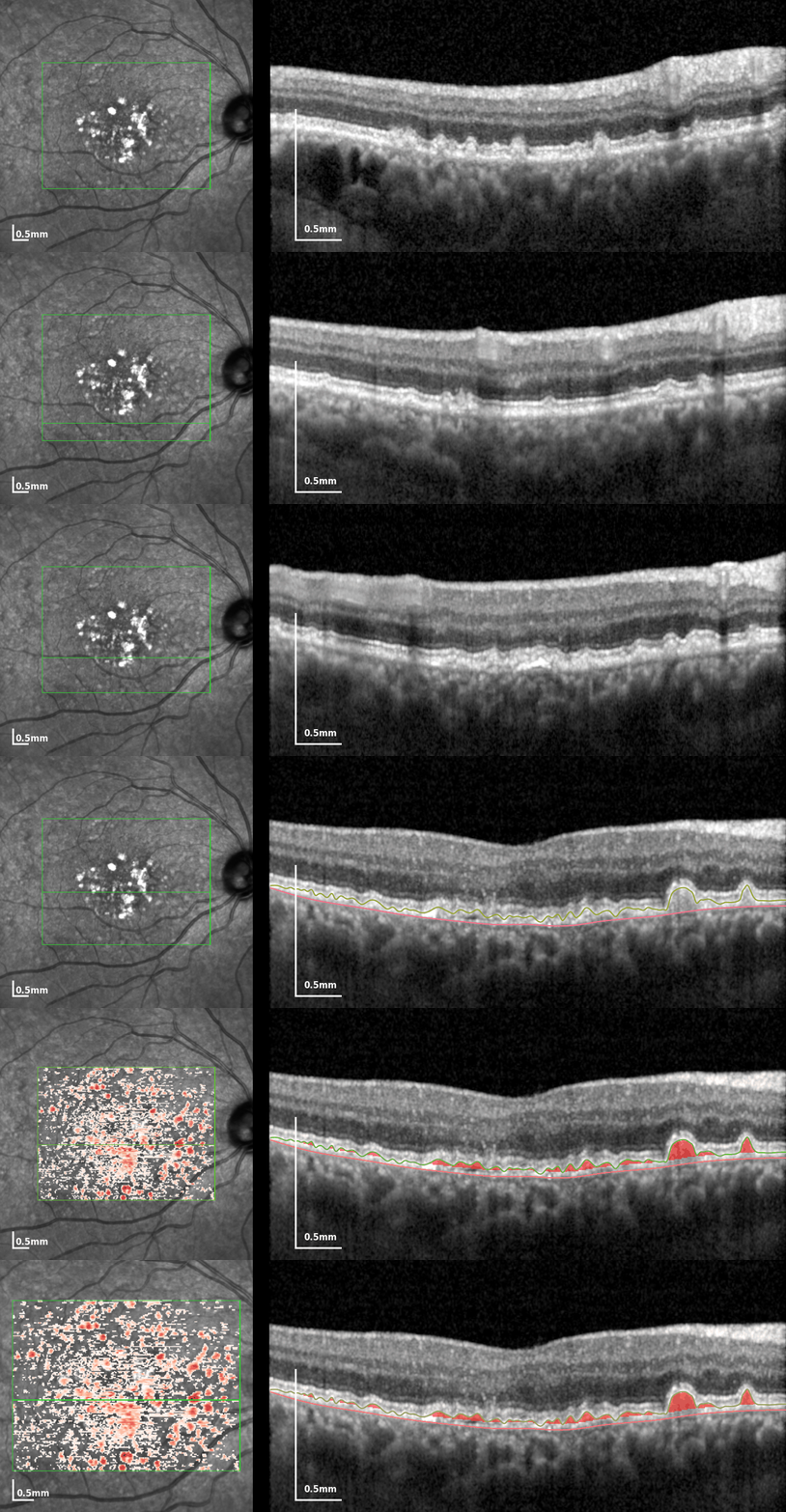



eyepy provides a unified and user-friendly interface for working with retinal imaging data. With support for a wide range of file formats, it enables researchers and clinicians to import, process, and visualize OCT volumes and angiography data with ease. The core EyeVolume object offers intuitive methods for plotting fundus images, B-scans, and quantitative analyses such as drusen and retinal layer thickness. Comprehensive documentation and example workflows are available to help you get started quickly.
Features
- Import Structural Data (HEYEX-E2E, HEYEX-VOL, HEYEX-XML, Topcon-FDA, B-Scan collections, RETOUCH Challenge, AMD Dataset from Duke University)
- Import Angiographic OCT Data (HEYEX-VOL)
- Analyze OCT volumes (compute and quantify drusen)
- Visualize OCT volumes with annotations and quantifications
- Compute and visualize retinal layer thickness
- Compute and visualize OCTA enface projections.
- Save and load EyeVolume objects
Getting Started
Installation
Attention: If you want to use a version prior to 0.12.0 you have to install from the eyepie name instead. This is because we used eyepie as a package name on PyPI until the previous owner of the eyepy name on PyPI was so kind to transfer it to us.
To install the latest version of eyepy run pip install -U eyepy. (It is eyepie for versions < 0.12.0)
Optional Dependencies
Some file formats require additional dependencies:
- Topcon FDA files:
pip install eyepy[fda](requiresoct-converter) - RETOUCH dataset:
pip install eyepy[itk](requiresitk) - Plotting:
pip install eyepy[plot](requiresmatplotlib) - Quantification:
pip install eyepy[quant](requiresscipy) - TIFF codecs:
pip install eyepy[tiff](requiresimagecodecs) - Pandas metadata export:
pip install eyepy[pandas]
Install every optional feature with pip install eyepy[all].
Getting Started
When you don't have a supported OCT volume at hand you can check out our sample datasets to get familiar with eyepy.
from eyepy.data import load
struc_ev = load("drusen_patient")
struc_ev = load("healthy_OD")
angio_ev = load("healthy_OD_Angio")
If you have data at hand use one of eyepy's import functions.
import eyepy as ep

# Import HEYEX E2E export
ev = ep.import_heyex_e2e("path/to/file.e2e")
# Import HEYEX XML export
ev = ep.import_heyex_xml("path/to/folder")
# Import HEYEX VOL export
ev = ep.import_heyex_vol("path/to/file.vol")
# Import Topcon FDA export
ev = ep.import_topcon_fda("path/to/file.fda")
# Import volume from Duke public dataset
ev = ep.import_duke_mat("path/to/file.mat")
# Import volume from RETOUCH challenge
ev = ep.import_retouch("path/to/volume_folder")
# Import HEYEX OCTA VOL export
ev_angio = ep.import_heyex_angio_vol("path/to/volume_folder")
Spectralis OCTA (OCT Angiography) Support
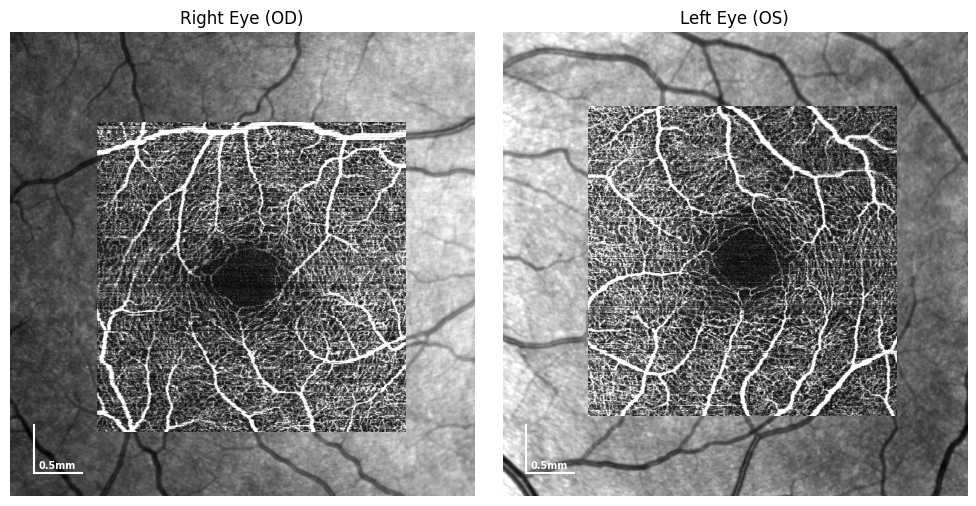
eyepy is capable of reading and visualizing OCT Angiography (OCTA) data from Heidelberg Spectralis devices. You can explore and analyze both structural and angiography volumes using the same unified interface.
Example: Load and Visualize Spectralis OCTA Sample Data
The following example demonstrates how to load OCTA sample data, and plot the enface projections.
import eyepy as ep
import matplotlib.pyplot as plt

# Load sample data
angio_OD = ep.data.load("healthy_OD_Angio")
angio_OS = ep.data.load("healthy_OS_Angio")

fig, axes = plt.subplots(1, 2, figsize=(14, 7))
for i, (angio, title) in enumerate(zip([angio_OD, angio_OS], ["Right Eye (OD)", "Left Eye (OS)"])):
    # Show localizer with Angiography overlay for the complete retina
    angio.plot(ax=axes[i], slabs=["RET"])
    axes[i].set_title(title)
    axes[i].axis("off")

plt.tight_layout()
Related Projects:
- eyeseg: A python package for segmentation of retinal layers and drusen in OCT data.
- OCT-Converter: Extract raw optical coherence tomography (OCT) and fundus data from proprietary file formats. (.fds/.fda/.e2e/.img/.oct/.dcm)
- eyelab: A GUI for annotation of OCT data based on eyepy
- Projects by the Translational Neuroimaging Laboratory
- UOCTE Unofficial continuation of https://bitbucket.org/uocte/uocte
- OCTAnnotate
- heyexReader
- OCTExplorer Iowa Reference Algorithm
Citation
If you use eyepy in your research, please cite it. You can find citation information and export BibTeX entries via the Zenodo record:
Contributing
For details on contributing and setting up a development environment, see the Contributing Guide.
1 maintainer

Release files for eyepy 0.21.0
For a detailed explanation of source distributions (sdists) and built distributions (wheels), please see the package formats documentation.
Source distribution (sdist)
| File | Size | Uploaded | |
|---|---|---|---|
| eyepy-0.21.0.tar.gz | 88.5 kB | Details |
Built distribution (wheel)
| File | Interpreter | ABI | Platform | Reset |
|---|---|---|---|---|
| eyepy-0.21.0-py3-none-any.whl | Python 3 | none | any | Details |
Total release size: 190.9 kB
Release files / eyepy-0.21.0.tar.gz
| Download URL | eyepy-0.21.0.tar.gz |
|---|---|
| Size | 88.5 kB |
| Tags | Source |
|
SHA-256 checksum How to use checksums |
21bbc04b4294fcacce39e52e82668e7400bcd513634f129706bc4dd52c22a9aa
|
|
BLAKE2b-256 checksum How to use checksums |
60e3dc821c61c265ed40da426b33eb535370b12932fe802f45bfe24f2d88ff3a
|
| Upload date | |
|
Uploaded using Trusted Publishing? What is trusted publishing? |
Yes |
| Uploaded via |
twine/7.0.0 CPython/3.13.14
|
Provenance
Provenance describes where a file came from. On PyPI, provenance is shared via attestations, which provide a verifiable record of the build or publishing details. View details, limitations and caveats.


PyPI Publish Attestation
PyPI verified that this artifact, at this checksum, originated from the publisher listed below.
Signed by GitHub Actions, verified by PyPI on Sep 4, 2026.
Transparency logRelease files / eyepy-0.21.0-py3-none-any.whl
| Download URL | eyepy-0.21.0-py3-none-any.whl |
|---|---|
| Size | 102.4 kB |
| Tags | Python 3 |
|
SHA-256 checksum How to use checksums |
8808344cc54cb2af8dcf9c23db0bee0b27101bf1ff60d9a0d7b1e72a522b94b0
|
|
BLAKE2b-256 checksum How to use checksums |
fda2f6987205604f98a2df689ebb25a3f7d8b86753793e568ff4bc1c0a385d1c
|
| Upload date | |
|
Uploaded using Trusted Publishing? What is trusted publishing? |
Yes |
| Uploaded via |
twine/7.0.0 CPython/3.13.14
|
Provenance
Provenance describes where a file came from. On PyPI, provenance is shared via attestations, which provide a verifiable record of the build or publishing details. View details, limitations and caveats.
PyPI Publish Attestation
PyPI verified that this artifact, at this checksum, originated from the publisher listed below.
Signed by GitHub Actions, verified by PyPI on Sep 4, 2026.
Transparency log













