
No project description provided

Project description
Eynollah
Document Layout Analysis
Introduction
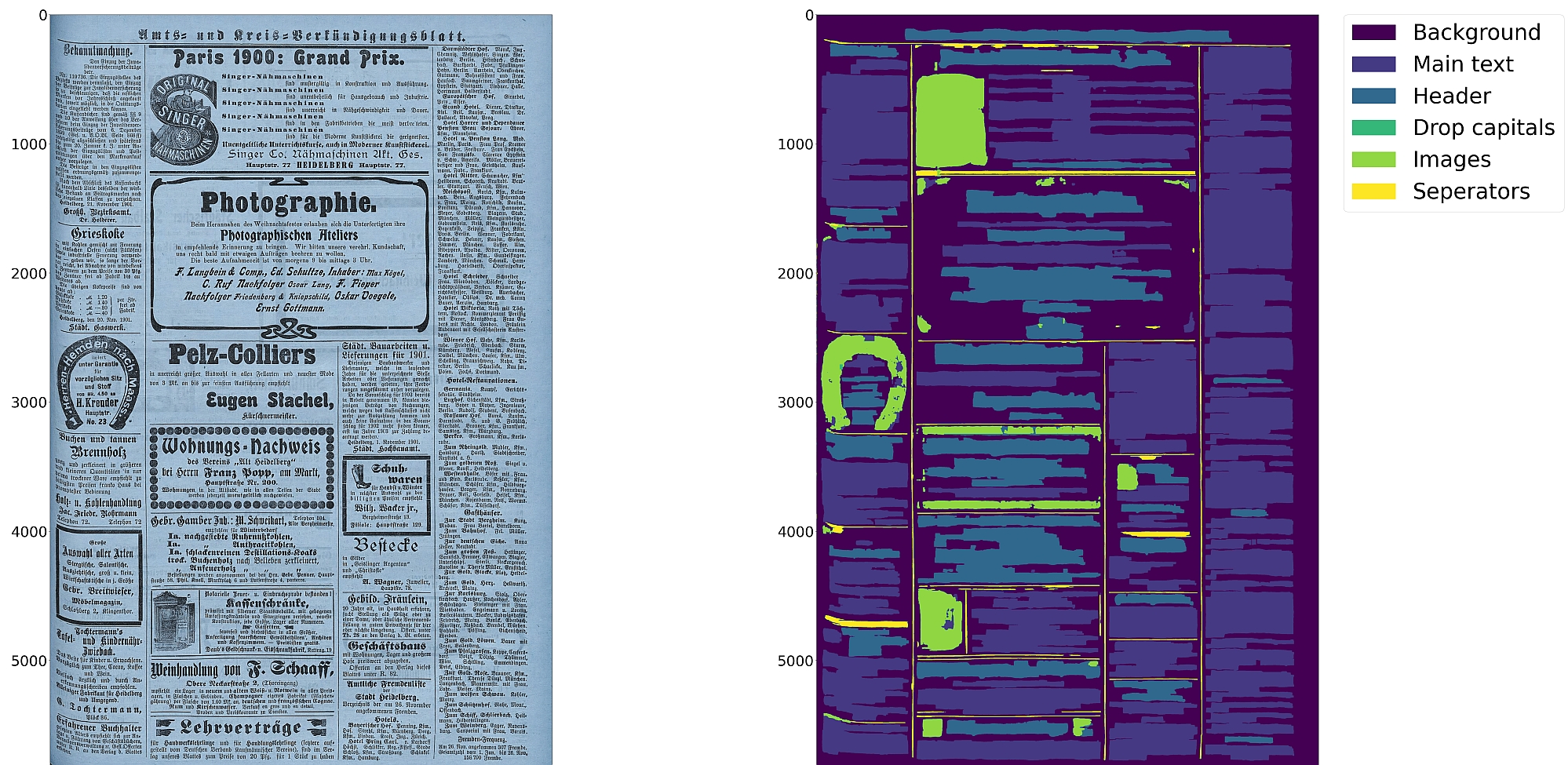
This tool performs document layout analysis (segmentation) from image data and returns the results as PAGE-XML.
It can currently detect the following layout classes/elements:
In addition, the tool can be used to detect the ReadingOrder of regions. The final goal is to feed the output to an OCR model.
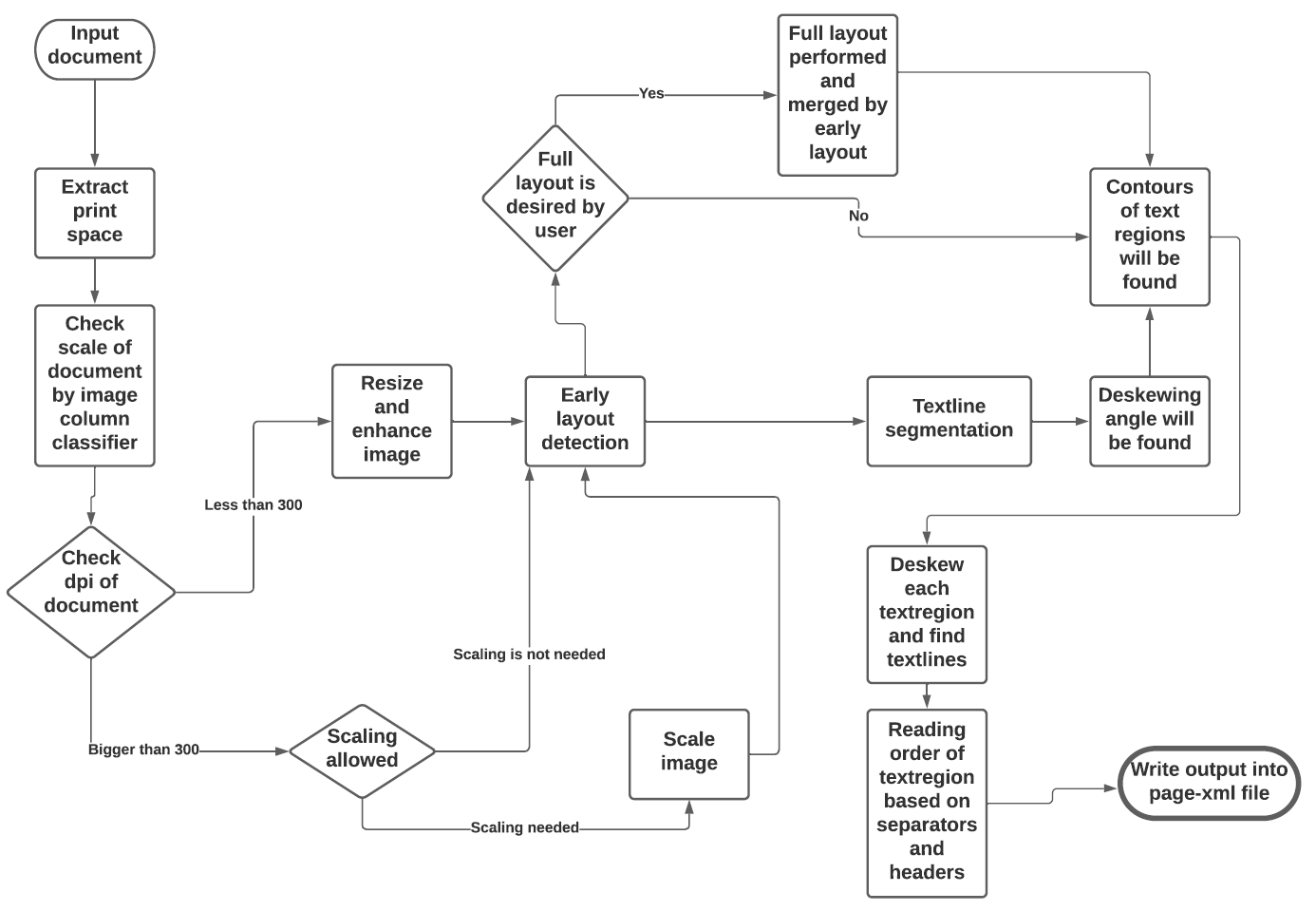
The tool uses a combination of various models and heuristics (see flowchart below for the different stages and how they interact):
- Border detection
- Layout detection
- Textline detection
- Image enhancement
- Scale classification
- Heuristic methods
The first three stages are based on pixel-wise segmentation.
Border detection
For the purpose of text recognition (OCR) and in order to avoid noise being introduced from texts outside the printspace, one first needs to detect the border of the printed frame. This is done by a binary pixel-wise-segmentation model trained on a dataset of 2,000 documents where about 1,200 of them come from the dhSegment project (you can download the dataset from here) and the remainder having been annotated in SBB. For border detection, the model needs to be fed with the whole image at once rather than separated in patches.
Layout detection
As a next step, text regions need to be identified by means of layout detection. Again a pixel-wise segmentation model was trained on 131 labeled images from the SBB digital collections, including some data augmentation. Since the target of this tool are historical documents, we consider as main region types text regions, separators, images, tables and background - each with their own subclasses, e.g. in the case of text regions, subclasses like header/heading, drop capital, main body text etc. While it would be desirable to detect and classify each of these classes in a granular way, there are also limitations due to having a suitably large and balanced training set. Accordingly, the current version of this tool is focussed on the main region types background, text region, image and separator.
Textline detection
In a subsequent step, binary pixel-wise segmentation is used again to classify pixels in a document that constitute textlines. For textline segmentation, a model was initially trained on documents with only one column/block of text and some augmentation with regard to scaling. By fine-tuning the parameters also for multi-column documents, additional training data was produced that resulted in a much more robust textline detection model.
Image enhancement
This is an image to image model which input was low quality of an image and label was actually the original image. For this one we did not have any GT, so we decreased the quality of documents in SBB and then feed them into model.
Scale classification
This is simply an image classifier which classifies images based on their scales or better to say based on their number of columns.
Heuristic methods
Some heuristic methods are also employed to further improve the model predictions:
- After border detection, the largest contour is determined by a bounding box, and the image cropped to these coordinates.
- For text region detection, the image is scaled up to make it easier for the model to detect background space between text regions.
- A minimum area is defined for text regions in relation to the overall image dimensions, so that very small regions that are noise can be filtered out.
- Deskewing is applied on the text region level (due to regions having different degrees of skew) in order to improve the textline segmentation result.
- After deskewing, a calculation of the pixel distribution on the X-axis allows the separation of textlines (foreground) and background pixels.
- Finally, using the derived coordinates, bounding boxes are determined for each textline.
Installation
pip install . or
pip install . -e for editable installation
Alternatively, you can also use make with these targets:
make install or
make install-dev for editable installation
Models
In order to run this tool you also need trained models. You can download our pretrained models from qurator-data.de.
Alternatively, running make models will download and extract models to $(PWD)/models_eynollah.
Usage
The basic command-line interface can be called like this:
eynollah \
-i <image file name> \
-o <directory to write output xml or enhanced image> \
-m <directory of models> \
-fl <if true, the tool will perform full layout analysis> \
-ae <if true, the tool will resize and enhance the image and produce the resulting image as output> \
-as <if true, the tool will check whether the document needs rescaling or not> \
-cl <if true, the tool will extract the contours of curved textlines instead of rectangle bounding boxes> \
-si <if a directory is given here, the tool will output image regions inside documents there>
The tool does accept and works better on original images (RGB format) than binarized images.
--full-layout vs --no-full-layout
Here are the difference in elements detected depending on the --full-layout/--no-full-layout command line flags:
--full-layout |
--no-full-layout |
|
|---|---|---|
| reading order | x | x |
| header regions | x | - |
| text regions | x | x |
| text regions / text line | x | x |
| drop-capitals | x | - |
| marginals | x | x |
| marginals / text line | x | x |
| image region | x | x |
How to use
First, this model makes use of up to 9 trained models which are responsible for different operations like size detection, column classification, image enhancement, page extraction, main layout detection, full layout detection and textline detection.That does not mean that all 9 models are always required for every document. Based on the document characteristics and parameters specified, different scenarios can be applied.
-
If none of the parameters is set to
true, the tool will perform a layout detection of main regions (background, text, images, separators and marginals). An advantage of this tool is that it tries to extract main text regions separately as much as possible. -
If you set
-ae(allow image enhancement) parameter totrue, the tool will first check the ppi (pixel-per-inch) of the image and when it is less than 300, the tool will resize it and only then image enhancement will occur. Image enhancement can also take place without this option, but by setting this option totrue, the layout xml data (e.g. coordinates) will be based on the resized and enhanced image instead of the original image. -
For some documents, while the quality is good, their scale is very large, and the performance of tool decreases. In such cases you can set
-as(allow scaling) totrue. With this option enabled, the tool will try to rescale the image and only then the layout detection process will begin. -
If you care about drop capitals (initials) and headings, you can set
-fl(full layout) totrue. With this setting, the tool can currently distinguish 7 document layout classes/elements. -
In cases where the document includes curved headers or curved lines, rectangular bounding boxes for textlines will not be a great option. In such cases it is strongly recommended setting the flag
-cl(curved lines) totrueto find contours of curved lines instead of rectangular bounding boxes. Be advised that enabling this option increases the processing time of the tool. -
To crop and save image regions inside the document, set the parameter
-si(save images) to true and provide a directory path to store the extracted images. -
This tool is actively being developed. If problems occur, or the performance does not meet your expectations, we welcome your feedback via issues.
Release history Release notifications | RSS feed


Download files
Download the file for your platform. If you're not sure which to choose, learn more about installing packages.
Source Distribution
Built Distribution
Filter files by name, interpreter, ABI, and platform.
If you're not sure about the file name format, learn more about wheel file names.
Copy a direct link to the current filters
File details
Details for the file eynollah-0.0.3.tar.gz.
File metadata
- Download URL: eynollah-0.0.3.tar.gz
- Upload date:
- Size: 65.7 kB
- Tags: Source
- Uploaded using Trusted Publishing? No
- Uploaded via: twine/3.4.1 importlib_metadata/3.7.3 pkginfo/1.7.0 requests/2.25.1 requests-toolbelt/0.9.1 tqdm/4.59.0 CPython/3.6.9
File hashes
| Algorithm | Hash digest | |
|---|---|---|
| SHA256 |
3105f222b07958592013faa22d4487cf28b561e7a54d59d2a94fcfe9ad9fc31d
|
|
| MD5 |
9b2ba1819d1d0232d6d4d49fd4eb2e4c
|
|
| BLAKE2b-256 |
34822f16f10f71374e546563c5344f22c4308c9ae9375eda1438f60848745b4a
|
File details
Details for the file eynollah-0.0.3-py3-none-any.whl.
File metadata
- Download URL: eynollah-0.0.3-py3-none-any.whl
- Upload date:
- Size: 69.0 kB
- Tags: Python 3
- Uploaded using Trusted Publishing? No
- Uploaded via: twine/3.4.1 importlib_metadata/3.7.3 pkginfo/1.7.0 requests/2.25.1 requests-toolbelt/0.9.1 tqdm/4.59.0 CPython/3.6.9
File hashes
| Algorithm | Hash digest | |
|---|---|---|
| SHA256 |
cd8106b4e4f72a241fa846edd0e3c680f5a0a0b599d1547aae7963c668bab23f
|
|
| MD5 |
a8eb4be9d28ec6777726a95f995219c4
|
|
| BLAKE2b-256 |
3260921840b798d50d0086b1bc94d4bdfdf59c3853af6b26fb40840d120ee7eb
|






