
Easy Mark (ezmk)
Easy-to-use color coordination terminal library with simple customization & function binding.
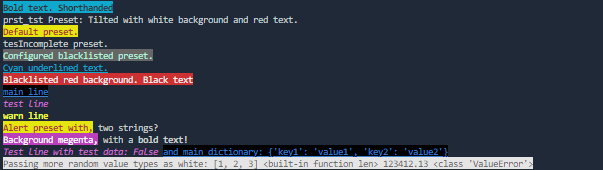
Use now with pip install ezmk
mark(string, **kwargs)
Use the mark() as you would use the print() function but with the additional features of easy-to-add format modification.
Modify text color by prefixing your statement with ^, followed by an appropriate color specification.
Example
mark("^red This text is red!")
Use the # key to specify the background color, and use the ~ key to specify styling such as bold, underline, or italic. Colors and styles autocomplete if identifying initial words are used like mark("#r This text is also red!").
You can add multiple modifiers if you indicate their end with a space like mark("#m^b~u working text!"). Using mark("#m ^b ~u failed text!") will only interpret the first modifier.
To print a simple and noticeable message to the console, fire the mark() function without arguments.
Text Foreground and Background Colors
black, red, green, yellow, blue, magenta, cyan, white, gray, light-red/lr, light-green/lg, light-yellow/ly, light-blue/lb, light-magenta/lm, light-cyan/lc, light-white/lw
Text Style Effects
bold/b, dim/d, italic/i, underline/u, blink/bl, reverse/r, hidden/r, strikethrough/r
bind(func, activation_string, args=(args), kwargs=(kwargs))
To pass a function and bind it to a custom key you can use bind(). When the key is used following the bind character: @ like mark("@bnd_fnc Binded function fired!") the function will be called.
To set a function to bind to the mark() function itself pass the function without a key.
Presets
You can specify presets in configuration, allowing you to use a key(activation string) to add a collection of modifiers to a statement. No space is needed to indicate a preset's ending unless the preset contents a space itself. This enables very handy color-coordinated printing to the console:
Example
mark("!Alert preset.")ormark("$Success preset.")(using default presets.)
Configuration
To configure, create ezmk.cfg file in the project directory.
ping:stringWhat's printed to the console whenmark()when fired without any arguments.debug:boolIf set to true, print the raw interpretation of each mark statement to terminal.presets:dictCustom keys that load configured format modifiers. Defaults include(to change default either override or list in blacklist):!as~b^r#y$as^lg#gwarnas^y~btestas^m~imainas^blu#bla~u
blacklistPresets or modifiers that don't get interpreted.
1 maintainer

Metadata
1 maintainer
Release files for ezmk 1.0.3
For a detailed explanation of source distributions (sdists) and built distributions (wheels), please see the package formats documentation.
Source distribution (sdist)
| File | Size | Uploaded | |
|---|---|---|---|
| ezmk-1.0.3.tar.gz | 8.2 kB | Details |
Built distribution (wheel)
| File | Interpreter | ABI | Platform | Reset |
|---|---|---|---|---|
| ezmk-1.0.3-py3-none-any.whl | Python 3 | none | any | Details |
Total release size: 15.2 kB
Release files / ezmk-1.0.3.tar.gz
| Download URL | ezmk-1.0.3.tar.gz |
|---|---|
| Size | 8.2 kB |
| Tags | Source |
|
SHA-256 checksum How to use checksums |
fb01c94f9ee40a0dc117cf8a7349a062aaa1346f6f2df8e506bcb7918aa32d67
|
|
BLAKE2b-256 checksum How to use checksums |
9ac7cf023b52810cea84ab67c04535010464b6eed38d8ea627cf205b5fd53972
|
| Upload date | |
|
Uploaded using Trusted Publishing? What is trusted publishing? |
No |
| Uploaded via |
twine/5.1.1 CPython/3.12.6
|
Release files / ezmk-1.0.3-py3-none-any.whl
| Download URL | ezmk-1.0.3-py3-none-any.whl |
|---|---|
| Size | 7.1 kB |
| Tags | Python 3 |
|
SHA-256 checksum How to use checksums |
70b167b4beea9e10f34638aa95406d8fd45ee79fd4d99ae4e757b0a765029852
|
|
BLAKE2b-256 checksum How to use checksums |
5ad85d69a7e2080e9d48deeb703579783eccef8bce8b2a0359f9013a1051b790
|
| Upload date | |
|
Uploaded using Trusted Publishing? What is trusted publishing? |
No |
| Uploaded via |
twine/5.1.1 CPython/3.12.6
|














