
Package to allow for easy/structured modeling and splitting up your model into multiple files
Verified details
These details have been verified by PyPIProject links
GitHub Statistics
Maintainers

Project description
EZ Modeller
This package helps to you easily structure a model into separate files per constraint/variable when modelling with Gurobi.
For the constraints and variables, you can use nested directory structures to keep everything neatly organized.
To install the package, just use pip:
pip install ezmodeller
Examples
Please see the /examples folder of this repository for some examples on how to use the framework in both strict (let the framework perform additional checks and have type hinting available) and non-strict mode (You might get missing attribute / element errors if you try to refer to for example variables that do not exist)
To create the initial version of the type hinting file, generate your model and use the function generate_model_typing_hints( <name_of_output_file.py> ) to generate the output file that you can then include again in your variable / constraint definitions.
High-level usage
The main idea of the ezmodeller library is that you create separate folders for the variables and constraints and define your variables and folders as separate python modules under these folders. Later, when you define the model, you only need to provide the folder/module for the constraints and variables to the __init__ of the OptimizationModel object and the framework will find all variables and constraints automatically recursively under the provided folders/modules. You are free to use any level of directory nesting for the variables and constraints modules you create, the framework will find all of them as long as they are defined under the module/folder you provide to the __init__.
Variables
To define a variable, you must create a python module anywhere under the folder you defined as variable modules base folder. The structure for these files must be the following (where I added extra comments to explain the different components
# We need the standard gurobi items to be able to use things like CONTINUOUS and INFINITY
from gurobipy import GRB

# This import is needed because any variable we want to add MUST be subclass of ModelVariable
from ezmodeller import ModelVariable


# Here we define a new variable called Buy by definining it as a subclass of ModelVariable
# By default, the framework will use the class name for the name of the symbolic variable
class Buy(ModelVariable):

    # You MUST implement the function set_variable_properties(self). If you do not want
    # to make any modifications from the defaults, you will still have to define the function
    # but give it just the statement 'pass' as the function body
    #
    # The framework will automatically call this function
    def set_variable_properties(self):

        # You can influence the following properties for the symbolic variable in this
        # function

        # Set the type of the variable to CONTINUOUS / INTEGER / BINARY.
        # Defaults to CONTINUOUS
        self.var_type = GRB.CONTINUOUS

        # Set the lowerbound of the variable. Defaults to 0
        self.var_lb = 0

        # Set the upperbound of the variable. Defaults to GRB.INFINITY
        self.var_ub = GRB.INFINITY

        # Set the name of the variable to be used in the model. Defaults to the class
        # name, in this example that is Buy
        self.name = "Buy"

        # Indicate whether the symbolic variable needs to be generated or not.
        # Defaults to True
        self.is_enabled = True

        # Indicate what the dimensions (and also their order) for this variable are
        # Providing this information is optional, except when you are using the
        # OptimizationModel in strict mode. Defining the dimensions does allow
        # the framework to generate typing hints that allow you to see what the
        # order of the dimensions are when using a variable in a constraint
        self.dimensions = ["food"]


    # You MUST implement this function to return the combinations for which a
    # variable must be generated. The function will get the `input_data` you
    # defined as an argument (the structure of which is up to you as developer)
    #
    # In the diet problem example, we want the Buy continuous variable to be
    # generated for every food item we have
    def get_index_domain(self, input_data):
        return input_data["foods"]
The above items are required items that must be implemented. When defining variables, there is also the option of providing a definition for an equality constraint. This is especially useful for variables that are not really the decision variables, but their value depends on the other decisions variables.
A common example of this would be a decision variable InventoryLevel, which is typically defined as Inventory[t] = Inventory[t-1] + Produced[t] - Demand[t]. Of course one could just define the equality constraint separately, but sometimes it just reads easier to have this definition connected directly to the variable.
In order to define the corresponding equality constraint, you only have to implement the function get_equality_constraint_generator(self, input_data, variables) inside of the class definition. The two arguments are the input_data you have defined and variables being the collection of all variables the framework found. You can either get the variables from this collection using the attribute way (using a .) or using the indexing way like a dictionary, where you use the name of the variable as the key.
The function should return a generator that can be given to the gurobi function model.addConstrs
The example of the inventory balance constraint could be implemented as follows:
# fmt: off
    def get_equality_constraint_generator(self, input_data, variables):

        # Get reference for the variables (assuming they are defined in classes Inventory and Production)
        var_inventory = variables.Inventory
        var_production = variables["Production"]

        # Get reference to demand from input (assuming input_data is dictionary holding separate input items)

        # Assume demand is dict[time, float]
        demand = input_data["demand]

        # Assume start_inventory = float
        start_inventory = input_data["start_inventory"]

        # assume time_periods = list[str]
        time_periods = input_data["time_periods"]

        # assume prev_time_period = dict[time, time], giving access to previous time for any time t
        prev_time_period = input_data["prev_time_period"]

        first_time_period = time_periods[0]


        return (

            var_inventory[ t ]

            ==

            (

                (
                    # Deal with the situation of the first time period not having a previous time
                    # period but having to use the static input provided


                    start_inventory if t == first_time_period else 0

                    +

                    var_inventory[ prev_time_period[ t ] ] if t != first_time_period else 0
               )

                +

                var_production[ t ]

                -

                demand[ t ]
            )


            for t in time_periods
        )
# fmt: on
Since it might be easier to use whitespace in a different way compared to standard python programming, I personally use the option of disabling any black formatting for this code by adding the # fmt: off and # fmt: on lines around these code blocks. Using the extra whitespace, it is directly clear to me what the logic of the constraint is, which would be removed the moment black would reformat this. However, this is personal preference for the developers.
Constraints
Defining constraints is done in a very similar way as defining variables, you define a separate class for every symbolic constraint and this constraint must be a subclass of the ModelConstraint class. An example is the following from the diet problem:
# fmt: off

# Import needed to be able to create subclass
from ezmodeller import ModelConstraint


# Define a new constraint that will ensure the nutrition values will be above
# the provided lowerbound
class NutritionLowerBound(ModelConstraint):


    # You must implement the set_constraint_properties function. If you do not
    # want to change antyhing, you can just use the single statement pass
    def set_constraint_properties(self):

        # Set the dimensions over which this constraint is defined.
        # This is optional, except when you indicate the OptimizationModel should
        # be strict. It also provides additional typing hints
        self.dimensions = ["category"]

        # Tell the framework which variables this constraint uses. Setting this
        # is optional, except when you indicate the OptimizationModel should be
        # strict. If not set, or if you use variables in the definition not defined
        # here, the framework will give warnings
        self.required_variables = ["Buy"]

        # Optionally overrule the name of the constraint. If not set, the default
        # will be the name of the class
        self.name = "NutritionLowerBound"

        # Indicate whether the symbolic constraint needs to be generated or not.
        # Defaults to True
        self.is_enabled = True


    # Define the actual definition of the constraint. This function must return
    # a generator that can be given to the gurobi model.addConstrs function.
    def get_gurobi_constraints_generator(self, input_data, variables):
        input_categories = input_data["categories"]
        nutrition_values = input_data["nutritionValues"]
        min_nutrition_values = input_data["minNutrition"]
        foods = input_data["foods"]

        # Only for those lines for which we have a min defined
        index_domain = [x for x in input_categories if min_nutrition_values[x]]


        # Convenience aliases, using the fact that the framework makes the name available
        # as an attribute
        _var_buy = variables.Buy


        # For every category, the total sum of this nutrition value provided by the
        # bought foods should be >= min required value
        return (

                sum(
                    nutrition_values[(f,c)] * _var_buy[f]

                    for f in foods
                )

                >=

                min_nutrition_values[c]

                for c in index_domain
            )
# fmt: on
Objective
Finally, you must also create one class that is a subclass of the ModelObjective class that will be used to provide the objective of the model.
This one looks very similar to the constraints:
# fmt: off

# Needed for accessing gurobi elements
from gurobipy import GRB

# Needed for creating subclass of the ModelObjective from the framework
from ezmodeller import ModelObjective


# Define new objective by making it a subclass of ModelObjective
class MinTotalDietCost(ModelObjective):

    # You must implement this function to set the properties of the objective
    def set_objective_properties(self):

        # Set the direction to either GRB.MINIMIZE or GRB.MAXIMIZE
        self.direction = GRB.MINIMIZE


        # Similar to the constraints, defined which variables we are using. Providing this
        # information is optional, except when you are creating the model in strict mode.
        self.required_variables = ["Buy"]


    # Implement this function to return a generator that can be given to the model.setObjective function
    # of gurobi
    def get_gurobi_objective_expression(self, input_data, variables):

        _var_buy = variables["Buy"]
        _coeff_cost = input_data["cost"]

        return sum(

            (
                _var_buy[i]
                *
                _coeff_cost[i]
            )

            for i in _var_buy.index_domain
        )

# fmt: on
Strict mode
When you create the OptimizationModel object with the argument strict=True, the framework will do some additional checks. First of all, it will check if you have defined the dimensions for all of the variables and constraints. Furthermore, it will also check if the number of dimensions in the dimensions attribute is equal to the number of dimensions in the actually generated domain for the variable/constraint. Also, the framework will raise an error in case you are using a variable in a constraint definition, but have not declared it within the required_variables attribute of that constraint.
Typing hints
After you created an OptimizationModel object, you can use the function generate_model_typing_hints(output_file) to have the framework generate a typing hints file (sort of stub file) that can give you information about the dimensions and their order during the development. For example, for a simple transportation problem (see the examples folder) the variable Transport has the statement self.dimensions = ["from_factory", "to_customer"]. The file that the generate_model_typing_hints function will generate will be the following:
# Automatically generated using generate_model_typing_hints function
from typing import Any

from ezmodeller.collections import ConstraintsCollection, VariablesCollection
from ezmodeller.model_constraint import ModelConstraint
from ezmodeller.model_variable import ModelVariable

type t_customer = Any
type t_factory = Any
type t_from_factory = Any
type t_to_customer = Any


class TransportProblemVariables(VariablesCollection):
    Transport: ModelVariable[tuple[t_from_factory, t_to_customer]]


class TransportProblemConstraints(ConstraintsCollection):
    RespectDemand: ModelConstraint[t_customer]
    RespectSupply: ModelConstraint[t_factory]
By importing this typing hints file in for example a constraint definition like RespectSupply, your editor will be able to provide the following hints for you:
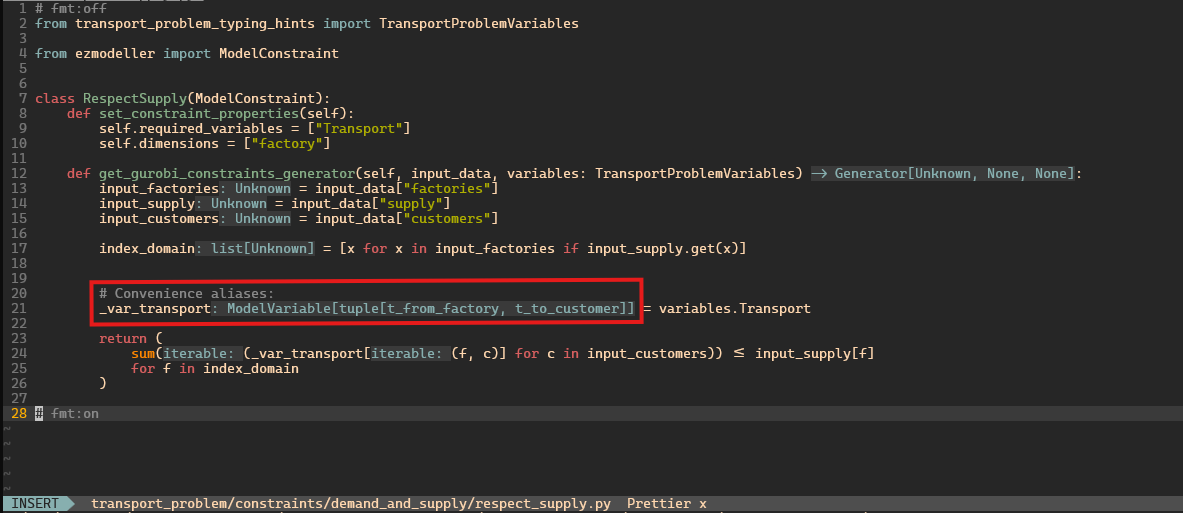
For this example with just two dimensions, that is not such a big problem. However, when you have variables with 4, 5 or even more dimensions, this will help you to keep track what the order was.
Project details
Verified details
These details have been verified by PyPIProject links
GitHub Statistics
Maintainers
Release history Release notifications | RSS feed


Download files
Download the file for your platform. If you're not sure which to choose, learn more about installing packages.
Source Distribution
Built Distribution
Filter files by name, interpreter, ABI, and platform.
If you're not sure about the file name format, learn more about wheel file names.
Copy a direct link to the current filters
File details
Details for the file ezmodeller-0.1.3.tar.gz.
File metadata
- Download URL: ezmodeller-0.1.3.tar.gz
- Upload date:
- Size: 29.8 kB
- Tags: Source
- Uploaded using Trusted Publishing? Yes
- Uploaded via: twine/6.1.0 CPython/3.12.9
File hashes
| Algorithm | Hash digest | |
|---|---|---|
| SHA256 |
08faf951cd354c56328f2450f0ec153a3fe8e37731f764e5c35e9f94185be548
|
|
| MD5 |
26e8e495e9cfa5f47b56b0f0bbee8a9b
|
|
| BLAKE2b-256 |
5f7acfc766fd7628a7eeefd4b30ce9cba127705c87e7475e616659a20affc9f8
|
Provenance
The following attestation bundles were made for ezmodeller-0.1.3.tar.gz:
Publisher:
pypi.yml on gdiepen/ezmodeller
-
Statement:
-
Statement type:
https://in-toto.io/Statement/v1 -
Predicate type:
https://docs.pypi.org/attestations/publish/v1 -
Subject name:
ezmodeller-0.1.3.tar.gz -
Subject digest:
08faf951cd354c56328f2450f0ec153a3fe8e37731f764e5c35e9f94185be548 - Sigstore transparency entry: 202698090
- Sigstore integration time:
-
Permalink:
gdiepen/ezmodeller@89efdfbdf1f4499cae068ca7b7f4fb1781e8ca37 -
Branch / Tag:
refs/tags/v0.1.3 - Owner: https://github.com/gdiepen
-
Access:
public
-
Token Issuer:
https://token.actions.githubusercontent.com -
Runner Environment:
github-hosted -
Publication workflow:
pypi.yml@89efdfbdf1f4499cae068ca7b7f4fb1781e8ca37 -
Trigger Event:
release
-
Statement type:
File details
Details for the file ezmodeller-0.1.3-py3-none-any.whl.
File metadata
- Download URL: ezmodeller-0.1.3-py3-none-any.whl
- Upload date:
- Size: 23.7 kB
- Tags: Python 3
- Uploaded using Trusted Publishing? Yes
- Uploaded via: twine/6.1.0 CPython/3.12.9
File hashes
| Algorithm | Hash digest | |
|---|---|---|
| SHA256 |
0a34695489820b87e67569cfb4dff38a01734a53a130292ab0672d857da854d8
|
|
| MD5 |
7fe2995615e8dd973bf4dc585127742a
|
|
| BLAKE2b-256 |
399a764515be78be1193b403b4e2926371e447b3ff2a705b98377521781eb36a
|
Provenance
The following attestation bundles were made for ezmodeller-0.1.3-py3-none-any.whl:
Publisher:
pypi.yml on gdiepen/ezmodeller
-
Statement:
-
Statement type:
https://in-toto.io/Statement/v1 -
Predicate type:
https://docs.pypi.org/attestations/publish/v1 -
Subject name:
ezmodeller-0.1.3-py3-none-any.whl -
Subject digest:
0a34695489820b87e67569cfb4dff38a01734a53a130292ab0672d857da854d8 - Sigstore transparency entry: 202698092
- Sigstore integration time:
-
Permalink:
gdiepen/ezmodeller@89efdfbdf1f4499cae068ca7b7f4fb1781e8ca37 -
Branch / Tag:
refs/tags/v0.1.3 - Owner: https://github.com/gdiepen
-
Access:
public
-
Token Issuer:
https://token.actions.githubusercontent.com -
Runner Environment:
github-hosted -
Publication workflow:
pypi.yml@89efdfbdf1f4499cae068ca7b7f4fb1781e8ca37 -
Trigger Event:
release
-
Statement type:






