
EZMonitorModeButton
A simple yet robust Python GUI for the Raspberry Pi to easily enable and disable monitor mode on a wireless interface.
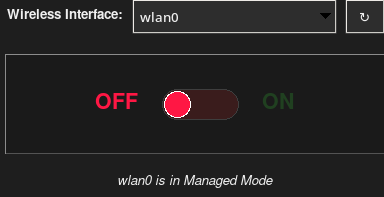
   In wireless security auditing, the standard way to enable monitor mode is using the  aircrack-ng  suite:

    1.  sudo airmon-ng check kill  (kills network managers,  wpa_supplicant ,  dhcpcd , etc.)
    2.  sudo airmon-ng start wlan0

     While entering monitor mode is easy, exiting it can be tedious and frustrating:

    • The Annoyance: When  airmon-ng check kill  runs, it completely destroys the system's normal internet connectivity. To get back online, a user has to stop monitor mode and manually restart all networking services in the correct sequence.
    • How EZMonitorModeButton solves this: This program automatically stops the monitor interface and sequentially restarts  NetworkManager, wpa_supplicant, avahi-daemon,and dhcpcd .
    • The Value: It acts as a safety net. Instead of leaving the user with broken internet, a single click restores normal network state cleanly.


          ┌────────────────┐
⋮         │ Start Auditing │
⋮         └────────────────┘
⋮                  │
⋮                  ▼
⋮         ◇───────────────◇
⋮         │ Choose Method │
⋮         ◇───────────────◇
⋮                 │ Command Line                      EZMONITORMODEBUTTON
⋮                 ▼
⋮         ┌────────────────────────────────┐    ┌──────────────────────┐
⋮         │ Type sudo airmon-ng check kill │    │ Click Glow Switch ON │
⋮         └────────────────────────────────┘    └──────────────────────┘
⋮                          │
⋮                          ▼
⋮         ┌─────────────────────────────────┐
⋮         │ Type sudo airmon-ng start wlan0 │
⋮         └─────────────────────────────────┘
⋮                          │
⋮                          ▼
⋮         ┌────────────────────┐
⋮         │ Auditing Completed │
⋮         └────────────────────┘
⋮                    │ Manual Cleanup
⋮                    ▼
⋮         ┌────────────────────────────────────────────────────────────┐    ┌───────────────────────┐
⋮         │ Type stop commands + restart NetworkManager/wpa_supplicant │    │ Click Glow Switch OFF │
⋮         └────────────────────────────────────────────────────────────┘    └───────────────────────┘
⋮                                                                                       │
⋮                                                                                       ▼
⋮         ┌─────────────────────────────────┐
⋮         │ Internet Restored Automatically │
⋮         └─────────────────────────────────┘
⋮
⋮
Version 1.4.2 (New!)
- Subprocess Timeout Safeguards: Protects GUI thread from freezing if a wireless driver hangs.
- Smart Interface Injection: Automatically passes target monitor interfaces to Wireshark (
-i), Wifite (-i), and Kismet (-c). - Robust Dependency Guard: Gracefully warns and disables action if the
airmon-ngsuite is missing.
Version 1.4.1
- Targeted Interface Disabling: Stop scripts now target specific monitor interfaces rather than alphabetically first.
- Crash Safeguards: Fixed a GUI refresh crash when started with no adapters connected, and added safe Unicode error decoding.
- Legacy OS Compatibility: Restores
dhcpcdnetworking services on legacy Pi OS installations. - UX/Aesthetics: Added interactive mouse cursor indicator and hover outline animations for the custom slider.
- Subprocess Compatibility: Runs terminal emulators as the original desktop user when launched via root wrapper to bypass desktop permission blocks.
Version 1.4.0
- Collapsible Tools Panel: Added a toggle button to collapse the Quick Tools section at the bottom, dynamically resizing the window to make only the main button/switch GUI visible.
- Custom Glowing Toggle Switch: Features a Canvas-based sliding switch flanked by status labels. Both ON and OFF are visible, with only the active state glowing (neon green for ON, bright red for OFF).
- Smooth Non-Freezing GUI: Ported command executions (
airmon-ng start/stop) to background threads. The interface stays responsive and updates status messages in real-time during transitions. - Precise Interface Tracking: Implemented exact status checking using a custom
iw devparser (withiwconfigfallback) to eliminate false positive states when multiple wireless adapters are active. - Smart Tool Launcher Validation: Detects if Wifite, Wireshark, or Kismet are installed. If a tool is missing, its launch button is gracefully disabled and labeled
(N/A). - Slate Dark Theme: Upgraded to a modern slate/charcoal styling configured via
ttk.Style. - Window Centering: GUI centers itself on launch for better desktop UX.
- Interface Refresh: Clear button to scan and refresh the list of available wireless cards.
Installation (Recommended)
Option 1: Debian Package (Pi/Ubuntu/Debian)
Download the latest .deb file from the Releases page and install it using:
sudo apt update
sudo apt install ./ezmonitormode_1.4.2_all.deb
Once installed, you can launch it from your application menu or by running ezmonitormode in the terminal.
Option 2: Via PyPI
pip install ezmonitormode
Once installed, run with sudo -E ezmonitormode.
Option 3: Running from Source
- Clone this repository:
git clone https://github.com/ldl805/EZMonitorModeButton.git
cd EZMonitorModeButton
- Install dependencies:
sudo apt update
sudo apt install python3-tk aircrack-ng wireless-tools iw
- Run the application:
sudo -E python3 src/ezmonitormode/monitor_gui.py
Troubleshooting
"no display name and no $DISPLAY environment variable"
This occurs if the GUI cannot find your screen.
- Running via SSH: Ensure you connected with X11 forwarding:
ssh -X user@pi. - Running via sudo: Use
sudo -E ezmonitormodeto preserve your display settings. - Running in Headless mode: This application requires a graphical desktop (Pi Desktop, VNC, etc.).
System Dependencies
Before running ezmonitormode, ensure you have the following system tools installed:
sudo apt update
sudo apt install python3-tk aircrack-ng wireless-tools
Optional tools for the shortcut buttons:
sudo apt install wifite wireshark kismet
License
MIT License
1 maintainer

Release files for ezmonitormode 1.5.0
For a detailed explanation of source distributions (sdists) and built distributions (wheels), please see the package formats documentation.
Source distribution (sdist)
| File | Size | Uploaded | |
|---|---|---|---|
| ezmonitormode-1.5.0.tar.gz | 13.2 kB | Details |
Built distribution (wheel)
| File | Interpreter | ABI | Platform | Reset |
|---|---|---|---|---|
| ezmonitormode-1.5.0-py3-none-any.whl | Python 3 | none | any | Details |
Total release size: 28.1 kB
Release files / ezmonitormode-1.5.0.tar.gz
| Download URL | ezmonitormode-1.5.0.tar.gz |
|---|---|
| Size | 13.2 kB |
| Tags | Source |
|
SHA-256 checksum How to use checksums |
360f22eacb5a87ef742379be386a7e8423e722ff64c2941c4ba7239adbf9b8b4
|
|
BLAKE2b-256 checksum How to use checksums |
9c4d0295870caf18640fc57d150d144f130370dd8ea2126c16d6c7c01dc74f53
|
| Upload date | |
|
Uploaded using Trusted Publishing? What is trusted publishing? |
No |
| Uploaded via |
twine/7.0.0 CPython/3.13.14
|
Release files / ezmonitormode-1.5.0-py3-none-any.whl
| Download URL | ezmonitormode-1.5.0-py3-none-any.whl |
|---|---|
| Size | 14.9 kB |
| Tags | Python 3 |
|
SHA-256 checksum How to use checksums |
eba670b1a568b0754e5dac4588a4744a433338184e3d65ea4ca50a2a17633f99
|
|
BLAKE2b-256 checksum How to use checksums |
7546a51565ea5bacdb9954c75886926b76cef23937c5e8de49522fef66e3d890
|
| Upload date | |
|
Uploaded using Trusted Publishing? What is trusted publishing? |
No |
| Uploaded via |
twine/7.0.0 CPython/3.13.14
|














