
eznbtemplater
As in easy notebook templater.
Generates PDF and Jupyter Notebook files from a notebook template (.ipynb file).
I made this small and simple library to facilitate the creation of professionnal looking reports and calculation notes programatically, without having to learn extensive templating engines or mess with more LaTeX than desired. My previous attempts of accomplishing this goal involved using existing packages that did not yield satisfactory results for pandas DataFrames. This one does!
Installation
Install the package from PyPI with pip using:
pip install eznbtemplater
Additional Requirements
A fully functional LaTeX environnement must be available to nbconvert on your system; instructions vary. Please refer these two links if your LaTeX conversion fails.
Usage
The package provides 2 templater functions: render_nb and render_pdf. Both work the same way; a Jupyter Notebook template must be provided (.ipynb file or nbformat.NotebookNode object), the output path must be specified and keywords (identified as {{keyword}} in the template) can be provided with their type to update the template.
Here is render_pdf's function definition:
def render_pdf(
    *,
    output_path: Path,
    template_nb: Optional[nbformat.NotebookNode] = None,
    template_path: Optional[Path] = None,
    **kwargs,
):
Any number of keyword arguments can be provided to match and replace {{keyword}} fields in the Jupyter Notebook template (.ipynb file or nbformat.NotebookNode object). If desired, a keyword argument with the same name plus _cell_type can be provided to change the resulting notebook cell type, e.g.: to markdown.
Example
From Static Template File
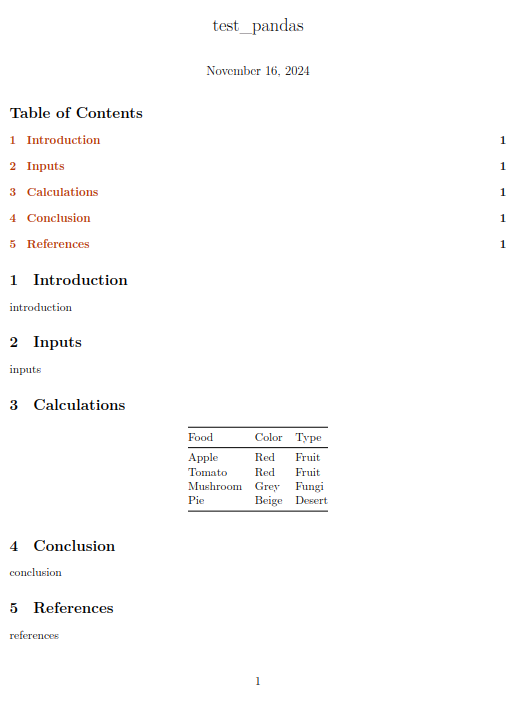
This is the test_pandas_pdf() test from tests/test_renderers.py; it replaces the {{calculations}} keyword with a pandas DataFrame to generate a PDF report.
import pandas as pd
from pathlib import Path
from eznbtemplater import render_pdf

template_path: Path = Path("eznbtemplater/templates/calculation_note.ipynb")

output_path: Path = Path("tests/test_pandas.pdf")

headers = ["Food", "Color", "Type"]
data: list = [
    ["Apple", "Red", "Fruit"],
    ["Tomato", "Red", "Fruit"],
    ["Mushroom", "Grey", "Fungi"],
    ["Pie", "Beige", "Desert"],
]
df: pd.DataFrame = pd.DataFrame(
    data=data,
    columns=headers,
).set_index("Food")

render_pdf(
    template_path=template_path,
    output_path=output_path,
    calculations=df.to_markdown(),
    calculations_cell_type="markdown",
)
Here is the PDF result (margins were cropped for this picture, and the {{introduction}}, {{inputs}}, {{conclusion}} and {{references}} appear without their curly braces because they weren't replaced in the example):
From Dynamically Defined Template
This is the test_nb_programatically() test from tests/test_nb_programatically.py; it works with a notebook template created with nbformat, inspired by this example, instead of a static notebook template file:
from eznbtemplater.eznbtemplater import render_nb
import nbformat as nbf
from pathlib import Path


nb: nbf.NotebookNode = nbf.v4.new_notebook()
nb["cells"] = [
    nbf.v4.new_raw_cell(r"\renewcommand{\contentsname}{Table of Contents}"),
    nbf.v4.new_raw_cell(r"\tableofcontents"),
    nbf.v4.new_markdown_cell("# Introduction"),
    nbf.v4.new_markdown_cell("{{introduction}}"),
]

output_path: Path = Path("tests/test_nb_programatically.ipynb")

introduction: str = "This is a ***test***, don't mind me."
render_nb(
    template_nb=nb,
    output_path=output_path,
    introduction=introduction,
)
Additional Examples
See tests/test_renderers.py for a few additional examples.
Contributing
Contributions are welcome; please:
- Use uv.
- Run
uv syncto install the development environment. - Run
uv run pre-commit installto active the pre-commit hooks, including black. - Ensure pytest runs without failures with
make tests. - Be nice.
The source code is hosted at https://github.com/miek770/eznbtemplater.
License
eznbtemplater is licensed under the MIT License. See LICENSE file for details.
1 maintainer

Metadata
1 maintainer
Release files for eznbtemplater 0.1.5
For a detailed explanation of source distributions (sdists) and built distributions (wheels), please see the package formats documentation.
Source distribution (sdist)
| File | Size | Uploaded | |
|---|---|---|---|
| eznbtemplater-0.1.5.tar.gz | 98.4 kB | Details |
Built distribution (wheel)
| File | Interpreter | ABI | Platform | Reset |
|---|---|---|---|---|
| eznbtemplater-0.1.5-py3-none-any.whl | Python 3 | none | any | Details |
Total release size: 104.0 kB
Release files / eznbtemplater-0.1.5.tar.gz
| Download URL | eznbtemplater-0.1.5.tar.gz |
|---|---|
| Size | 98.4 kB |
| Tags | Source |
|
SHA-256 checksum How to use checksums |
e1ac42356fec0562601b68a742c822360d6288822ef881904d81058624e9a855
|
|
BLAKE2b-256 checksum How to use checksums |
41adfa063451263d5e00acfe16bfb46084cab46102378622c943590c40a915f7
|
| Upload date | |
|
Uploaded using Trusted Publishing? What is trusted publishing? |
No |
| Uploaded via |
twine/5.1.1 CPython/3.10.15
|
Release files / eznbtemplater-0.1.5-py3-none-any.whl
| Download URL | eznbtemplater-0.1.5-py3-none-any.whl |
|---|---|
| Size | 5.5 kB |
| Tags | Python 3 |
|
SHA-256 checksum How to use checksums |
658f246991b96d895a310d116742c3579bcf1427d8d47a08be56535a64f07cd0
|
|
BLAKE2b-256 checksum How to use checksums |
cc1b7821c60ed2c9e410fee0445122efd04c406beb65d30fad8255667d16364c
|
| Upload date | |
|
Uploaded using Trusted Publishing? What is trusted publishing? |
No |
| Uploaded via |
twine/5.1.1 CPython/3.10.15
|














