
F7
I know a command that could do that
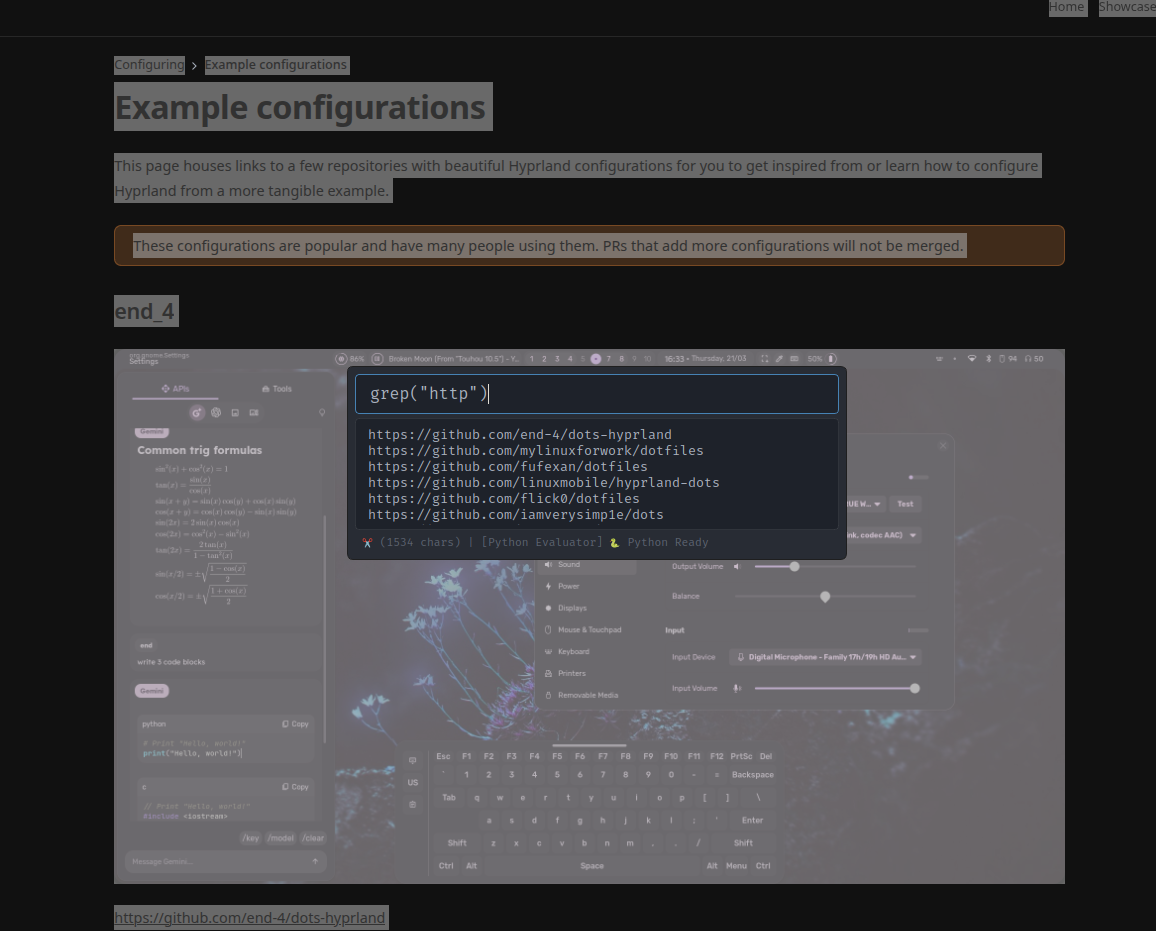
F7 is an app to help you manipulate strings fast and easily using Python, the command line, or a local LLM.
Installation
Install using pip:
pip install f7
Or using pipx:
pipx install f7
Setup
Linux
Requirements: xsel on X, wl-clipboard on Wayland.
To create desktop files, run:
f7 register
That will create the main application desktop file and optionally register a startup file.
Next, go to your system's keyboard shortcuts settings (e.g., Settings > Keyboard > Shortcuts > Add Application on KDE or GNOME), and bind the f7 application to your preferred shortcut (e.g., F7 or F4).
You can also try registering the command <f7 path> show instead.
Windows
Run:
f7 register
That will register the startup registry key. The app listens for your configured shortcut. You can change the shortcut using the F7 settings in the tray menu.
macOS
Currently not supported, but may be possible using macOS's Shortcuts app (Shortcuts > + > Shell Script) or Automator.
If you find a way to make it work, feel free to open a PR or reach out!
Usage
-
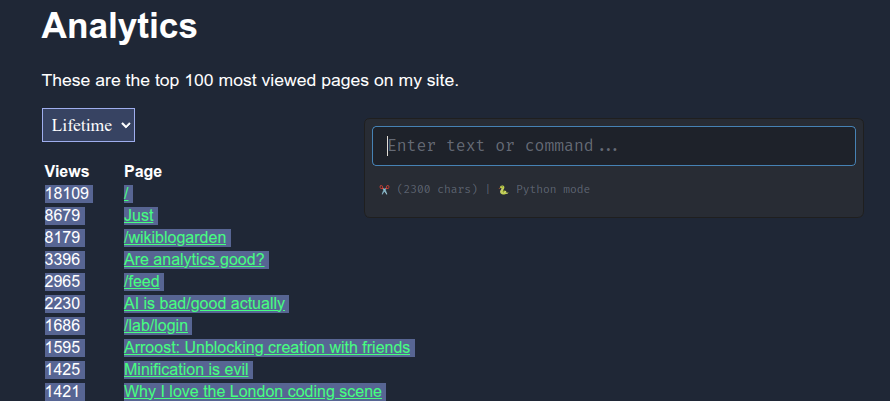
Select the Text: Highlight any text from any app.
-
Activate F7: Hit your shortcut key.
-
Type Your Transformation:
In the input field, use Python (default), command-line (
$prefix), or LLM (!prefix or suffix).Example using Python:
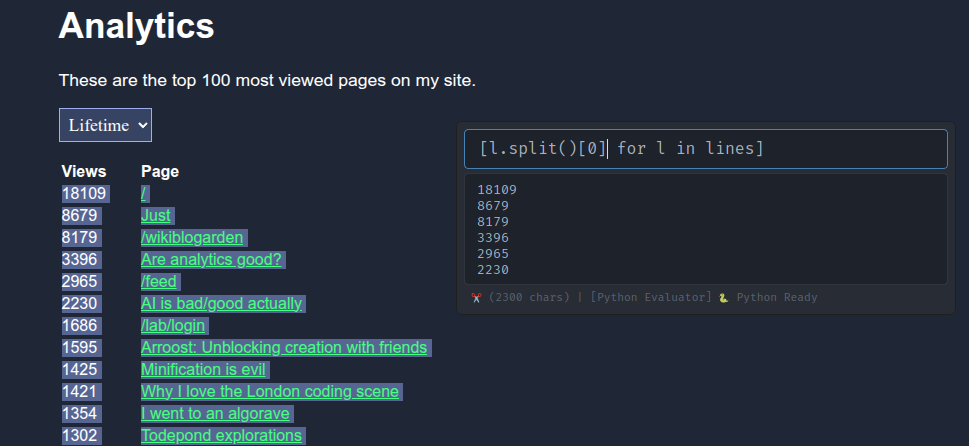
[l.split()[0] for l in lines]
(This tells the app: for each line, split it into words, and give me the first one.)
Or using Bash:
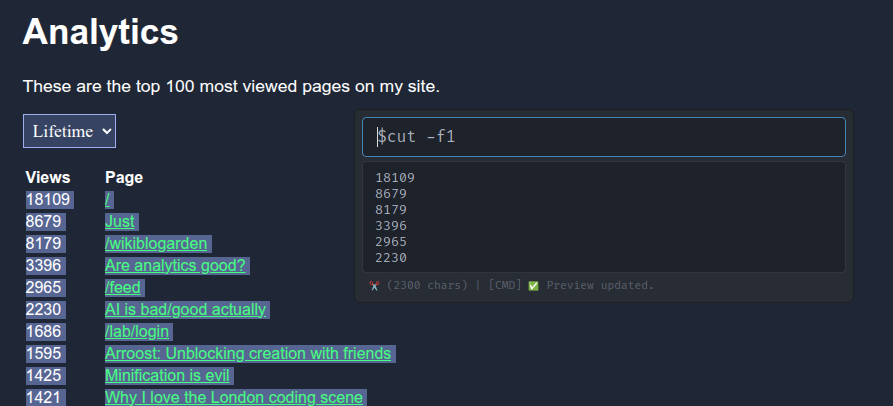
$cut -f1
(Use
$$cut -f1for live preview.)Live preview will show up as you type:
18109 8679 ... -
Hit Enter: Result is copied to your clipboard.
-
Done! Paste it wherever you want.
Command Line Mode
You could also use $ prefix to run a command (then ctrl+enter to preview), or $$ fix to live-preview:
Local AI (LLM) Setup
Supports two backends: Ollama and Llama.cpp.
1. Ollama Setup
- Install Ollama: ollama.com
- Pull a model: For example:
ollama pull phi3
You can find other available models on the Ollama library website.
-
Configure in App:
- Open F7 settings (
/settingsor tray menu) - Go to AI tab
- Set Backend to
ollama - Set Model Name (e.g.,
phi3)
- Open F7 settings (
2. Llama.cpp Setup:
2. Llama.cpp Setup
-
Download a GGUF model: e.g., from Hugging Face
- Recommended:
Q4_K_M
- Recommended:
-
Configure in App:
- Open F7 settings
- Go to AI tab
- Set Backend to
llama_cpp - Set path to the GGUF model
- Enable GPU if you have one (
llama_cpp_use_GPU)
F7 python
F7 adds a few helpful twists to regular Python to speed things up:
-
Predefined variables:
text(alias:s),lines,words -
Auto-parsed content:
_var will try to parse the text as JSON, Python literal, CSV or base64. -
Forgiving syntax: complete
({[so half-written code like[ l for l in linesworks!
-
List display: Lists show as joined lines (
"\n".join(...)) instead ofrepr(...), so it easier to work with lines. -
Auto-display: Typing
text.upperorurldecodeget output automatically if they match(str) → str, or a method oftext. -
Useful built-ins:
grep("foo")→ likere.search(...)overlinessub("a", "b")→ likere.sub(...)ontext- Other helpers:
entropy,from_base64,from_tsv, etc.
-
Preloaded utils: Things like
lnjoin = "\n".join,urlencode = quote_plus. also there are string formatters likesnake_case,camel_casethat came fromstring_utils
FAQ
F7 key triggers "caret browsing" in Chrome/uim
Unfortunately, Chrome doesn’t let you disable F7. Options:
-
Remap shortcut to something else (e.g.
F4)- Windows:
F7 settings > System > Hotkey - Linux: System Settings > Keyboard Shortcuts
- Use a browser that allows shortcut customization (e.g., Brave, Vivaldi)
- Remap
F7key to something else (e.g. using PowerToys on Windows bind F7 to alt+F7)
- Windows:
F7 key triggers caret browsing in Firefox
If you use caret browsing, consider remapping the shortcut. Otherwise, just click "Do not ask me again" and choose "No". Firefox will remember your choice.
How to report errors/problems/suggestions
please open a GitHub issue
How can I donate you
If you found this app useful, please buy me a coffee:

1 maintainer

Metadata
1 maintainer
Release files for f7 0.1.3
For a detailed explanation of source distributions (sdists) and built distributions (wheels), please see the package formats documentation.
Source distribution (sdist)
| File | Size | Uploaded | |
|---|---|---|---|
| f7-0.1.3.tar.gz | 50.6 kB | Details |
Built distribution (wheel)
| File | Interpreter | ABI | Platform | Reset |
|---|---|---|---|---|
| f7-0.1.3-py3-none-any.whl | Python 3 | none | any | Details |
Total release size: 107.9 kB
Release files / f7-0.1.3.tar.gz
| Download URL | f7-0.1.3.tar.gz |
|---|---|
| Size | 50.6 kB |
| Tags | Source |
|
SHA-256 checksum How to use checksums |
7f20151dd2558560d1632986f20146a06d7e395429ec8eae6266d3f8d5a67a3c
|
|
BLAKE2b-256 checksum How to use checksums |
fc00cde79f25e41d923e50ceb82cdb38211934f26a86c34f501adb1a36dfa473
|
| Upload date | |
|
Uploaded using Trusted Publishing? What is trusted publishing? |
No |
| Uploaded via |
poetry/2.1.3 CPython/3.13.3 Linux/6.14.9-300.fc42.x86_64
|
Release files / f7-0.1.3-py3-none-any.whl
| Download URL | f7-0.1.3-py3-none-any.whl |
|---|---|
| Size | 57.3 kB |
| Tags | Python 3 |
|
SHA-256 checksum How to use checksums |
107a94f3227a29db529427d13243df5bfa3f18a267b7c8a2dbe4ecb945a3af52
|
|
BLAKE2b-256 checksum How to use checksums |
fc006f227931cc3631c79593030cf7d8d0caf05ecce06aa75f91785a882f1629
|
| Upload date | |
|
Uploaded using Trusted Publishing? What is trusted publishing? |
No |
| Uploaded via |
poetry/2.1.3 CPython/3.13.3 Linux/6.14.9-300.fc42.x86_64
|














