
Fab Downloader
Get the Unreal Engine items in your Fab library without the Epic Games Launcher: add them to a project, install code plugins into an engine (including source-built engines, which the launcher cannot install into), or download a build for any engine version. Windows only, with a window and a command line.
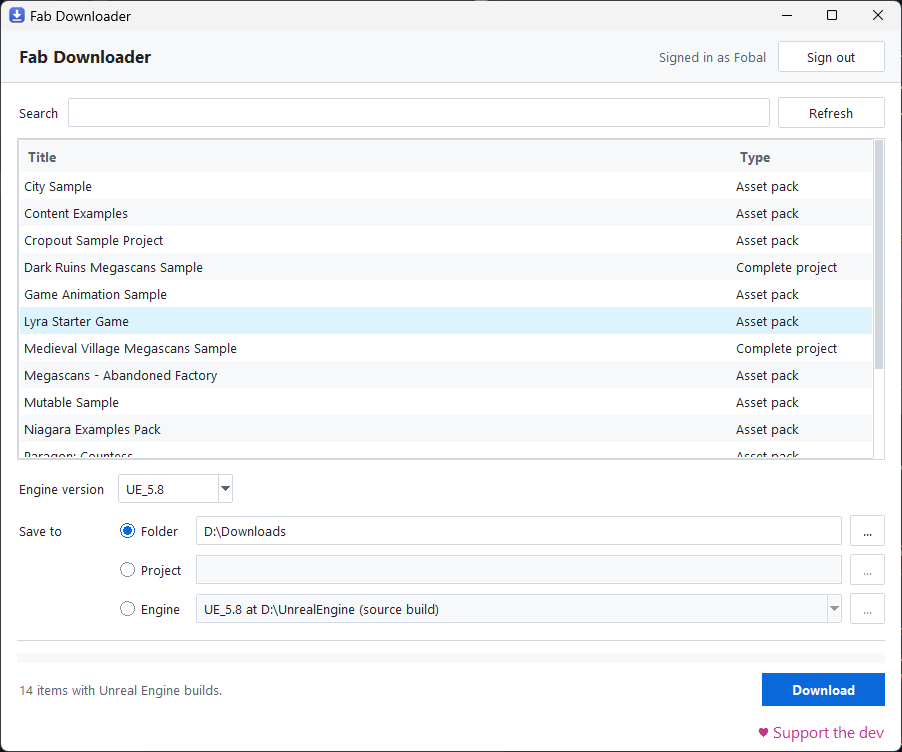
Fab Downloader is not affiliated with, endorsed by or supported by Epic Games. See Disclaimer.
Install
- Executable (window only, no Python needed): download
fab-downloader.exefrom Releases. It is not code-signed, so SmartScreen or antivirus software may warn about it; if so, use pipx or the source. - pipx (Python 3.11+):
pipx install fab-downloader, then runfab-downloaderfor the window orfabdlfor the command line. - Source (Python 3.11+, standard library only): clone the repo and run
fab-downloader.pyw, orpy -3 -m fabdlfor the command line.
Usage
- Click Open Epic login and sign in. The page then shows JSON text: copy the whole page
(Ctrl+A, Ctrl+C) and the window signs in, or paste just the
authorizationCodevalue. - Search your library, select an item and pick an engine version.
- Under Save to, choose a destination:
- Folder: Download saves the build to
<folder>\<title> <engine>. - Project: pick a
.uproject. Add to project puts a code plugin inPluginsor merges an asset pack intoContent. - Engine: pick a detected engine, or browse to one. Install to engine puts a code
plugin in
Engine\Plugins\Marketplace.
- Folder: Download saves the build to
Anything that gets replaced is backed up to the project's or engine's Saved folder first, and
nothing changes if the Unreal Editor has the files open. The .uproject is never edited; if a
plugin needs enabling, you are told to do it in Edit > Plugins.
For a project or engine, the Installed column lists the plugins Fab Downloader put there. Check for updates looks for newer builds; install an item again to update it.
The window and the command line share one session, saved in
%APPDATA%\fab-downloader\session.bin and encrypted for your Windows user with DPAPI.
Sign out, or fabdl logout, deletes it.
Engine detection, backups and downloads are covered in more detail in How it works.
Command line
fabdl list [search]
fabdl install [search] [--project GAME.uproject | --engine-dir ENGINE_ROOT] [--engine 5.3]
fabdl outdated [--project GAME.uproject | --engine-dir ENGINE_ROOT]
fabdl download [search] [--engine 5.3] [--out FOLDER]
fabdl logout
search is an asset id or part of a title; if several items or engine versions match, it lists
them and asks. Without --project or --engine-dir, install and outdated use the project
last chosen in the window, and install picks the target's engine version unless --engine is
given. download --out must not exist yet. --platform (default Windows) sets the build
platform.
To sign in, the first command that needs a session opens the Epic login page and asks for the
authorizationCode value.
Limits
- Fab has no public API. Fab Downloader uses the launcher's private endpoints, which Epic can change without notice and does not officially support.
- Encrypted manifests and chunks are not supported.
- Downloads cannot be paused or resumed; closing the window is the only way to cancel one.
Contributing
Bug reports and pull requests are welcome; see CONTRIBUTING.md. Report security problems privately as described in SECURITY.md.
Sponsor
Fab Downloader is free. If it saves you time, you can support it through:
- GitHub Sponsors
- Bitcoin:
bc1qhj0n2mlyjr43zg7ygyu9y9k9hfqzleaxkvjprt - Ethereum, Polygon and other EVM networks:
0x4C6C4c665113C6311501567c0BFC38029b00a82e
Starring the repo and sharing it with other Unreal developers are also greatly appreciated.
Disclaimer
Fab Downloader is an independent project, not affiliated with, endorsed by or supported by Epic Games, Inc. Epic Games, Fab and Unreal Engine are trademarks or registered trademarks of Epic Games, Inc. in the United States and elsewhere.
It only downloads items in the signed-in account's own Fab library, through the same endpoints the Epic Games Launcher uses. You are responsible for following Epic's terms and the license of each item you download.
License
Copyright (C) 2026 Fobal. Licensed under the GNU General Public License v3.0.
1 maintainer

Metadata
1 maintainer
Release files for fab-downloader 1.1.0
For a detailed explanation of source distributions (sdists) and built distributions (wheels), please see the package formats documentation.
Source distribution (sdist)
| File | Size | Uploaded | Provenance | Actions |
|---|---|---|---|---|
| fab_downloader-1.1.0.tar.gz | 79.4 kB | With provenance | Details for fab_downloader-1.1.0.tar.gz |
Built distribution (wheel)
| File | Interpreter | ABI | Platform | Actions Reset |
|---|---|---|---|---|
| fab_downloader-1.1.0-py3-none-any.whl | Python 3 | none | any | Details for fab_downloader-1.1.0-py3-none-any.whl |
Total release size: 141.8 kB
Release files / fab_downloader-1.1.0.tar.gz
| Download URL | fab_downloader-1.1.0.tar.gz |
|---|---|
| Size | 79.4 kB |
| Tags | Source |
|
SHA-256 checksum How to use checksums |
e890d01d3f1643995b87d9b82457d63decbb9b1cb1a7cab76e301dba6fbfa922
|
|
BLAKE2b-256 checksum How to use checksums |
31453809b02721a93b50f2029d827340d5bd10f985718f417b9ece7e4c572c77
|
| Upload date | |
|
Uploaded using Trusted Publishing? What is trusted publishing? |
Yes |
| Uploaded via |
twine/7.0.0 CPython/3.13.16
|
Provenance
Provenance describes where a file came from. On PyPI, provenance is shared via attestations, which provide a verifiable record of the build or publishing details. View details, limitations and caveats.


PyPI Publish Attestation
PyPI verified that this artifact, at this checksum, originated from the publisher listed below.
Signed by GitHub Actions, verified by PyPI on Oct 30, 2026.
Transparency logRelease files / fab_downloader-1.1.0-py3-none-any.whl
| Download URL | fab_downloader-1.1.0-py3-none-any.whl |
|---|---|
| Size | 62.5 kB |
| Tags | Python 3 |
|
SHA-256 checksum How to use checksums |
ee245edfe46d58819f25a583f791d0ced1319c962f9a1d36f59fa1f6659bec1d
|
|
BLAKE2b-256 checksum How to use checksums |
311cd1a2998695e567e4a14c97b42c16e75784edc6724ae13e12f4b1ca1b5b22
|
| Upload date | |
|
Uploaded using Trusted Publishing? What is trusted publishing? |
Yes |
| Uploaded via |
twine/7.0.0 CPython/3.13.16
|
Provenance
Provenance describes where a file came from. On PyPI, provenance is shared via attestations, which provide a verifiable record of the build or publishing details. View details, limitations and caveats.
PyPI Publish Attestation
PyPI verified that this artifact, at this checksum, originated from the publisher listed below.
Signed by GitHub Actions, verified by PyPI on Oct 30, 2026.
Transparency logSecurity for fab-downloader 1.1.0
Provenance
Provenance describes where a file came from. On PyPI, provenance is shared via attestations, which provide a verifiable record of the build or publishing details. View details, limitations and caveats.
Full provenance
Both files in this release have been uploaded with provenance metadata.
Attestation for fab_downloader-1.1.0.tar.gz
PyPI Publish Attestation
PyPI verified that this artifact, at this checksum, originated from the publisher listed below.
Signed by GitHub Actions, verified by PyPI on Oct 30, 2026.
Transparency logA note on package security
PyPI is a repository for distributing packages, not a service for auditing them. While third-party security researchers and our staff do their best to detect and remove malicious packages, PyPI cannot guarantee the quality, security or suitability of any given package.
To learn more about protecting yourself from malicious actors, visit our package security documentation.














