
fabric-ai-meta





Make any Power BI semantic model readable by AI, from your laptop.
Point it at a .pbip folder and you get a classified schema, an AI readiness score, and framework-native exports for LangChain, OpenAI, Semantic Kernel, and AutoGen. No Fabric tenant, no notebook, no sign-in.
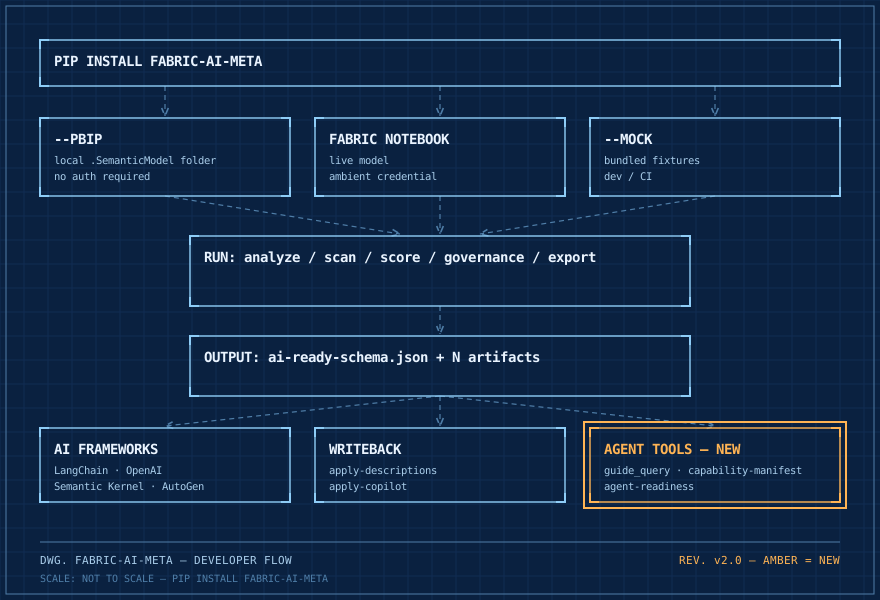
Try it
In Power BI Desktop: File > Save As > .pbip. Then:
pip install fabric-ai-meta
fabric-ai-meta analyze "Sales" --pbip ./Sales.SemanticModel
That reads the local TMDL, classifies every table and measure, scores the model, and writes ./output/sales/:
ai-ready-schema.json          # tables, measures, relationships, all classified
readiness-score.json          # {"score": 0.82}  <- how AI-ready this model is
langchain-tool.json           # drop straight into LangChain
openai-function.json          # and into OpenAI function calling
semantic-kernel-plugin.json   # and Semantic Kernel  (export autogen adds the fourth)
measure-dependency-graph.json
extraction-raw.json
It parses your DAX, so a TOTALYTD(...) measure comes back understood, not guessed:
{ "name": "Sales YTD", "category": "time_intelligence", "requires_date_filter": true }
No model handy? fabric-ai-meta analyze "Adventure Works" --mock runs the same flow on bundled fixtures.
Your models never leave your machine
Table names, measure logic, and business rules describe how your company works. You never have to trust this tool with any of it.
- Local by default.
--pbipreads TMDL off your disk,--mockuses bundled fixtures. Neither touches a network or an account. - No telemetry. The only outbound calls in the codebase go to the Fabric REST API and to the LLM provider you configure. Both are opt-in.
- LLM enrichment is opt-in and capped. Nothing is sent anywhere without
--llm-enrich. You pick the provider (10+, including local Ollama), you supply the key, andmax_cost_per_runstops an overspending run. - Writeback is dry-run by default.
apply-descriptionsandapply-copilotshow the diff and change nothing until you pass--no-dry-run.
Reaching a live workspace, to read it or to write back, is the only thing that needs Fabric, because the Fabric SDKs only exist in the notebook runtime. Everything else, analysis, scoring, and every export, runs anywhere Python does.
| Mode | Where it runs | Extractor | Auth |
|---|---|---|---|
| Fabric | Fabric notebook | SemanticLinkExtractor (needs [fabric]) |
Ambient, automatic |
Local .pbip |
Any machine | PbipExtractor over local TMDL |
None |
| Local / CI mock | Any machine | MockExtractor over fixture JSON |
None |
Commands
Every command takes --pbip <folder>, --mock, or --workspace <name>. Worked examples for all of them are in the user guide.
| Command | What it does |
|---|---|
analyze |
Extract, classify, score, and export one model |
scan |
The same across a whole workspace or a Git Integration repo, plus workspace-summary.json |
score |
AI readiness score: description coverage, naming consistency, relationship completeness |
governance |
Cross-model naming inconsistencies, duplicate DAX under different names, readiness ranking |
export |
langchain, openai, semantic-kernel, autogen, prep-for-ai, copilot, or your own plugin |
auth |
login, status, logout for local Entra sign-in (requires [fabric]) |
apply-descriptions |
Push generated descriptions to a live model through XMLA / TOM |
apply-copilot |
Push an edited Copilot/ folder back through the Fabric REST API |
diff |
Compare two workspace scans: score changes, models added or removed, regressions |
serve |
MCP server exposing six tools, so your IDE agent can answer questions about your models directly |
Add --llm-enrich to any extraction command to fill in missing descriptions and detect fact-table grain. It is off unless you ask, cost-capped, and works with 10+ providers including a local Ollama.
Do you even need an ontology?
Knowledge graph projects are expensive and most semantic models do not need one: a star schema with good descriptions already answers the questions people actually ask. Run this before you fund the project.
fabric-ai-meta governance --pbip ./models --graph-necessity --report ./gov.json
The report gains a verdict per model:
{
  "name": "Contoso Sales",
  "tier": "GRAPH_UNNECESSARY",
  "pressure": 0.0,
  "confidence": "evidenced",
  "evidence": [
    "4 of 4 questions resolve within <=2 tables (flat aggregation)",
    "no bridge or many-to-many relationships",
    "relationship graph is a shallow star (diameter 2)",
    "single fact table"
  ],
  "recommendation": "Described schema suffices; defer ontology/graph adoption."
}
Tiers are GRAPH_UNNECESSARY, GRAPH_OPTIONAL, and GRAPH_WARRANTED, blended from four signals: how many real questions traverse three or more tables, bridge and many-to-many presence, relationship graph depth, and multi-fact complexity. No Fabric capacity, no LLM calls.
Pass --questions ./questions.txt (one per line, or a JSON list) to judge against what your users actually ask. Without it the check falls back to Copilot example prompts, then to measure dependencies, which is a conservative proxy: DAX names columns in one or two tables while real traversal happens through relationships at query time. That fallback biases toward GRAPH_UNNECESSARY, so supply real questions when you want the verdict to carry weight.
Why this exists
Microsoft's AI features for semantic models (Prep for AI, Copilot descriptions, Data Agents, Fabric IQ Ontology) share three limits. Prep for AI is configured by hand, one model at a time, with no bulk API. Nothing exports outside Fabric, so a LangChain or function-calling pipeline starts blind. And nothing compares models, so Total Sales in one and Sum of Sales in another stay invisibly identical.
This is not a replacement for those tools. It is an automation layer on top of them and a bridge to the AI ecosystem outside Fabric.
Library API
from fabric_ai_meta import MockExtractor, score_model, generate_ai_ready_schema, to_openai_function

model = MockExtractor().extract("Adventure Works", "Production Analytics")
score, breakdown = score_model(model)
schema = generate_ai_ready_schema(model)
openai_fn = to_openai_function(model)
47 public exports; see fabric_ai_meta.__all__.
Custom exporters
Subclass BaseExporter, register it under the fabric_ai_meta.exporters entry point group, and it appears as fabric-ai-meta export <name> with the same flags as the built-ins. No fork needed. Worked dbt example: docs/plugin-development.md.
Docs
| User guide | Every capability from install to writeback, with persona-mapped paths |
notebooks/quickstart.ipynb |
The same tour inside a Fabric runtime |
| CI/CD guide | Enforce governance thresholds on every PR, with ready-to-paste workflows |
| Plugin development | Ship your own exporter |
schemas/ |
JSON Schema for every output file |
Contributing
Issues and pull requests welcome. Before opening one:
pip install -e ".[dev]"
pytest tests/ -q     # 568 tests, no Fabric runtime or network needed
ruff check .
New exporters ship as plugins rather than PRs here. Sample models under src/fabric_ai_meta/fixtures/ and doc fixes are the easiest first contributions.
If this saved you time, star the repository. That is the signal I use to decide what to build next.
License
MIT. See LICENSE.
Built by Prasanth Sistla. Not affiliated with, endorsed by, or sponsored by Microsoft. "Microsoft Fabric", "Power BI", and "Copilot" are trademarks of Microsoft Corporation.
1 maintainer

Download files
Download the file for your platform. If you're not sure which to choose, learn more about installing packages.
Source Distribution
Built Distribution
Filter files by name, interpreter, ABI, and platform.
If you're not sure about the file name format, learn more about wheel file names.
Copy a direct link to the current filters
File details
Details for the file fabric_ai_meta-1.8.0.tar.gz.
File metadata
- Download URL: fabric_ai_meta-1.8.0.tar.gz
- Upload date:
- Size: 182.9 kB
- Tags: Source
- Uploaded using Trusted Publishing? Yes
- Uploaded via:
twine/6.1.0 CPython/3.13.14
File hashes
| Algorithm | Hash digest | |
|---|---|---|
| SHA256 |
2233f8282f5f0701ef82267c62b96b141450abdeafa3cd3907d0e081b0acd641
|
|
| MD5 |
f4197b042af9024e57410455e690006b
|
|
| BLAKE2b-256 |
aa4608f4042a3872e477a430bc6f8e16b71d982ffe6bd600c2de8835d0afbdef
|
Provenance
The following attestation bundles were made for fabric_ai_meta-1.8.0.tar.gz:
Publisher:
publish.yml on psistla/fabric-ai-meta
-
Statement:
-
Statement type:
https://in-toto.io/Statement/v1 -
Predicate type:
https://docs.pypi.org/attestations/publish/v1 -
Subject name:
fabric_ai_meta-1.8.0.tar.gz -
Subject digest:
2233f8282f5f0701ef82267c62b96b141450abdeafa3cd3907d0e081b0acd641 - Sigstore transparency entry: 2242766745
- Sigstore integration time:
-
Permalink:
psistla/fabric-ai-meta@41dca0dc164faa7bda366eb34ffc9e7ff2c672fc -
Branch / Tag:
refs/tags/v1.8.0 - Owner: https://github.com/psistla
-
Access:
public
-
Token Issuer:
https://token.actions.githubusercontent.com -
Runner Environment:
github-hosted -
Publication workflow:
publish.yml@41dca0dc164faa7bda366eb34ffc9e7ff2c672fc -
Trigger Event:
push
-
Statement type:
File details
Details for the file fabric_ai_meta-1.8.0-py3-none-any.whl.
File metadata
- Download URL: fabric_ai_meta-1.8.0-py3-none-any.whl
- Upload date:
- Size: 109.1 kB
- Tags: Python 3
- Uploaded using Trusted Publishing? Yes
- Uploaded via:
twine/6.1.0 CPython/3.13.14
File hashes
| Algorithm | Hash digest | |
|---|---|---|
| SHA256 |
7b1015232e03c95554553107c2cefe8a8f16fdb9046e119c5f6bc719a5962b8c
|
|
| MD5 |
155331159b86f7f2c0874b8c39ffa253
|
|
| BLAKE2b-256 |
af07e2a1c2c2f7b6d7bc51eda5837ca83ca344c044bf1f7f83389b316efaadb6
|
Provenance
The following attestation bundles were made for fabric_ai_meta-1.8.0-py3-none-any.whl:
Publisher:
publish.yml on psistla/fabric-ai-meta
-
Statement:
-
Statement type:
https://in-toto.io/Statement/v1 -
Predicate type:
https://docs.pypi.org/attestations/publish/v1 -
Subject name:
fabric_ai_meta-1.8.0-py3-none-any.whl -
Subject digest:
7b1015232e03c95554553107c2cefe8a8f16fdb9046e119c5f6bc719a5962b8c - Sigstore transparency entry: 2242767264
- Sigstore integration time:
-
Permalink:
psistla/fabric-ai-meta@41dca0dc164faa7bda366eb34ffc9e7ff2c672fc -
Branch / Tag:
refs/tags/v1.8.0 - Owner: https://github.com/psistla
-
Access:
public
-
Token Issuer:
https://token.actions.githubusercontent.com -
Runner Environment:
github-hosted -
Publication workflow:
publish.yml@41dca0dc164faa7bda366eb34ffc9e7ff2c672fc -
Trigger Event:
push
-
Statement type:














