
Face Recognition
Detect facial landmarks from Python using the world's most accurate face alignment network, capable of detecting points in both 2D and 3D coordinates.
Build using FAN's state-of-the-art deep learning based face alignment method.

Note: The lua version is available here.
For numerical evaluations it is highly recommended to use the lua version which uses indentical models with the ones evaluated in the paper. More models will be added soon.




Features
Detect 2D facial landmarks in pictures

import face_alignment
from skimage import io

fa = face_alignment.FaceAlignment(face_alignment.LandmarksType._2D, flip_input=False)

input = io.imread('../test/assets/aflw-test.jpg')
preds = fa.get_landmarks(input)
Detect 3D facial landmarks in pictures
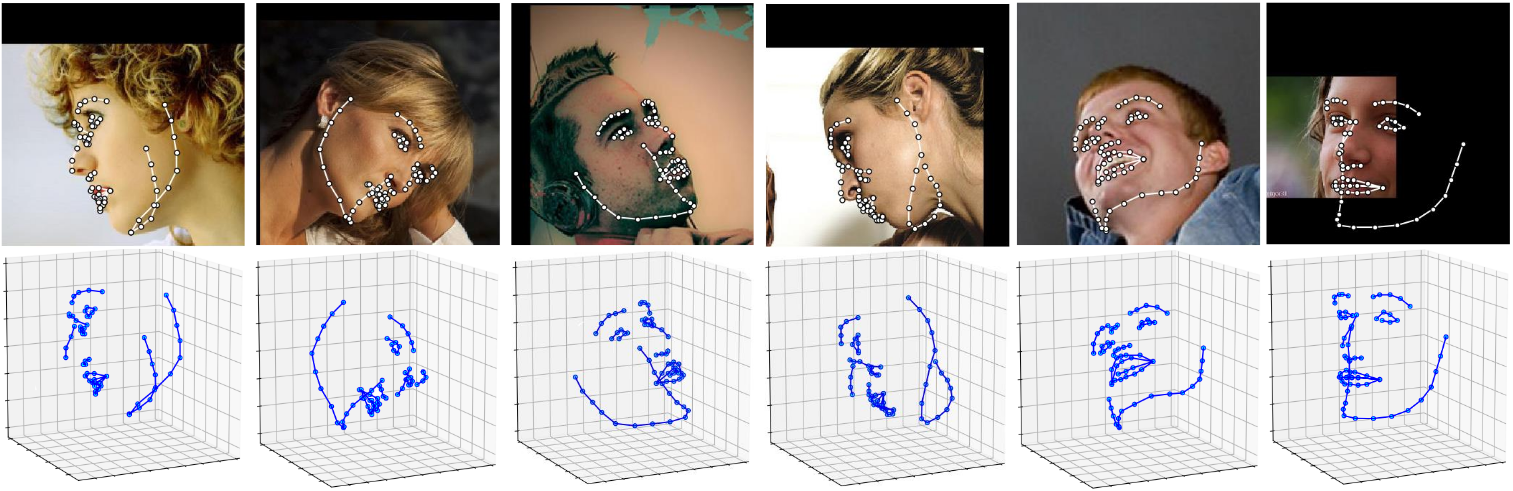
import face_alignment
from skimage import io

fa = face_alignment.FaceAlignment(face_alignment.LandmarksType._3D, flip_input=False)

input = io.imread('../test/assets/aflw-test.jpg')
preds = fa.get_landmarks(input)
Process an entire directory in one go
import face_alignment
from skimage import io

fa = face_alignment.FaceAlignment(face_alignment.LandmarksType._2D, flip_input=False)

preds = fa.get_landmarks_from_directory('../test/assets/')
Detect the landmarks using a specific face detector.
By default the package will use the SFD face detector. However the users can alternatively use dlib, BlazeFace, or pre-existing ground truth bounding boxes.
import face_alignment

# sfd for SFD, dlib for Dlib and folder for existing bounding boxes.
fa = face_alignment.FaceAlignment(face_alignment.LandmarksType._2D, face_detector='sfd')
Running on CPU/GPU
In order to specify the device (GPU or CPU) on which the code will run one can explicitly pass the device flag:
import face_alignment

# cuda for CUDA
fa = face_alignment.FaceAlignment(face_alignment.LandmarksType._2D, device='cpu')
Please also see the examples folder
Installation
Requirements
- Python 3.5+ (it may work with other versions too). Last version with support for python 2.7 was v1.1.1
- Linux, Windows or macOS
- pytorch (>=1.5)
While not required, for optimal performance(especially for the detector) it is highly recommended to run the code using a CUDA enabled GPU.
Binaries
The easiest way to install it is using either pip or conda:
| Using pip | Using conda |
|---|---|
pip install face-alignment |
conda install -c 1adrianb face_alignment |
Alternatively, bellow, you can find instruction to build it from source.
From source
Install pytorch and pytorch dependencies. Please check the pytorch readme for this.
Get the Face Alignment source code
git clone https://github.com/1adrianb/face-alignment
Install the Face Alignment lib
pip install -r requirements.txt
python setup.py install
Docker image
A Dockerfile is provided to build images with cuda support and cudnn. For more instructions about running and building a docker image check the orginal Docker documentation.
docker build -t face-alignment .
How does it work?
While here the work is presented as a black-box, if you want to know more about the intrisecs of the method please check the original paper either on arxiv or my webpage.
Contributions
All contributions are welcomed. If you encounter any issue (including examples of images where it fails) feel free to open an issue. If you plan to add a new features please open an issue to discuss this prior to making a pull request.
Citation
@inproceedings{bulat2017far,
  title={How far are we from solving the 2D \& 3D Face Alignment problem? (and a dataset of 230,000 3D facial landmarks)},
  author={Bulat, Adrian and Tzimiropoulos, Georgios},
  booktitle={International Conference on Computer Vision},
  year={2017}
}
For citing dlib, pytorch or any other packages used here please check the original page of their respective authors.
Acknowledgements
- To the pytorch team for providing such an awesome deeplearning framework
- To my supervisor for his patience and suggestions.
- To all other python developers that made available the rest of the packages used in this repository.
1 maintainer

Metadata
1 maintainer
Release files for face-alignment-edit 1.3.3.3
For a detailed explanation of source distributions (sdists) and built distributions (wheels), please see the package formats documentation.
Source distribution (sdist)
| File | Size | Uploaded | |
|---|---|---|---|
| face_alignment_edit-1.3.3.3.tar.gz | 26.2 kB | Details |
Built distribution (wheel)
| File | Interpreter | ABI | Platform | Reset |
|---|---|---|---|---|
| face_alignment_edit-1.3.3.3-py2.py3-none-any.whl | Python 3, Python 2 | none | any | Details |
Total release size: 55.1 kB
Release files / face_alignment_edit-1.3.3.3.tar.gz
| Download URL | face_alignment_edit-1.3.3.3.tar.gz |
|---|---|
| Size | 26.2 kB |
| Tags | Source |
|
SHA-256 checksum How to use checksums |
42d96811a54fb8b69b54d3861ccb4377984d52db8bbe6489f9f9180f82b00cd1
|
|
BLAKE2b-256 checksum How to use checksums |
27c6753c50da7eb3477cad1a3bf9c84a1890b90ec5b63e6ae6e28f122f9e2dfb
|
| Upload date | |
|
Uploaded using Trusted Publishing? What is trusted publishing? |
No |
| Uploaded via |
twine/3.4.2 importlib_metadata/4.8.1 pkginfo/1.4.2 requests/2.26.0 requests-toolbelt/0.9.1 tqdm/4.26.0 CPython/3.7.0
|
Release files / face_alignment_edit-1.3.3.3-py2.py3-none-any.whl
| Download URL | face_alignment_edit-1.3.3.3-py2.py3-none-any.whl |
|---|---|
| Size | 28.9 kB |
| Tags | Python 2 Python 3 |
|
SHA-256 checksum How to use checksums |
cbe498a5e66ee4be2e79f6c949c0082ce01d9fda960b299281d7a17c09b0ea75
|
|
BLAKE2b-256 checksum How to use checksums |
8bb2cfb5d9087202c372856fcc69f9613ab310444d5ec8de7db39076090b91dc
|
| Upload date | |
|
Uploaded using Trusted Publishing? What is trusted publishing? |
No |
| Uploaded via |
twine/3.4.2 importlib_metadata/4.8.1 pkginfo/1.4.2 requests/2.26.0 requests-toolbelt/0.9.1 tqdm/4.26.0 CPython/3.7.0
|














