
face-recognition-ng
Face Recognition


Features
Find faces in pictures
Find all the faces that appear in a picture:
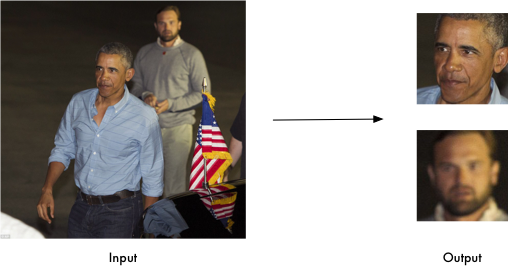
import face_recognition
image = face_recognition.load_image_file("your_file.jpg")
face_locations = face_recognition.face_locations(image)
Find and manipulate facial features in pictures
Get the locations and outlines of each person’s eyes, nose, mouth and chin.
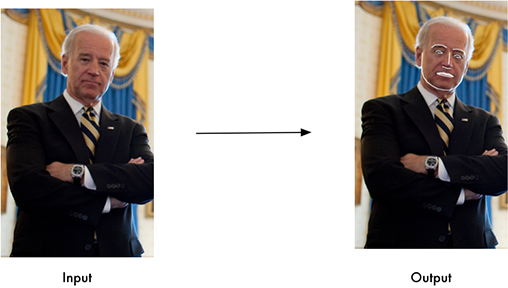
import face_recognition
image = face_recognition.load_image_file("your_file.jpg")
face_landmarks_list = face_recognition.face_landmarks(image)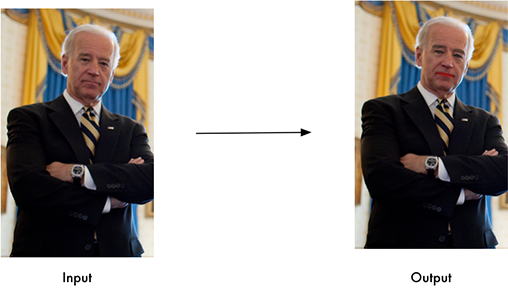
Identify faces in pictures
Recognize who appears in each photo.
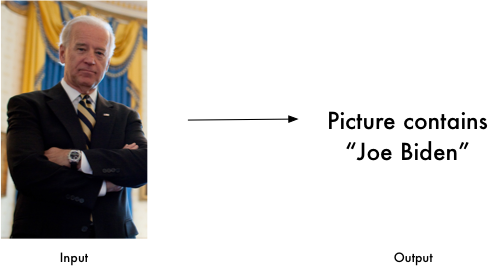
import face_recognition
known_image = face_recognition.load_image_file("biden.jpg")
unknown_image = face_recognition.load_image_file("unknown.jpg")

biden_encoding = face_recognition.face_encodings(known_image)[0]
unknown_encoding = face_recognition.face_encodings(unknown_image)[0]

results = face_recognition.compare_faces([biden_encoding], unknown_encoding)
You can even use this library with other Python libraries to do real-time face recognition:
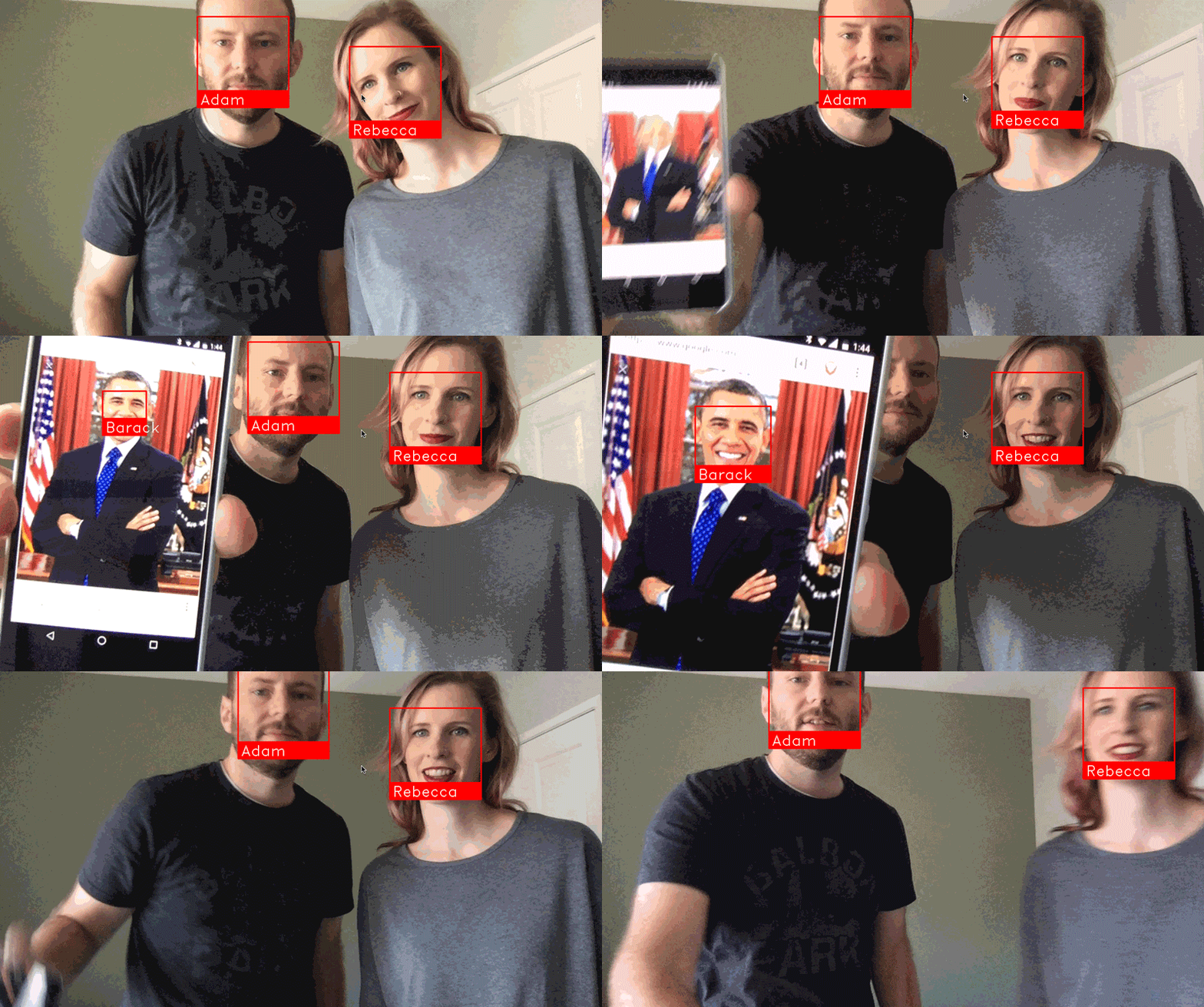
See this example for the code.
Installation
Requirements
Python 3.9+
macOS or Linux (Windows not officially supported, but might work)
Installing on Mac or Linux
First, make sure you have dlib already installed with Python bindings:
Then, install this package from PyPI:
pip install face-recognition-ngInstalling on Raspberry Pi 2+
Installing on Windows
While Windows isn’t officially supported, helpful users have posted instructions on how to install this library:
Installing a pre-configured Virtual Machine image
Download the pre-configured VM image (for VMware Player or VirtualBox).
Usage
Command-Line Interface
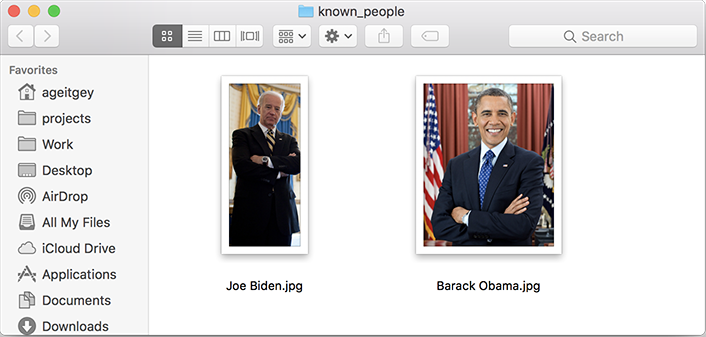
Next, you need a second folder with the files you want to identify:

$ face_recognition ./pictures_of_people_i_know/ ./unknown_pictures/

/unknown_pictures/unknown.jpg,Barack Obama
/face_recognition_test/unknown_pictures/unknown.jpg,unknown_personAdjusting Tolerance / Sensitivity
$ face_recognition --tolerance 0.54 ./pictures_of_people_i_know/ ./unknown_pictures/

/unknown_pictures/unknown.jpg,Barack Obama
/face_recognition_test/unknown_pictures/unknown.jpg,unknown_person$ face_recognition --show-distance true ./pictures_of_people_i_know/ ./unknown_pictures/
/unknown_pictures/unknown.jpg,Barack Obama,0.378542298956785
/face_recognition_test/unknown_pictures/unknown.jpg,unknown_person,NoneMore Examples
$ face_recognition ./pictures_of_people_i_know/ ./unknown_pictures/ | cut -d ',' -f2

Barack Obama
unknown_person
Speeding up Face Recognition
Pass in a --cpus <number_of_cpu_cores_to_use> parameter:
$ face_recognition --cpus 4 ./pictures_of_people_i_know/ ./unknown_pictures/You can also pass in --cpus -1 to use all CPU cores in your system.
Python Module
API Docs: https://face-recognition.readthedocs.io.
Automatically find all the faces in an image
import face_recognition

image = face_recognition.load_image_file("my_picture.jpg")
face_locations = face_recognition.face_locations(image)

# face_locations is now an array listing the co-ordinates of each face!You can also opt-in to a somewhat more accurate deep-learning-based face detection model.
import face_recognition

image = face_recognition.load_image_file("my_picture.jpg")
face_locations = face_recognition.face_locations(image, model="cnn")

# face_locations is now an array listing the co-ordinates of each face!Automatically locate the facial features of a person in an image
import face_recognition

image = face_recognition.load_image_file("my_picture.jpg")
face_landmarks_list = face_recognition.face_landmarks(image)

# face_landmarks_list is now an array with the locations of each facial feature in each face.
# face_landmarks_list[0]['left_eye'] would be the location and outline of the first person's left eye.Recognize faces in images and identify who they are
import face_recognition

picture_of_me = face_recognition.load_image_file("me.jpg")
my_face_encoding = face_recognition.face_encodings(picture_of_me)[0]

# my_face_encoding now contains a universal 'encoding' of my facial features that can be compared to any other picture of a face!

unknown_picture = face_recognition.load_image_file("unknown.jpg")
unknown_face_encoding = face_recognition.face_encodings(unknown_picture)[0]

# Now we can see the two face encodings are of the same person with `compare_faces`!

results = face_recognition.compare_faces([my_face_encoding], unknown_face_encoding)

if results[0] == True:
    print("It's a picture of me!")
else:
print("It's not a picture of me!")Python Code Examples
All the examples are available here.
Face Detection
Facial Features
Facial Recognition
Find and recognize unknown faces in a photograph based on photographs of known people
Compare faces by numeric face distance instead of only True/False matches
Recognize faces in live video using your webcam - Faster Version (Requires OpenCV to be installed)
Recognize faces in a video file and write out new video file (Requires OpenCV to be installed)
Run a web service to recognize faces via HTTP (Requires Flask to be installed)
Recognize faces with a K-nearest neighbors classifier
How Face Recognition Works
Caveats
The face recognition model is trained on adults and does not work very well on children. It tends to mix up children quite easy using the default comparison threshold of 0.6.
Deployment to Cloud Hosts (Heroku, AWS, etc)
Common Issues
Issue: Illegal instruction (core dumped) when using face_recognition or running examples.
Issue: RuntimeError: Unsupported image type, must be 8bit gray or RGB image. when running the webcam examples.
Solution: Your webcam probably isn’t set up correctly with OpenCV. Look here for more.
Issue: AttributeError: 'module' object has no attribute 'face_recognition_model_v1'
Solution: The version of dlib you have installed is too old. You need version 19.7 or newer. Upgrade dlib.
Issue: Attribute Error: 'Module' object has no attribute 'cnn_face_detection_model_v1'
Solution: The version of dlib you have installed is too old. You need version 19.7 or newer. Upgrade dlib.
Issue: TypeError: imread() got an unexpected keyword argument 'mode'
Solution: The version of scipy you have installed is too old. You need version 0.17 or newer. Upgrade scipy.
Changes from upstream
This fork picks up where the original face_recognition library left off. The public Python API and CLI are fully compatible — no changes to existing code are required.
What changed:
Packaging: Migrated to a fully PEP 517/518/621-compliant pyproject.toml. setup.py and MANIFEST.in removed. Published on PyPI as face-recognition-ng.
Python support: Dropped Python 2 and Python < 3.9. Targets Python 3.9–3.14.
Dependencies: Updated minimum versions for click (≥ 8), numpy (≥ 1.24), and Pillow (≥ 9).
Source cleanup: Removed from __future__ imports, # -*- coding: utf-8 -*- headers, dead Python 2 version guards, and replaced quit() with a proper ImportError. F-strings and idiomatic Python 3 throughout.
CI: Updated GitHub Actions to modern action versions; matrix now covers 3.9–3.14.
Modernisation assistance: Packaging and Python 3 modernisation in this fork was assisted by Claude Code (Anthropic).
Thanks
Many, many thanks to Davis King (@nulhom) for creating dlib and for providing the trained facial feature detection and face encoding models used in this library. For more information on the ResNet that powers the face encodings, check out his blog post.
Thanks to everyone who works on all the awesome Python data science libraries like numpy, scipy, scikit-image, pillow, etc, etc that makes this kind of stuff so easy and fun in Python.
Thanks to Cookiecutter and the audreyr/cookiecutter-pypackage project template for making Python project packaging way more tolerable.
1 maintainer

Metadata
1 maintainer
Release files for face-recognition-ng 1.4.2
For a detailed explanation of source distributions (sdists) and built distributions (wheels), please see the package formats documentation.
Source distribution (sdist)
| File | Size | Uploaded | Provenance | Actions |
|---|---|---|---|---|
| face_recognition_ng-1.4.2.tar.gz | 21.0 kB | With provenance | Details for face_recognition_ng-1.4.2.tar.gz |
Built distribution (wheel)
| File | Interpreter | ABI | Platform | Actions Reset |
|---|---|---|---|---|
| face_recognition_ng-1.4.2-py3-none-any.whl | Python 3 | none | any | Details for face_recognition_ng-1.4.2-py3-none-any.whl |
Total release size: 35.9 kB
Release files / face_recognition_ng-1.4.2.tar.gz
| Download URL | face_recognition_ng-1.4.2.tar.gz |
|---|---|
| Size | 21.0 kB |
| Tags | Source |
|
SHA-256 checksum How to use checksums |
3bfff83d79d33c91d07905baa060cad9fea4600aded5df22a7f58d174ad906dd
|
|
BLAKE2b-256 checksum How to use checksums |
5ec46e502f3f4e0b305dbbd7d8ed3d78e170b254cb8295ce819de010dc17a404
|
| Upload date | |
|
Uploaded using Trusted Publishing? What is trusted publishing? |
Yes |
| Uploaded via |
twine/6.1.0 CPython/3.13.12
|
Provenance
Provenance describes where a file came from. On PyPI, provenance is shared via attestations, which provide a verifiable record of the build or publishing details. View details, limitations and caveats.


PyPI Publish Attestation
PyPI verified that this artifact, at this checksum, originated from the publisher listed below.
Signed by GitHub Actions, verified by PyPI on Jun 3, 2026.
Transparency logRelease files / face_recognition_ng-1.4.2-py3-none-any.whl
| Download URL | face_recognition_ng-1.4.2-py3-none-any.whl |
|---|---|
| Size | 15.0 kB |
| Tags | Python 3 |
|
SHA-256 checksum How to use checksums |
5722d946d7d2c0b42408b841807f3481c6488df9c18a78deeb9865867a02971b
|
|
BLAKE2b-256 checksum How to use checksums |
89638f04c18e8496b92f2c42c55ab8c79abf28619ed2067aac0a0d925f014e18
|
| Upload date | |
|
Uploaded using Trusted Publishing? What is trusted publishing? |
Yes |
| Uploaded via |
twine/6.1.0 CPython/3.13.12
|
Provenance
Provenance describes where a file came from. On PyPI, provenance is shared via attestations, which provide a verifiable record of the build or publishing details. View details, limitations and caveats.
PyPI Publish Attestation
PyPI verified that this artifact, at this checksum, originated from the publisher listed below.
Signed by GitHub Actions, verified by PyPI on Jun 3, 2026.
Transparency logSecurity for face-recognition-ng 1.4.2
Provenance
Provenance describes where a file came from. On PyPI, provenance is shared via attestations, which provide a verifiable record of the build or publishing details. View details, limitations and caveats.
Full provenance
Both files in this release have been uploaded with provenance metadata.
Attestation for face_recognition_ng-1.4.2.tar.gz
PyPI Publish Attestation
PyPI verified that this artifact, at this checksum, originated from the publisher listed below.
Signed by GitHub Actions, verified by PyPI on Jun 3, 2026.
Transparency logA note on package security
PyPI is a repository for distributing packages, not a service for auditing them. While third-party security researchers and our staff do their best to detect and remove malicious packages, PyPI cannot guarantee the quality, security or suitability of any given package.
To learn more about protecting yourself from malicious actors, visit our package security documentation.














