
Warp, morph and average human faces!

Project description
Built with Python, OpenCV, Numpy, Scipy, dlib.
Requirements
Install OpenCV: Mac installation steps
pip install -r requirements.txt
Download http://dlib.net/files/shape_predictor_68_face_landmarks.dat.bz2 and extract file.
Export DBLIB_DATA_DIR to the folder where shape_predictor_68_face_landmarks.dat is located. E.g DBLIB_DATA_DIR=/Downloads/data
Either:
Use as local command-line utility
$ git clone https://github.com/alyssaq/face_morpher
Morphing Faces
Morph from a source to destination image:
python facemorpher/morpher.py --src=<src_imgpath> --dest=<dest_imgpath> --plot
Morph through a series of images in a folder:
python facemorpher/morpher.py --images=<folder> --out_video=out.avi
All options listed in morpher.py (pasted below):
Morph from source to destination face or
Morph through all images in a folder

Usage:
    morpher.py (--src=<src_path> --dest=<dest_path> | --images=<folder>)
            [--width=<width>] [--height=<height>]
            [--num=<num_frames>] [--fps=<frames_per_second>]
            [--out_frames=<folder>] [--out_video=<filename>]
            [--plot] [--background=(black|transparent|average)]

Options:
    -h, --help              Show this screen.
    --src=<src_imgpath>     Filepath to source image (.jpg, .jpeg, .png)
    --dest=<dest_imgpath>   Filepath to destination image (.jpg, .jpeg, .png)
    --images=<folder>       Folderpath to images
    --width=<width>         Custom width of the images/video [default: 500]
    --height=<height>       Custom height of the images/video [default: 600]
    --num=<num_frames>      Number of morph frames [default: 20]
    --fps=<fps>             Number frames per second for the video [default: 10]
    --out_frames=<folder>   Folder path to save all image frames
    --out_video=<filename>  Filename to save a video
    --plot                  Flag to plot images [default: False]
    --background=<bg>       Background of images to be one of (black|transparent|average) [default: black]
    --version               Show version.
Averaging Faces
Average faces from all images in a folder:
python facemorpher/averager.py --images=<images_folder> --out=average.png
All options listed in averager.py (pasted below):
Face averager

Usage:
    averager.py --images=<images_folder> [--blur] [--plot]
            [--background=(black|transparent|average)]
            [--width=<width>] [--height=<height>]
            [--out=<filename>] [--destimg=<filename>]

Options:
    -h, --help             Show this screen.
    --images=<folder>      Folder to images (.jpg, .jpeg, .png)
    --blur                 Flag to blur edges of image [default: False]
    --width=<width>        Custom width of the images/video [default: 500]
    --height=<height>      Custom height of the images/video [default: 600]
    --out=<filename>       Filename to save the average face [default: result.png]
    --destimg=<filename>   Destination face image to overlay average face
    --plot                 Flag to display the average face [default: False]
    --background=<bg>      Background of image to be one of (black|transparent|average) [default: black]
    --version              Show version.
Steps (facemorpher folder)
1. Locator
Locates face points
For a different locator, return an array of (x, y) control face points
2. Aligner
Align faces by resizing, centering and cropping to given size
3. Warper
Given 2 images and its face points, warp one image to the other
Triangulates face points
Affine transforms each triangle with bilinear interpolation
4a. Morpher
Morph between 2 or more images
4b. Averager
Average faces from 2 or more images
Blender
Optional blending of warped image:
Weighted average
Alpha feathering
Poisson blend
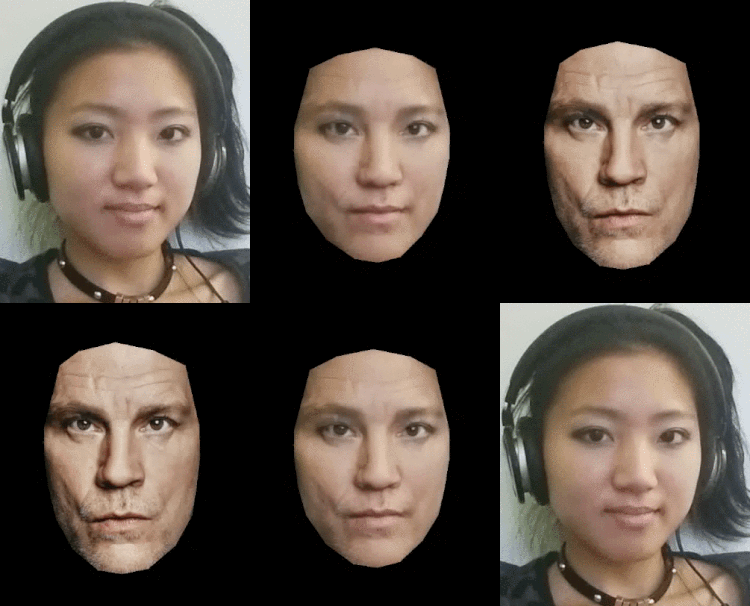
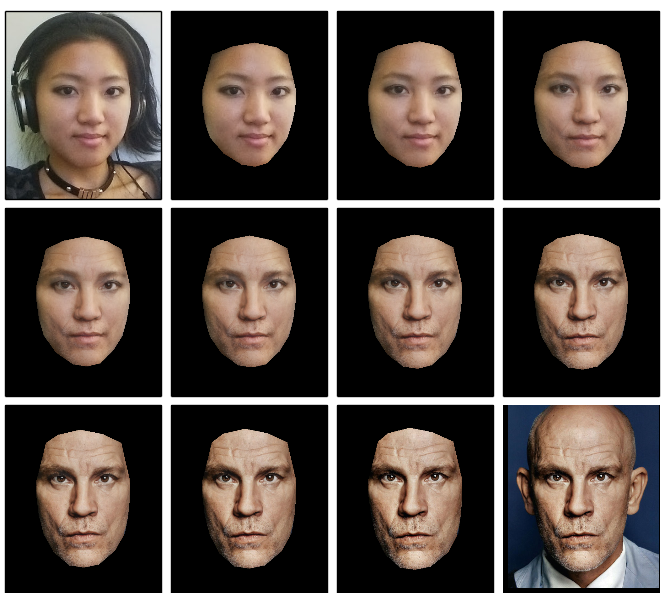
Examples - Being John Malkovich
Create a morphing video between the 2 images:
(out.avi played and recorded as gif)
Save the frames to a folder:
Plot the frames:
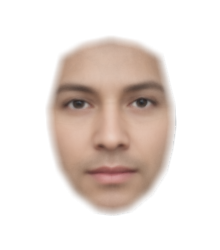
Average all face images in a folder:
85 images used
Use as pip library
$ pip install facemorpher
Examples
Additional options are exactly the same as the command line
import facemorpher

# Get a list of image paths in a folder
imgpaths = facemorpher.list_imgpaths('imagefolder')

# To morph, supply an array of face images:
facemorpher.morpher(imgpaths, plot=True)

# To average, supply an array of face images:
facemorpher.averager(['image1.png', 'image2.png'], plot=True)
Once pip installed, 2 binaries are also available as a command line utility:
$ facemorpher --src=<src_imgpath> --dest=<dest_imgpath> --plot
$ faceaverager --images=<images_folder> --plot
Try out in a docker container
Mount local folder to /images in docker container, run it and enter a bash session. –rm removes the container when you close it.
$ docker run -v /Users/alyssa/Desktop/images:/images --name py3 --rm -it jjanzic/docker-python3-opencv bash
Once you’re in the container, install facemorpher and try the examples listed above
root@0dad0912ebbe:/# pip install facemorpher
root@0dad0912ebbe:/# facemorpher --src=<img1> --dest=<img2> --plot
Documentation
http://alyssaq.github.io/face_morpher
Build & publish Docs
./scripts/publish_ghpages.sh
License
Release history Release notifications | RSS feed


Download files
Download the file for your platform. If you're not sure which to choose, learn more about installing packages.
Source Distribution
Built Distributions
Filter files by name, interpreter, ABI, and platform.
If you're not sure about the file name format, learn more about wheel file names.
Copy a direct link to the current filters
File details
Details for the file facemorpher-5.2.dev0.tar.gz.
File metadata
- Download URL: facemorpher-5.2.dev0.tar.gz
- Upload date:
- Size: 13.7 kB
- Tags: Source
- Uploaded using Trusted Publishing? No
- Uploaded via: twine/1.12.1 pkginfo/1.4.2 requests/2.21.0 setuptools/40.6.3 requests-toolbelt/0.8.0 tqdm/4.28.1 CPython/3.7.2
File hashes
| Algorithm | Hash digest | |
|---|---|---|
| SHA256 |
27306b0a20b1c80adc446865c09aeba740675d84fb1b5a280e5a4250acfb391e
|
|
| MD5 |
964af10e650993475a30e959af20ca13
|
|
| BLAKE2b-256 |
4eb60e787d12c3445e85ea379e26178551395531343e62414ba248f5287a12f4
|
File details
Details for the file facemorpher-5.2.dev0-py3-none-any.whl.
File metadata
- Download URL: facemorpher-5.2.dev0-py3-none-any.whl
- Upload date:
- Size: 18.1 kB
- Tags: Python 3
- Uploaded using Trusted Publishing? No
- Uploaded via: twine/1.12.1 pkginfo/1.4.2 requests/2.21.0 setuptools/40.6.3 requests-toolbelt/0.8.0 tqdm/4.28.1 CPython/3.7.2
File hashes
| Algorithm | Hash digest | |
|---|---|---|
| SHA256 |
d1035cf54bde39d4bb447d88796711cf6e6ad3d34c8a8c9d958df0906ffa36c8
|
|
| MD5 |
58ee659f6e69174d39d83c392b93c649
|
|
| BLAKE2b-256 |
7113c8e03b9831e63a2ed1f8165798ed141a9f13cb14f895cb01aad8a844194f
|
File details
Details for the file facemorpher-5.2.dev0-py2-none-any.whl.
File metadata
- Download URL: facemorpher-5.2.dev0-py2-none-any.whl
- Upload date:
- Size: 21.4 kB
- Tags: Python 2
- Uploaded using Trusted Publishing? No
- Uploaded via: twine/1.12.1 pkginfo/1.4.2 requests/2.21.0 setuptools/40.6.3 requests-toolbelt/0.8.0 tqdm/4.28.1 CPython/3.7.2
File hashes
| Algorithm | Hash digest | |
|---|---|---|
| SHA256 |
fc8a4a96afac4f6aac2b2f1e63813a4e5442e71e12e84b401bdb3624123429cd
|
|
| MD5 |
590faea028f79db14b84c29217a2f2a1
|
|
| BLAKE2b-256 |
17442c4aacf9fb237a493130033e3037df0fbe98eafc131ff70c8a5a1d3fe26c
|






