
Figures with precise control over overall width, plot aspect ratio, between-plot spacing, and colorbar dimensions.

Project description
faceted




Figures with precise control over overall width, overall height, plot aspect ratio, between-plot spacing, and colorbar dimensions.
Description
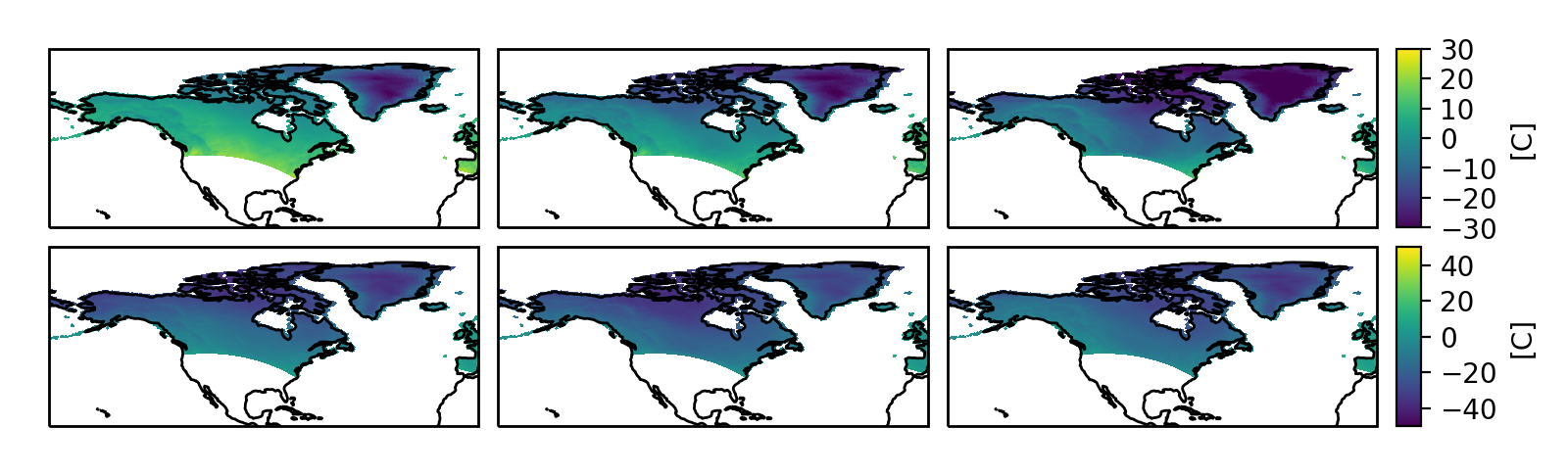
The purpose of this module is to make it easy to produce single-or-multi-panel
figures in matplotlib with strict dimensional constraints. For example,
perhaps you would like to make a figure that fits exactly within a column of a
manuscript without any scaling, and you would like the panels to be as large
as possible, but retain a fixed aspect ratio (height divided by width). Maybe
some (or all) of your panels require an accompanying colorbar. With
out of the box matplotlib tools this is actually somewhat tricky.
Internally, this module uses the flexible matplotlib AxesGrid toolkit,
with some additional logic to enable making these kinds of
dimensionally-constrained
panel plots with precise padding and colorbar size(s).
Another project with a similar motivation is panel-plots; however it does not have support
for adding colorbars to a dimensionally-constrained figure. One part of the
implementation there that inspired part of what is done here is the ability
to add user-settable padding to the edges of the figure (to add space for
axes ticks, ticklabels, and labels). This eliminates the need for using
bbox_inches='tight' when saving the figure, and enables you
to make sure that your figures are exactly the dimensions you need for your use.
I intend to keep the scope of this project quite limited. I want the results it produces to remain extremely easy to understand and control. For more complicated figure layouts, e.g. multiple panels with different sizes and aspect ratios, and a more magical approach to setting figure boundary padding and between-panel spacing, a library worth checking out is proplot. The "smart tight layout" feature it provides is an impressive automated method of solving some of the same problems addressed by this library.
For information on how to use faceted, see the documentation:
https://faceted.readthedocs.io/en/latest/.
Installation
You can install faceted either from PyPI:
$ pip install faceted
or directly from source:
$ git clone https://github.com/spencerkclark/faceted.git
$ cd faceted
$ pip install -e .


Download files
Download the file for your platform. If you're not sure which to choose, learn more about installing packages.
Source Distribution
Built Distribution
Filter files by name, interpreter, ABI, and platform.
If you're not sure about the file name format, learn more about wheel file names.
Copy a direct link to the current filters
File details
Details for the file faceted-2026.7.0.tar.gz.
File metadata
- Download URL: faceted-2026.7.0.tar.gz
- Upload date:
- Size: 872.6 kB
- Tags: Source
- Uploaded using Trusted Publishing? No
- Uploaded via: twine/6.2.0 CPython/3.13.14
File hashes
| Algorithm | Hash digest | |
|---|---|---|
| SHA256 |
88e83a7a80f017129eb5a52f744c015a3f5101e90ca1168f7eb5ca65319357dc
|
|
| MD5 |
0513a765b2169c1bcf92b4b296c314aa
|
|
| BLAKE2b-256 |
5009127f4635b018494fd3b981a479ce56a7023c518f6d78c8c0d78ed5d78e66
|
File details
Details for the file faceted-2026.7.0-py3-none-any.whl.
File metadata
- Download URL: faceted-2026.7.0-py3-none-any.whl
- Upload date:
- Size: 209.2 kB
- Tags: Python 3
- Uploaded using Trusted Publishing? No
- Uploaded via: twine/6.2.0 CPython/3.13.14
File hashes
| Algorithm | Hash digest | |
|---|---|---|
| SHA256 |
1369b1ab3bf1d20dc8e7a85ede8bdb28971b2e9ef8f3c8e283f395f69a4076ed
|
|
| MD5 |
5f1f34495b2fecc1285f9b13c7d9101f
|
|
| BLAKE2b-256 |
72400e330fd3e591c6a4cc2b1e44bb5af52e51e7f2e9ee4dbfe52244e4b9aa77
|






