







fairchem by the FAIR Chemistry team
fairchem is the FAIR Chemistry's centralized repository of all its data, models,
demos, and application efforts for materials science and quantum chemistry.
UMA is now much faster!

The vertical axis is force MAE (meV/Å) on the public OMol25 validation set; the horizontal axis is MD speed (ns/day at a 1 fs timestep) from the mean runtime of an ASE NVE step on a 1000-atom silicon cell using an NVIDIA H200. See the benchmark details and reproduction scripts for the full setup.
For more OMol model accuracy benchmarks, you can also see the FAIR Chemistry leaderboard.
Please use this logo for references to UMA!
Latest news
October 2026
- UMA Nitro, the new default inference mode, is much faster than turbo for molecular dynamics and relaxations on a single GPU. On a single NVIDIA H200, it reaches ~6 ns/day for 1,000 atoms in ASE MD and raw inference throughput equivalent to ~33 ns/day for 150 atoms, with support for systems up to 15,000 atoms. Special thanks to Max Zhdanov, Emanuele Arcelli (FlashUMA work), Carole-Jean Wu, Christian Puhrsch, Zachary DeVito, Aditya Venkataraman, Michael Lazos, and Animesh Jain who contributed and helped improve UMA Nitro. See UMA Nitro.
- Two new UMA-S-1.2.1 models:
uma-s-1p2p1-ft-d4revfor molecules (ωB97M-D4rev) anduma-s-1p2p1-ft-r2scanfor materials (r²SCAN, trained on MAD-1.6). These improve a wide range of observables compared to experiments. Please be aware of their limitations. - DFT-D3(BJ) dispersion (including GPU support) for any ASE calculator, with PBE and r²SCAN presets. These make the respective materials tasks significantly more transferable outside of solid-state systems. See D3 dispersion corrections.
September 2026
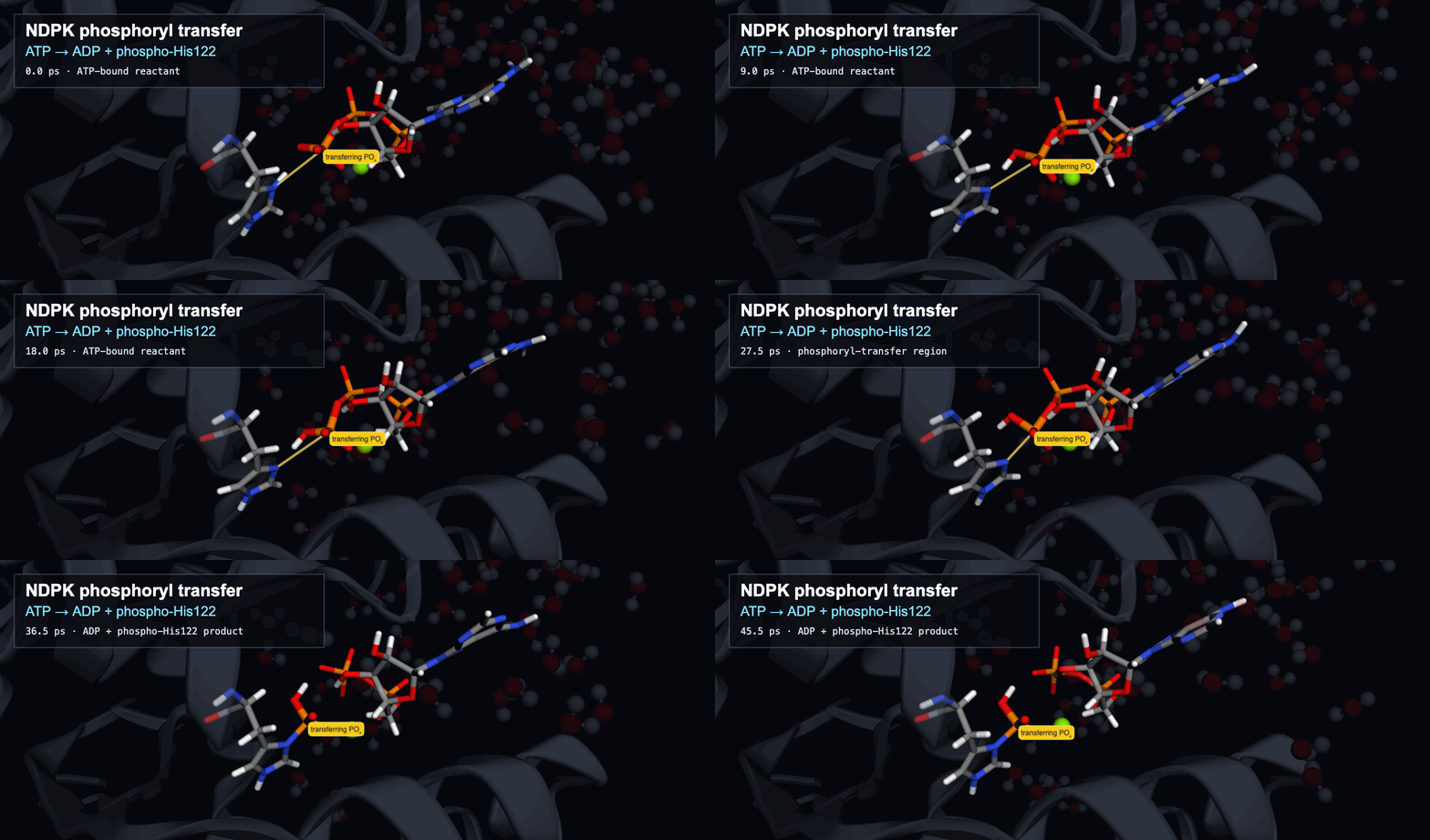
Read our new paper on quantum-accurate atomistic modeling of enzyme catalysis using a machine-learned potential.
June 2026
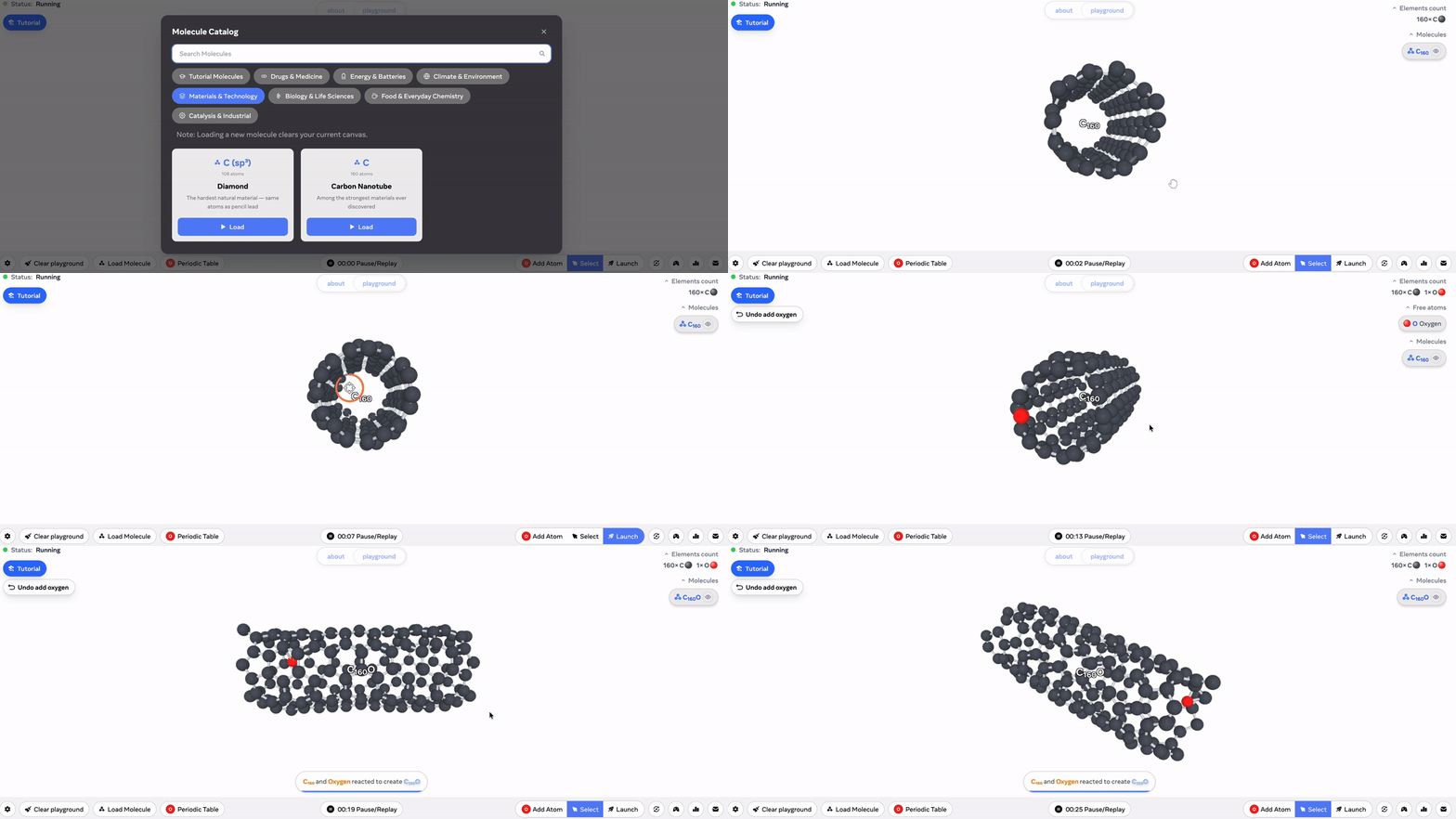
UMA playground released, try the interactive educational demo here yourself!
March 2026
UMA-1.2 released! ~50% faster, ~40% more accurate on Open Molecules test set, and expanded data coverage for catalysts (oxides and interfaces), molecules, and polymers!
October 2025
check out our seamless Multi-node, Multi-GPU and LAMMPs interfaces to run large scale dynamics!
June 2025
UMA/OMol first released! Read about the UMA model and OMol25 dataset release.
Installation
Although not required, we highly recommend installing using a package manager and virtualenv such as uv, it is much faster and better at resolving dependencies than standalone pip.
Install fairchem-core using pip
pip install fairchem-core
If you want to contribute or make modifications to the code, clone the repo and install in edit mode
git clone git@github.com:facebookresearch/fairchem.git

pip install -e fairchem/packages/fairchem-core[dev]
Quick Start
The easiest way to use pretrained models is via the ASE FAIRChemCalculator.
A single uma model can be used for a wide range of applications in chemistry and materials science by picking the
appropriate task name for domain specific prediction.
Instantiate a calculator from a pretrained model
Make sure you have a Hugging Face account, have already applied for model access to the UMA model repository, and have logged in to Hugging Face using an access token. You can use the following to save an auth token,
huggingface-cli login
Models are referenced by their name, below are the currently supported models:
| Model Name | Description |
|---|---|
| uma-s-1p2p1 | Latest version of the UMA small model, fastest of the UMA models while still SOTA on most benchmarks (6.6M/290M active/total params) |
| uma-s-1p2p1-ft-d4rev | UMA-S-1.2.1 fine-tuned to ωB97M-D4rev for molecular systems; omol task only. See new models |
| uma-s-1p2p1-ft-r2scan | UMA-S-1.2.1 fine-tuned on r²SCAN data (MAD-1.6) for inorganic materials and beyond; omat task only, not spin-polarized. See new models |
| uma-m-1p1 | Best in class UMA model across all metrics, but slower and more memory intensive than uma-s (50M/1.4B active/total params) |
Set the task for your application and calculate
- oc20: use this for catalysis
- oc22: use this for oxide catalysis (>1p2)
- oc25: use this for (electro)catalysis (>1p2)
- omat: use this for inorganic materials
- omol: use this for molecules+polymers
- odac: use this for MOFs
- omc: use this for molecular crystals
Relax an adsorbate on a catalytic surface,
from ase.build import fcc100, add_adsorbate, molecule
from ase.optimize import LBFGS
from fairchem.core import pretrained_mlip, FAIRChemCalculator

predictor = pretrained_mlip.get_predict_unit("uma-s-1p2p1", device="cuda")
calc = FAIRChemCalculator(predictor, task_name="oc20")

# Set up your system as an ASE atoms object
slab = fcc100("Cu", (3, 3, 3), vacuum=8, periodic=True)
adsorbate = molecule("CO")
add_adsorbate(slab, adsorbate, 2.0, "bridge")

slab.calc = calc

# Set up LBFGS dynamics object
opt = LBFGS(slab)
opt.run(0.05, 100)
Relax an inorganic crystal,
from ase.build import bulk
from ase.optimize import FIRE
from ase.filters import FrechetCellFilter
from fairchem.core import pretrained_mlip, FAIRChemCalculator

predictor = pretrained_mlip.get_predict_unit("uma-s-1p2p1", device="cuda")
calc = FAIRChemCalculator(predictor, task_name="omat")

atoms = bulk("Fe")
atoms.calc = calc

opt = FIRE(FrechetCellFilter(atoms))
opt.run(0.05, 100)
Run Molecular Dynamics (MD)
Note: pretrained_mlip.get_predict_unit() currently uses a seed to set the global state of the numpy RNG. In order to obtain different trajectories for different runs of the following code, we have to set a random seed as shown below:
import numpy as np
from ase import units
from ase.io import Trajectory
from ase.md.langevin import Langevin
from ase.build import molecule
from fairchem.core import pretrained_mlip, FAIRChemCalculator

seed = np.random.randint(0, np.iinfo(np.int32).max, dtype=int)
# the default inference mode (nitro) is the fastest for MD on a single GPU
predictor = pretrained_mlip.get_predict_unit("uma-s-1p2p1", device="cuda", seed=seed)
calc = FAIRChemCalculator(predictor, task_name="omol")

atoms = molecule("H2O")
atoms.calc = calc

dyn = Langevin(
    atoms,
    timestep=0.1 * units.fs,
    temperature_K=400,
    friction=0.001 / units.fs,
)
trajectory = Trajectory("my_md.traj", "w", atoms)
dyn.attach(trajectory.write, interval=1)
dyn.run(steps=1000)
Calculate a spin gap,
from ase.build import molecule
from fairchem.core import pretrained_mlip, FAIRChemCalculator

predictor = pretrained_mlip.get_predict_unit("uma-s-1p2p1", device="cuda")

#  singlet CH2
singlet = molecule("CH2_s1A1d")
singlet.info.update({"spin": 1, "charge": 0})
singlet.calc = FAIRChemCalculator(predictor, task_name="omol")

#  triplet CH2
triplet = molecule("CH2_s3B1d")
triplet.info.update({"spin": 3, "charge": 0})
triplet.calc = FAIRChemCalculator(predictor, task_name="omol")

triplet.get_potential_energy() - singlet.get_potential_energy()
D3 dispersion corrections
DFTD3Calculator adds GPU-accelerated DFT-D3(BJ) energies, forces and analytic stresses (via nvalchemiops) to any
ASE calculator. For example, use functional="pbe" for PBE-trained heads and functional="r2scan" for uma-s-1p2p1-ft-r2scan.
from fairchem.core import DFTD3Calculator, FAIRChemCalculator, pretrained_mlip

predictor = pretrained_mlip.get_predict_unit("uma-s-1p2p1", device="cuda")
calc = DFTD3Calculator(
    FAIRChemCalculator(predictor, task_name="omat"), functional="pbe", device="cuda"
)
See the D3 docs for the parameters and references.
Multi-GPU Inference and LAMMPs
If you have multiple gpus (or multiple nodes), we handle all the parallelism for you under the hood by a single flag (workers=N). Use inference_settings="multigpu" (formerly turbo) with workers > 1, since the default (nitro) runs on a single GPU. This is also compatible with LAMMPs to perform large scale MD. See our docs for more details. This requires the Ray package to be installed and comes with the extras bundle.
pip install fairchem-core[extras]
import time

import numpy as np
from ase import units
from ase.md.langevin import Langevin
from fairchem.core import pretrained_mlip, FAIRChemCalculator

from fairchem.core.datasets.common_structures import get_fcc_crystal_by_num_atoms

seed = np.random.randint(0, np.iinfo(np.int32).max, dtype=int)
predictor = pretrained_mlip.get_predict_unit(
    "uma-s-1p2p1",
    inference_settings="multigpu",
    device="cuda",
    workers=8,
    seed=seed,
)
calc = FAIRChemCalculator(predictor, task_name="omat")

atoms = get_fcc_crystal_by_num_atoms(8000)
atoms.calc = calc

dyn = Langevin(
    atoms,
    timestep=0.1 * units.fs,
    temperature_K=400,
    friction=0.001 / units.fs,
)
# warmup 10 steps
dyn.run(steps=10)
start_time = time.time()
dyn.attach(
    lambda: print(
        f"Step: {dyn.get_number_of_steps()}, E: {atoms.get_potential_energy():.3f} eV, "
        f"QPS: {dyn.get_number_of_steps()/(time.time()-start_time):.2f}"
    ),
    interval=1,
)
dyn.run(steps=1000)
LICENSE
fairchem is available under a MIT License. Models/checkpoint licenses vary by application area.
MIT License
Copyright (c) Meta Platforms, Inc. and affiliates.
Permission is hereby granted, free of charge, to any person obtaining a copy of this software and associated documentation files (the "Software"), to deal in the Software without restriction, including without limitation the rights to use, copy, modify, merge, publish, distribute, sublicense, and/or sell copies of the Software, and to permit persons to whom the Software is furnished to do so, subject to the following conditions:
The above copyright notice and this permission notice shall be included in all copies or substantial portions of the Software.
THE SOFTWARE IS PROVIDED "AS IS", WITHOUT WARRANTY OF ANY KIND, EXPRESS OR IMPLIED, INCLUDING BUT NOT LIMITED TO THE WARRANTIES OF MERCHANTABILITY, FITNESS FOR A PARTICULAR PURPOSE AND NONINFRINGEMENT. IN NO EVENT SHALL THE AUTHORS OR COPYRIGHT HOLDERS BE LIABLE FOR ANY CLAIM, DAMAGES OR OTHER LIABILITY, WHETHER IN AN ACTION OF CONTRACT, TORT OR OTHERWISE, ARISING FROM, OUT OF OR IN CONNECTION WITH THE SOFTWARE OR THE USE OR OTHER DEALINGS IN THE SOFTWARE.
1 maintainer

Metadata
1 maintainer
Release files for fairchem-core 2.24.0
For a detailed explanation of source distributions (sdists) and built distributions (wheels), please see the package formats documentation.
Source distribution (sdist)
| File | Size | Uploaded | Provenance | |
|---|---|---|---|---|
| fairchem_core-2.24.0.tar.gz | 612.0 kB | With provenance | Details |
Built distribution (wheel)
| File | Interpreter | ABI | Platform | Reset |
|---|---|---|---|---|
| fairchem_core-2.24.0-py3-none-any.whl | Python 3 | none | any | Details |
Total release size: 1.4 MB
Release files / fairchem_core-2.24.0.tar.gz
| Download URL | fairchem_core-2.24.0.tar.gz |
|---|---|
| Size | 612.0 kB |
| Tags | Source |
|
SHA-256 checksum How to use checksums |
7a43615eb2596975bb74f5e4d9ecb0cf5bdc4f0e49de241172ea812a84c54703
|
|
BLAKE2b-256 checksum How to use checksums |
b475ed8fd8366770f88670cb2410662456d49f41fe7443039db17e53d61536b3
|
| Upload date | |
|
Uploaded using Trusted Publishing? What is trusted publishing? |
Yes |
| Uploaded via |
twine/7.0.0 CPython/3.13.16
|
Provenance
Provenance describes where a file came from. On PyPI, provenance is shared via attestations, which provide a verifiable record of the build or publishing details. View details, limitations and caveats.


PyPI Publish Attestation
PyPI verified that this artifact, at this checksum, originated from the publisher listed below.
Signed by GitHub Actions, verified by PyPI on Oct 22, 2026.
Transparency logRelease files / fairchem_core-2.24.0-py3-none-any.whl
| Download URL | fairchem_core-2.24.0-py3-none-any.whl |
|---|---|
| Size | 768.2 kB |
| Tags | Python 3 |
|
SHA-256 checksum How to use checksums |
8f05ab0032e7accaaac3621da947420969441032b2c5830348848d90705c19a7
|
|
BLAKE2b-256 checksum How to use checksums |
ecd5bc01fac6c9b9860a2c23a31e2415f5d810b0be803c309032d894d0e8061e
|
| Upload date | |
|
Uploaded using Trusted Publishing? What is trusted publishing? |
Yes |
| Uploaded via |
twine/7.0.0 CPython/3.13.16
|
Provenance
Provenance describes where a file came from. On PyPI, provenance is shared via attestations, which provide a verifiable record of the build or publishing details. View details, limitations and caveats.
PyPI Publish Attestation
PyPI verified that this artifact, at this checksum, originated from the publisher listed below.
Signed by GitHub Actions, verified by PyPI on Oct 22, 2026.
Transparency logSecurity for fairchem-core 2.24.0
Provenance
Provenance describes where a file came from. On PyPI, provenance is shared via attestations, which provide a verifiable record of the build or publishing details. View details, limitations and caveats.
Full provenance
All 2 files in this release have been uploaded with provenance metadata.
Attestation for fairchem_core-2.24.0.tar.gz
PyPI Publish Attestation
PyPI verified that this artifact, at this checksum, originated from the publisher listed below.
Signed by GitHub Actions, verified by PyPI on Oct 22, 2026.
Transparency logA note on package security
PyPI is a repository for distributing packages, not a service for auditing them. While third-party security researchers and our staff do their best to detect and remove malicious packages, PyPI cannot guarantee the quality, security or suitability of any given package.















