
Fake Git History Generator
A simple utility to generate fake git history for a Github and Gitlab profile to make your profile look more active than it actually is.
Author: Md. Almas Ali




Table of Contents
- Introduction
- Support This Project
- Installation
- Options and Usage
- Demo and Examples
- Things to Remember
- Caution
- License
Introduction
Fake Git History Generator is a simple utility to generate fake git history for a Github and Gitlab profile to make your profile look more active than it actually is. It generates fake commits for the last 90 days (by default config) with random commit counts per day (0-3). You can also specify the number of commits per day, start date, end date, start time, end time, time zone, work days only, weekends only, remote origin, auto git push, and verbose output.
It uses the git command to create commits and push them to the remote repository.
Give this project a star, if you like it. (Highly Recommended) 🌟
This project is inspired by fake-git-history JS project.
Note: Read the Caution section before using this tool.
Support This Project
If you find this project useful and want to support my work, you can buy me a coffee. My work is open source and free. Your support will allow me to continue my work and build more projects. Thank you for your support!

Installation
You need to have Git and Python3 installed on your machine. Then you can install it with pip.
pip install fake-git-history
You can also install it from source. If you want then follow this.
# Clone the git repository
git clone https://github.com/Almas-Ali/fake-git-history.git fake-git-history

# Change your directory to fake-git-history
cd fake-git-history

# Install it with pip
pip install .
Options and Usage
--commit-per-day and -c
Specify the number of commits to be created for each day.
The default value is 0-3, which means it will randomly generate from 0 to 3 commits per day. For example, to generate commits randomly between 6 and 12 per day, you can do:
fake-git-history --commit-per-day "6-12"
# or
fake-git-history -c "6-12"
You can also give a strict number. For example, you need 16 contributions every single day. Then use this command. Not recommended, this will make views to easily detect your bot.
fake-git-history --commit-per-day "16"
# or
fake-git-history -c "16"
--work-days-only and -wd
Use this option if you don't want to commit on weekends. Example:
fake-git-history --work-days-only
# or
fake-git-history -d
--weekends-only and -we
Use this option if you only want to contribute on weekends. Example:
fake-git-history --weekends-only
# or
fake-git-history -w
--start-date and --end-date or -sd and -ed
The starting data is by default set to previous 90 days from the current date and end date is by default present date. If you don't change, it will create commits for the last 90 days. You can change the start date and end date. Example:
# User defined start and end date
fake-git-history --start-date "01/03/2016" --end-date "12/02/2023"
# or
fake-git-history -s "01/03/2016" -e "12/02/2023"

# Flexible end date
fake-git-history --start-date "01/03/2016"
# or
fake-git-history -s "01/03/2016"
The date formating is DD/MM/YYYY. You have to write this way.
--start-time and --end-time or -st and -et
The starting time is by default set to 00:00:00 and end time is by default 23:59:59. You can change the start time and end time. Example:
# User defined start and end time
fake-git-history --start-time "09:00:00" --end-time "17:00:00"
# or
fake-git-history -st "09:00:00" -et "17:00:00"
The time formating is HH:MM:SS. You have to write this way.
--time-zone and -tz
The time zone is by default set to your local time zone. You can change the time zone. Example:
# User defined time zone
fake-git-history --time-zone "+0600"
# or
fake-git-history -tz "+0600"
The time zone formating is +HHMM or -HHMM. You have to write this way.
--remote-origin and -r
Use this option to set the remote origin. Example:
fake-git-history --remote-origin "git@github.com:<YOUR-USERNAME>/<YOUR-REPO>.git"
# or
fake-git-history -r "git@github.com:<YOUR-USERNAME>/<YOUR-REPO>.git"
--auto-git-push and -a
Use this option to automatically push the commits to the remote repository. Example:
fake-git-history --auto-git-push
# or
fake-git-history -a
--verbose and -vv
Use this option to see the verbose output. Without this option you won't be able to see much information about the process. Example:
fake-git-history --verbose
# or
fake-git-history -vv
--version and -v
Use this option to check the version of this script.
fake-git-history --version
# or
fake-git-history -v
--help and -h
You can always refer to this help menu to see the options available. Example:
fake-git-history --help
Output
usage: fake-git-history [-h] [--start-date START_DATE] [--end-date END_DATE] [--start-time START_TIME] [--end-time END_TIME] [--time-zone TIME_ZONE] [--work-days-only] [--weekends-only] [--commit-per-day COMMIT_PER_DAY] [--auto-git-push] [--remote-origin REMOTE_ORIGIN] [--verbose] [--version]

Fake Git History - A simple utility to generate fake git history for a Github and Gitlab profile.

options:
  -h, --help            show this help message and exit
  --start-date START_DATE, -sd START_DATE
                        Set the start date (dd/mm/yyyy)
  --end-date END_DATE, -ed END_DATE
                        Set the end date (dd/mm/yyyy)
  --start-time START_TIME, -st START_TIME
                        Set the start time (hh:mm:ss)
  --end-time END_TIME, -et END_TIME
                        Set the end time (hh:mm:ss)
  --time-zone TIME_ZONE, -tz TIME_ZONE
                        Set the time zone in the format +0600
  --work-days-only, -wd
                        Create commits to workdays only
  --weekends-only, -we  Create commits to weekends only
  --commit-per-day COMMIT_PER_DAY, -c COMMIT_PER_DAY
                        Set the number of commits per day
  --auto-git-push, -a   Enable auto git push
  --remote-origin REMOTE_ORIGIN, -r REMOTE_ORIGIN
                        Set the remote origin
  --verbose, -vv        Enable verbose mode
  --version, -v         Show the version
After running the script, you will see a my-history folder in your current directory. This folder contains the git repository with the fake commits. You can check the commits by going to the my-history folder and running the git log command.
cd my-history
git log
If you have enabled the auto git push and set the remote origin, then the commits will be pushed to the remote repository. You can check the commits on your Github or Gitlab profile.
Demo and Examples
Example 1
Generate fake git history for the last 90 days with 0-3 commits per day.
fake-git-history
Example 2
Generate fake git history for the last 90 days with 6-12 commits per day.
fake-git-history --commit-per-day "6-12"
# or
fake-git-history -c "6-12"
Example 3
Generate fake git history from 01/03/2016 to 12/02/2023 with 6-12 commits per day with verbose output.
fake-git-history --start-date "01/03/2016" --end-date "12/02/2023" --commit-per-day "6-12" --verbose
# or
fake-git-history -sd "01/03/2016" -ed "12/02/2023" -c "6-12" -vv
Example 4
Generate fake git history from 03/02/2000 to present date with 60-100 commits per day with verbose output. Add remote origin and auto git push.
fake-git-history --start-date "03/02/2000" --commit-per-day "60-100" --remote-origin "git@github.com:<YOUR-USERNAME>/<YOUR-REPO>.git" --auto-git-push --verbose
# or
fake-git-history -sd "03/02/2000" -c "60-100" -r "git@github.com:<YOUR-USERNAME>/<YOUR-REPO>.git" -a -vv
Example 5
Generate fake git history from "07/03/2021" to "07/03/2022" and start time "09:00:00" and end time "17:00:00" with 4-6 commits per day in "-0300" timezone with verbose output. Add remote origin and auto git push.
fake-git-history --start-date "07/03/2021" --end-date "07/03/2022" --start-time "09:00:00" --end-time "17:00:00" -tz "-0300" --commit-per-day "4-6" --remote-origin "git@github.com:<YOUR-USERNAME>/<YOUR-REPO>.git" --auto-git-push --verbose
# or
fake-git-history -sd "07/03/2021" -ed "07/03/2022" -st "09:00:00" -et "17:00:00" -tz "-0300" -c "4-6" -r "git@github.com:<YOUR-USERNAME>/<YOUR-REPO>.git" -a -vv
Note 1: You need to have SSH keys setup for the auto git push to work. If you don't have SSH keys setup, you can follow this guide.
Note 2: Don't forget to change your repository in private mode if you don't want others to see your fake commits. You can do this by going to your repository settings and changing the visibility to private.
Things to Remember
- Check which email is set in your git config. You can check it by running the following command in your terminal:
git config --global user.email
Make sure the email is the same as the one you are using in your GitHub or Gitlab account. If not, you can set it by running the following command:
git config --global user.email "<YOUR-EMAIL>"
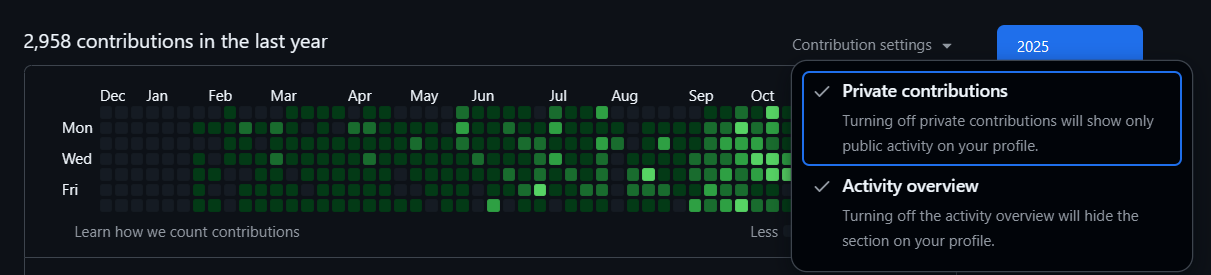
- If you are setting the repo as private, make sure to enable the option "Private contributions" in your GitHub profile graph top right side on the graph. Select both options. See the image below:
Caution
This tool was created as a joke, so please don't take it seriously. While cheating is never encouraged, if someone is judging your professional skills based on your GitHub activity graph, they deserve to see a rich activity graph. 🤓
License
This project is licensed under the MIT License. Feel free to use and modify this project. If you liked this project, give it a star ⭐.
1 maintainer

Metadata
1 maintainer
Release files for fake-git-history 1.0.3
For a detailed explanation of source distributions (sdists) and built distributions (wheels), please see the package formats documentation.
Source distribution (sdist)
| File | Size | Uploaded | |
|---|---|---|---|
| fake_git_history-1.0.3.tar.gz | 311.8 kB | Details |
Built distribution (wheel)
| File | Interpreter | ABI | Platform | Reset |
|---|---|---|---|---|
| fake_git_history-1.0.3-py3-none-any.whl | Python 3 | none | any | Details |
Total release size: 323.2 kB
Release files / fake_git_history-1.0.3.tar.gz
| Download URL | fake_git_history-1.0.3.tar.gz |
|---|---|
| Size | 311.8 kB |
| Tags | Source |
|
SHA-256 checksum How to use checksums |
055f8708764aae62182959ddc79bf7cbc08af61192011c487b83f1c1fb9a2e4c
|
|
BLAKE2b-256 checksum How to use checksums |
57ba57d8fa2b7dfc707e9f5fd8d041edd1d8a49aa3bb540f06b4a71af0dc2f6b
|
| Upload date | |
|
Uploaded using Trusted Publishing? What is trusted publishing? |
No |
| Uploaded via |
twine/6.2.0 CPython/3.9.25
|
Release files / fake_git_history-1.0.3-py3-none-any.whl
| Download URL | fake_git_history-1.0.3-py3-none-any.whl |
|---|---|
| Size | 11.4 kB |
| Tags | Python 3 |
|
SHA-256 checksum How to use checksums |
7a44bddf437e47b31574d91f56642165eedd039ad6cbc485c7f204419cd33aab
|
|
BLAKE2b-256 checksum How to use checksums |
34c51e34654f90a473aeed9fa1f94cf1eb54a58a4e9ee8bda0ec52a67137c1cb
|
| Upload date | |
|
Uploaded using Trusted Publishing? What is trusted publishing? |
No |
| Uploaded via |
twine/6.2.0 CPython/3.9.25
|














