
fakeroute
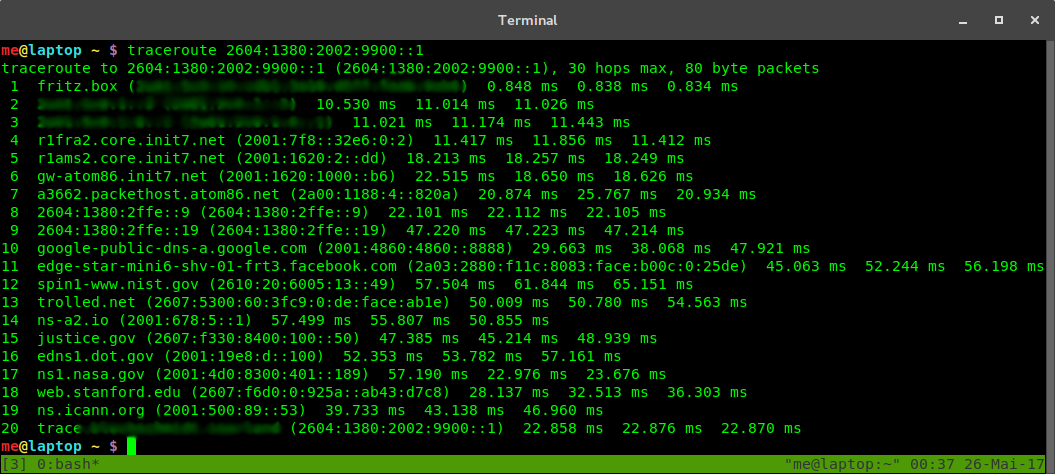
Fakeroute allows you to insert fake IPv4 and IPv6 hops between the last real hop and your Linux server by making use of IP address spoofing.
Setup
Install the package using pip install .. Run sudo fakeroute on the machine for
which you want to spoof the traceroute.
You can supply the path to a text file with custom IP addresses to be spoofed using --hops.
The file can contain IPv4 and IPv6 addresses, one per line.
To test the script, you can set up a virtual machine with a bridged network interface, such that it obtains its own IP via DHCP, and traceroute the IP of the host.
Most ISPs will not allow you to spoof IP addresses nowadays. You can still make use of fakeroute by externalizing the
spoofing process. To this end, start fakeroute with the --spoofer option, which expects IP:port to listen on, in a
data center that allows spoofing. Then, on the machine for which you want to fake the traceroute, supply fakeroute with
the remote endpoint (IP:port) of the spoofer using --remote. You can add an HMAC --key to not allow everyone to
use your spoofing service.
usage: fakeroute.py [-h] [--hops HOPS] [--remote REMOTE] [--spoofer SPOOFER] [--key KEY]

Fake traceroute generator

options:
  -h, --help         show this help message and exit
  --hops HOPS        Path to file containing IPv4 and IPv6 addresses
  --remote REMOTE    IP:port of remote spoofing service
  --spoofer SPOOFER  IP:port to launch a spoofing service locally
  --key KEY          HMAC-SHA256 signing key for remote spoofing authentication in hex format
How does it work?
IP packet headers contain a one byte time to live (TTL, IPv4) or hop limit (HL, IPv6) field which is supposed to be
decreased by every router on the packet's path to prevent infinite circulations.
Initially, the sender populates the packet with a sufficiently large value.
Most routers signal the expiry of the TTL by replying with an ICMP "TTL expired" packet to the packet sender.
Tracerouting works by sending out packets with increasing TTL.
The first router will drop the packet with TTL 1 and send an ICMP reply, the second router will drop the packet with TTL
2 and so on.
By simply dropping all packets with a TTL below a certain threshold N at the last hop, it will appear as if N hops, that
do not reply with ICMP packets, had been inserted.
The fakeroute.py script uses a raw socket to capture packets with low TTL and either relays them to a server in
a data center without egress filtering (i.e. where packets with spoofed source
IP address are not filtered) or generates ICMP replies for them from fake source IP addresses directly.
Where does it work?
Most providers will filter packets with forged IP addresses. An incomplete list of server providers without egress filtering is available here:
| Provider | Product | Date | Status |
|---|---|---|---|
| no longer working |
If you know more server providers, please submit a pull request with the details (provider name, product name, date, and, if possible, a CAIDA Spoofer report).
Screenshot
1 maintainer

Metadata
1 maintainer
Release files for fakeroute 1.0.1
For a detailed explanation of source distributions (sdists) and built distributions (wheels), please see the package formats documentation.
Source distribution (sdist)
| File | Size | Uploaded | |
|---|---|---|---|
| fakeroute-1.0.1.tar.gz | 7.2 kB | Details |
Built distribution (wheel)
| File | Interpreter | ABI | Platform | Reset |
|---|---|---|---|---|
| fakeroute-1.0.1-py3-none-any.whl | Python 3 | none | any | Details |
Total release size: 14.9 kB
Release files / fakeroute-1.0.1.tar.gz
| Download URL | fakeroute-1.0.1.tar.gz |
|---|---|
| Size | 7.2 kB |
| Tags | Source |
|
SHA-256 checksum How to use checksums |
271d42d75880fced01b77870e4d9a0b3133169ef081d5032ea49b2019e8bfa20
|
|
BLAKE2b-256 checksum How to use checksums |
afdf322dfe51027f20456dbe816968dbd430c30615745575cc7f50413a5f0206
|
| Upload date | |
|
Uploaded using Trusted Publishing? What is trusted publishing? |
Yes |
| Uploaded via |
twine/6.1.0 CPython/3.13.7
|
Provenance
Provenance describes where a file came from. On PyPI, provenance is shared via attestations, which provide a verifiable record of the build or publishing details. View details, limitations and caveats.


PyPI Publish Attestation
PyPI verified that this artifact, at this checksum, originated from the publisher listed below.
Signed by GitHub Actions, verified by PyPI on Mar 26, 2026.
Transparency logRelease files / fakeroute-1.0.1-py3-none-any.whl
| Download URL | fakeroute-1.0.1-py3-none-any.whl |
|---|---|
| Size | 7.7 kB |
| Tags | Python 3 |
|
SHA-256 checksum How to use checksums |
ed5190b8861223a7cd4020d8502ce584f3d772369e798da36dfda1fa04237274
|
|
BLAKE2b-256 checksum How to use checksums |
dffa7a68abf24bb6372513fc739952e875bc145f4fa0aeea165a59b6bbd663c8
|
| Upload date | |
|
Uploaded using Trusted Publishing? What is trusted publishing? |
Yes |
| Uploaded via |
twine/6.1.0 CPython/3.13.7
|
Provenance
Provenance describes where a file came from. On PyPI, provenance is shared via attestations, which provide a verifiable record of the build or publishing details. View details, limitations and caveats.
PyPI Publish Attestation
PyPI verified that this artifact, at this checksum, originated from the publisher listed below.
Signed by GitHub Actions, verified by PyPI on Mar 26, 2026.
Transparency log












