
fa
Say what you want, in plain language. fa puts the shell command on your prompt, you check
it, and press Enter.
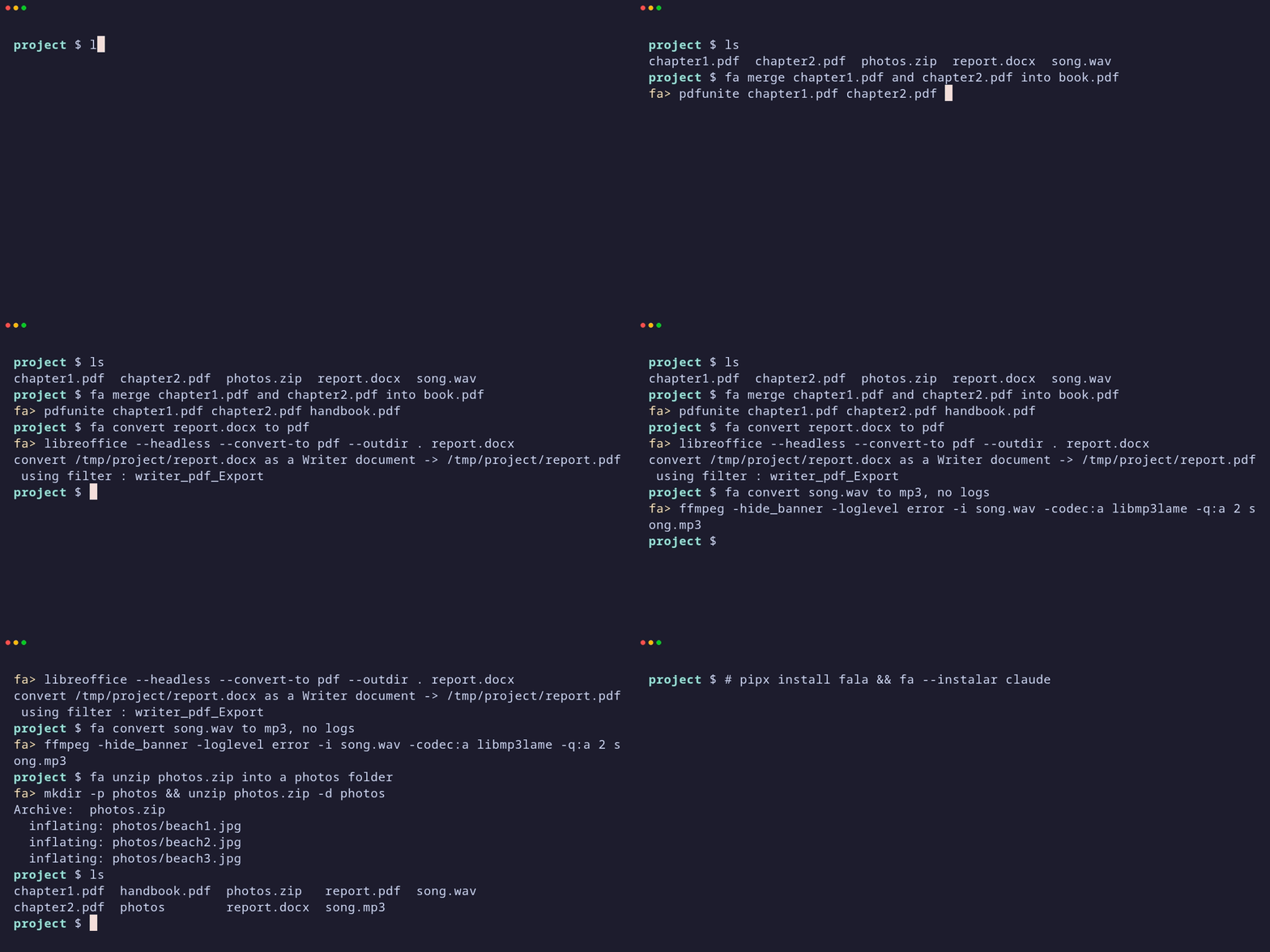
$ fa show the 3 biggest files here
fa> find . -type f -printf '%s %p\n' | sort -nr | head -3
$ fa quem está escutando na porta 8080
fa> sudo ss -ltnp 'sport = :8080'
The terminal stops being a pile of tools to memorize and becomes a place where you write what you want. Nothing runs until you press Enter: you can edit the line, or erase it to cancel. Both your request and the command go to your shell history, so you learn the commands as you go.
Install
You need Python 3.11+ and bash or zsh.
pipx install fala          # or: uv tool install fala · pip install --user fala
fa --instalar claude       # or codex, agy, pi, anthropic, openai, openrouter, groq, ollama
fa --instalar adds one line to your ~/.bashrc (or ~/.zshrc), saves which model to use,
and sends a test request. Open a new terminal and you're done.
Or ask your coding agent: "install fa (github.com/canpse/fala) using my Claude
subscription". The instructions it needs are in AGENTS.md and in fa --agente.
Which model
Any of these works. A small, fast model is enough: the job is turning one sentence into one command.
| provider | what it uses | key |
|---|---|---|
claude |
your Claude subscription, through the official claude CLI |
already logged in |
codex |
your ChatGPT subscription, through the official codex CLI |
already logged in |
agy |
your Antigravity login, through the official agy CLI |
already logged in |
pi |
whatever pi is logged into | already logged in |
anthropic |
Anthropic API | ANTHROPIC_API_KEY |
openai, openrouter, groq |
their APIs | OPENAI_API_KEY, OPENROUTER_API_KEY, GROQ_API_KEY |
ollama, compat |
a local model, or any OpenAI-compatible API (llama.cpp, vLLM, LM Studio) | optional |
Time per request measured on a 4-core laptop: pi with fa --servico 1.6 s, claude (Haiku)
3.1 s, codex (GPT-6 Luna, low) 4.8 s, agy (Gemini 3.8 Flash Low) 6.3 s.
Change it any time: fa --config provedor=codex modelo=gpt-6-luna. Check it: fa --testar.
API keys stay in environment variables, never in the config file.
About subscriptions: claude, codex and agy run the official program you installed
and logged into yourself, once per request, with no tools enabled. That is ordinary personal
use of those programs, but each company sets (and has changed) its own terms. For a team, a
server or a product, use an API key.
What goes to the model
Each request sends: the fixed instructions, your current folder path, the names of the files in it (two levels deep, up to 80), and the request. File contents are never sent.
fa --reconhecer is optional and makes answers much better: it records your distribution,
tools, network interfaces and running services once, in ~/.config/fa/sistema.txt, and that
file goes along with every request. It includes your hostname and local IP addresses. Read
or edit it before using a provider you don't trust.
Example packs
fa -r <request> adds network examples to the request (fa -h lists the packs). A pack is a
text file of request => command lines with a # flag: x line. Put your own in
~/.config/fa/pacotes/: they are the place to teach fa the hosts, interfaces and habits of
your machine.
Commands
fa <request>              command on your prompt, Enter runs it
fa -r <request>           with the network pack
fa --instalar [provider]  set up shell, provider and test
fa --config key=value     change settings · fa --config shows them
fa --testar               show what's in use and send a test request
fa --reconhecer           read this machine once, for better answers
fa --servico              keep pi open as a systemd user service (provider pi)
fa --traduzir <request>   only print the command
fa --agente               instructions for AI agents
Status
Early (0.1.1). Tested on Fedora with bash; zsh support is written but not yet tested. Built-in instructions and messages are in Portuguese; requests work in any language. The tests are in testes/.
License
MIT
1 maintainer

Metadata
1 maintainer
Release files for fala 0.1.1
For a detailed explanation of source distributions (sdists) and built distributions (wheels), please see the package formats documentation.
Source distribution (sdist)
| File | Size | Uploaded | Provenance | |
|---|---|---|---|---|
| fala-0.1.1.tar.gz | 21.7 kB | With provenance | Details |
Built distribution (wheel)
| File | Interpreter | ABI | Platform | Reset |
|---|---|---|---|---|
| fala-0.1.1-py3-none-any.whl | Python 3 | none | any | Details |
Total release size: 45.2 kB
Release files / fala-0.1.1.tar.gz
| Download URL | fala-0.1.1.tar.gz |
|---|---|
| Size | 21.7 kB |
| Tags | Source |
|
SHA-256 checksum How to use checksums |
ca70f2d19d800d3a710b1376271fbda15a1725996fdcfd230dd15d48e73c27c8
|
|
BLAKE2b-256 checksum How to use checksums |
de5c9cf31f8daf7155701442f2a6841b6b90d5638c41719ae614ac2e52ded613
|
| Upload date | |
|
Uploaded using Trusted Publishing? What is trusted publishing? |
Yes |
| Uploaded via |
twine/7.0.0 CPython/3.13.16
|
Provenance
Provenance describes where a file came from. On PyPI, provenance is shared via attestations, which provide a verifiable record of the build or publishing details. View details, limitations and caveats.


PyPI Publish Attestation
PyPI verified that this artifact, at this checksum, originated from the publisher listed below.
Signed by GitHub Actions, verified by PyPI on Oct 23, 2026.
Transparency logRelease files / fala-0.1.1-py3-none-any.whl
| Download URL | fala-0.1.1-py3-none-any.whl |
|---|---|
| Size | 23.5 kB |
| Tags | Python 3 |
|
SHA-256 checksum How to use checksums |
18ef8989122956a246276e8c9f8e088b0cf1815087370f4345601e71e0e43fb6
|
|
BLAKE2b-256 checksum How to use checksums |
c77c76ecdef8b7c1f0032851490ffe26128ddbb3dc333fe7b17adc1812148b0e
|
| Upload date | |
|
Uploaded using Trusted Publishing? What is trusted publishing? |
Yes |
| Uploaded via |
twine/7.0.0 CPython/3.13.16
|
Provenance
Provenance describes where a file came from. On PyPI, provenance is shared via attestations, which provide a verifiable record of the build or publishing details. View details, limitations and caveats.
PyPI Publish Attestation
PyPI verified that this artifact, at this checksum, originated from the publisher listed below.
Signed by GitHub Actions, verified by PyPI on Oct 23, 2026.
Transparency logSecurity for fala 0.1.1
Provenance
Provenance describes where a file came from. On PyPI, provenance is shared via attestations, which provide a verifiable record of the build or publishing details. View details, limitations and caveats.
Full provenance
All 2 files in this release have been uploaded with provenance metadata.
Attestation for fala-0.1.1.tar.gz
PyPI Publish Attestation
PyPI verified that this artifact, at this checksum, originated from the publisher listed below.
Signed by GitHub Actions, verified by PyPI on Oct 23, 2026.
Transparency logA note on package security
PyPI is a repository for distributing packages, not a service for auditing them. While third-party security researchers and our staff do their best to detect and remove malicious packages, PyPI cannot guarantee the quality, security or suitability of any given package.
To learn more about protecting yourself from malicious actors, visit our package security documentation.














