
FalcorComp
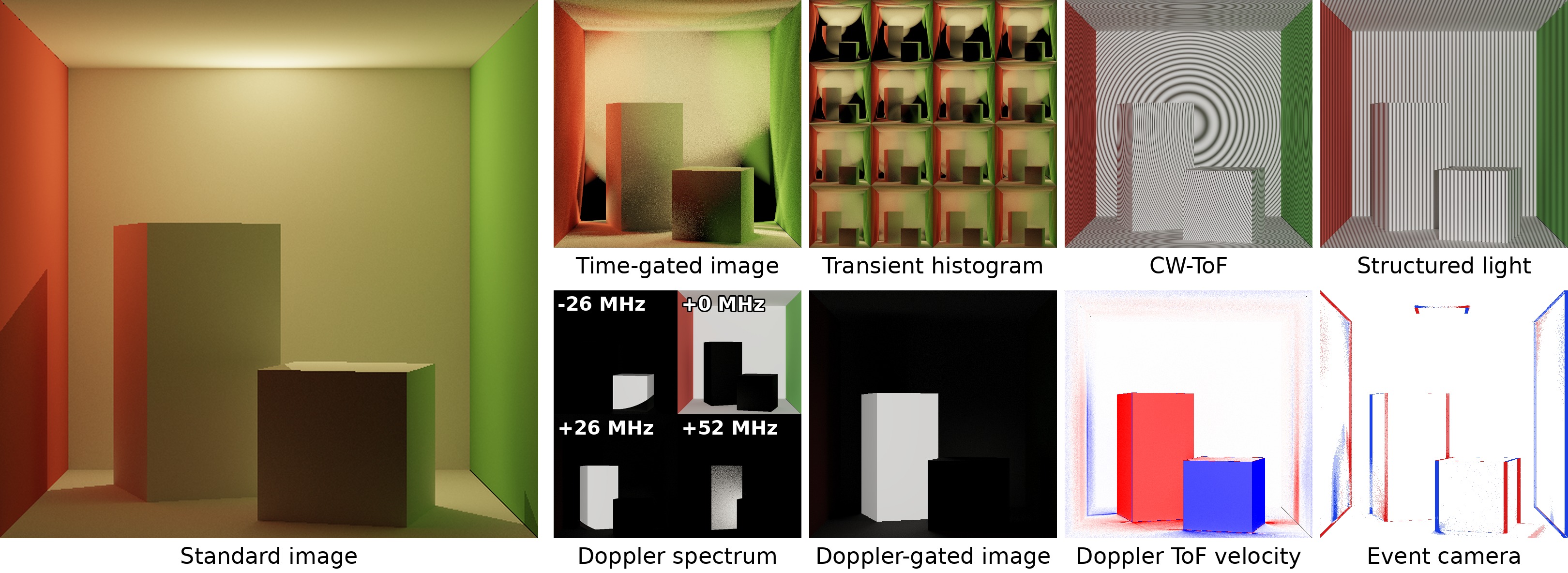
FalcorComp is a GPU renderer for computational imaging, built on NVIDIA's Falcor rendering framework. It adds render passes that simulate imaging systems beyond conventional cameras — time-of-flight, modulated light, Doppler sensing and event cameras — and it is installed and used as the Python package falcorcomp. All renderers run on the GPU with hardware ray tracing, for interactive as well as offline simulation.
The package is a binary wheel for Linux and Windows. It contains Falcor, the render passes and their shaders, so no separate Falcor build is needed. Every release has Linux wheels; only some have Windows wheels (0.2.1 so far), and on Windows pip installs the newest release that has one.
import falcorcomp as falcor
testbed = falcor.Testbed(create_window=False)
Documentation, tutorials and the reference of every render pass: falcorcomp.readthedocs.io.
Render passes
| Application | Render passes |
|---|---|
| Time-gated rendering | TimeGatedPathTracerInline, TimeGatedReSTIRInline |
| Transient rendering | TransientHistogramPathTracerInline, TransientHistogramReSTIRInline |
| Continuous-wave ToF | CWToFPathTracerInline |
| Structured light | StructuredLightPathTracerInline |
| Doppler (optical heterodyne detection) | DopplerGatedPathTracerInline, DopplerHistogramPathTracerInline |
| Doppler ToF | DopplerToFPathTracerInline, VelocityGroundTruthInline (ground-truth velocity) |
| Event cameras | EventDifference, EventSVGF, EventGenerator, with Falcor's PathTracer and SVGFPass |
| Utilities | LaserLight, InlinePathTracer, VBufferRT/GBufferRT, AccumulatePass, TransientHistogramAccumulatePass, ToneMapper, TransientHistogramViewer, LaserPositionViewer, SplitScreenPass |
Scene importers: pbrt, pyscene, Mitsuba, Assimp.
Not in the package, for license reasons: PathTracer's useRTXDI option (the RTXDI SDK's shaders cannot be redistributed in source form) and OptixDenoiser (the OptiX SDK license). Both work in a build from source.
Research
FalcorComp includes the implementations of these papers:
- ToF ReSTIR: Time-of-Flight Rendering with Spatio-temporal Reservoir Resampling, SIGGRAPH 2026 (ACM TOG). Project page
- Difference-aware Filtering for Event Camera Simulation, EGSR 2026 (Computer Graphics Forum). Project page
- Geometric Antithetic Sampling for Spatiotemporally Modulated Light, SIGGRAPH Asia 2026.
- A Monte Carlo Rendering Framework for Simulating Optical Heterodyne Detection, SIGGRAPH 2025 (ACM TOG), honorable mention. Project page
- Doppler Time-of-Flight Rendering, SIGGRAPH Asia 2023 (ACM TOG). Project page
The BibTeX entries are in the README on GitHub.
Requirements
- Operating system: Linux x86_64 with glibc 2.35 or newer (for example, Ubuntu 22.04 or later), or 64-bit Windows 11 (Windows 10 is untested). macOS is not supported.
- GPU: an NVIDIA GPU with hardware ray tracing (RTX), and a recent NVIDIA driver. falcorcomp renders with Vulkan on Linux, and with Direct3D 12 on Windows, where Vulkan also works:
falcor.Testbed(device_type=falcor.DeviceType.Vulkan). - Python: 64-bit Python 3.9 to 3.13. On Linux, also its shared library (for example,
libpython3.10.so.1.0for Python 3.10). Conda environments and most system Pythons include it; on Debian or Ubuntu, install it withsudo apt install libpython3.Xfor your version3.X.
Installation
pip install falcorcomp
Creating a Testbed initializes the GPU device, so this checks the driver as well as the package:
python -c "import falcorcomp as falcor; falcor.Testbed(create_window=False); print('falcorcomp works')"
Compiled shaders are cached in ~/.cache/falcorcomp/ on Linux and in %LOCALAPPDATA%\falcorcomp\ on Windows. Set FALCOR_SHADER_CACHE_PATH to use another directory, or to an empty string to disable the cache.
License
FalcorComp is based on Falcor, which is licensed under the BSD 3-Clause license by NVIDIA (LICENSE.md). The wheel also bundles third-party components under their own licenses, including NVIDIA proprietary ones (NVTT, the CUDA runtime, RTXDI); see THIRD_PARTY_NOTICES.md and third_party_licenses/ in the installed package.
1 maintainer

Metadata
1 maintainer
Release files for falcorcomp 0.2.2
For a detailed explanation of source distributions (sdists) and built distributions (wheels), please see the package formats documentation.
Built distributions (wheels)
| File | Reset | |||
|---|---|---|---|---|
| falcorcomp-0.2.2-cp313-cp313-manylinux_2_35_x86_64.whl | CPython 3.13 | CPython 3.13 | Linux glibc 2.35+ x86-64 | Details |
| falcorcomp-0.2.2-cp312-cp312-manylinux_2_35_x86_64.whl | CPython 3.12 | CPython 3.12 | Linux glibc 2.35+ x86-64 | Details |
| falcorcomp-0.2.2-cp311-cp311-manylinux_2_35_x86_64.whl | CPython 3.11 | CPython 3.11 | Linux glibc 2.35+ x86-64 | Details |
| falcorcomp-0.2.2-cp310-cp310-manylinux_2_35_x86_64.whl | CPython 3.10 | CPython 3.10 | Linux glibc 2.35+ x86-64 | Details |
| falcorcomp-0.2.2-cp39-cp39-manylinux_2_35_x86_64.whl | CPython 3.9 | CPython 3.9 | Linux glibc 2.35+ x86-64 | Details |
Total release size: 296.3 MB
Release files / falcorcomp-0.2.2-cp313-cp313-manylinux_2_35_x86_64.whl
| Download URL | falcorcomp-0.2.2-cp313-cp313-manylinux_2_35_x86_64.whl |
|---|---|
| Size | 59.3 MB |
| Tags | CPython 3.13 Linux glibc 2.35+ x86-64 |
|
SHA-256 checksum How to use checksums |
15346568c0cb4ff37b9113fe269577ab709f9d1091547b5499df9c83dbd2f8ed
|
|
BLAKE2b-256 checksum How to use checksums |
bac84aab7d7f52c5da77a4f5c58aa9723429cc551a0a424e9464249716777764
|
| Upload date | |
|
Uploaded using Trusted Publishing? What is trusted publishing? |
No |
| Uploaded via |
twine/7.0.0 CPython/3.10.12
|
Release files / falcorcomp-0.2.2-cp312-cp312-manylinux_2_35_x86_64.whl
| Download URL | falcorcomp-0.2.2-cp312-cp312-manylinux_2_35_x86_64.whl |
|---|---|
| Size | 59.3 MB |
| Tags | CPython 3.12 Linux glibc 2.35+ x86-64 |
|
SHA-256 checksum How to use checksums |
ef380f828b0ea19e128a1f3a00a524e7127fc146292f3bbddb473f278d93dcce
|
|
BLAKE2b-256 checksum How to use checksums |
8c03186da4ecdba154754dfd6238b31ded14ff60fc07793e5ae2f3c5c682fc5e
|
| Upload date | |
|
Uploaded using Trusted Publishing? What is trusted publishing? |
No |
| Uploaded via |
twine/7.0.0 CPython/3.10.12
|
Release files / falcorcomp-0.2.2-cp311-cp311-manylinux_2_35_x86_64.whl
| Download URL | falcorcomp-0.2.2-cp311-cp311-manylinux_2_35_x86_64.whl |
|---|---|
| Size | 59.3 MB |
| Tags | CPython 3.11 Linux glibc 2.35+ x86-64 |
|
SHA-256 checksum How to use checksums |
d16b7b1e6a145da414fcc3dcde8fd989c2d48db176885395feba22e9fcaa7948
|
|
BLAKE2b-256 checksum How to use checksums |
18d8ae6a16f8fb24058c038014322829da041abf4284392ab797156132f2eb09
|
| Upload date | |
|
Uploaded using Trusted Publishing? What is trusted publishing? |
No |
| Uploaded via |
twine/7.0.0 CPython/3.10.12
|
Release files / falcorcomp-0.2.2-cp310-cp310-manylinux_2_35_x86_64.whl
| Download URL | falcorcomp-0.2.2-cp310-cp310-manylinux_2_35_x86_64.whl |
|---|---|
| Size | 59.2 MB |
| Tags | CPython 3.10 Linux glibc 2.35+ x86-64 |
|
SHA-256 checksum How to use checksums |
bc5da7500a23cdface0c7e6035851791f58c718251c2ac04360fdd6a4a993d75
|
|
BLAKE2b-256 checksum How to use checksums |
4dc203920fd74e213a7620a9db72b1e1335c8498026086a0d8aab8f43abb4ac9
|
| Upload date | |
|
Uploaded using Trusted Publishing? What is trusted publishing? |
No |
| Uploaded via |
twine/7.0.0 CPython/3.10.12
|
Release files / falcorcomp-0.2.2-cp39-cp39-manylinux_2_35_x86_64.whl
| Download URL | falcorcomp-0.2.2-cp39-cp39-manylinux_2_35_x86_64.whl |
|---|---|
| Size | 59.2 MB |
| Tags | CPython 3.9 Linux glibc 2.35+ x86-64 |
|
SHA-256 checksum How to use checksums |
80dcd19531f5fa9dbb8edaf766f34ed4ae62f2eeb173180238072a9980df05ad
|
|
BLAKE2b-256 checksum How to use checksums |
1427a44b768a9881eff8c6de6d2a3c3a9cbcdaf08973cbdbf056000515b72d09
|
| Upload date | |
|
Uploaded using Trusted Publishing? What is trusted publishing? |
No |
| Uploaded via |
twine/7.0.0 CPython/3.10.12
|














