
AI-friendly schema + utilities for co-parenting / custody schedules (ISO week based).
Verified details
These details have been verified by PyPIProject links
GitHub Statistics
Maintainers

Project description
family-schedulekit




A reusable, machine-readable schema for defining family custody / parenting schedules. Designed to be AI-friendly (JSON rules + examples) so you can generate clear messages, calendar entries, or visualizations for any given date.
🎯 Purpose
This project provides:
- A neutral schema for defining parenting time schedules.
- A JSON template for rules (weekdays, weekends, holidays, exceptions).
- Worked examples (with ISO 8601 calendar week rotation).
- Clear handoff logic for school days and special Sunday rules.
You can reuse this schema for any co-parenting arrangement by changing the parties and rules.
Why family-schedulekit?
✅ AI-Ready: JSON schema designed for LLM integration
✅ Legally Sound: ISO 8601 week numbering matches court documents
✅ Visual: Generate beautiful PNG calendars
✅ Flexible: Support for complex modulo rules and exceptions
✅ Type-Safe: Full Pydantic validation
✅ CLI + API: Use from command line or Python code
📸 Visual Examples
Calendar View
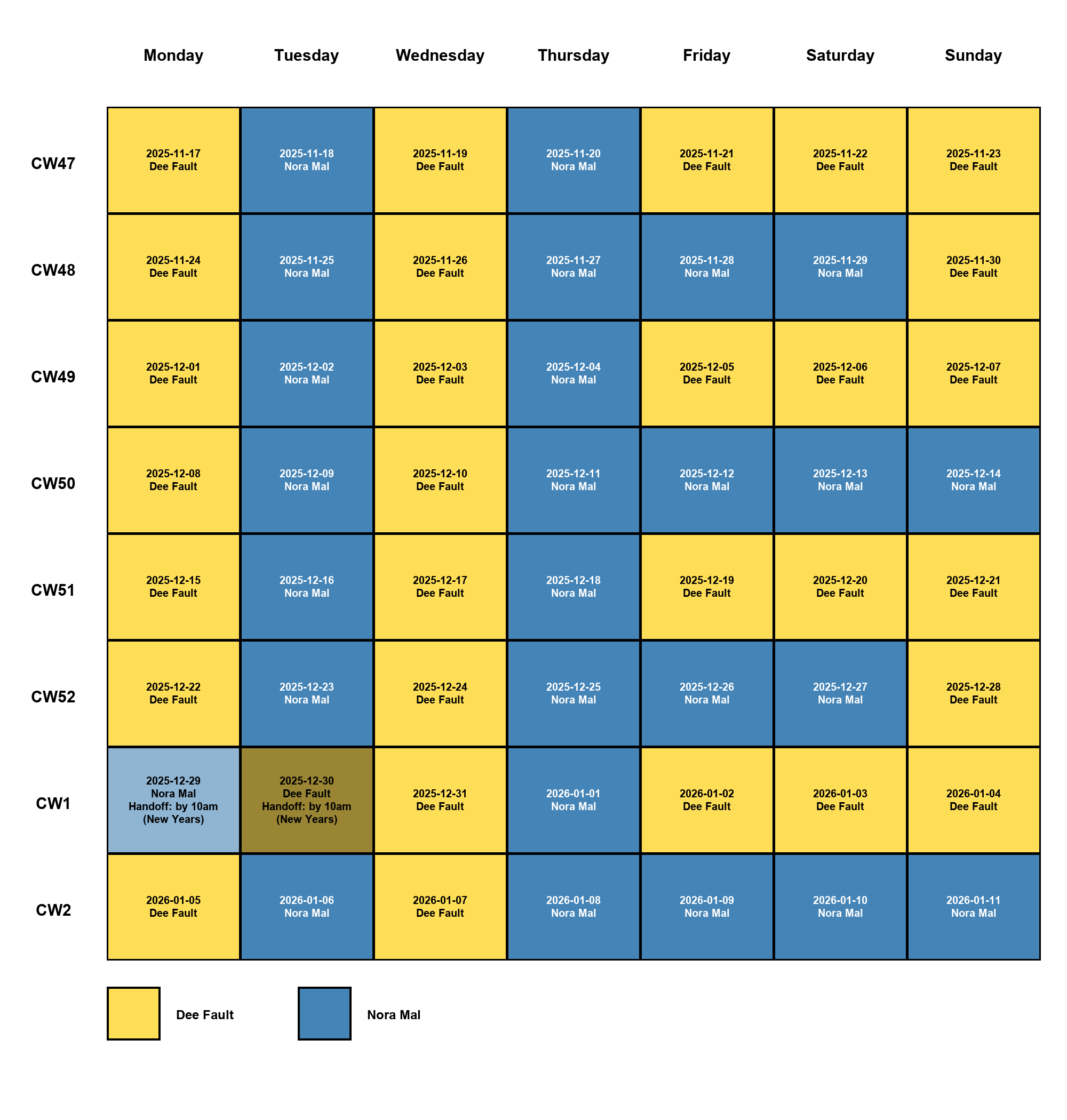
Hot pink = Guardian 1, Midnight blue = Guardian 2
The calendar color-codes each day by guardian (hot pink for Guardian 1, midnight blue for Guardian 2), making it easy to see custody patterns at a glance. You can export schedules in multiple formats (JSON, PNG) and customize colors to match your preferences.
CLI Output Example
$ family-schedulekit resolve 2025-02-23
{
  "date": "2025-02-23",
  "calendar_week": 8,
  "guardian": "guardian_2",
  "handoff": "guardian_2_to_guardian_1_by_1pm"
}
📖 Rules Summary
-
Schedule Structure
- Schedules are organized by odd weeks and even weeks
- Each week (odd or even) defines custody for all 7 days
- Any day can use simple guardian assignment or complex modulo rules
-
Example Schedule
- Odd ISO weeks (CW1, CW3, CW5, …):
- Monday-Thursday → Guardian 1
- Friday-Sunday → Guardian 1
- Even ISO weeks (CW2, CW4, CW6, …):
- Monday → Guardian 2
- Tuesday → Guardian 1
- Wednesday → Guardian 2
- Thursday → Guardian 1
- Friday-Saturday → Guardian 2
- Sunday uses modulo rules based on calendar week number:
- If
CW % 4 == 0: Guardian 2 has Sunday - Otherwise: Guardian 1 has Sunday
- If
- Odd ISO weeks (CW1, CW3, CW5, …):
-
Handoffs
- Default handoff location applies whenever custody changes between guardians
- Special handoffs can be configured for any weekday with specific times and guardians
- Example: Sunday Guardian 2 → Guardian 1 by 1 PM when Guardian 2 has custody
-
Calendar Week System
- Uses ISO 8601 week numbering (CW1 begins on the Monday containing the first Thursday of the year)
📦 Configuration Template
The default configuration format is YAML (JSON is also supported).
version: "1.0.0"

parties:
  guardian_1: Dee Fault
  guardian_2: Nora Mal
  children:
    - Buggy
    - Piplet

calendar_week_system: ISO8601

handoff:
  default_location: school
  special_handoffs:
    sunday:
      from_guardian: guardian_2
      to_guardian: guardian_1
      time:
        hour: 13
        minute: 0
        by: true
      description: guardian_2_to_guardian_1_by_1pm

rules:
  odd_weeks:
    monday: guardian_1
    tuesday: guardian_1
    wednesday: guardian_1
    thursday: guardian_1
    friday: guardian_1
    saturday: guardian_1
    sunday: guardian_1
  even_weeks:
    monday: guardian_2
    tuesday: guardian_1
    wednesday: guardian_2
    thursday: guardian_1
    friday: guardian_2
    saturday: guardian_2
    sunday:
      modulo_rules:
        - modulo: 4
          remainder: 0
          guardian: guardian_2
      otherwise: guardian_1

holidays:
  "2025-12-25": guardian_1
  "2025-07-04": guardian_2

visualization:
  guardian_1: hotpink
  guardian_2: midnightblue
  holiday: lightblue
  unknown: gray
Note: Both YAML (
.yaml,.yml) and JSON (.json) formats are supported. YAML is recommended for better readability.
🔧 Advanced Configuration
Modulo Rules for Complex Schedules
The schema supports flexible modulo rules for even-week days, allowing complex rotation patterns beyond simple alternating weeks.
Basic Modulo Rule Structure
sunday:
  modulo_rules:
    - modulo: 4
      remainder: 0
      guardian: guardian_2
  otherwise: guardian_1
modulo: The divisor for the modulo operation (≥2)remainder: The target remainder when CW % modulo is calculated (0 to modulo-1)guardian: Which parent gets custody when the rule matchesotherwise: Fallback guardian when no rules match
Multiple Modulo Rules
You can chain multiple modulo rules for a single day. Rules are evaluated in order:
saturday:
  modulo_rules:
    - modulo: 3
      remainder: 0
      guardian: guardian_1
    - modulo: 3
      remainder: 1
      guardian: guardian_2
  otherwise: guardian_2
This gives Guardian 1 every CW divisible by 3 (CW6, CW12, CW18...), Guardian 2 when CW%3==1 (CW4, CW10, CW16...), and Guardian 2 otherwise (CW8, CW14...).
Advanced Example: Different Modulo on Each Day
even_weeks:
  monday: guardian_2
  tuesday: guardian_1
  wednesday: guardian_2
  thursday: guardian_1
  friday:
    modulo_rules:
      - modulo: 4
        remainder: 2
        guardian: guardian_1
    otherwise: guardian_2
  saturday:
    modulo_rules:
      - modulo: 3
        remainder: 0
        guardian: guardian_1
    otherwise: guardian_2
  sunday:
    modulo_rules:
      - modulo: 4
        remainder: 0
        guardian: guardian_2
    otherwise: guardian_1
Holiday Overrides
Define specific dates that override normal schedule rules:
holidays:
  "2025-12-25": guardian_1
  "2025-07-04": guardian_2
  "2025-11-27": guardian_2
Dates must be in YYYY-MM-DD format. When a date appears in holidays, it completely overrides weekday/weekend rules.
Note: The holidays field is deprecated in favor of the more flexible swaps system (see below).
Date Swaps/Exceptions
Use swaps for schedule exceptions with automatic visual differentiation and optional notes:
swaps:
  "2025-12-25":
    guardian: guardian_1
    note: Christmas
    handoff: at guardian_1's house by 10am
  "2025-07-04":
    guardian: guardian_2
    color: red
    note: 4th of July swap
  "2025-03-15":
    guardian: guardian_2
    note: Spring break trade
Swap Features:
- Automatic color shading: By default, swap days use a lighter/darker shade of the guardian's color
- Custom colors: Override with
"color": "red"or any named color/hex value - Notes: Add context with the
notefield (shown in visualizations) - Custom handoffs: Specify handoff details specific to this swap
Visualization Colors:
Configure swap shading and week start day in the visualization section:
visualization:
  guardian_1: hot_pink
  guardian_2: midnight_blue
  swap_shade_percent: 20
  start_weekday: sunday
swap_shade_percent: Controls how much to lighten (for dark colors) or darken (for light colors) swap dates. Default is 20%.start_weekday: First day of week in PNG calendars. Options:"monday"(default) or"sunday"
Special Handoff Rules
Configure specific handoff times and guardians for any weekday:
handoff:
  default_location: school
  special_handoffs:
    sunday:
      from_guardian: guardian_2
      to_guardian: guardian_1
      time:
        hour: 13
        minute: 0
        by: true
      description: guardian_2_to_guardian_1_by_1pm
    friday:
      from_guardian: guardian_1
      to_guardian: guardian_2
      time:
        hour: 15
        minute: 30
      description: Weekend pickup at school
Time Format:
hour: Integer 0-23 (required)minute: Integer 0-59 (default: 0)use_24h: Boolean, use 24-hour format (default: false = 12-hour AM/PM)by: Boolean, indicates "by this time" vs "at this time" (default: false)
Time Examples:
time:
  hour: 13
  minute: 0                    # 1:00 PM (or 1PM)

time:
  hour: 15
  minute: 30                   # 3:30 PM

time:
  hour: 18
  minute: 0
  use_24h: true                # 18:00

time:
  hour: 13
  minute: 0
  by: true                     # by 1:00 PM
Special handoff rules apply when:
- The current day matches a configured weekday
- The guardian with custody matches
from_guardian - Then the handoff description will be included in the schedule
Examples:
Simple default handoff location:
handoff:
  default_location: school
Multiple special handoffs:
handoff:
  default_location: school
  special_handoffs:
    monday:
      from_guardian: guardian_2
      to_guardian: guardian_1
      time:
        hour: 18
        minute: 0
      description: Guardian 2 drops off at Guardian 1's house
    thursday:
      from_guardian: guardian_1
      to_guardian: guardian_2
      time:
        hour: 17
        minute: 0
Visualization Colors
Customize PNG calendar colors using any of the 147 CSS3 color names or hex strings:
visualization:
  guardian_1: coral
  guardian_2: steelblue
  holiday: gold
  unknown: lightgray
All CSS3 Color Names Supported:
The library supports all 147 standard CSS3 color names via the webcolors library, including:
- Pinks:
pink,hotpink,deeppink,lightpink,palevioletred, etc. - Blues:
blue,darkblue,midnightblue,lightblue,skyblue,steelblue,navy, etc. - Greens:
green,darkgreen,lightgreen,forestgreen,lime,limegreen,seagreen, etc. - Purples:
purple,lavender,violet,indigo,orchid,plum, etc. - Oranges/Reds:
orange,coral,red,crimson,tomato,orangered,salmon, etc. - Yellows:
yellow,gold,goldenrod,khaki, etc. - Grays:
gray,grey,lightgray,darkgray,silver,dimgray, etc. - And many more:
chocolate,sienna,wheat,beige,ivory,snow, etc.
View All Available Colors:
To see the complete list of 147 colors with visual previews in your terminal:
family-schedulekit list-colors
This command displays all color names with colored swatches, RGB values, and shows exactly what value to use in your schema.
You can also use hex strings: "#FF1493", "#81C995", etc.
Default Colors:
guardian_1:hotpink(RGB: 255, 105, 180)guardian_2:midnightblue(RGB: 25, 25, 112)holiday:lightblue(RGB: 173, 216, 230)unknown:gray(RGB: 128, 128, 128)
🚀 Installation
Requires Python 3.13+ (supports up to Python 3.14).
For Users
Install from PyPI:
pip install family-schedulekit
Or with uv:
uv add family-schedulekit
For Development
Clone the repository and install with dev dependencies:
git clone https://github.com/weekendsuperhero/family-schedulekit
cd family-schedulekit
uv sync --extra dev
uv sync --extra devinstalls runtime dependencies along with ruff, pytest, mypy, Pillow, and argcomplete.
⚡ Quick Start
# 1. Create a schedule configuration
family-schedulekit init --guardian-1 "Parent A" --guardian-2 "Parent B" --child "Child Name"

# 2. Check who has custody today
family-schedulekit resolve $(date +%Y-%m-%d)

# 3. Export a visual calendar
family-schedulekit export --weeks 4 --formats png
See your schedule at schedule_YYYY-MM-DD.png!
📚 Usage
Configuration File
The CLI uses a configuration file to store your schedule settings. By default, configs are stored in:
~/.config/family-schedulekit/schedule.yaml
This follows the XDG Base Directory specification for user configuration files.
Format Support: The tool supports both YAML (.yaml, .yml) and JSON (.json) formats. YAML is recommended for better readability, but JSON is fully supported for backward compatibility.
Config Versioning: All config files include a version field (currently 1.0.0) to track schema changes and ensure compatibility as the project evolves.
CLI Commands
# Generate a new schedule configuration (saves to ~/.config/family-schedulekit/schedule.yaml)
family-schedulekit init --guardian-1 ParentA --guardian-2 ParentB --child Child1 --child Child2

# Or specify a custom location (supports .yaml, .yml, or .json)
family-schedulekit init --guardian-1 ParentA --guardian-2 ParentB --child Child1 --child Child2 -o path/to/config.yaml

# Resolve a specific date (uses ~/.config/family-schedulekit/schedule.yaml by default)
family-schedulekit resolve 2025-02-23

# Resolve an entire week
family-schedulekit resolve --week-of 2025-02-23

# List available templates
family-schedulekit list-templates

# List all 147 CSS3 color names with terminal preview
family-schedulekit list-colors

# Export multi-format schedule files (defaults to most recent Monday, uses your config)
family-schedulekit export --weeks 6 --formats json png

# Or specify a custom start date
family-schedulekit export --start 2025-02-03 --weeks 6 --formats json png

# Use a different config file (supports .yaml, .yml, or .json)
family-schedulekit export --config path/to/config.yaml --weeks 6 --formats png
ℹ️ PNG export requires Pillow, which is included with the base install.
PNG Color Scheme: Calendar visualizations use color-coded cells to distinguish guardians. The default colors are:
- Guardian 1:
hotpink(RGB: 255, 105, 180) - Guardian 2:
midnightblue(RGB: 25, 25, 112) - Holiday override:
lightblue(RGB: 173, 216, 230)
The colors are chosen for high contrast and accessibility, with automatic text color selection (black or white) based on background luminance. You can customize colors using any of the 147 CSS3 color names or hex values (see Visualization Colors).
Working with uv
If you use uv:
# Sync project dependencies (runtime + dev extras)
uv sync --extra dev

# Run commands in the managed environment
uv run --extra dev pytest
uv run family-schedulekit export --start 2025-02-03 --weeks 6 --formats png
The workspace uv.lock should be committed so collaborators resolve the exact versions.
Shell Completions
Auto-complete subcommands and options using argcomplete:
Bash:
# Enable once per shell session
eval "$(register-python-argcomplete family-schedulekit)"

# Or install permanently
register-python-argcomplete family-schedulekit >> ~/.bash_completion
source ~/.bash_completion
Zsh:
# Add to ~/.zshrc
autoload -U bashcompinit && bashcompinit
eval "$(register-python-argcomplete family-schedulekit)"

# Reload your shell
source ~/.zshrc
Fish:
# Generate and save completions
register-python-argcomplete --shell fish family-schedulekit > ~/.config/fish/completions/family-schedulekit.fish

# Reload completions
source ~/.config/fish/completions/family-schedulekit.fish
Python API
from family_schedulekit import resolve_for_date, load_default_config
from datetime import date

config = load_default_config()
result = resolve_for_date(date(2025, 2, 23), config)
print(result)
# {'date': '2025-02-23', 'calendar_week': 8, 'guardian': 'guardian_2', 'handoff': 'guardian_2_to_guardian_1_by_1pm'}
Custom PNG Colors
You can customize calendar visualization colors programmatically:
from family_schedulekit.visualizer import render_schedule_image
from family_schedulekit.exporter import resolve_range
from family_schedulekit import load_default_config
from datetime import date
from pathlib import Path

config = load_default_config()
records = resolve_range(date(2025, 2, 3), weeks=6, cfg=config)

# Custom color palette (CSS3 color names, hex strings, or RGB tuples)
custom_palette = {
    "guardian_1": "coral",          # CSS3 color name (147 colors available)
    "guardian_2": "steelblue",      # CSS3 color name
    "holiday": "#FFD700"            # Hex string
    # Can also use RGB tuples: "guardian_1": (242, 139, 130)
}

render_schedule_image(
    records=records,
    start=date(2025, 2, 3),
    weeks=6,
    out_path=Path("custom_schedule.png"),
    palette=custom_palette
)
Default colors:
guardian_1:hotpink(RGB: 255, 105, 180)guardian_2:midnightblue(RGB: 25, 25, 112)holiday:lightblue(RGB: 173, 216, 230)unknown:gray(RGB: 128, 128, 128)
See all 147 available CSS3 color names: family-schedulekit list-colors
AI Integration
Generate comprehensive context for AI assistants to understand and work with your schedule:
# Generate AI context with schema and examples
family-schedulekit ai-context --weeks 4 --output ai-context.json

# Or output to stdout for piping
family-schedulekit ai-context --date 2025-03-01 | jq .rules_summary
from family_schedulekit import generate_ai_context
from datetime import date

# Generate context for AI assistants
context = generate_ai_context(
    target_date=date(2025, 3, 1),
    weeks_ahead=4,
    include_examples=True,
    include_schema=True
)

# Context includes:
# - JSON schema for validation
# - Human-readable rules
# - Resolved schedule examples
# - Decision-making examples
# - AI-specific instructions
The AI context includes everything needed for LLMs to:
- Make custody decisions for any date
- Draft schedule-aware messages
- Plan activities considering handoff times
- Resolve scheduling conflicts
- Generate calendar entries
🔍 Troubleshooting
"Module not found" error
Make sure you installed with pip install family-schedulekit not just cloning the repo.
PNG export not working
Pillow is required and should install automatically. If not:
pip install Pillow
Shell completions not working
Bash:
# Add to ~/.bashrc or ~/.bash_profile
eval "$(register-python-argcomplete family-schedulekit)"
source ~/.bashrc
Zsh:
# Add to ~/.zshrc
autoload -U bashcompinit && bashcompinit
eval "$(register-python-argcomplete family-schedulekit)"
source ~/.zshrc
Fish:
# Generate completions file
register-python-argcomplete --shell fish family-schedulekit > ~/.config/fish/completions/family-schedulekit.fish
Config file not found
The default config location is ~/.config/family-schedulekit/schedule.yaml. Create it with:
family-schedulekit init --guardian-1 "Parent A" --guardian-2 "Parent B" --child "Child Name"
Need help?
Open an issue: https://github.com/weekendsuperhero/family-schedulekit/issues
📝 License
Dual Licensed: This project is available under two licenses:
- PolyForm Noncommercial 1.0.0 (free) for personal, educational, and non-commercial use with attribution
- Commercial License (paid) for business and commercial use
Which license do I need?
Non-Commercial (FREE with Attribution):
- Individual personal use ✓
- Educational purposes ✓
- Non-profit organizations ✓
- Academic research ✓
- Open-source projects (non-commercial) ✓
- Requires: Preserve copyright notice and license terms
Commercial (PAID LICENSE REQUIRED):
- Business or enterprise use
- Commercial products or services
- Revenue-generating applications
- For-profit organizations
- Internal business operations
Get a Commercial License
For commercial licensing inquiries:
- Email: weekend@weekendsuperhero.io
- Web: https://weekendsuperhero.io/family-schedulekit/licensing
- 30-day free trials available!
Learn More
See LICENSING.md for detailed information about:
- License comparison and FAQ
- Commercial pricing tiers (starting at $499/year)
- How to obtain a commercial license
- Compliance requirements
Quick links:
- LICENSE - Main license overview
- LICENSE-NONCOMMERCIAL - PolyForm Noncommercial 1.0.0 terms
- LICENSE-COMMERCIAL - Commercial license info
Required Notice: Copyright (c) 2025 Weekend Superhero LLC (https://weekendsuperhero.io)
© 2025 Weekend Superhero LLC. All rights reserved.
Project details
Verified details
These details have been verified by PyPIProject links
GitHub Statistics
Maintainers


Download files
Download the file for your platform. If you're not sure which to choose, learn more about installing packages.
Source Distribution
Built Distribution
Filter files by name, interpreter, ABI, and platform.
If you're not sure about the file name format, learn more about wheel file names.
Copy a direct link to the current filters
File details
Details for the file family_schedulekit-1.3.2.tar.gz.
File metadata
- Download URL: family_schedulekit-1.3.2.tar.gz
- Upload date:
- Size: 137.1 kB
- Tags: Source
- Uploaded using Trusted Publishing? Yes
- Uploaded via: twine/6.1.0 CPython/3.13.7
File hashes
| Algorithm | Hash digest | |
|---|---|---|
| SHA256 |
1f4fcd0bf742161eacec45a3b159950c5606b4a1c22cde12e2619ef4ed2502af
|
|
| MD5 |
cc9ba9ed55b1a05e3ff934b29b8aac4b
|
|
| BLAKE2b-256 |
0c0d79abb52de1fabce811e6348d4d3e22df349777d0e03e6fac7ab95dc7d01e
|
Provenance
The following attestation bundles were made for family_schedulekit-1.3.2.tar.gz:
Publisher:
publish.yml on WeekendSuperhero/family-schedulekit
-
Statement:
-
Statement type:
https://in-toto.io/Statement/v1 -
Predicate type:
https://docs.pypi.org/attestations/publish/v1 -
Subject name:
family_schedulekit-1.3.2.tar.gz -
Subject digest:
1f4fcd0bf742161eacec45a3b159950c5606b4a1c22cde12e2619ef4ed2502af - Sigstore transparency entry: 708953259
- Sigstore integration time:
-
Permalink:
WeekendSuperhero/family-schedulekit@196e19320259c9cdec230b2f89ef5771e1ae3c44 -
Branch / Tag:
refs/tags/v1.3.2 - Owner: https://github.com/WeekendSuperhero
-
Access:
public
-
Token Issuer:
https://token.actions.githubusercontent.com -
Runner Environment:
github-hosted -
Publication workflow:
publish.yml@196e19320259c9cdec230b2f89ef5771e1ae3c44 -
Trigger Event:
push
-
Statement type:
File details
Details for the file family_schedulekit-1.3.2-py3-none-any.whl.
File metadata
- Download URL: family_schedulekit-1.3.2-py3-none-any.whl
- Upload date:
- Size: 39.4 kB
- Tags: Python 3
- Uploaded using Trusted Publishing? Yes
- Uploaded via: twine/6.1.0 CPython/3.13.7
File hashes
| Algorithm | Hash digest | |
|---|---|---|
| SHA256 |
9a385a63e99cf93006b02e5213dcadd85ddb66fd8051a372787403788d36fe54
|
|
| MD5 |
e91b1eda1d352f508a95aa59d0580464
|
|
| BLAKE2b-256 |
37a8f046a5d362aa309a57448d87ebfe4fbf3d36fa7f1cc2b968c59bf243a9e9
|
Provenance
The following attestation bundles were made for family_schedulekit-1.3.2-py3-none-any.whl:
Publisher:
publish.yml on WeekendSuperhero/family-schedulekit
-
Statement:
-
Statement type:
https://in-toto.io/Statement/v1 -
Predicate type:
https://docs.pypi.org/attestations/publish/v1 -
Subject name:
family_schedulekit-1.3.2-py3-none-any.whl -
Subject digest:
9a385a63e99cf93006b02e5213dcadd85ddb66fd8051a372787403788d36fe54 - Sigstore transparency entry: 708953263
- Sigstore integration time:
-
Permalink:
WeekendSuperhero/family-schedulekit@196e19320259c9cdec230b2f89ef5771e1ae3c44 -
Branch / Tag:
refs/tags/v1.3.2 - Owner: https://github.com/WeekendSuperhero
-
Access:
public
-
Token Issuer:
https://token.actions.githubusercontent.com -
Runner Environment:
github-hosted -
Publication workflow:
publish.yml@196e19320259c9cdec230b2f89ef5771e1ae3c44 -
Trigger Event:
push
-
Statement type:






