
fanuc
This project was inspired by the following theses, journal articles, and conference papers (Traditional Chinese, with an English gloss of each title):
- Chen, Y.-F. (2020). 數位孿生於機械手臂虛實整合之研究 [Digital twin for physical-virtual integration of a robotic arm] (Master's thesis). Tamkang University. DOI: 10.6846/TKU.2020.00496
- Chen, Y.-L. (2021). 遠端語音監控製造系統 [A remote voice-monitored manufacturing system] (Master's thesis). Ling Tung University.
- Jhong, J.-R. (2019). 應用機械視覺於機械手臂自動化系統之設計 [Applying machine vision to the design of a robotic-arm automation system] (Master's thesis). I-Shou University.
- Shih, C.-H., & Lin, W.-Y. (2025). 基於大型語言模型之智慧機器人製造單元助理 [An LLM-based intelligent assistant for a robotic manufacturing cell]. 機械工業雜誌 [Journal of Industry Machinery], (509), 20-32. DOI: 10.30256/JIM.202508_(509).0006
- Huang, Y.-Y., Wang, C.-S., Nien, S.-H., & Chen, G.-R. (2019). 機械手臂資訊擷取與檢測應用 [Robotic-arm information acquisition and inspection applications]. In TANET2019 臺灣網際網路研討會 [Taiwan Internet Conference] (pp. 1059-1063). National Sun Yat-sen University. DOI: 10.6924/TANET.201909.0192
- Tu, Y.-Y. (2016). 工研院機器手臂動態控制器-使用者自訂函數介紹 [ITRI's robotic-arm dynamic controller: an introduction to user-defined functions]. 機械工業雜誌 [Journal of Industry Machinery], (400), 17-28. DOI: 10.30256/JIM.201607_(400).0004
The driver/ KAREL programs are primarily derived from
fanucpy's MAPPDK driver. See
NOTICE for the detailed, file-by-file account of what was
kept, what was fixed (including bugs inherited from upstream, some
still open there), and what this project added on top.
Test environment
This project uses a FANUC ER-4iA (Education Series) robot arm with an R-30iB Mate Plus controller; full specs are on FANUC's spec page.
Real-hardware testing was made possible by the Department of Computer Science and Information Engineering / Graduate Institute of Computer Science and Information Engineering / Graduate Institute of Electrical Engineering and Computer Science at Vanung University, who provided the physical space and resources to work with the robot. Thank you.









A toolkit for controlling a FANUC robot from Python, built on the
MAPPDK KAREL driver. Reads and writes the current position, joint
angles, registers, and digital I/O, controls a gripper, sends motion
commands, runs TP programs, reads alarm state, and ships a fanuc
command-line tool you can use straight from the terminal.
This repository has two parts:
src/fanuc/: the Python package, talking to the controller over a plain TCP socketdriver/: the KAREL/TP driver that runs on the controller and does the other end of that talking
How this compares
A few other Python packages talk to FANUC controllers, over genuinely different protocols with different tradeoffs; this isn't a ranking, just what each one actually requires:
| Protocol | Extra runtime dependencies | License | |
|---|---|---|---|
| fanuc-python (this) | MAPPDK, over a custom KAREL driver you build and upload yourself | none | Apache-2.0 |
| fanucpy | MAPPDK, same driver family this project's driver/ is derived from |
numpy, scipy | Apache-2.0 |
| pyfanuc | FOCAS, via the fwlipy bindings |
fwlipy | MIT |
| UnderAutomation.Fanuc | CGTP / Telnet KCL / SNPX / FTP / RMI, official protocols, no custom driver to write | pythonnet (+ .NET Core on Linux) | Commercial (30-day trial) |
MAPPDK needs a KAREL driver on the controller (this project ships one, see driver/) and has no protocol-level authentication (see the caution above); FOCAS and the official protocols UnderAutomation.Fanuc uses don't need a custom driver, at the cost of a separate binding library or a commercial license.
Contents
- How this compares
- Test environment
- Install
- Quick start
- Command line
- Python API
- Architecture
- Commands the driver supports
- The driver/ directory
- Directory layout
- Citing this project
- Changelog
- License
Install
The controller side needs a one-time setup first, see docs/controller-setup.md. Once that's done, install the package:
pip install fanuc-python
The PyPI distribution is named fanuc-python, but the Python import
and the CLI command are both still just fanuc (from fanuc import FanucRobot, fanuc pos); only what you type into pip install
changed.
For development instead (running the test suite, editing the source),
clone the repo and install in editable mode with the dev extra:
pip install -e ".[dev]".
Quick start
from fanuc import FanucRobot

with FanucRobot(host="127.0.0.1") as robot:
    print(robot.get_curpos().format())        # read the current Cartesian pose
    robot.move_joint([0, 0, 0, 0, -90, 0], velocity=25)
Connect, read position, move: that's the basic usage. For the gripper, registers, and exception handling, see Python API below.
More usage is in examples/; each script demonstrates exactly one feature, and running one prints the actual command sent to the controller and the result, closer to real output than the docs:
| Script | What it demonstrates |
|---|---|
| demo.py | Connect, read state, move, read/write DOUT (minimal demo) |
| read_position.py | Read the current position (pose, joint angles) |
| home_position.py | How the home pose is configured, customized, and moved to |
| gripper_control.py | Dual-signal gripper: open, close, reset, read state |
| check_reachability.py | Checking whether a joint/Cartesian target is legal before moving |
| registers_io.py | Reading and writing R[n], PR[n], SR[n], the joint-type position register, DI[n], system variables |
| raw_command.py | Sending a raw command string, reading/writing a generic RDO |
| power_reading.py | Reading the connected robot's instantaneous power draw |
| alarm_status.py | Reading the most recent alarm (full content) |
| call_prog.py | How to call a TP program, and what to watch out for |
| robot_app.py | The RobotApp task framework's lifecycle |
| record_waypoints.py | Jogging by hand, pressing Enter to record waypoints |
| move_sequence.py | Reading a waypoint JSON and running it in order (with a preflight check) |
| patrol_route.py | A complete multi-point loop built in code, relative to the current position, with CNT blending and a linear leg |
| trace_motion.py | Recording a move's actual trajectory in the background over the S7 connection |
These are the English versions. The Chinese version, with matching filenames, is in examples/chinese/.
Command line
| Command | What it does |
|---|---|
fanuc connect set --host 192.168.1.10 --gripper-travel 1s |
Save connection settings |
fanuc connect show |
Show the currently saved connection settings |
fanuc connect clear |
Clear them, back to the built-in defaults |
fanuc pos |
Read the current position |
fanuc watch -i 0.2 |
Continuously display position |
fanuc status |
driver version, override speed, most recent alarm |
fanuc io get rdo 7 |
Read RDO[7] |
fanuc io set do 1 true |
Write DO[1] |
fanuc reg get r 1 |
Read R[1] |
fanuc reg set r 1 100 |
Write R[1] |
fanuc reg get pr 81 |
Read PR[81] |
fanuc din 1 |
Read DI[1] |
fanuc power |
Instantaneous power draw |
fanuc move joint 0 0 0 0 -90 0 --confirm |
Move the robot |
fanuc call MY_PROG --confirm |
Run a TP program |
Also usable as python -m fanuc. move/call won't run without --confirm.
Connection parameters (--host, --port, etc.) can be saved with
fanuc connect set so later commands don't need to repeat them.
Shell TAB completion (optional)
Install the complete extra, then register once under bash/zsh (write
this into your shell's config file and it's permanent; only needs
running once):
pip install "fanuc-python[complete]"
eval "$(register-python-argcomplete fanuc)"
After that, fanuc <TAB> lists subcommands like pos/watch/connect,
and option names (--host, --gripper-travel) complete too. Only
bash, zsh, tcsh, and fish are supported (a limitation of the
argcomplete package itself). PowerShell has no equivalent
mechanism, so installing this extra won't do anything there. Skipping
this extra doesn't affect any other CLI functionality, it just means
no TAB completion.
Python API
Registers and status:
robot.get_reg(1)            # R[1]
robot.set_reg(1, 100)       # integer
robot.set_reg(1, 1.5)       # real
robot.get_preg(81)          # PR[81], returns a Pose
robot.set_preg(81, [290, 0, 210, -180, 0, 0])
robot.get_din(1)            # DI[1]
robot.get_sys_var("$MCR.$GENOVERRIDE")
robot.get_override()        # override speed %
robot.get_alarm()           # Alarm(code, severity, cause_code, time, program, message)
result = robot.check_joint([45, -20, 15, 0, -45, 90])
if not result:
    print(result.describe())     # e.g. "invalid: J2=150.00 is outside -110.00~120.00"

robot.check_pose([400, 50, -100, -180, 0, 0])   # is this Cartesian position reachable?
check_joint's legality check uses the controller's built-in
J_IN_RANGE, not a self-maintained angle table, so it accounts for
mechanical-coupling limits like J2/J3 too. On failure, it separately
compares each axis against fanuc.limits.DEFAULT_JOINT_LIMITS_DEG
(the real numbers read off the TP); result.violations lists which
axis is likely at fault. If every axis checks out on its own, that
means it's a pure coupling limit the table can't capture, and
describe() says so honestly.
check_pose uses the same CHECK_EPOS built-in that movep uses to
judge reachability, a function already verified in production use.
There's no per-axis diagnosis for it: an unreachable Cartesian
position is usually the inverse kinematics having no solution, unlike
joint angles which can be broken down to a single axis.
examples/move_sequence.py runs every
waypoint through check_joint before doing anything; check_pose's
standalone usage is in
examples/check_reachability.py.
Gripper
ee_DO_num is for a single-signal gripper: one output directly
corresponds to open/close. Pneumatic grippers are often wired
differently: open and close are two independent signals (e.g. a
SCHUNK EGP), not the same signal inverted, and switching between them
needs a minimum rest time; switching too fast can damage the
gripper's internal electronics. This kind of wiring uses
ee_open_num/ee_close_num:
with FanucRobot(host="127.0.0.1", ee_DO_type="RDO",
           ee_open_num=7, ee_close_num=8,
           gripper_travel="500ms") as robot:
    robot.gripper(True)          # close: clears open, rests, then sets close;
                                  # waits gripper_travel before returning
    robot.gripper(False)         # open
    robot.gripper_reset()        # reset alarms (both signals True at once)
    robot.get_gripper()          # "idle" / "open" / "closed" / "reset"
Which number ee_open_num/ee_close_num gets depends on how it's
actually wired:
- Different grippers and wiring can map open/close to different ROs; follow your gripper's wiring sheet, don't copy the example
- The RO7/RO8 in the example above were confirmed on real hardware in the verification setup (a SCHUNK EGP, on the EE Pinout): RO7=ON, RO8=OFF is open; RO7=OFF, RO8=ON is close. Reconfirm this when switching grippers
gripper_travel is required, a string with a unit, e.g. "2s",
"0.5s", "100ms":
- Whenever any gripper output is configured (
ee_DO_numoree_open_num/ee_close_num),gripper_travelmust be given, or constructingFanucRobot()raisesValueErroroutright - Bare numbers aren't accepted (just
2doesn't work); a missing or wrong unit is a common source of mistakes, so it's enforced - It means how long the gripper actually takes to finish opening or
closing, a different thing from the signal-switch rest time
(
GRIPPER_REST_S, an electrical characteristic roughly the same across this kind of gripper, built into the package). Travel time is physical movement time; it depends on gripper size, air pressure, and stroke length, and varies per gripper with no safe universal default, so it has to come from your spec sheet or an actual measurement gripper()waits the full travel time after sending the signal before returning, so that by the time the call returns the gripper has actually finished moving; the next action (e.g. carrying a workpiece away) won't happen while the gripper is still mid-travel
Exceptions
Split into a few categories, no need to match error strings:
from fanuc import ConnectionError_, UnreachableError

try:
    robot.move_pose([9999, 0, 0, 0, 0, 0])
except UnreachableError:
    ...     # position unreachable, adjust the target
except ConnectionError_:
    ...     # connection dropped, reconnect
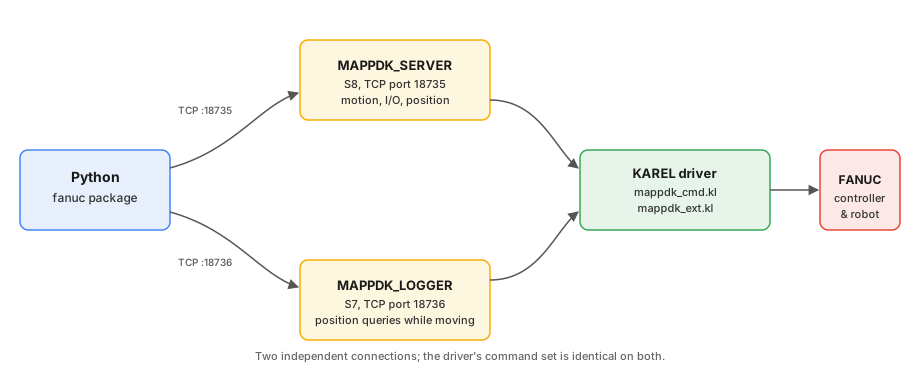
Querying position mid-motion
The driver is synchronous and blocking. Once movej is sent, that
connection is stuck until the move finishes, and position can't be
queried during that time. MAPPDK_LOGGER on the controller exists for
exactly this: it's a second server, listening on a different port:
from fanuc import FanucRobot, DEFAULT_PORT, LOGGER_PORT

mover = FanucRobot(host="127.0.0.1", port=DEFAULT_PORT)   # S8, sends motion commands
probe = FanucRobot(host="127.0.0.1", port=LOGGER_PORT)    # S7, queries position at the same time
Both ports support the same commands. S7 needs to be set up separately
on the controller, see
docs/protocol/connections.md. To
record a full trajectory while moving, use fanuc.MotionTracer
directly, see examples/trace_motion.py.
The RobotApp task framework
Use RobotApp when writing a repeatable task (to be called by a
scheduler or a web API); its interface mirrors upstream fanucpy's
RobotApp: the subclass takes a FanucRobot in __init__, _main()
handles connecting and cleanup itself, and run() wraps the result or
any exception into an AppResult.
from fanuc import FanucRobot, RobotApp

class MyApp(RobotApp):
    def __init__(self, robot):
        self.robot = robot

    def configure(self):
        pass  # static setup, no connection

    def _main(self, **kwargs):
        self.robot.connect()
        try:
            ...
            return "done"
        finally:
            self.robot.disconnect()

app = MyApp(FanucRobot(host="127.0.0.1"))
app.configure()
result = app.run()
if not result:
    print(result.message)
Full example at examples/robot_app.py.
Architecture
No third-party dependencies, only the standard library's socket.
src/fanuc/
├── cli.py         command line
├── robot.py       high-level API
├── app.py         RobotApp task framework
├── protocol.py    encoding/decoding command strings
├── transport.py   socket
├── types.py       Pose / Joints
└── exceptions.py  exceptions
The protocol layer never touches a socket, so command formats can be
tested offline; transport.py is exercised with a real loopback TCP
server instead of mocks. tests/ has 220 tests, no ROBOGUIDE or real
hardware needed:
pytest
Coverage (needs the dev extra, pip install -e ".[dev]") is
currently 100% line and branch, every path reachable offline through
real sockets, fakes, or mocks. That's a statement about what the test
suite exercises, not a claim the code is bug-free. See the
codecov dashboard for the
current per-file breakdown, or run it locally:
pytest --cov=fanuc --cov-report=term-missing
To add a new command: write encode_* / parse_* in protocol.py
with tests first, then wire it into robot.py.
Commands the driver supports
The base commands (motion, digital I/O, reading position) come from
the original driver; this project adds 15 more (ver, getreg,
setreg, getpreg, setpreg, getdin, getsysvar, getalarm,
chkjnt, chkpos, setsysvarnum, getsreg, setsreg, getjpreg,
setjpreg), all verified on real hardware, details in
docs/protocol.md. getalarm currently only reads
the most recent alarm, not history; see that document.
connect() sends ver to check this, telling whether the controller
has this project's extended driver loaded. If not, robot.extended
is False, and calling an extended method says outright that it
needs this project's driver, instead of a cryptic wrong-command.
robot.driver_version    # 'fanuc-driver 0.2.0', None without the extended driver
robot.extended          # True / False
Command format, field widths, and driver limits are all in docs/protocol.md.
To try a new command, robot.send_raw("...") sends a raw string directly.
The driver/ directory
The KAREL programs that run on the controller: source, compiled output, and the files to upload are kept separate.
| What you want | Where to look |
|---|---|
| Load the driver onto the controller | driver/upload/; the 5 files in there are everything to upload |
| Edit the KAREL code, recompile | driver/README.md |
| Set up the controller's tag, load, verify | docs/controller-setup.md |
The driver reserves a few registers and frame numbers; using the same numbers elsewhere in your workcell overwrites them:
| Resource | Used for |
|---|---|
UFRAME[8], UTOOL[1] |
frames |
R[81] |
velocity |
R[82] |
acceleration |
R[83] |
CNT |
PR[81] |
target position |
fanuc.RESERVED gets you this list in code, details in
docs/protocol/reserved-resources.md.
Directory layout
fanuc/
├── src/fanuc/   the package
├── examples/    example scripts (English; Chinese versions in examples/chinese/)
├── tests/       protocol tests
├── driver/      KAREL source (driver/upload/ is what gets uploaded to the controller)
└── docs/        setup and protocol docs (docs/zh/ is the Chinese version, structure matches)
Citing this project
If this package is useful in your own academic work, please cite it; CITATION.cff has the machine-readable version (GitHub renders a "Cite this repository" button from it), and here's the same information as BibTeX:
@software{tai_fanuc_python,
  author  = {Tai, Tzu-Heng},
  title   = {fanuc-python: a Python driver for FANUC robots over MAPPDK},
  url     = {https://github.com/Kevin28576/fanuc},
  version = {1.2.0},
  year    = {2026}
}
Changelog
See CHANGELOG.md.
License
Apache License 2.0, see LICENSE.
The KAREL programs in driver/ are adapted from
fanucpy (Copyright Agajan
Torayev, Apache-2.0); what was changed is in NOTICE.
Last updated: 2026-09-02
1 maintainer

Metadata
1 maintainer
Release files for fanuc-python 1.2.0
For a detailed explanation of source distributions (sdists) and built distributions (wheels), please see the package formats documentation.
Source distribution (sdist)
| File | Size | Uploaded | Provenance | Actions |
|---|---|---|---|---|
| fanuc_python-1.2.0.tar.gz | 91.7 kB | With provenance | Details for fanuc_python-1.2.0.tar.gz |
Built distribution (wheel)
| File | Interpreter | ABI | Platform | Actions Reset |
|---|---|---|---|---|
| fanuc_python-1.2.0-py3-none-any.whl | Python 3 | none | any | Details for fanuc_python-1.2.0-py3-none-any.whl |
Total release size: 156.8 kB
Release files / fanuc_python-1.2.0.tar.gz
| Download URL | fanuc_python-1.2.0.tar.gz |
|---|---|
| Size | 91.7 kB |
| Tags | Source |
|
SHA-256 checksum How to use checksums |
f257d5fadf18ca0d6e4ded80ff9eda760270dc1c3f3c8ecb23071fbbe3980454
|
|
BLAKE2b-256 checksum How to use checksums |
9bb1237a347e07ed92e9ea604605d5954772ad9f7bdb4e8db340440ce918e1da
|
| Upload date | |
|
Uploaded using Trusted Publishing? What is trusted publishing? |
Yes |
| Uploaded via |
twine/7.0.0 CPython/3.13.14
|
Provenance
Provenance describes where a file came from. On PyPI, provenance is shared via attestations, which provide a verifiable record of the build or publishing details. View details, limitations and caveats.


PyPI Publish Attestation
PyPI verified that this artifact, at this checksum, originated from the publisher listed below.
Signed by GitHub Actions, verified by PyPI on Sep 4, 2026.
Transparency logRelease files / fanuc_python-1.2.0-py3-none-any.whl
| Download URL | fanuc_python-1.2.0-py3-none-any.whl |
|---|---|
| Size | 65.1 kB |
| Tags | Python 3 |
|
SHA-256 checksum How to use checksums |
a59388106bced16ee2adf0878d24168426a4d979e6a3c3ac813cb0487dc932c3
|
|
BLAKE2b-256 checksum How to use checksums |
3927ff751c505bb1a34317dc5d2b438e3dde1f3dfa7f395098a26b9f5e5d8ce4
|
| Upload date | |
|
Uploaded using Trusted Publishing? What is trusted publishing? |
Yes |
| Uploaded via |
twine/7.0.0 CPython/3.13.14
|
Provenance
Provenance describes where a file came from. On PyPI, provenance is shared via attestations, which provide a verifiable record of the build or publishing details. View details, limitations and caveats.
PyPI Publish Attestation
PyPI verified that this artifact, at this checksum, originated from the publisher listed below.
Signed by GitHub Actions, verified by PyPI on Sep 4, 2026.
Transparency logSecurity for fanuc-python 1.2.0
Provenance
Provenance describes where a file came from. On PyPI, provenance is shared via attestations, which provide a verifiable record of the build or publishing details. View details, limitations and caveats.
Full provenance
All 2 files in this release have been uploaded with provenance metadata.
Attestation for fanuc_python-1.2.0.tar.gz
PyPI Publish Attestation
PyPI verified that this artifact, at this checksum, originated from the publisher listed below.
Signed by GitHub Actions, verified by PyPI on Sep 4, 2026.
Transparency logA note on package security
PyPI is a repository for distributing packages, not a service for auditing them. While third-party security researchers and our staff do their best to detect and remove malicious packages, PyPI cannot guarantee the quality, security or suitability of any given package.
To learn more about protecting yourself from malicious actors, visit our package security documentation.














