

Your sinks can be slow. Your app shouldn't be.
Async-first structured logging for FastAPI and modern Python applications.









Fapilog is an async-first logging pipeline that keeps your app responsive even when log sinks are slow or bursty. Every log becomes a structured JSON object optimized for aggregators and search. Built-in PII redaction, backpressure control, and first-class FastAPI integration built to be the perfect companion for FastAPI microservices.
Also suitable for on-prem, desktop, or embedded projects where structured, JSON-ready logging is needed.
Benchmarks: For performance comparisons between fapilog, structlog, and loguru, check out the benchmarks page.
Why fapilog?
- Performance: Logging I/O is queued and processed off the critical path—slow sinks never block your request handlers.
- Structured data: Every log entry becomes a JSON object, optimized for log aggregators, searching, and analytical tools.
- Framework integration: Purpose-built for FastAPI with automatic request logging and correlation ID tracking.
- Backpressure control: Configurable policies when logs arrive faster than sinks can process—balance latency versus durability.
- Security: Built-in PII redaction automatically masks sensitive data in production environments.
- Reliability: Clean shutdown procedures drain queues to prevent log loss.
- Extensibility: Add custom sinks, filters, processors, enrichers, and redactors through clean extension points.
- Cloud integration: Native support for CloudWatch, Loki, PostgreSQL, and stdout routing.
Read more → | Compare with structlog, loguru, and others →
When to use / when stdlib is enough
Use fapilog when
- Services must not jeopardize request latency SLOs due to logging
- Workloads include bursts, slow/remote sinks, or compliance/redaction needs
- Teams standardize on structured JSON logs and contextual metadata
Stdlib may be enough for
- Small scripts/CLIs writing to fast local stdout/files with minimal structure
Installation
pip install fapilog
See the full guide at docs/getting-started/installation.md for extras and upgrade paths.
🚀 Features (core)
- Log calls never block on I/O — your app stays fast even with slow sinks
- Smart console output — pretty in terminal, JSON when piped to files or tools
- Extend without forking — add enrichers, redactors, processors, or custom sinks
- Context flows automatically — bind request_id once, see it in every log
- Secrets masked by default — passwords and API keys don't leak to logs
- Route logs by level — send errors to your database, info to stdout
🎯 Quick Start
from fapilog import get_logger, runtime

# Zero-config logger with isolated background worker and auto console output
logger = get_logger(name="app")
logger.info("Application started", environment="production")

# Scoped runtime that auto-flushes on exit
with runtime() as log:
    log.error("Something went wrong", code=500)
Example output (TTY):
2025-01-11 14:30:22 | INFO | Application started environment=production
Production Tip: Use
preset="production"for log durability - it setsdrop_on_full=Falseto prevent silent log drops under load. See reliability defaults for details.
Configuration Presets
Get started quickly with built-in presets for common scenarios:
from fapilog import get_logger, get_async_logger

# Development: DEBUG level, immediate flush, no redaction
logger = get_logger(preset="dev")
logger.debug("Debugging info")

# Production: INFO level, file rotation, automatic redaction
logger = get_logger(preset="production")
logger.info("User login", password="secret")  # password auto-redacted

# Minimal: Matches default behavior (backwards compatible)
logger = get_logger(preset="minimal")
| Preset | Log Level | Drops Logs? | File Output | Redaction | When to use |
|---|---|---|---|---|---|
dev |
DEBUG | No | No | No | See every log instantly while debugging locally |
production |
INFO | Backpressure retry | Fallback only | Yes | All production — adaptive scaling, circuit breaker, backpressure |
serverless |
INFO | If needed | No | Yes | Lambda/Cloud Functions with fast flush |
hardened |
INFO | Never | Yes | Yes (HIPAA+PCI) | Regulated environments (HIPAA, PCI-DSS) |
minimal |
INFO | Default | No | No | Migrating from another logger—start here |
Security Note: By default, only URL credentials (
user:pass@host) are stripped. For full field redaction (passwords, API keys, tokens), use a preset likeproductionor configure redactors manually. See redaction docs.
See docs/user-guide/presets.md for the full presets guide including decision matrix and trade-off explanations.
Sink routing by level
Route errors to a database while sending info logs to stdout:
export FAPILOG_SINK_ROUTING__ENABLED=true
export FAPILOG_SINK_ROUTING__RULES='[
  {"levels": ["ERROR", "CRITICAL"], "sinks": ["postgres"]},
  {"levels": ["DEBUG", "INFO", "WARNING"], "sinks": ["stdout_json"]}
]'
from fapilog import runtime

with runtime() as log:
    log.info("Routine operation")   # → stdout_json
    log.error("Something broke!")   # → postgres
See docs/user-guide/sink-routing.md for advanced routing patterns.
FastAPI request logging
from fastapi import Depends, FastAPI
from fapilog.fastapi import get_request_logger, setup_logging

app = FastAPI(
    lifespan=setup_logging(
        preset="production",
        sample_rate=1.0,                  # sampling for successes; errors always logged
        redact_headers=["authorization"], # mask sensitive headers
        skip_paths=["/healthz"],          # skip noisy paths
    )
)

@app.get("/")
async def root(logger=Depends(get_request_logger)):
    await logger.info("Root endpoint accessed")  # request_id auto-included
    return {"message": "Hello World"}
Need manual middleware control? Use the existing primitives:
from fastapi import FastAPI
from fapilog.fastapi import setup_logging
from fapilog.fastapi.context import RequestContextMiddleware
from fapilog.fastapi.logging import LoggingMiddleware

app = FastAPI(lifespan=setup_logging(auto_middleware=False))
app.add_middleware(RequestContextMiddleware)  # sets correlation IDs
app.add_middleware(LoggingMiddleware)        # emits request_completed / request_failed
Stability
Fapilog follows Semantic Versioning. As a 0.x project:
- Core APIs (logger, FastAPI middleware): Stable within minor versions. Breaking changes only in minor version bumps (0.3 → 0.4) with deprecation warnings.
- Plugins: Stable unless marked experimental.
- Experimental: CLI, mmap_persistence sink. May change without notice.
We aim for 1.0 when core APIs have been production-tested across multiple releases.
Component Stability
| Component | Stability | Notes |
|---|---|---|
| Core logger | Stable | Breaking changes with deprecation |
| FastAPI middleware | Stable | Breaking changes with deprecation |
| Built-in sinks | Stable | file, stdout, webhook |
| Built-in enrichers | Stable | |
| Plugin system | Stable | Contract may evolve |
| CLI | Placeholder | Not implemented |
| mmap_persistence | Experimental | Performance testing |
Early adopters
Fapilog is pre-1.0 but actively used in production. What this means:
- Core APIs are stable - We avoid breaking changes; when necessary, we deprecate first
- 0.x → 0.y upgrades may require minor code changes (documented in CHANGELOG)
- Experimental components (CLI, mmap_persistence) are not ready for production
- Feedback welcome - Open issues or join Discord
🏗️ Architecture
Your log calls return immediately. Everything else happens in the background:
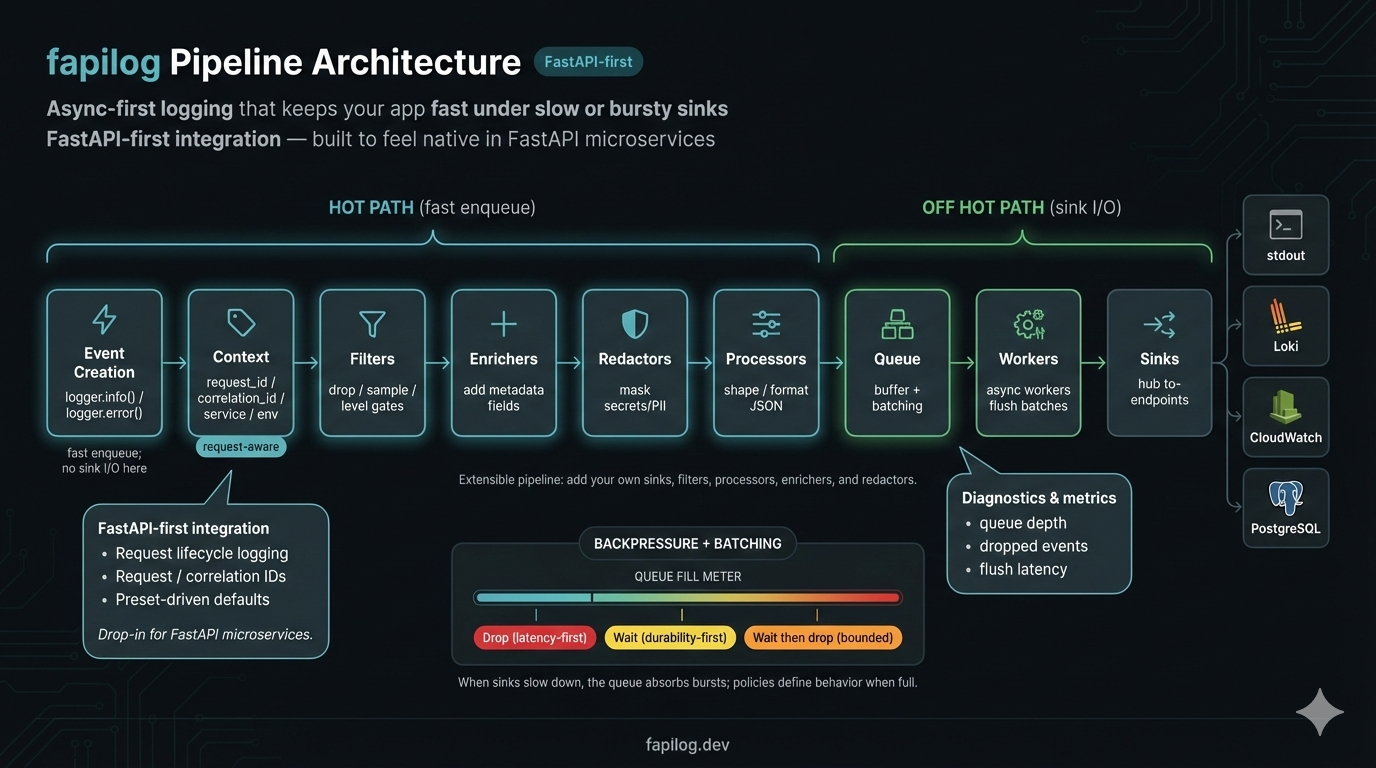
See Redactors documentation: docs/plugins/redactors.md
🔧 Configuration
Builder API (Recommended)
The Builder API provides a fluent, type-safe way to configure loggers:
from fapilog import LoggerBuilder

# Production setup with file rotation and CloudWatch
logger = (
    LoggerBuilder()
    .with_preset("production")
    .with_level("INFO")
    .add_file("logs/app", max_bytes="100 MB", max_files=10)
    .add_cloudwatch("/myapp/prod", region="us-east-1")
    .with_circuit_breaker(enabled=True)
    .with_redaction(fields=["password", "api_key"])
    .build()
)

# Async version for FastAPI
from fapilog import AsyncLoggerBuilder

logger = await (
    AsyncLoggerBuilder()
    .with_preset("fastapi")
    .add_stdout()
    .build_async()
)
See Builder API Reference for complete documentation.
Settings Class
Container-scoped settings via Pydantic v2:
from fapilog import get_logger
from fapilog.core.settings import Settings

settings = Settings()  # reads env at call time
logger = get_logger(name="api", settings=settings)
logger.info("configured", queue=settings.core.max_queue_size)
Default enrichers
By default, the logger enriches each event before serialization:
runtime_info:service,env,version,host,pid,pythoncontext_vars:request_id,user_id(if set), and optionallytrace_id/span_idwhen OpenTelemetry is present
You can toggle enrichers at runtime:
from fapilog.plugins.enrichers.runtime_info import RuntimeInfoEnricher

logger.disable_enricher("context_vars")
logger.enable_enricher(RuntimeInfoEnricher())
Internal diagnostics (optional)
Enable structured WARN diagnostics for internal, non-fatal errors (worker/sink):
export FAPILOG_CORE__INTERNAL_LOGGING_ENABLED=true
Diagnostics write to stderr by default (Unix convention), keeping them separate from application logs on stdout. For backward compatibility:
export FAPILOG_CORE__DIAGNOSTICS_OUTPUT=stdout
When enabled, you may see messages like:
[fapilog][worker][WARN] worker_main error: ...
[fapilog][sink][WARN] flush error: ...
Apps will not crash; these logs are for development visibility.
🔌 Plugin Ecosystem
Send logs anywhere, enrich them automatically, and filter what you don't need:
Sinks — Send logs where you need them
- Console: JSON for machines, pretty output for humans
- File: Auto-rotating logs with compression and retention policies
- HTTP/Webhook: Send to any endpoint with retry, batching, and HMAC signing
- Cloud: CloudWatch (AWS), Loki (Grafana) — no custom integration needed
- Database: PostgreSQL for queryable log storage
- Routing: Split by level — errors to one place, info to another
Enrichers — Add context without boilerplate
- Runtime info: Service name, version, host, PID added automatically
- Request context: request_id, user_id flow through without passing them around
- Kubernetes: Pod, namespace, node info from K8s downward API
Filters — Control log volume and cost
- Level filtering: Drop DEBUG in production
- Sampling: Log 10% of successes, 100% of errors
- Rate limiting: Prevent log floods from crashing your aggregator
🧩 Extensions & Roadmap
Available now:
- Enterprise audit logging with
fapilog-tamperadd-on - Grafana Loki integration
- AWS CloudWatch integration
- PostgreSQL sink for structured log storage
Roadmap (not yet implemented):
- Additional cloud providers (Azure Monitor, GCP Logging)
- SIEM integrations (Splunk, Elasticsearch)
- Message queue sinks (Kafka, Redis Streams)
⚡ Execution Modes & Throughput
Fapilog automatically detects your execution context and optimizes accordingly:
| Mode | Context | Throughput | Use Case |
|---|---|---|---|
| Async | AsyncLoggerFacade or await calls |
~100K+ events/sec | FastAPI, async frameworks |
| Bound loop | SyncLoggerFacade started inside async |
~100K+ events/sec | Sync APIs in async apps |
| Thread | SyncLoggerFacade started outside async |
~10-15K events/sec | CLI tools, sync scripts |
# Async mode (fastest) - for FastAPI and async code
from fapilog import get_async_logger
logger = await get_async_logger(preset="fastapi")
await logger.info("event")  # ~100K+ events/sec

# Bound loop mode - sync API, async performance
async def main():
    logger = get_logger(preset="production")  # Started inside async context
    logger.info("event")  # ~100K+ events/sec (no cross-thread overhead)

# Thread mode - for traditional sync code
logger = get_logger(preset="production")  # Started outside async context
logger.info("event")  # ~10-15K events/sec (cross-thread sync)
Why the difference? Thread mode requires cross-thread synchronization for each log call. Async and bound loop modes avoid this overhead by working directly with the event loop.
Recommendation: For maximum throughput in async applications, use AsyncLoggerFacade or ensure SyncLoggerFacade.start() is called inside an async context.
See Execution Modes Guide for detailed patterns and migration tips.
📈 Enterprise performance characteristics
- High throughput in async modes
- AsyncLoggerFacade and bound loop mode deliver ~100,000+ events/sec. Thread mode (sync code outside async) achieves ~10-15K events/sec due to cross-thread coordination. See execution modes for details.
- Non‑blocking under slow sinks
- Under a simulated 3 ms-per-write sink, fapilog reduced app-side log-call latency by ~75–80% vs stdlib, maintaining sub‑millisecond medians. Reproduce with
scripts/benchmarking.py.
- Under a simulated 3 ms-per-write sink, fapilog reduced app-side log-call latency by ~75–80% vs stdlib, maintaining sub‑millisecond medians. Reproduce with
- Burst absorption with predictable behavior
- With a 20k burst and a 3 ms sink delay, fapilog processed ~90% and dropped ~10% per policy, keeping the app responsive.
- Tamper-evident logging add-on
- Optional
fapilog-tamperpackage adds integrity MAC/signatures, sealed manifests, and enterprise key management (AWS/GCP/Azure/Vault). Seedocs/addons/tamper-evident-logging.mdanddocs/enterprise/tamper-enterprise-key-management.md.
- Optional
- Honest note
- In steady-state fast-sink scenarios, Python's stdlib logging can be faster per call. Fapilog shines under constrained sinks, concurrency, and bursts.
📚 Documentation
- See the
docs/directory for full documentation - Benchmarks:
python scripts/benchmarking.py --help - Extras:
pip install fapilog[fastapi]for FastAPI helpers,[metrics]for Prometheus exporter,[system]for psutil-based metrics,[mqtt]reserved for future MQTT sinks. - Reliability hint: set
FAPILOG_CORE__DROP_ON_FULL=falseto prefer waiting over dropping under pressure in production. - Quality signals: ~90% line coverage (see
docs/quality-signals.md); reliability defaults documented indocs/user-guide/reliability-defaults.md.
🤝 Contributing
We welcome contributions! Please see our Contributing Guide for details.
Support
If fapilog is useful to you, consider giving it a star on GitHub — it helps others discover the library.

📄 License
This project is licensed under the Apache License 2.0 - see the LICENSE file for details.
🔗 Links
Fapilog — Your sinks can be slow. Your app shouldn't be.
1 maintainer

Metadata
1 maintainer
Release files for fapilog 0.18.1
For a detailed explanation of source distributions (sdists) and built distributions (wheels), please see the package formats documentation.
Source distribution (sdist)
| File | Size | Uploaded | Provenance | |
|---|---|---|---|---|
| fapilog-0.18.1.tar.gz | 1.0 MB | With provenance | Details |
Built distribution (wheel)
| File | Interpreter | ABI | Platform | Reset |
|---|---|---|---|---|
| fapilog-0.18.1-py3-none-any.whl | Python 3 | none | any | Details |
Total release size: 1.3 MB
Release files / fapilog-0.18.1.tar.gz
| Download URL | fapilog-0.18.1.tar.gz |
|---|---|
| Size | 1.0 MB |
| Tags | Source |
|
SHA-256 checksum How to use checksums |
016e3e522ca85ee9544d552e917a66fb31abe9e2145c8fda593ae50a94ff7356
|
|
BLAKE2b-256 checksum How to use checksums |
79901c583a4654b54043d26a3f04ad7e68d9ab34e59b6f20d1c135e0f279506e
|
| Upload date | |
|
Uploaded using Trusted Publishing? What is trusted publishing? |
Yes |
| Uploaded via |
twine/6.1.0 CPython/3.13.7
|
Provenance
Provenance describes where a file came from. On PyPI, provenance is shared via attestations, which provide a verifiable record of the build or publishing details. View details, limitations and caveats.


PyPI Publish Attestation
PyPI verified that this artifact, at this checksum, originated from the publisher listed below.
Signed by GitHub Actions, verified by PyPI on Feb 20, 2026.
Transparency logRelease files / fapilog-0.18.1-py3-none-any.whl
| Download URL | fapilog-0.18.1-py3-none-any.whl |
|---|---|
| Size | 278.0 kB |
| Tags | Python 3 |
|
SHA-256 checksum How to use checksums |
2e7f26b5a19babdaf69c4fce641327299ead02c5548db335e05bbc2ff904c7fd
|
|
BLAKE2b-256 checksum How to use checksums |
e94d4b39f3c6607b4d8ba913799054f025d9d38b38095694d60611badda25d71
|
| Upload date | |
|
Uploaded using Trusted Publishing? What is trusted publishing? |
Yes |
| Uploaded via |
twine/6.1.0 CPython/3.13.7
|
Provenance
Provenance describes where a file came from. On PyPI, provenance is shared via attestations, which provide a verifiable record of the build or publishing details. View details, limitations and caveats.
PyPI Publish Attestation
PyPI verified that this artifact, at this checksum, originated from the publisher listed below.
Signed by GitHub Actions, verified by PyPI on Feb 20, 2026.
Transparency logSecurity for fapilog 0.18.1
Provenance
Provenance describes where a file came from. On PyPI, provenance is shared via attestations, which provide a verifiable record of the build or publishing details. View details, limitations and caveats.
Full provenance
All 2 files in this release have been uploaded with provenance metadata.
Attestation for fapilog-0.18.1.tar.gz
PyPI Publish Attestation
PyPI verified that this artifact, at this checksum, originated from the publisher listed below.
Signed by GitHub Actions, verified by PyPI on Feb 20, 2026.
Transparency logA note on package security
PyPI is a repository for distributing packages, not a service for auditing them. While third-party security researchers and our staff do their best to detect and remove malicious packages, PyPI cannot guarantee the quality, security or suitability of any given package.














