
Fast Automatic License Plate Recognition.

Project description
FastALPR











FastALPR is a high-performance, customizable Automatic License Plate Recognition (ALPR) system. We offer fast and efficient ONNX models by default, but you can easily swap in your own models if needed.
For Optical Character Recognition (OCR), we use fast-plate-ocr by default, and for license plate detection, we use open-image-models. However, you can integrate any OCR or detection model of your choice.
📋 Table of Contents
- ✨ Features
- 📦 Installation
- 🚀 Quick Start
- 🛠️ Customization and Flexibility
- 📖 Documentation
- 🤝 Contributing
- 🙏 Acknowledgements
- 📫 Contact
✨ Features
- High Accuracy: Uses advanced models for precise license plate detection and OCR.
- Customizable: Easily switch out detection and OCR models.
- Easy to Use: Quick setup with a simple API.
- Out-of-the-Box Models: Includes ready-to-use detection and OCR models
- Fast Performance: Optimized with ONNX Runtime for speed.
📦 Installation
pip install fast-alpr[onnx-gpu]
By default, no ONNX runtime is installed. To run inference, you must install at least one ONNX backend using an appropriate extra.
| Platform/Use Case | Install Command | Notes |
|---|---|---|
| CPU (default) | pip install fast-alpr[onnx] |
Cross-platform |
| NVIDIA GPU (CUDA) | pip install fast-alpr[onnx-gpu] |
Linux/Windows |
| Intel (OpenVINO) | pip install fast-alpr[onnx-openvino] |
Best on Intel CPUs |
| Windows (DirectML) | pip install fast-alpr[onnx-directml] |
For DirectML support |
| Qualcomm (QNN) | pip install fast-alpr[onnx-qnn] |
Qualcomm chipsets |
🚀 Quick Start
[!TIP] Try
fast-alprin Hugging Spaces.
Here's how to get started with FastALPR:
from fast_alpr import ALPR

# You can also initialize the ALPR with custom plate detection and OCR models.
alpr = ALPR(
    detector_model="yolo-v9-t-384-license-plate-end2end",
    ocr_model="cct-xs-v2-global-model",
)

# The "assets/test_image.png" can be found in repo root dir
alpr_results = alpr.predict("assets/test_image.png")
print(alpr_results)
Output:
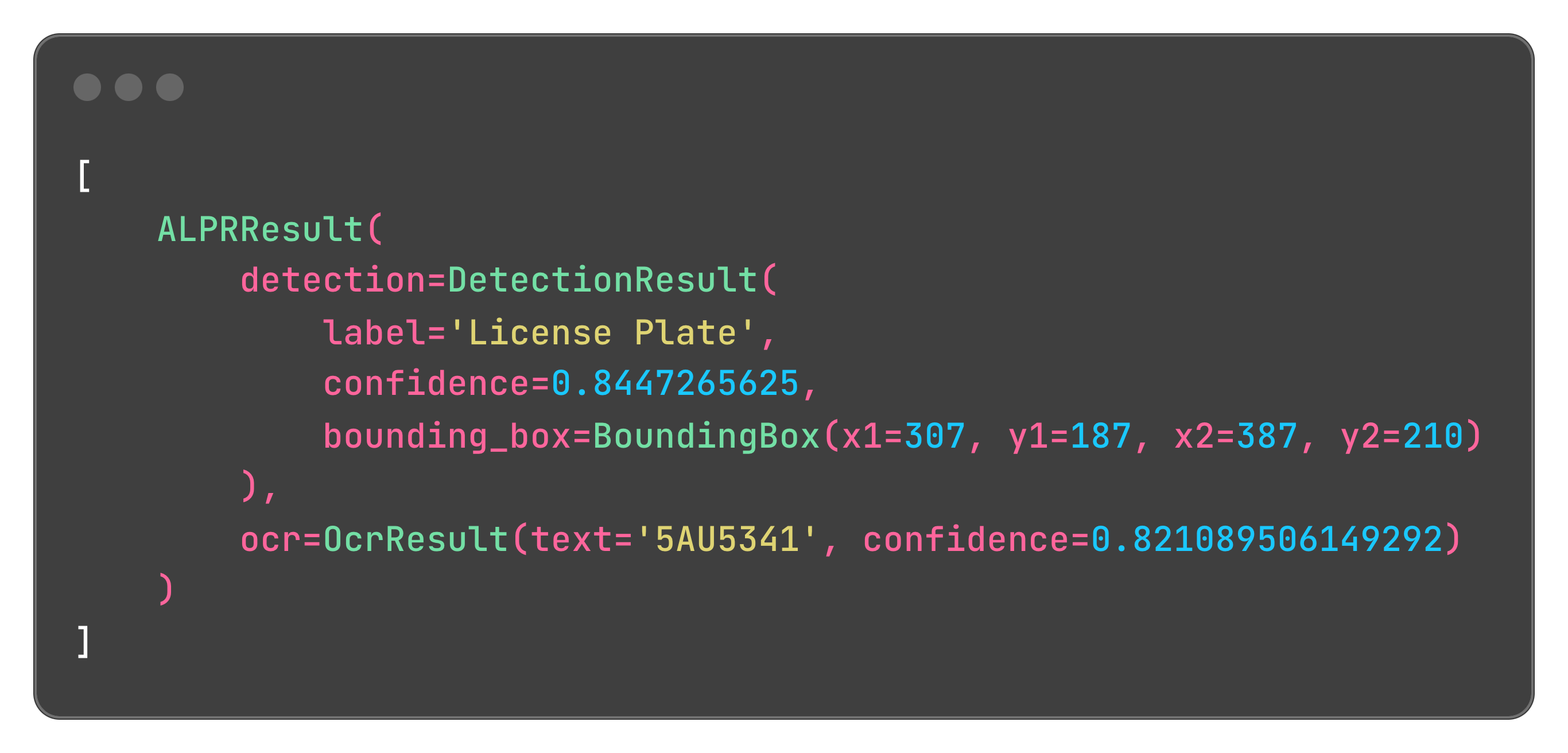
You can also draw the predictions directly on the image:
import cv2

from fast_alpr import ALPR

# Initialize the ALPR
alpr = ALPR(
    detector_model="yolo-v9-t-384-license-plate-end2end",
    ocr_model="cct-xs-v2-global-model",
)

# Load the image
image_path = "assets/test_image.png"
frame = cv2.imread(image_path)

# Draw predictions on the image and get the ALPR results
drawn = alpr.draw_predictions(frame)
annotated_frame = drawn.image
results = drawn.results
Annotated frame:

🛠️ Customization and Flexibility
FastALPR is designed to be flexible. You can customize the detector and OCR models according to your requirements. You can very easily integrate with Tesseract OCR to leverage its capabilities:
import re
from statistics import mean

import numpy as np
import pytesseract

from fast_alpr.alpr import ALPR, BaseOCR, OcrResult


class PytesseractOCR(BaseOCR):
    def __init__(self) -> None:
        """
        Init PytesseractOCR.
        """

    def predict(self, cropped_plate: np.ndarray) -> OcrResult | None:
        if cropped_plate is None:
            return None
        # You can change 'eng' to the appropriate language code as needed
        data = pytesseract.image_to_data(
            cropped_plate,
            lang="eng",
            config="--oem 3 --psm 6",
            output_type=pytesseract.Output.DICT,
        )
        plate_text = " ".join(data["text"]).strip()
        plate_text = re.sub(r"[^A-Za-z0-9]", "", plate_text)
        avg_confidence = mean(conf for conf in data["conf"] if conf > 0) / 100.0
        return OcrResult(text=plate_text, confidence=avg_confidence)


alpr = ALPR(detector_model="yolo-v9-t-384-license-plate-end2end", ocr=PytesseractOCR())

alpr_results = alpr.predict("assets/test_image.png")
print(alpr_results)
[!TIP] See the docs for more examples!
📖 Documentation
Comprehensive documentation is available here, including detailed API references and additional examples.
🤝 Contributing
Contributions to the repo are greatly appreciated. Whether it's bug fixes, feature enhancements, or new models, your contributions are warmly welcomed.
To start contributing or to begin development, you can follow these steps:
- Clone repo
git clone https://github.com/ankandrew/fast-alpr.git
- Install all dependencies (make sure you have uv installed):
make install - To ensure your changes pass linting and tests before submitting a PR:
make checks
🙏 Acknowledgements
- fast-plate-ocr for default OCR models.
- open-image-models for default plate detection models.
📫 Contact
For questions or suggestions, feel free to open an issue.


Download files
Download the file for your platform. If you're not sure which to choose, learn more about installing packages.
Source Distribution
Built Distribution
Filter files by name, interpreter, ABI, and platform.
If you're not sure about the file name format, learn more about wheel file names.
Copy a direct link to the current filters
File details
Details for the file fast_alpr-0.4.0.tar.gz.
File metadata
- Download URL: fast_alpr-0.4.0.tar.gz
- Upload date:
- Size: 1.8 MB
- Tags: Source
- Uploaded using Trusted Publishing? Yes
- Uploaded via: twine/6.1.0 CPython/3.13.7
File hashes
| Algorithm | Hash digest | |
|---|---|---|
| SHA256 |
02e3011598c5c83c260e215f7bec8cae9f67a1e9b903db1079a14bdb15d4eb0d
|
|
| MD5 |
1544a47e50bdfa8df9ef931a812c1890
|
|
| BLAKE2b-256 |
53545adde5e01028218db494084e932cd8fae391170b8da70f98ae36709721eb
|
Provenance
The following attestation bundles were made for fast_alpr-0.4.0.tar.gz:
Publisher:
release.yaml on ankandrew/fast-alpr
-
Statement:
-
Statement type:
https://in-toto.io/Statement/v1 -
Predicate type:
https://docs.pypi.org/attestations/publish/v1 -
Subject name:
fast_alpr-0.4.0.tar.gz -
Subject digest:
02e3011598c5c83c260e215f7bec8cae9f67a1e9b903db1079a14bdb15d4eb0d - Sigstore transparency entry: 1108508557
- Sigstore integration time:
-
Permalink:
ankandrew/fast-alpr@aca4ecdd279350ffdda8dffb0badd70952470c28 -
Branch / Tag:
refs/tags/v0.4.0 - Owner: https://github.com/ankandrew
-
Access:
public
-
Token Issuer:
https://token.actions.githubusercontent.com -
Runner Environment:
github-hosted -
Publication workflow:
release.yaml@aca4ecdd279350ffdda8dffb0badd70952470c28 -
Trigger Event:
push
-
Statement type:
File details
Details for the file fast_alpr-0.4.0-py3-none-any.whl.
File metadata
- Download URL: fast_alpr-0.4.0-py3-none-any.whl
- Upload date:
- Size: 10.9 kB
- Tags: Python 3
- Uploaded using Trusted Publishing? Yes
- Uploaded via: twine/6.1.0 CPython/3.13.7
File hashes
| Algorithm | Hash digest | |
|---|---|---|
| SHA256 |
a3e835c60fcebe1445ccdd3128da958968866b0df2bfe3960357b78251296499
|
|
| MD5 |
4986567730329fa54466c4fa906b7010
|
|
| BLAKE2b-256 |
3bf262454cec77ea25c01e3634a5ba645251eb3de821f9d29de72d9b62f4ccbc
|
Provenance
The following attestation bundles were made for fast_alpr-0.4.0-py3-none-any.whl:
Publisher:
release.yaml on ankandrew/fast-alpr
-
Statement:
-
Statement type:
https://in-toto.io/Statement/v1 -
Predicate type:
https://docs.pypi.org/attestations/publish/v1 -
Subject name:
fast_alpr-0.4.0-py3-none-any.whl -
Subject digest:
a3e835c60fcebe1445ccdd3128da958968866b0df2bfe3960357b78251296499 - Sigstore transparency entry: 1108508560
- Sigstore integration time:
-
Permalink:
ankandrew/fast-alpr@aca4ecdd279350ffdda8dffb0badd70952470c28 -
Branch / Tag:
refs/tags/v0.4.0 - Owner: https://github.com/ankandrew
-
Access:
public
-
Token Issuer:
https://token.actions.githubusercontent.com -
Runner Environment:
github-hosted -
Publication workflow:
release.yaml@aca4ecdd279350ffdda8dffb0badd70952470c28 -
Trigger Event:
push
-
Statement type:






